Exclude Nodes from Coverage Snapshot
When a coverage snapshot is created, you can exclude specific items from its current presentation. As soon as you do this, dotCover will instantly recalculate coverage statistics.
Exclude nodes from coverage snapshot
Open a coverage snapshot in the Coverage Results Browser window or in the Unit Test Coverage window.
Right-click a node in the coverage tree (or on a type if you are in the Hot Spots view) and choose Exclude selected node or Exclude all nodes except selected.
Alternatively, you can choose Exclude selected node and create coverage filter. In this case, in addition to excluding the node from the current presentation of the snapshot, dotCover creates the corresponding runtime coverage filter that will exclude this item when you run coverage analysis again.
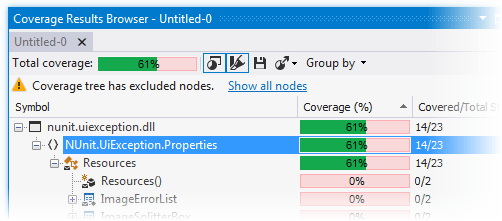
The corresponding nodes will be excluded from the coverage tree and the total coverage will be recalculated.
When some nodes are excluded, the corresponding warning appears above the coverage tree. You can click Show all nodes to display the excluded nodes.