Editor
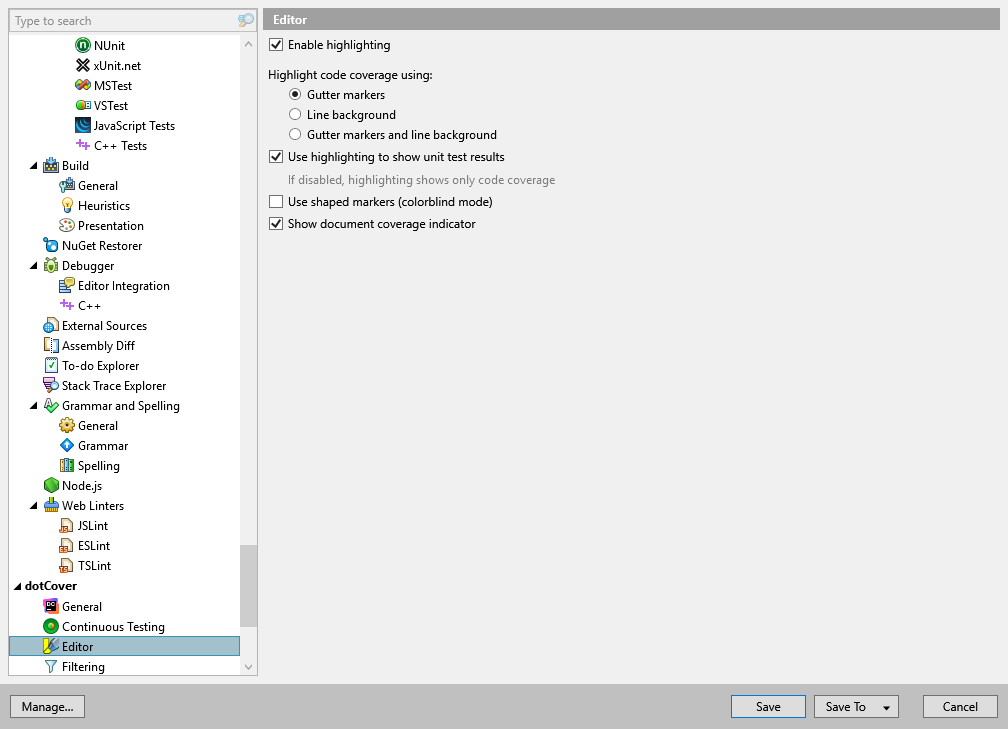
This option page allows you to configure a visual presentation of covered and uncovered code. To indicate the code state, dotCover uses colored markers in the left Visual Studio gutter.
Enable highlighting | Enables code highlighting. |
Highlight code coverage using | Defines the highlighting mode:
|
Use highlighting to show unit test results | If selected, dotCover will use the marker color to indicate not only the coverage of a particular code statement by unit tests but tests results as well. If cleared, markers will indicate only code coverage. |
Use shaped markers (colorblind mode) | If selected, markers will indicate code coverage and test results not only with color but also with their shape. |
Show document coverage indicator | Shows/hides an additional coverage indicator: the "shield" icon on the ReSharper marker bar. |
You can configure highlighting colors in Visual Studio options: Choose , and then find entries beginning with 'dotCover'.