Annotations
Annotations are pieces of metadata that provide information about code elements, such as classes, methods, or parameters.
In Java, there is a set of built-in annotations. Also, many libraries and frameworks, such as Spring and Lombok, define their own annotations. The metadata provided by these annotations can be used both at compile- and run-time, for example, to generate boilerplate code, or interact with the user classes through reflection.
Code contract annotations
There is also a class of annotations describing code semantics and contracts. They can be used by developers to better understand the implications of using a particular API as well as assist static analyzers to identify problematic areas.
IntelliJ IDEA recognizes popular Java annotations and takes them into account when analyzing code. Examples of such annotation frameworks are Checker Framework and ErrorProne
For information on JetBrains' @Contract annotation, refer to the official repository.
Nullability annotations
Nullability annotations are a subset of code contract annotations. By explicitly declaring the nullability of elements, the code becomes easier to maintain and less prone to nullability-related errors.
On the other hand, IntelliJ IDEA's static analysis will be using these annotations to catch potential errors at design-time. For example, IntelliJ IDEA will analyze the data flow in your project and report attempts to dereference a variable that can potentially be null, or vice versa, suggest getting rid of redundant guard conditions where they are safe to remove.
Configure nullability annotations
While IntelliJ IDEA recognizes the popular nullability annotations, you may still want to add your custom annotations to the list. IntelliJ IDEA will then use them for determining the nullability of a symbol.
Go to .
Under Options, select Configure Annotations.
Default nullability annotations
By default, the following annotations are recognized by IntelliJ IDEA:
android.support.annotation.Nullable
androidx.annotation.Nullable
androidx.annotation.RecentlyNullable
com.android.annotations.Nullable
edu.umd.cs.findbugs.annotations.Nullable
io.reactivex.annotations.Nullable
io.reactivex.rxjava3.annotations.Nullable
jakarta.annotation.Nullable
javax.annotation.CheckForNull
javax.annotation.Nullable
org.checkerframework.checker.nullness.compatqual.NullableDecl
org.checkerframework.checker.nullness.compatqual.NullableType
org.checkerframework.checker.nullness.qual.Nullable
org.eclipse.jdt.annotation.Nullable
org.jetbrains.annotations.Nullable
org.jspecify.annotations.Nullable
android.support.annotation.NonNull
androidx.annotation.NonNull
androidx.annotation.RecentlyNonNull
com.android.annotations.NonNull
edu.umd.cs.findbugs.annotations.NonNull
io.reactivex.annotations.NonNull
io.reactivex.rxjava3.annotations.NonNull
jakarta.annotation.Nonnull
javax.annotation.Nonnull
lombok.NonNull
org.checkerframework.checker.nullness.compatqual.NonNullDecl
org.checkerframework.checker.nullness.compatqual.NonNullType
org.checkerframework.checker.nullness.qual.NonNull
org.eclipse.jdt.annotation.NonNull
org.jetbrains.annotations.NotNull
org.jspecify.annotations.NonNull
Disable nullability assertions
When you compile your project with IntelliJ IDEA build tool, the IDE adds assertions to all code elements annotated with @NotNull. These assertions will throw an error if the elements happen to be null at runtime. This fail-fast behavior may help you to diagnose the problems at an early stage. If this is not the desired effect for you, you can disable these assertions.
Go to and uncheck the Add runtime assertions for notnull-annotated methods and parameters option.
Infer nullity
If your project is missing nullability annotations, completely or partially, you can have IntelliJ IDEA infer and insert the nullability annotations for you.
Make sure the library with annotations is configured for your project. IntelliJ IDEA uses the annotation specified in Annotation used for code generation in .
In the main menu, go to .
In the Specify Infer Nullity Scope dialog, select the scope of the analysis. If you want to include test sources or annotate local variables, select the corresponding checkboxes.
JetBrains annotations dependency
IntelliJ IDEA has its own annotations set available as a separate dependency. It contains annotations for expressing nullability, ranges, contracts, mutability, purity, and more.
The package consists of several dozens of annotations. Some of the most common are:
@Nullableand@NotNull– indicate a variable, parameter, or return value that can or cannot be null.@Nls– indicates that an annotated code element is a string that needs to be localized.@NonNls– indicates that an annotated code element is a string which is not visible to users, which doesn't require localization, and which doesn't contain strings requiring localization. When you annotate an element with@NonNls, localization tools will skip this element and strings inside it.@PropertyKey– indicates that a method parameter accepts arguments that must be valid property keys in a specific resource bundle. When a string literal that is not a property key in a bundle is passed as a parameter, IntelliJ IDEA highlights it as an error. The annotation is also used to provide completion in string literals passed as parameters.@TestOnly– indicates that a method or a constructor must be called from testing code only.@Contract– lets you specify a set of rules (a contract) that a method must follow. If the contract is violated, IntelliJ IDEA reports a problem.@Language– injects code written in another language in a Java String.
Add JetBrains Annotations dependency to the project
When you use a JetBrains annotation in your code, the Add 'annotations' to classpath intention action will help you quickly add the required dependency.
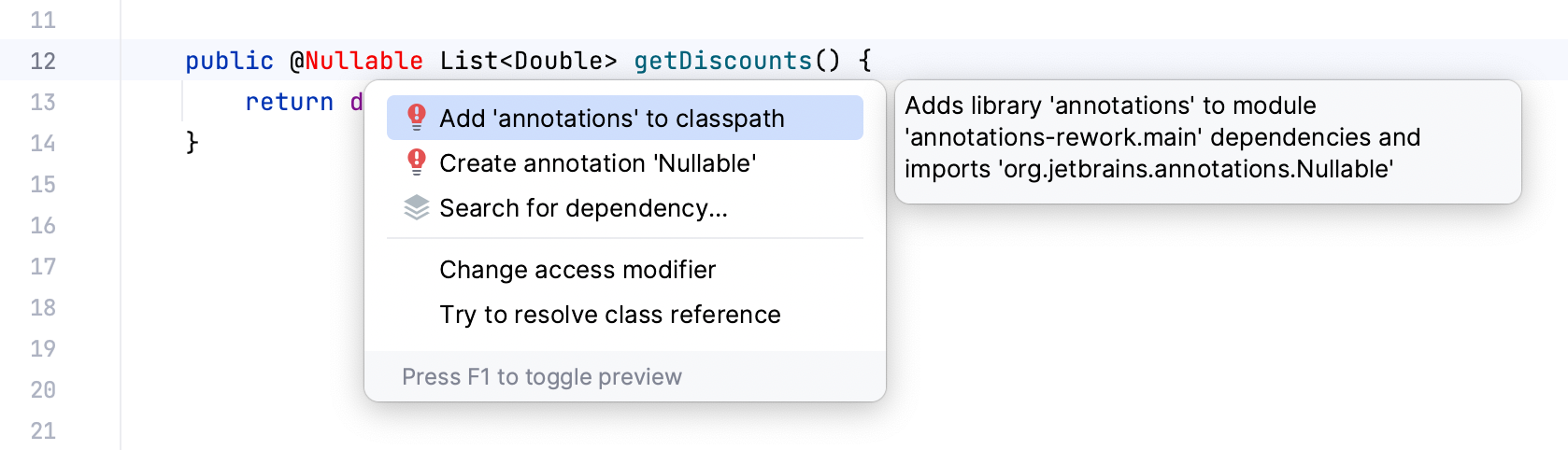
Otherwise, you can add it manually, using the following artifact coordinates: https://central.sonatype.com/artifact/org.jetbrains/annotations/24.0.1
<dependencies> <dependency> <groupId>org.jetbrains</groupId> <artifactId>annotations</artifactId> <version>26.0.2</version> <scope>provided</scope> </dependency> </dependencies>dependencies { compileOnly 'org.jetbrains:annotations:26.0.2' }dependencies { compileOnly("org.jetbrains:annotations:26.0.2") }Go to . Click
 , and select From Maven. In the search field, type
 org.jetbrains:annotations:26.0.2. Click OK.
Inferred annotations
If the code is not annotated at all, IntelliJ IDEA can still infer many of the annotations from bytecode and sources. These annotations aren't physically inserted in the code, but the IDE shows them as if they were in place to help you better understand code contacts. The inferred annotations are also used in code analysis just like regular annotations.
IntelliJ IDEA can infer the following JetBrains annotations: @Nullable, @NotNull, @Contract, @Unmodifiable, and @UnmodifiableView. For full documentation on this annotations' flavor, refer to the package source code.
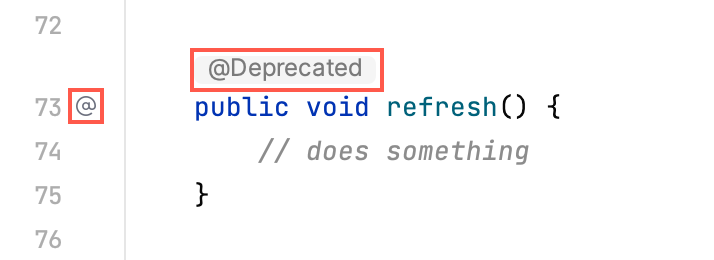
In the editor, inferred annotations are marked with the  icon in the gutter.

Add an inferred annotation to the code
If you want to physically insert an inferred annotation in the code, click the
near the desired annotation, then select Insert.
Show inferred annotations inline
You can configure the IDE to show inferred annotations right in your code.

Press Ctrl+Alt+S to open settings and then select .
Select the Inferred annotations checkbox.
External annotations
If you want to use annotations explicitly, but don’t want them to clutter your codebase, it is also possible to store them externally. You may choose to commit the file with annotations to the common repository or keep them exclusively in your local environment.
External annotations are regular annotations that are stored outside your source code in an XML file called annotations.xml.
Common cases when you may want to use them are:
Working in a team whose members use different IDEs and static analysis tools
Annotating code whose sources you cannot change, for example, library classes
Keeping code clean from annotations that serve a very specific purpose (for example, @Async.Schedule/Execute or @DebugRenderer).
In code, external annotations are marked with the gutter icon and are highlighted with gray. By default, IntelliJ IDEA displays external annotations in the editor.
Enable external annotations
To use external annotations, you need to enable them in the settings. If you skip this step, you will be able to annotate library code externally, but you will not be able to use external annotations with your source code.
Press Ctrl+Alt+S to open settings and then select .
Select the Use external annotations checkbox.
Add an external annotation
Specify an external annotation in one of the following ways:
When working with project code, you can type an annotation and then use the Annotate externally intention action. To access the intention actions menu, place the caret at an annotation and press Alt+Enter (or click the intention action
 icon).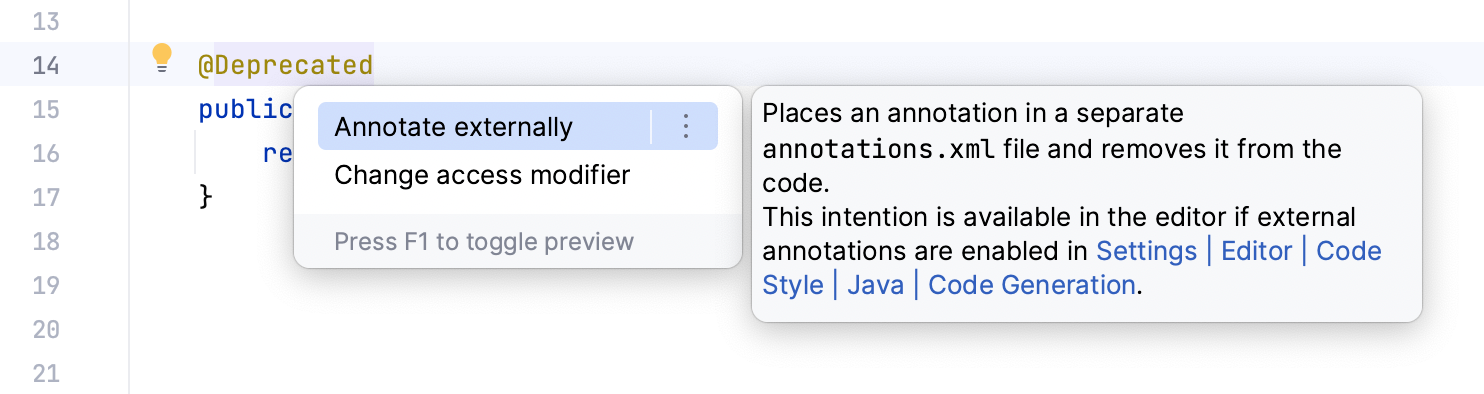
An alternative way, which you can use for both project code and libraries, is use the Annotate intention action on the element itself.
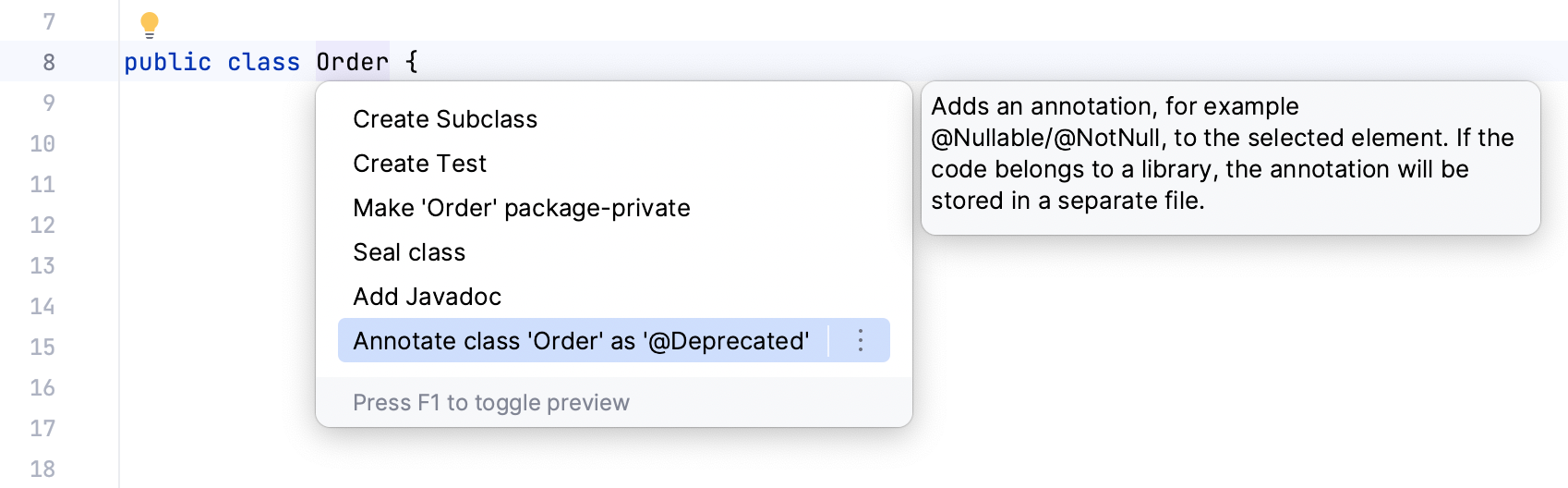
Depending on the annotations available in the current context, IntelliJ IDEA will let you pick the desired annotation from a menu or, if only one annotation is available, suggest inserting it right away.
If the annotations directory is not configured for your project or module yet, IntelliJ IDEA will prompt you to set it up.
Each external annotation that you add within this module will be stored in this folder. If you have multiple annotation roots, IntelliJ IDEA will ask you which one to use.
You can change this location later.
Remove an external annotation
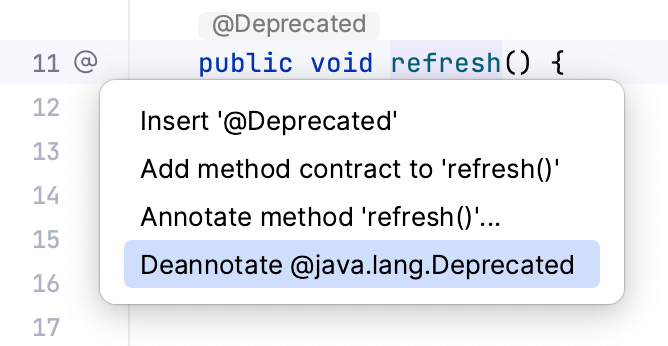
Click the gutter icon near the annotated element, then select Deannotate.
Configure annotations root directory
The annotations root directory is a folder where you store external annotations. They are configured in different places depending on the part of the project to which they apply.
For the entire project:
For individual modules:
For external Maven/Gradle dependencies:
Hide external annotations
External annotations are displayed in the editor by default. You can hide them from your code:
Right-click an external annotation, and disable the Show external annotations option. When the inlay hints are hidden, only the
icon in the gutter marks their presence in code.
If you want to enable the inlay hints later, you can do it in
Annotating language injections
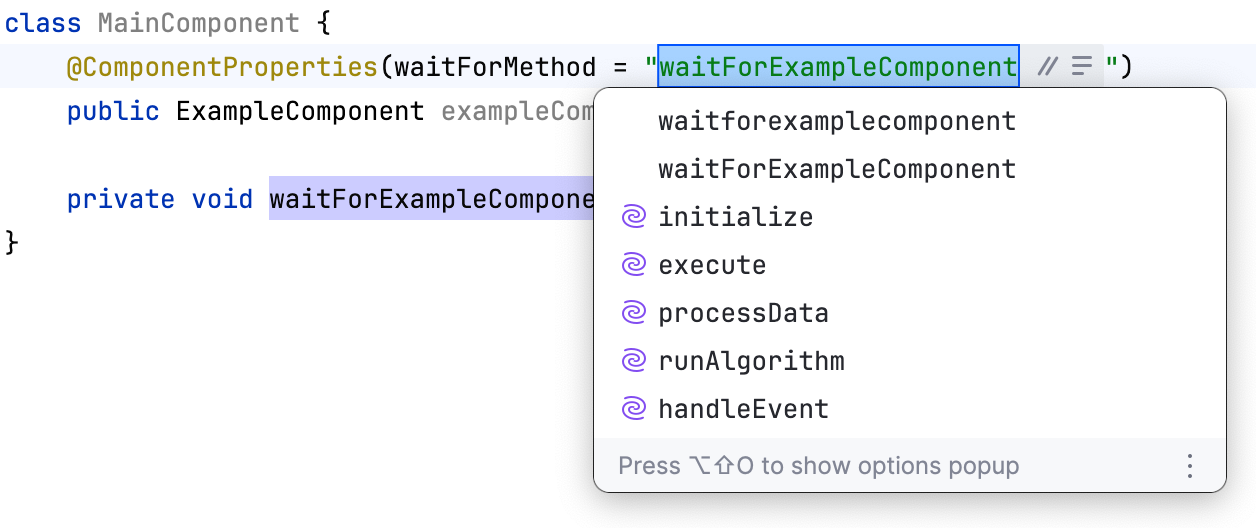
You can annotate code elements, such as members and parameters, as language injections using the @Language annotation from the JetBrains Annotations library. This gives you correct highlighting, navigation, and search in the IDE.
For example, you can mark an annotation parameter as referencing a Java method:
IntelliJ IDEA then recognizes the annotated string as a method name and lets you use the Rename refactoring and other features on the annotated element.