Check Perforce project status
Install the Perforce plugin
This functionality relies on the Perforce plugin, which you need to install and enable.
Press Ctrl+Alt+S to open settings and then select .
Open the Marketplace tab, find the Perforce plugin, and click Install (restart the IDE if prompted).
Besides indicating the current file status relative to the repository, IntelliJ IDEA integration with Perforce provides you with the accumulated view of the project files' statuses.
View differences between the current state of the project files and the repository
Open the required project.
In the main menu, go to .
Open the Commit tool window (Alt+0) .
The status of each file is indicated by the color in which the path to the file is displayed.
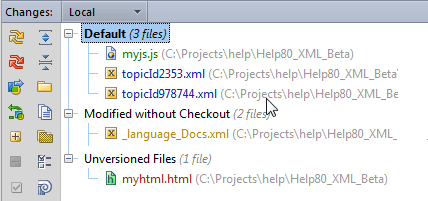
Refresh the statuses of project files
IntelliJ IDEA provides two refresh modes for statuses of files under Perforce control.
Standard Refresh takes into consideration only the changes made through the IntelliJ IDEA integration with Perforce. This improves performance as it does not require connecting to the server. However, this approach does not let you know about the changes made outside IntelliJ IDEA, for example, right through the p4v client application.
Force Refresh considers all the changes made to project, both from IntelliJ IDEA and from any other application, for example, right through p4v client.
Open the Commit tool window (Alt+0) .
Do one of the following:
To run Standard Refresh, click the Refresh toolbar button
 or press Ctrl+F5.
To run Force Refresh, click the Force Refresh toolbar button
 .
.