Code Style
Scheme
In this area, choose the code style scheme and change it as required. Code style scheme settings are automatically applied every time IntelliJ IDEA generates, refactors, or reformats your code.
The IDE comes with two pre-defined schemes: the Project scheme and the Default scheme.
In the Project scheme, the settings that you configure apply only to your current project.
These settings are stored in the codeStyles folder under .idea and are shared through VCS together with the project.
The IDE creates the folder after you modify code style settings for your project.
In the Default scheme (IDE-level scheme), the settings that you configure apply to all existing projects that have the Default code style scheme selected.
These settings are stored in the codestyles folder under the IntelliJ IDEA configuration directory and are not shared through VCS.
If you want to use the project code style scheme as your default scheme, you can copy it to the IDE level. The other way around is also possible: you can overwrite your current project settings with the settings from an IDE-level scheme and share them with other members of your team.
Item | Description |
|---|---|
Scheme | From this list, select the scheme to be used. The predefined schemes are shown bold. The custom schemes, ones created as copies of the predefined schemes, are in plain text. The location where the scheme is stored is written next to each scheme, for example, the Default scheme is stored in the IDE, the Project scheme is stored in the project. |
| Click this button to invoke the list of commands to manage the schemes:
|

General
Line Separators
IntelliJ IDEA lets you configure line separator and indentation options for various languages. When reformatting source code, IntelliJ IDEA will apply the specified indentation behavior and skip the sections denoted with the special formatting off/on markers.
Item | Description |
|---|---|
Line Separator | Use this list to specify which line separator is to be used in files created by IntelliJ IDEA. The available options are:
|
Hard wrap at | In this field, specify the number of columns to be used to display pages in the editor. |
Wrap on typing | Select this checkbox to ensure that edited text always fits in the specified right margin. |
Visual guides | In this field, specify multiple right margins. You can leave a default value or enter the number of spaces for your margin. If you want to specify several margins, enter numbers separated by comma. |
Indents detection
Select Detect and use existing file indents for editing to detect the indentation style in the current file and use this style instead of the indents specified in the Code Style settings for the specific language.
IntelliJ IDEA displays the indentation information in the status bar of the editor. You can click the indentation information to see the available actions, such as enable or disable this option, and change the current indentation to the ones specified in the Code Style settings for the specific language.
EditorConfig
Select the Enable EditorConfig support checkbox to use EditorConfig for code style. In this case you can specify code style settings that override the IDE settings and have different code styles within a project.
If you decide to use IDE settings after creating the EditorConfig settings file, you need to clear the Enable EditorConfig support checkbox.
Formatter
In this area, specify the markers to limit code fragments that you want to exclude from reformatting. In the source code, formatting markers are written inside line comments.
Item | Description |
|---|---|
Do not format | In the Do not format field, specify a glob pattern with the names of files and directories that you want to exclude from reformatting, code arrangement, and import optimization, for example: You can specify several glob patterns separated with a semicolon Use the asterisk |
Turn formatter on/off with markers in code comments |
|
Off: | In this field, specify the character string that will indicate the beginning of a code fragment which you want to exclude from reformatting. Type a character string with the |
On: | In this field, specify the character string that will indicate the end of a code fragment which you want to exclude from reformatting. Type a character string with the |
Enable regular expressions in formatter markers | Select this checkbox to use regular expressions instead of specifying the formatting markers explicitly. IntelliJ IDEA matches formatter on/off markers using the regular expression specified instead of the exact string. For example, using regular expressions allows you to have several markers for enabling the formatter and for disabling it. In that case, you can use the following regular expressions: See Example of using formatting markers for a demo. 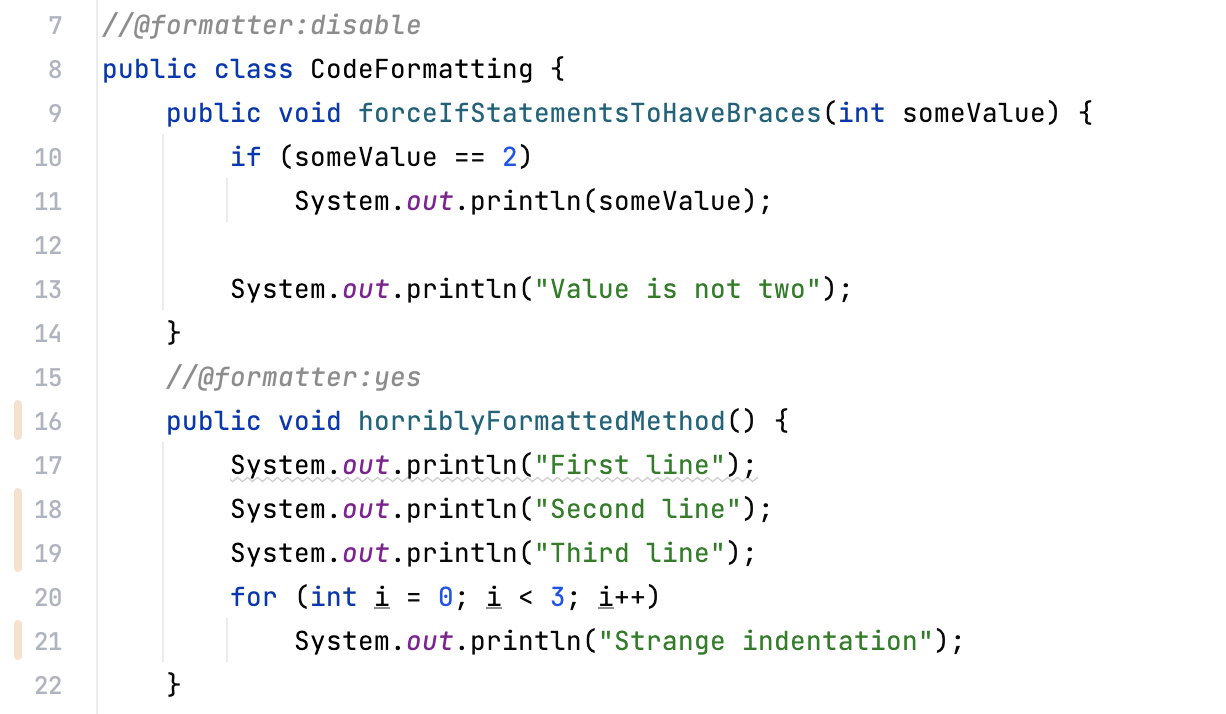 |