Breakpoints
Breakpoints are special markers that suspend program execution at a specific point. This lets you examine the program state and step through it. Breakpoints can be simple, for example, suspending the program on reaching some line of code, or involve more complex logic, such as checking against additional conditions, writing to a log, and so on).
Once set, a breakpoint remains in your project until you remove it explicitly, except for temporary breakpoints.
Types of breakpoints
The following types of breakpoints are available in IntelliJ IDEA:
Line breakpoints: suspend the program upon reaching the line of code where the breakpoint was set. This type of breakpoints can be set on any executable line of code.
Method breakpoints: suspend the program upon entering or exiting the specified method or one of its implementations, allowing you to check the method's entry/exit conditions.
Field watchpoints: suspend the program when the specified field is read or written to. This allows you to react to interactions with specific instance variables. For example, if at the end of a complicated process you are ending up with an obviously wrong value on one of your fields, setting a field watchpoint may help determine the origin of the fault.
Exception breakpoints: suspend the program when
Throwableor its subclasses are thrown. They apply globally to the exception condition and do not require a particular source code reference. Unlike stack traces, suspending an application on an exception allows you to examine the surrounding context or data while it is still available.
Set breakpoints
Set line breakpoints
Click the gutter at the executable line of code where you want to set the breakpoint. Alternatively, place the caret at the line and press Ctrl+F8.

To target a specific lambda or an if-return statement within a line, use the breakpoint icons that appear near these statements.
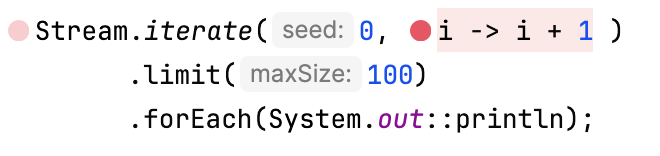
In scenarios where the lambda is the only code on the line that is meaningful to debug, like in the case with Java Stream operations, then IntelliJ IDEA will automatically set the breakpoint for this lambda instead of the entire line.
To set a temporary line breakpoint, press Ctrl+Alt+Shift+F8. Alternatively, hold Alt and click the gutter. This breakpoint will be removed from your project right after it is hit.
Set method breakpoints
Click the gutter at the line where the method is declared. Alternatively, place the caret at the method declaration and press Ctrl+F8.

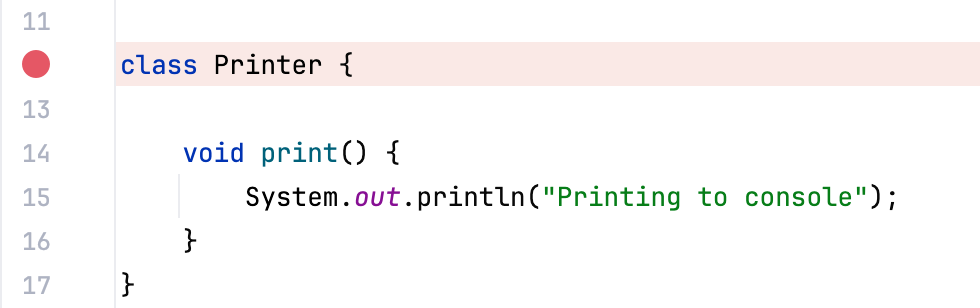
To suspend the program when the default constructor of a class is called, click the gutter at the line where the class is declared. Alternatively, place the caret at the class declaration and press Ctrl+F8.
To target multiple classes or methods, select from the main menu, then click Add Alt+Insert, select Java Method Breakpoints, and specify the class and method. Use
*to match the beginning, the ending, or the entire identifier.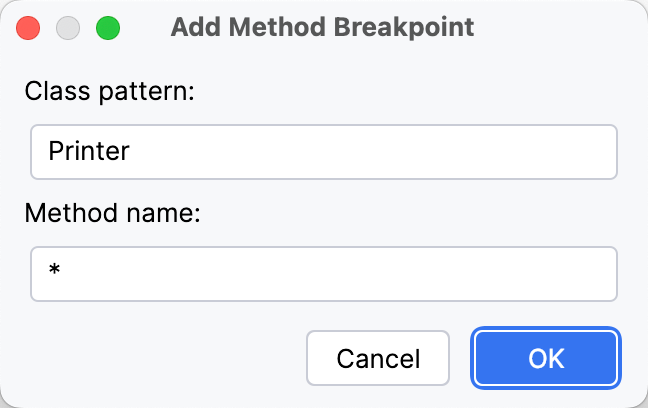
Syntax example:
Class
Method
Result
*printprint()methods in all classes (with any parameter list)Printer*any method in the
PrinterclassPrinterset*all setters in the
Printerclass**all methods (for example, if you want to suspend the application right after startup)
Set field watchpoints
Click the gutter at the line where the field is declared. Alternatively, place the caret at the line and press Ctrl+F8.

Set exception breakpoints
Press Ctrl+Shift+F8 or select from the main menu. Then, depending on the type of the exception:
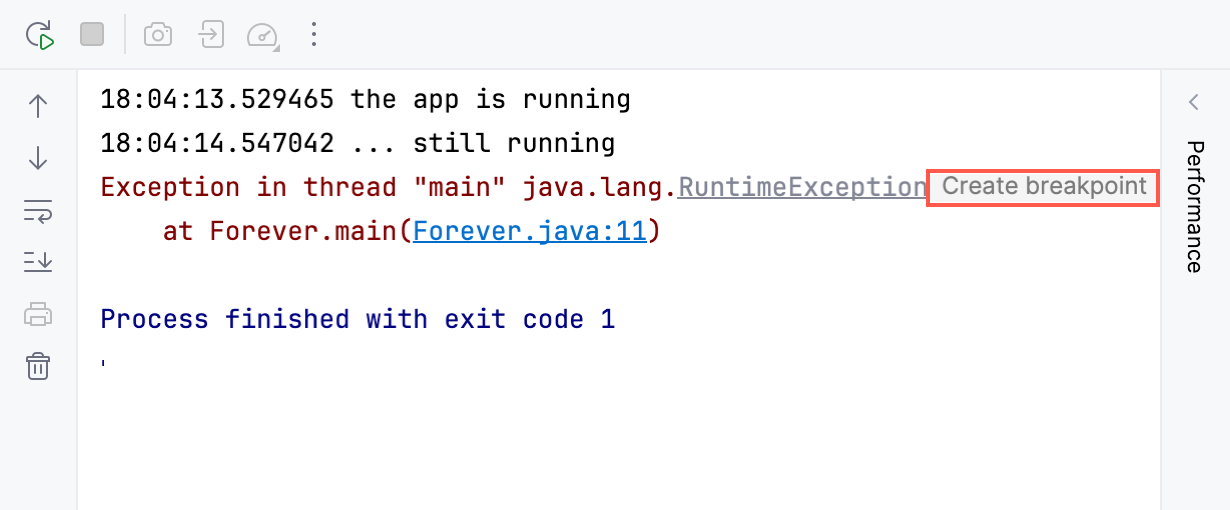
If you have an exception's stack trace in the console, you can set a breakpoint for this exception using the Create breakpoint button near the exception's name.
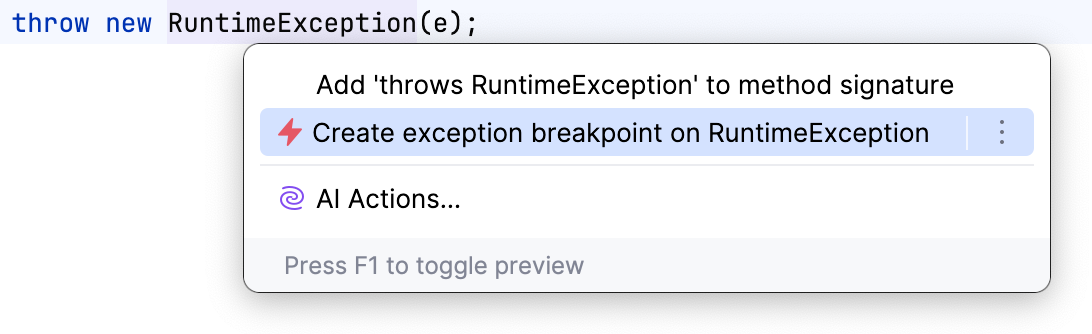
When at a declaration or usage of an exception in the editor, you can set a breakpoint for this exception using the context menu Alt+Enter.
Set conditional and logging breakpoints
To set a breakpoint that only suspends the application when a condition is met (conditional breakpoint) or logs a message (logging breakpoint or logpoint):
Right-click the line or declaration where you want to set the breakpoint.
From the menu that appears, select Add Conditional Breakpoint or Add Logging Breakpoint respectively.
In the popup that appears, specify the condition or the expression whose result you want to log.
For more information, refer to breakpoint conditions and logging breakpoints.
Manage breakpoints
Remove breakpoints
For non-exception breakpoints: click the breakpoint in the gutter.
For all breakpoints: go to Ctrl+Shift+F8 in the main menu, select the breakpoint, and click Remove or press Delete.
To avoid accidentally removing a breakpoint and losing its parameters, you can choose to remove breakpoints by dragging them to the editor or clicking the middle mouse button. To do this, go to and select Drag to the editor or click with the middle mouse button. Clicking a breakpoint will then enable or disable it.
Mute breakpoints
If you don't need to stop at your breakpoints for some time, you can mute them. This allows you to resume normal program operation without leaving the debugger session. After that, you can unmute breakpoints and continue debugging.
Click the Mute Breakpoints button
 in the toolbar of the Debug tool window.
Enable/disable breakpoints
When you remove a breakpoint, its internal configuration is lost. To temporarily turn an individual breakpoint off without losing its parameters, you can disable it:
For non-exception breakpoints: right-click it and set the Enabled option as required. Alternatively, you can do this by clicking a breakpoint while holding Alt or clicking it with the middle mouse button. For the middle mouse button, check that removing breakpoints is not assigned to it.
For all breakpoints: click Run | View Breakpoints Ctrl+Shift+F8 and check/uncheck the breakpoint on the list.
Move/copy breakpoints
To move a breakpoint, drag it to another line.
To copy a breakpoint, hold Ctrl and drag a breakpoint to another line. This creates a breakpoint with the same parameters at the destination.
View all set breakpoints
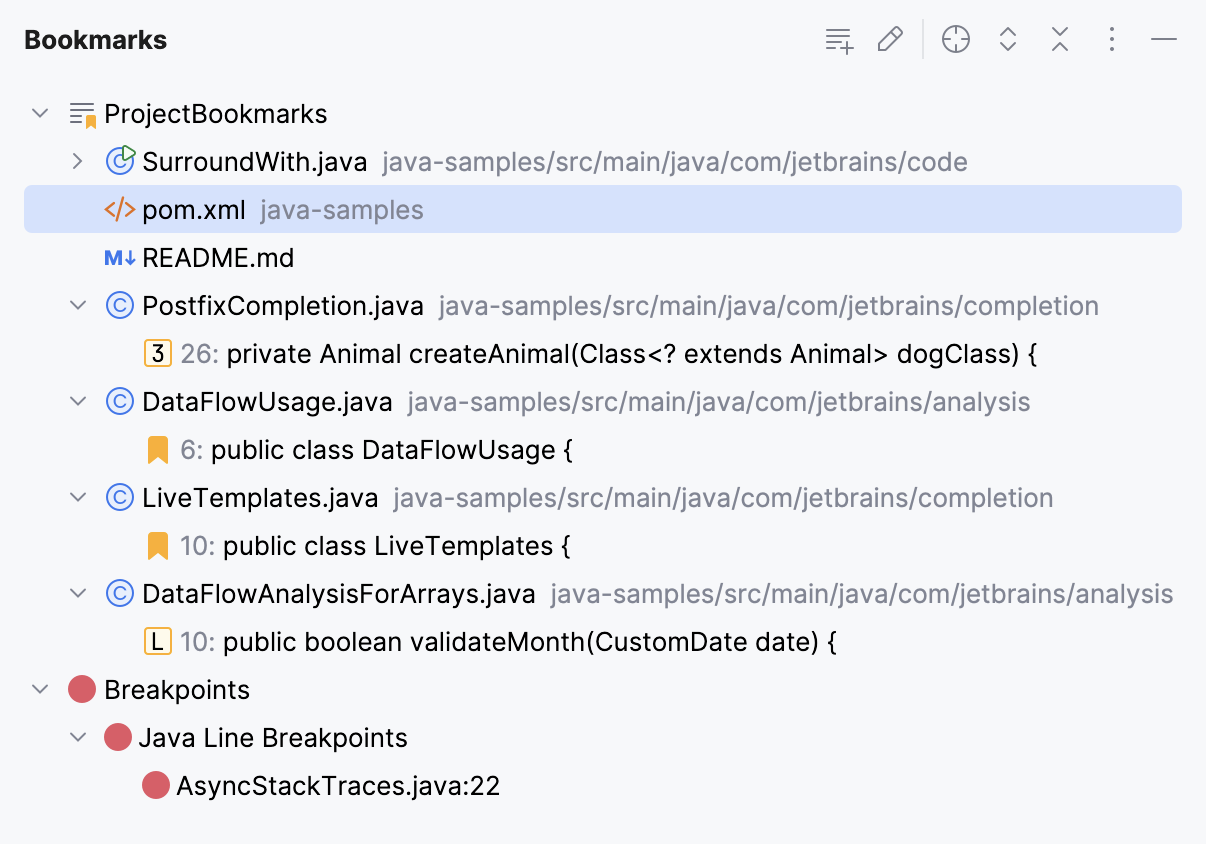
You can view the list of all breakpoints in the Bookmarks tool window. Breakpoints are automatically added to the dedicated list in the tool window once you place them in your code.
In the main menu, go to or press Alt+2 and expand the Breakpoints list.
Group breakpoints
You can organize breakpoints into groups, for example, if you need to mark out breakpoints for a specific problem.
In the Breakpoints dialog Ctrl+Shift+F8, select a breakpoint you want to place in a group and select from the menu.
Configure breakpoints' properties
Depending on the breakpoint type, you can configure additional properties which allow you to tailor its operation for specific needs. The most used options are available via intentions.
To access breakpoint intentions, place the caret at the line with the breakpoint and press Alt+Enter. Use this option when you need to quickly configure basic breakpoint properties.
To access the full list of properties, right-click the breakpoint and click More or press Ctrl+Shift+F8.
Intentions reference
Intention | Description |
|---|---|
Remove breakpoint | Removes the breakpoint at the selected line. |
Disable Breakpoint | Disables the breakpoint at the selected line. |
Edit Breakpoint | Opens a dialog with the most used breakpoint properties. For more properties, click More or press Ctrl+Shift+F8. |
Stop only in the class | Applies a class filter to exclude the classes derived from the current one. |
Do not stop in the class | Applies a class filter to exclude the current class. |
Stop only in the current object | Applies an instance filter to include only the current instance and exclude all others. This action is only available in non-static methods. |
Stop only if called from | Applies a caller filter to exclude all methods except for the one corresponding to the previous frame in the stack. |
Do not stop if called from | Applies a caller filter to exclude the method corresponding to the previous frame in the stack. |
Breakpoints' properties reference
In this chapter, you can find information on the features available for breakpoints.
Enabled
Clear the checkbox to temporarily disable a breakpoint without removing it from the project. Disabled breakpoints are skipped during stepping.
You can configure IntelliJ IDEA to enable/disable breakpoints on clicking rather than removing them altogether. To do this, go to and set the Remove breakpoint option to Drag to the editor or click with middle mouse button.
Suspend
Specifies whether to pause the program execution when the breakpoint is hit.
Non-suspending breakpoints are useful when you need to log some expression without pausing the program (for example, when you need to know how many times a method was called) or if you need to create a trigger breakpoint that will enable dependent breakpoints when hit.
The following policies are available for the breakpoints that suspend program execution:
All: all threads are suspended when any of the threads hits the breakpoint.
Thread: only the thread which hits the breakpoint is suspended.
If you want a policy to be used as the default one, click the Make default button.
Condition
This option is used to specify a condition that is checked each time the breakpoint is hit. If the condition evaluates to true, the selected actions are performed. Otherwise, the breakpoint is ignored.
The result of the expression is taken from the return statement. When there is no return statement, the result is taken from the last line of code.
In the body of the condition, you can use:
Multiple statements, including declarations, loops, anonymous classes, and so on
this(in nonstatic context), for example, to refer to the current exception:!(this.entries.isEmpty())Labels to include tracked instances in your expressions or check their boolean fields:
trackedObject_DebugLabel.isComplete()
When evaluating expressions, make sure you are aware of their possible side effects as they may potentially affect the behavior and the result of the program.
Logging options
When a breakpoint is hit, the following can be logged to the console:
"Breakpoint hit" message: a log message like
Breakpoint reached at ocean.Whale.main(Whale.java:5).Stack trace: the stack trace for the current frame. This is useful if you want to check what paths have led to this point without interrupting the program execution.
Evaluate and log: the result of an arbitrary expression, for example,
"Initializing"orusers.size().The expression disregards any access modifiers and is evaluated in the context of the line where the breakpoint is set.
The result of the expression is taken from the return statement. When there is no return statement, the result is taken from the last line of code, which doesn't have to be an expression: a literal works too. This can be used to produce a custom message or to keep track of some values as the program executes.
When evaluating expressions, make sure you are aware of their possible side effects as they may potentially affect the behavior and the result of the program.
Set a logging breakpoint
(optional) If the expression that you want to log is in front of you in the editor, select it.
Hold Shift and click the gutter.
Remove once hit
Specifies whether the breakpoint should be removed from the project after it has been hit once.
Disable until hitting the following breakpoint
When a breakpoint is selected in the Disable until hitting the following breakpoint box, it acts as a trigger for the current breakpoint. This disables the current breakpoint until the specified breakpoint has been hit.
You can also choose whether to disable it again after this has happened or leave it enabled.
This option is useful when you only need to suspend the program under certain conditions or after certain actions. In this case, the trigger breakpoint usually isn't required to stop the program execution and is made non-suspending.
Filters
IntelliJ IDEA debugger enables you to fine-tune the breakpoint operation by filtering out classes, instances, and caller methods and only suspend the program where needed.
The following types of filters are available:
Catch class filters: allow you to only suspend the program when the exception is going to be caught in one of the specified classes. Available only for exception breakpoints.
Instance filters: suspend the program only when a method is called on particular object instances. This type of filter only takes effect in a nonstatic context.
Class filters: suspend the program only in particular classes. In the case of exceptions, this filter matches throw site classes.
Caller filters: suspend the program depending on the caller of the current method. Select if you need to stop at a breakpoint only when the current method is called (or not called) from a certain method. The filter applies only to the immediate caller; the rest of the call stack does not affect the breakpoint.
To set up a filter, click the button near the text field and use a dialog or define it in text format. For text format, use the following syntax:
Classes and methods are specified using fully qualified names. If a filter is specified through a class name, it points at the class itself and all its subclasses which use its members via inheritance.
You can use patterns that begin or end with the
*wildcard to define groups of classes or methods, for example*.Fooorjava.*. A filter specified through a pattern points at classes/methods whose fully qualified names match this pattern.Object instances are specified using instance IDs. You can find the object ID in the Variables tab when the object is in the scope or using the Memory tab.
Class names, caller methods, patterns, and instance IDs are separated with spaces.
To exclude a class or a caller method, type
-before its name.In caller filters, use descriptors for parameters and return types, for example:
mypackage.MyObject.addString(Ljava/lang/String;)V. For detailed information on descriptors, refer to the official Oracle documentation.
Filter examples:
| A class/catch class filter that ignores the code inside the |
| A caller filter to exclude calls from |
| A class/catch class filter that applies the breakpoint to code in |
Pass count
Specifies that the breakpoint should work only after it has been hit a certain number of times. This is useful for debugging scenarios that involve suspending the application in long-running loops or for selectively logging frequent events.
Once the count completes, it resets and starts again. This means that if Pass count is set to 10, the breakpoint will work every tenth time it is hit.
If both Pass Count and Condition are set, IntelliJ IDEA first satisfies the condition and then checks for Pass Count.
Field access/modification
Field access | Select to make the watchpoint work when the field is being read. |
Field modification | Select to make the watchpoint work when the field is being written to. |
Emulated
When this option is enabled, IntelliJ IDEA sets a combination of line breakpoints at the first and last statements of a method instead of using a slower "true" method breakpoint. Emulated method breakpoints improve debugging performance and thus are used by default.
We only recommend disabling this option if you are debugging remote code, or if you need to set a breakpoint at native methods or classes without line number information.
Method entry/exit
Method entry | Select to make the breakpoint work after the method or its descendants are entered. |
Method exit | Select to make the breakpoint work before the method or its descendants return. |
Caught/uncaught exception
Caught exception | Select to make the breakpoint work when the specified exception was caught. |
Uncaught exception | Select to make the breakpoint work when the specified exception was not caught. This allows you to examine the program state and detect the cause before the program or thread crashes due to unhandled exception. |
Breakpoint statuses
Breakpoints can have the following statuses:
Status | Description |
|---|---|
Verified | After you have started a debugger session, the debugger checks whether it is technically possible to suspend the program at the breakpoint. If yes, the debugger marks the breakpoint as verified. |
Warning | If it is technically possible to suspend the program at the breakpoint, however there are issues related to it, the debugger sets the breakpoint status to warning. This may happen, for example, when it is impossible to suspend the program at one of the method's implementations. |
Invalid | If it is technically impossible to suspend the program at the breakpoint, the debugger marks it as invalid. This often happens because there is no executable code on the line. |
Inactive/dependent | A breakpoint is marked as inactive/dependent when it is configured to be disabled until another breakpoint is hit, and this has not happened yet. |
Muted | All breakpoints are temporarily inactive because they have been muted. |
Disabled | This breakpoint is temporarily inactive because it has been disabled. |
Non-suspending | The suspend policy is set for this breakpoint so that it does not suspend the execution when hit. |
Breakpoint icons
Depending on their type and status, breakpoints are marked with the following icons:
Line | Method | Field | Exception | |
|---|---|---|---|---|
Regular |
|
|
|
|
Disabled |
|
|
|
|
Verified |
|
|
| |
Muted |
|
|
| |
Inactive/dependent |
|
|
| |
Muted inactive/dependent |
|
|
| |
Muted disabled |
|
|
| |
Non-suspending |
|
|
| |
Verified non-suspending |
|
|
| |
Invalid |
| |||


Productivity tips
- Use breakpoints for "printf" debugging
Use non-suspending logging breakpoints (sometimes referred to as watchpoints in other debuggers) instead of inserting print statements in your code. This provides a more flexible and centralized way of handling debug log messages.
- Set logging breakpoints more quickly
To set a non-suspending logging breakpoint, hold Shift and click the gutter. This will not suspend the program execution and instead log a message like
Breakpoint reached at ocean.Whale.main(Whale.java:5). If you want to log some expression that is in front of you in the editor, select it before holding Shift and clicking the gutter.- Add breakpoint descriptions
If you have many breakpoints in your project, you can add descriptions to breakpoints for ease of search. To do this, right-click a breakpoint in the Breakpoints dialog Ctrl+Shift+F8 and select Edit description from the menu. Now when you start typing the breakpoint name, it gets the focus.
- Lambda expressions vs. method references
Due to JVM design, method references don't provide meaningful information in stack traces, as opposed to lambda expressions. Moreover, it is impossible to set a breakpoint on a method reference. If a method reference reduces traceability where it is critical, consider using a lambda instead.
- Diagnose the cause of fatal errors
As exception breakpoints work with
Throwable, you can also use them to suspend the program when a subclass ofErroris thrown. This is useful for investigating the causes of errors likeOutOfMemoryErrorandStackOverflowError. With an exception breakpoint set up for them, you will be able to look into what happened in the program before it crashes.- Test your program for concurrency issues
A good way to find out if a multi-threaded program is robust in terms of concurrency is to use breakpoints that only suspend one thread when hit. Stopping a single thread may reveal problems in the design of the application, which would not otherwise be evident.