TestNG
From this article, you will learn how to set up TestNG for your projects, create tests, and run them to see if your code is operating correctly. It contains just the basic steps to get you started.
If you want to know more about TestNG, refer to the official documentation. To learn more about testing features of IntelliJ IDEA, refer to other topics in this section.
You can choose to follow the steps on this page using Maven or Gradle.
Add TestNG to your project
Open pom.xml in the root directory of your project.
In pom.xml, press Alt+Insert and select Dependency.
In the dialog that opens, type
testNGin the search field.Locate the
org.testng:testngdependency, select its version in the search results, and click Add.When the dependency is added to pom.xml, press Ctrl+Shift+O or click
 in the Maven tool window to import the changes.
Open build.gradle in the root directory of your project.
In build.gradle, press Alt+Insert and select Add Maven artifact dependency.
In the dialog that opens, type
testNGin the search field.Locate the
org.testng:testngdependency, select its version in the search results, and click Add.When the dependency is added to build.gradle, press Ctrl+Shift+O or click
in the Gradle tool window to import the changes.
In the main menu, go to (Ctrl+Alt+Shift+S).
Under Project Settings, select Libraries and click
 .
.In the dialog that opens, specify the necessary library artifact, for example:
org.testng:testng:6.14.3.Apply the changes and close the dialog.
Create tests
Create a new TestNG class
In the Project tool window (Alt+1) , right-click the package inside the Test Sources Root
 in which you want to create a new test class.
Select from the context menu.
In the Create New Class dialog, name the new class and click OK.
In the editor, write the code for your test class. Use the TestNG annotations where necessary. For example, you may want to annotate the whole class or individual methods:
import org.testng.Assert; import org.testng.annotations.DataProvider; import org.testng.annotations.Test; @Test() public class SampleTest { @DataProvider public Object[][] data() { return new String[][] {new String[] {"data1"}, new String[] {"data2"}}; } @Test(dataProvider = "data") public void test(String d) { Assert.assertEquals("First Line\nSecond Line", "First Line\nSecond Line"); } }
Run tests
Run TestNG tests
To run an individual test, click
 in the gutter and select Run.
To run all tests in a test class, click
against the test class declaration and select Run.
You can view test results in the Run tool window.
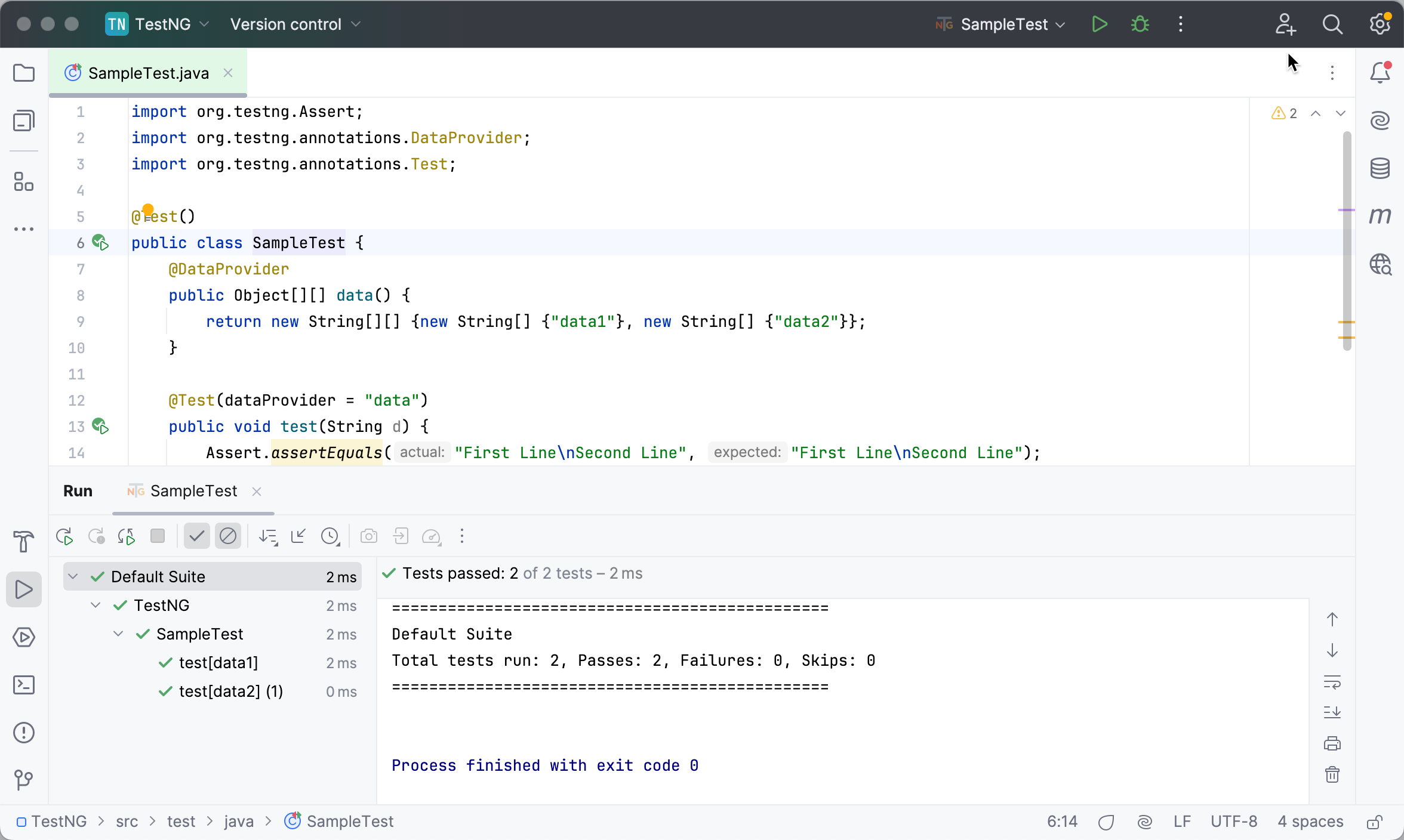
Run tests and generate reports
In IntelliJ IDEA, you can add VM options, use another JDK, or enable code coverage using run configurations. You can create multiple configurations for the same test class or test suite with different settings and compare the results.
For TestNG, you can configure the listener that will generate reports for you. Creating a separate run configuration might be helpful in case you don't want to generate reports every time you run your tests.
In the main menu, go to .
If there are no previously created TestNG configurations, click
and from the list that opens, select TestNG.Otherwise, select the required exising configuration from the list.
If it is a new configuration, give it a name.
From the Test kind list, select the scope of tests that you want to run. The next field will change accordingly allowing you to select specific tests to run.
In the Output directory field, you can specify a folder in which the IDE will place the report.
By default, the IDE creates a new test-output folder in the project root directory, but you can use another folder or use different folders for different reports.
Switch to the Listeners tab, click
, and add the EmailableReporteroption. This will generate an HTML report.Apply the changes and close the dialog.
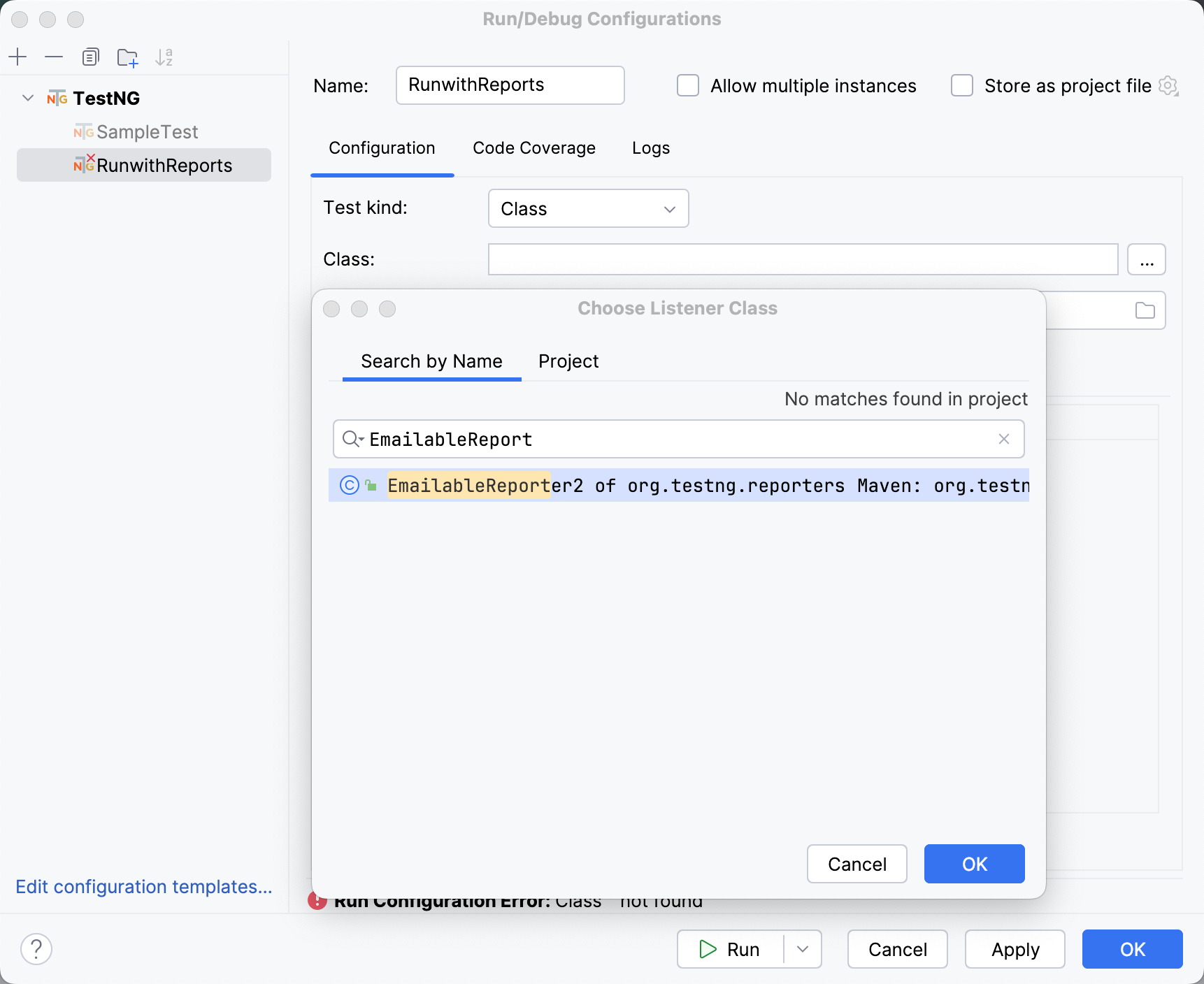
On the toolbar, make sure that the newly created run configuration is selected and click
next to it. Alternatively, press Shift+F10. 
The IDE creates an .html report with results of the test run in the folder that you have specified in the run configuration. If you haven't specified a folder, the test-output folder with the report will be created.
To quickly view this file in your browser, open the file in the editor. Then, go to and select a browser. You can also use the built-in preview to view the file. For more information, refer to Preview output of HTML files.
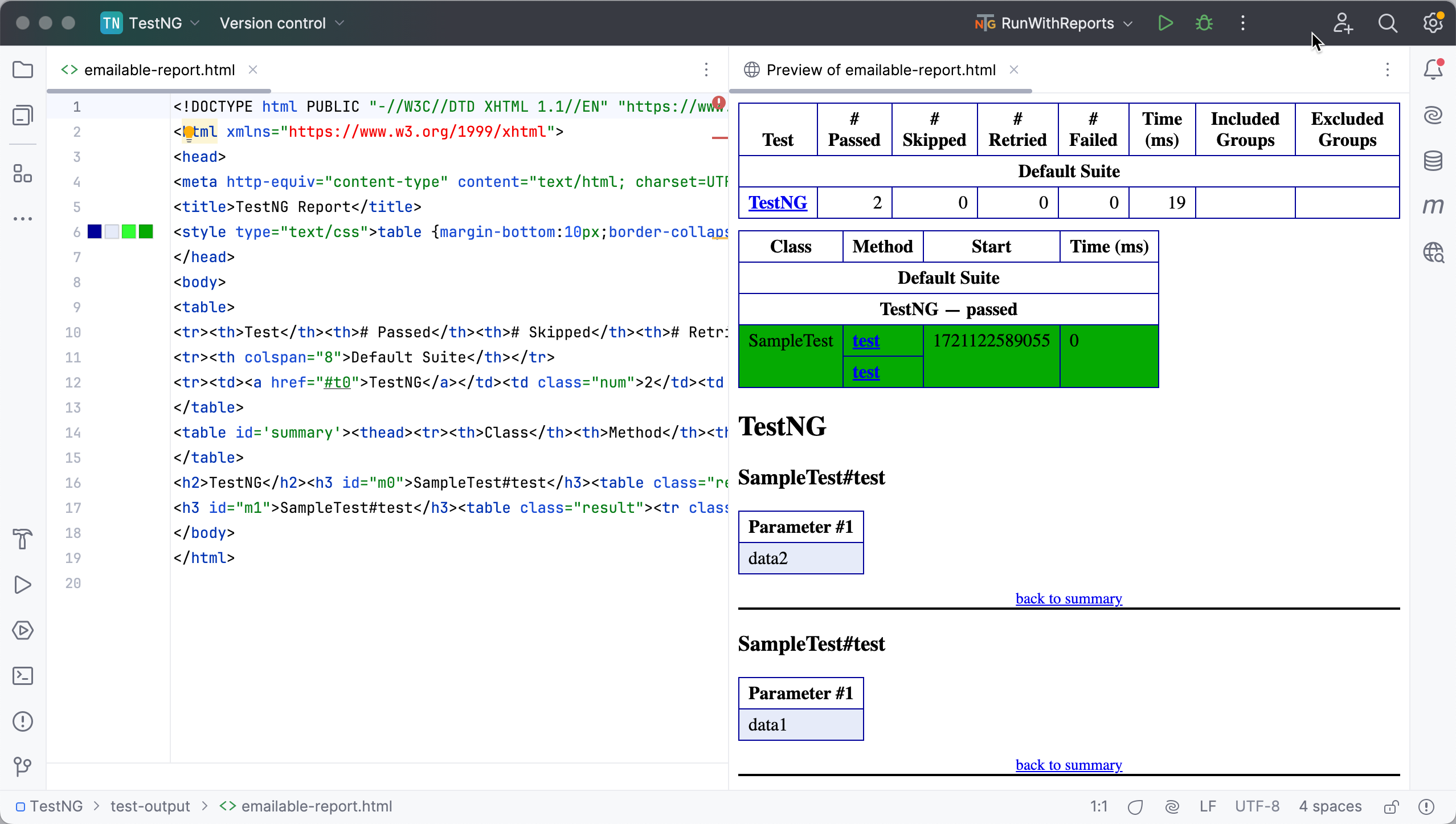
Test suites
In TestNG, a test suite is a collection of tests that are designed to test a specific functionality or feature of an application. It is a container that holds a group of related test cases. Test suites can be created by grouping multiple test cases or by combining multiple test suites.
TestNG does not allow defining the test suites inside the test code or the main testing source code. That is why a test suite can be defined in an XML or YAML file that contains information about the test cases, the classes or packages that contain the test cases, and the test parameters.
Create test suites in XML
You can specify test suites in .xml or .yaml files. If you are going to use YAML, make sure to add the corresponding dependency to the build file.
Right-click the project root folder in the Project tool window (Alt+1) , select and enter the name of the file, for example testng.xml.
Fill in the file with information about your tests. For more information, refer to testng.xml.
Use YAML for test suites
TestNG supports defining a test suite using YAML, however, it doesn't contain the YAML parser by default. If you want to use a YAML file, add the snakeyaml dependency. The version should correspond with the TestNG version that you use.
Open the build file (pom.xml or build.gradle), press Alt+Insert, and select Add dependency.
In the tool window that opens, type
snakeyamlin the search field.Locate the necessary dependency, select its version in the search results, and click Add next to it.
Press Ctrl+Shift+O or click the notification that appears in the top-right corner of the editor to load the changes.
Right-click the project root folder in the Project tool window (Alt+1) , select and enter the name of the file, for example testing.yaml.
Run a test suite
To be able to run a TestNG test suite, create a run configuration for this suite:
In the main menu, go to .
In the left-hand pane, click
and from the list that opens, select TestNG. Name the new configuration.From the Test kind list, select Suite.
The Suite field becomes available.
In the Suite field, click
 and specify the path to the XML or YAML file in which the test suite is configured.
In the Output directory field, you can specify a folder in which the IDE will place output files, such as test reports.
By default, the IDE creates a new test-output folder in the project root directory, but you can use another folder or use different folders for different outputs.
Apply the changes and close the dialog.
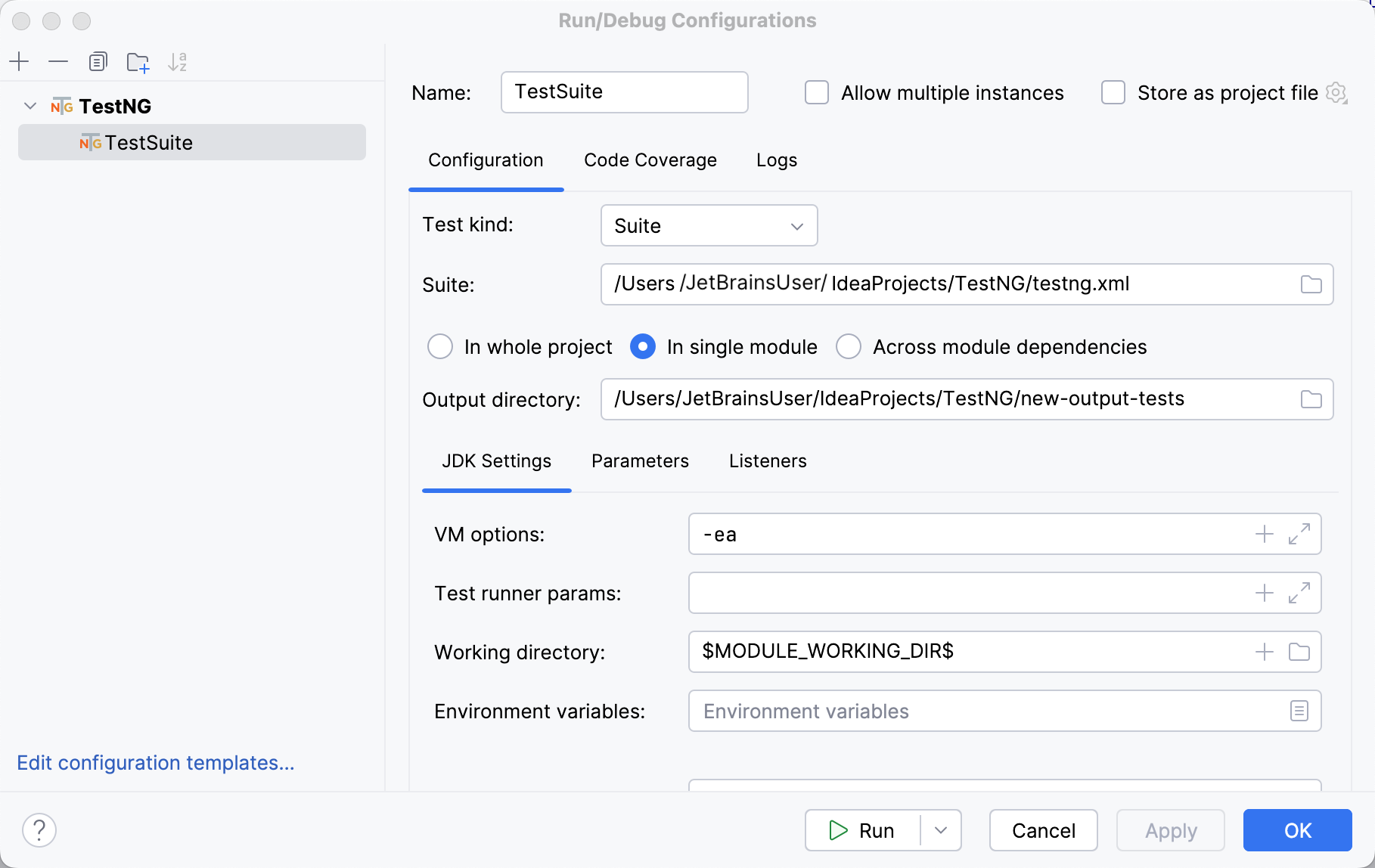
On the toolbar, make sure that the newly created run configuration is selected and click
next to it. Alternatively, press Shift+F10. 