In this area, specify how you want PhpStorm to treat connections received from hosts and through ports that are not registered as deployment server configurations.
Ignore external connections through unregistered server configurations: select this checkbox to have PhpStorm ignore connections received from hosts and through ports that are not registered as deployment server configurations. When this checkbox is selected, PhpStorm does not attempt to create a deployment server configuration automatically.
Break at first line in PHP scripts: select this checkbox to have the debugger stop as soon as connection between it and PhpStorm is established (instead of running automatically until the first breakpoint is reached). Alternatively turn on the Run | Break at first line in PHP scripts option from the main menu.
Max. simultaneous connections: use this spin box to limit the number of external connections that can be processed simultaneously.
Xdebug
Use the controls in this area to configure debugging using the Xdebug tool.
Debug port: in this field, specify the port for PhpStorm and the Xdebug engine to communicate through.
This must be the same port number as specified in the php.ini file:
xdebug.client_port="<the port (9003 by default) to which Xdebug connects>"
xdebug.remote_port="<the port (9000 by default) to which Xdebug connects>"
By default, Xdebug 2 listens on port 9000. For Xdebug 3, the default port has changed from 9000 to 9003. You can specify several ports by separating them with a comma. By default, the Debug port value is set to 9003,9000 to have PhpStorm listen on both ports simultaneously.
Can accept external connections: select this checkbox to enable PhpStorm to accept any incoming connections from Xdebug engines through the port specified in the Debug port field.
Resolve breakpoint if it's not available on the current line (Xdebug 2.8+): if selected, support for the Xdebug breakpoints resolving mechanism will be enabled in PhpStorm. Under this mechanism, the debugger evaluates whether PHP can generate internal executable bytecode for the current line. If there is no such code on the line that the breakpoint refers to, the corresponding breakpoint cannot be hit. Xdebug will scan up to 5 subsequent lines, stop at the line where executable code is located, and update the breakpoint definition to this line.
Force break at first line when no path mapping specified: select this checkbox to have the debugger stop as soon as it reaches and opens a file that is not mapped to any file in the project on the Servers page. The debugger stops at the first line of this file and Examine/update variables shows the following error message: Cannot find a local copy of the file on server <path to the file on the server> and a link Click to set up mappings. Click the link to open the Resolve Path Mappings Problem dialog and map the problem file to its local copy.
When this checkbox is cleared, the debugger does not stop upon reaching and opening an unmapped file, the file is just processed, and no error messages are displayed.
Move breakpoint to resolved position if it's different from the source: select this checkbox to enable automated adjustment of the breakpoint position to the line where Xdebug actually stops after resolving the breakpoint.
Note that the feature works only when the Resolve breakpoint if it's not available on the current line (Xdebug 2.8+) checkbox is enabled.
Force break at first line when a script is outside the project: select this checkbox to have the debugger stop at the first line as soon as it reaches and opens a file outside the current project. With this checkbox cleared, the debugger continues upon opening a file outside the current project.
Enable return function value debugging (Xdebug 3.2+): select this checkbox to add an extra debugging step for inspection of return values in functions that return them immediately without storing in intermediate variables.
Zend Debugger
Use the controls in this area to configure debugging using the Zend Debugger tool.
Debug port: in this field, specify the port for PhpStorm and the Zend Debugger engine to communicate through. Type the port number within the tunnel specified in the php.ini file through zend_debugger.tunnel_min_port and zend_debugger.tunnel_max_port. For more information, refer to Zend Debugger - Configuration Directives
Can accept external connections: select this checkbox to enable PhpStorm to accept any incoming connections from Zend Debugger engines through the port specified in the Debug port field.
Settings broadcasting port: in this field, specify the port through which the debugger settings are passed to the debugging toolbar in the browser.
Automatically detect IDE IP: when this checkbox is selected, PhpStorm detects all the host IP addresses to be sent to Zend Debugger through the debug_host parameter. All the detected IP addresses are listed in the field to the right. Auto-detection of IP address is helpful when you use Vagrant, or VirtualBox, or another virtualization tool.
Clear the checkbox to block auto-detection of host IP addresses and specify the required ones explicitly in the field.
Ignore Z-Ray system requests: select this checkbox to block requests from the Z-Ray system if they annoy you by invoking the PhpStorm debugger too often.
Evaluation
Show array and object children in Debug Console: select this checkbox to show the output for arrays and objects in the Console pane. When the checkbox is cleared, the output is not displayed.
Safe evaluation mode in value hints and Watches Frame:
When this checkbox is selected, PhpStorm checks that the expression or code fragment to be evaluated does not contain any undefined elements and informs you about any discrepancies detected.
If the checkbox is cleared, an exception appears if PhpStorm encounters any undefined elements during evaluation.
Import namespace and 'use' statements from evaluation context: when this checkbox is selected, during a debugging session PhpStorm is aware of the current namespace and of all the imported namespaces at the execution point. This information is used for calculating and showing Watches and Evaluate expressions to ensure that PhpStorm debug evaluations are identical with the actual result of the PHP code execution.
By default, the checkbox is selected.
The result of executing the following code is true (or showing 1 in the browser):
namespace Too\Car;
class Car{}
$my_car = new Car();
echo $my_car instanceof Car;
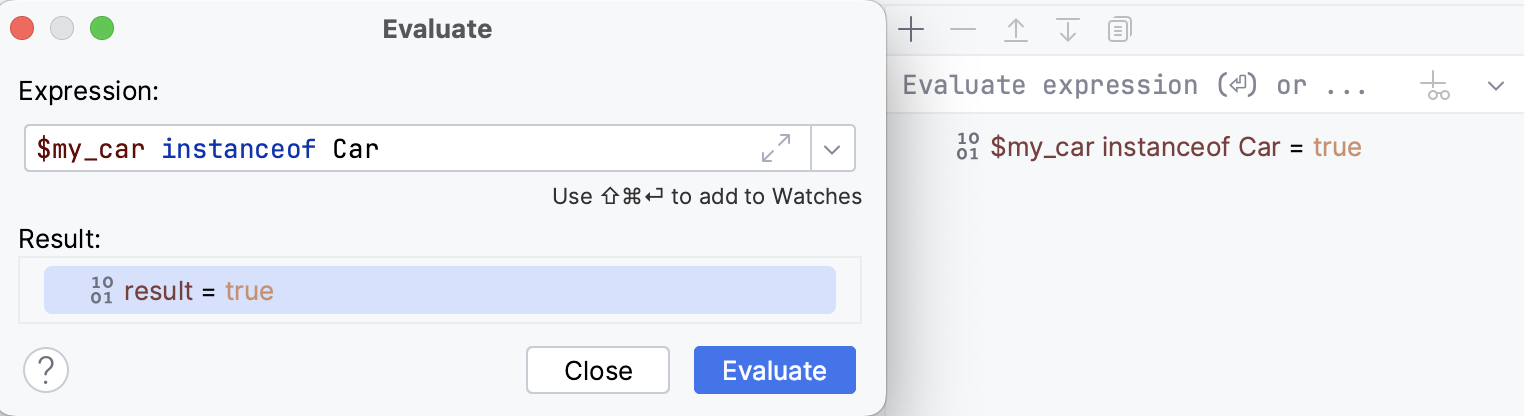
If the Import namespace and use statements... checkbox is selected, evaluating the $my_car instanceof Car expression and the $my_car instanceof Car watch will also show this result:
However if you clear the checkbox, Watches and Evaluate Expression will be executed in the global context. This means that instead of $my_car instanceof Car you will need to use the fully qualified class name $my_car instanceof \Too\Car\Car.
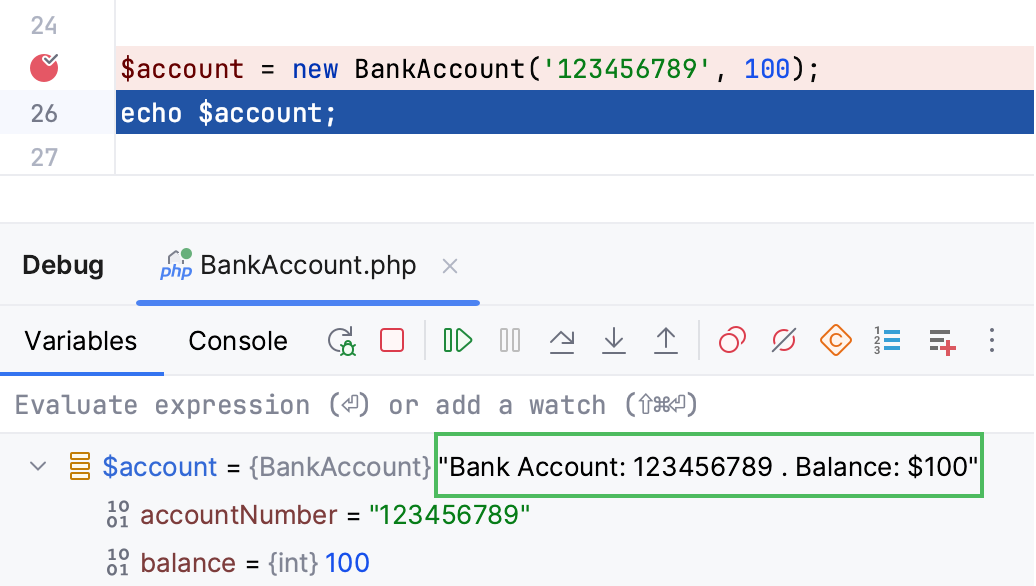
Enable 'toString' object view: when this checkbox is selected, the output in the Variables tab appends a rendered string representation to the object for the classes that contain the __toString() method.
In case of getting the Object of class {className} could not be converted to string (xdebug://debug-eval) error, unselect the checkbox.
Enable '... Navigate' links for class and member references: select this checkbox to display links to callback function declarations in the source code from calling elements in the Variables tab.
Advanced settings
Detect path mappings from deployment configurations:
When this checkbox is selected, PhpStorm attempts to retrieve path mappings for debugging in a remote environment from the server access configuration (deployment configuration).
When the checkbox is cleared, you have to specify the path mappings manually.
Notify if debug session was finished without being paused: Select this checkbox to have PhpStorm display a notification when no breakpoints are hit during Zero-Configuration debugging. This may happen if the path mappings are not configured or configured erroneously, or if you have not set any breakpoints. In the latter case, you can do any of the following:
Set a breakpoint by clicking the gutter at the desired executable line of code. For more information, refer to Breakpoints.
In the Settings dialog (Ctrl+Alt+S) , go to PHP | Debug and in the External Connections area, select the Break at first line in PHP scripts checkbox.
Enable the Run | Break at first line in PHP scripts option from the main menu.
If the checkbox is cleared, no debugging session is established and the PHP script is just executed without being suspended.
Pass required configuration options through command line (still need to enable debug extension manually): select this checkbox to have debugger configuration options passed through a command line.
Notify if breakpoint was resolved to a different line (Xdebug 2.8+): if selected, PhpStorm displays a notification when a breakpoint is resolved. Note that you need to enable Xdebug breakpoints resolving for this to work.