Gradle
IntelliJ IDEA supports a fully functional integration with Gradle that helps you automate your building process. You can easily create a new Gradle project, open and sync an existing one, work with several linked projects simultaneously, and manage them.
You can also create a Gradle project and store it in the WSL environment or open it from the WSL file system. For more information, refer to the WSL section.
Create a new Gradle project
Launch the New Project wizard. If no project is currently opened in IntelliJ IDEA, click New Project on the welcome screen. Otherwise, select from the main menu.
Name the new project and change its location if necessary.
Select the Create Git repository to place the new project under version control.
You will be able to do it later at any time.
Select a language that you want to use in your project. Click
 if you want to add other languages available via plugins.
Select Gradle in the list of Build system.
Specify project's SDK (JDK) or use the default one.
The selected Add sample code option will create a file with a basic code sample.
Select Gradle DSL. You can select Kotlin for the default syntax or Groovy as an alternative.
In Advanced Settings, specify the fields which resemble the Maven coordinates. These settings might be helpful if you decide to deploy your project to a Maven repository. The fields you specify are added to the build.gradle.kts file.
Gradle distribution: select Gradle wrapper that is a default-preferable option or Local installation when you want to use the specific local Gradle version.
Gradle version: if the wrapper option is selected, the latest Gradle distribution will be used unless you unselect the Auto-select option and select the specific version from the drop-down list.
Alternatively, if the Local installation was selected then the version you defined locally is used.
Auto-select: unselect this option to specify the Gradle version you want to use in your project.
Use these settings for future projects: select this checkbox to use the configured Gradle version in your future projects.
GroupId -
groupId of the new project. You can omit this field if you plan to deploy your project locally.ArtifactId -
artifactIdthat is added as a name of your new project.Version -
version of the new project. By default, this field is specified automatically.
Click Create.
Create a Jakarta EE project with Gradle as a build tool
Launch the New Project wizard. If no project is currently opened in IntelliJ IDEA, click New Project on the welcome screen. Otherwise, select from the main menu.
Under the Generators section, select Jakarta EE.
Configure your project selecting the appropriate options such as your project's name, location, language, and select Gradle as your build tool.
Click Create.
IntelliJ IDEA creates a Gradle project with the dedicated Gradle tool window and adds necessary dependencies.
For the more detailed information, refer to Tutorial: Your first Jakarta EE application.
Open an existing Gradle project
If no project is currently opened in IntelliJ IDEA, click Open on the welcome screen. Otherwise, select from the main menu.
If you have some custom plugins that require you to import your project from the IntelliJ IDEA model, press Ctrl+Shift+A and search for the Project from Existing Sources action.
In the dialog that opens, select a directory containing a Gradle project and click OK.
IntelliJ IDEA opens and syncs the project in the IDE.
If you need to adjust the Gradle settings options, refer to Gradle settings.
Check Gradle JVM and language level
Gradle JVM: when IntelliJ IDEA opens the Gradle project, it checks the
gradle.propertiesfile for the appropriate JVM version specified inorg.gradle.java.homeand uses it for the project. If it is not specified, then the project SDK is used. Alternatively, you can use the Gradle settings to configure the Gradle JVM.Language level: the language level settings are applied for a source root or for a module. If a Gradle project has a single linked project then the project default language level is set to the minimum language level among the module language levels. The module language level is set to
sourceCompatibilityin the build.gradle.kts file, in thejavablock.The preview part is set to the conjunction of preview flags of the module source sets. The source set module language level is set to the corresponding combination of
sourceCompatibilityproperty and--enable-previewflag.
Link a Gradle project to an IntelliJ IDEA project
You can have multiple Gradle projects inside one IntelliJ IDEA project. It might be helpful if you keep parts of code in different projects, have some legacy projects on which you need to work, have Gradle composite build or work with microservices. You can link such projects in IntelliJ IDEA and manage them simultaneously.
When you open a Gradle project, the link of the project is established automatically and the Gradle tool window is enabled.
If an IntelliJ IDEA project is not linked to a Gradle project, then the Gradle tool window is disabled. In this case, IntelliJ IDEA displays a message with a link that quickly lets you reimport your Gradle project and enable the Gradle tool window. If the Gradle tool window is active, then you have at least one Gradle project linked.
Open the Gradle tool window.
In the Gradle tool window, click
to attach a Gradle project.In the dialog that opens, select the desired build.gradle file, and click OK.
In the Import Module from Gradle window, specify options for the Gradle project that you are trying to link and click OK.
The project is linked. The Gradle tool window shows the toolbar and a tree view of Gradle entities.
If you need to link back the previously unlinked project, in the Project tool window, right-click the added build.gradle.kts or if it is a Gradle Groovy module the build.gradle file and select Import Gradle Project.
Add a new Gradle module to an existing Gradle project
You can add a Gradle module to a project in which you are already working.
In the main menu, go to to open the New Module wizard .
If the existing project is not the Gradle project then the process of adding a module is the same as Creating a new Gradle project. If the existing project is a Gradle project, then the process of adding a new module is shorter. You need to specify the name of your module in the ArtifactId field. The rest of the information is added automatically, and you can use either the default settings or change them according to your preferences. Also, note that Add as module to field, by default, displays the name of your project to which you are trying to add a module. You can click
 to select a different name if you have other linked Gradle projects.
Convert a regular project into a Gradle project
Open your project in IntelliJ IDEA.
In the Project tool window, right-click the name of your project and select .
In the dialog that opens enter build.gradle and click OK.
Open the build.gradle file in the editor, add the information you need and re-open your project. The following minimal information should be included in the project's build script file:
plugins { java } group = "org.example" version = "1.0-SNAPSHOT" repositories { mavenCentral() } sourceSets { main { java { setSrcDirs(listOf("src")) } } } dependencies { testImplementation(platform("org.junit:junit-bom:5.10.0")) testImplementation("org.junit.jupiter:junit-jupiter") } tasks.test { useJUnitPlatform() }As soon as you create a build.gradle.kts file, IntelliJ IDEA recognizes the Gradle build script and displays a notification suggesting to load the project as Gradle. After you load the project, IntelliJ IDEA enables the Gradle tool window.
We also recommend that you add the settings.gradle.kts file to your project and add
rootProject.name = "projectName"to it. Where"projectName"would be the name of your project.
Access the Gradle settings
Use the Gradle settings to configure the build and run actions for each linked Gradle project, a Gradle version, importing of the project's changes, and so on.
In the Settings dialog (Ctrl+Alt+S) , go to .
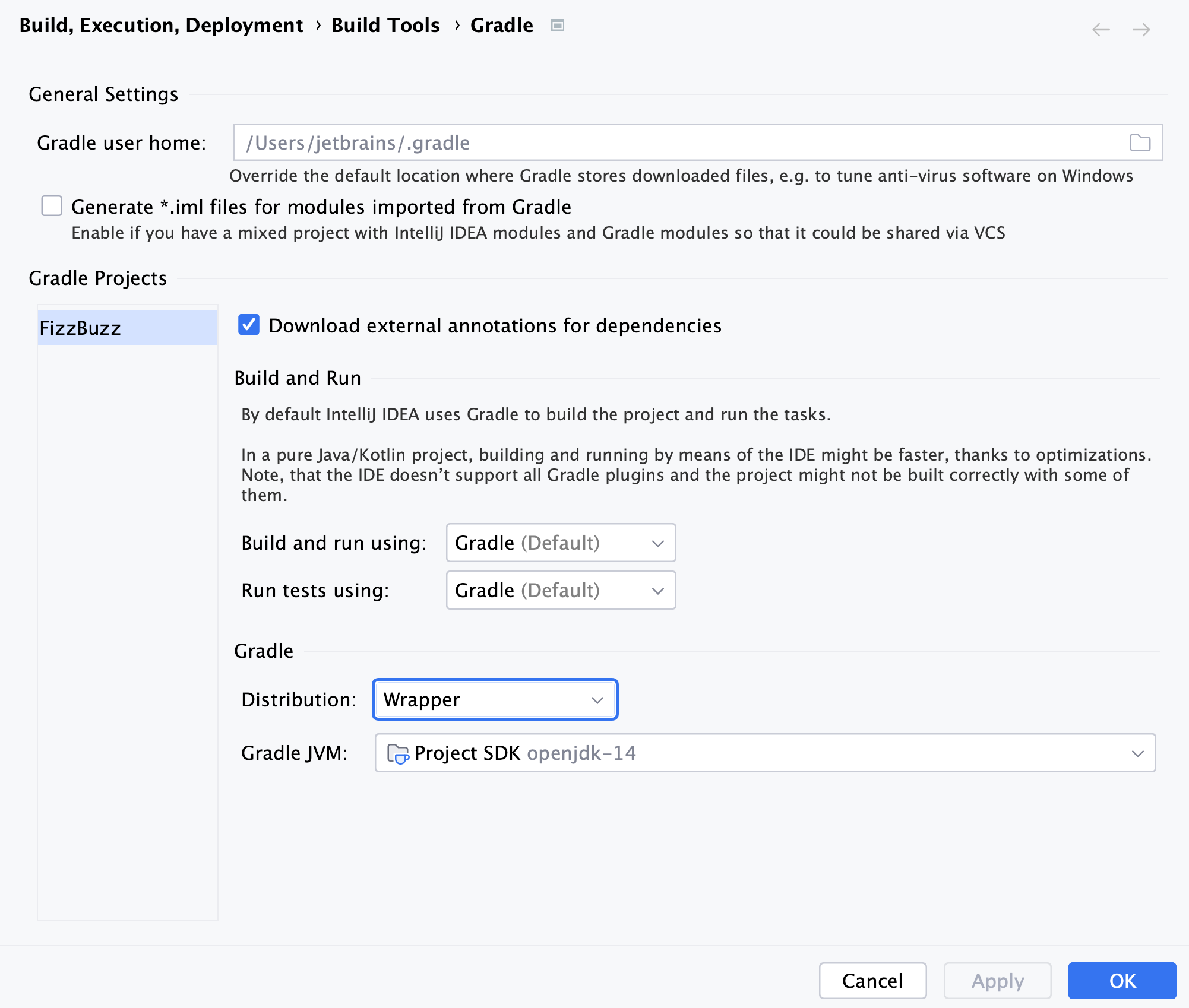
On the Gradle settings page, configure the available options and click OK to save the changes.
Configure a Gradle version for a project
IntelliJ IDEA lets you use different options to configure a Gradle version for your Gradle project. You can use the default Gradle wrapper, use a Gradle wrapper as a task, or configure a local Gradle distribution.
Select
 in the Gradle tool window to quickly access the Gradle settings page.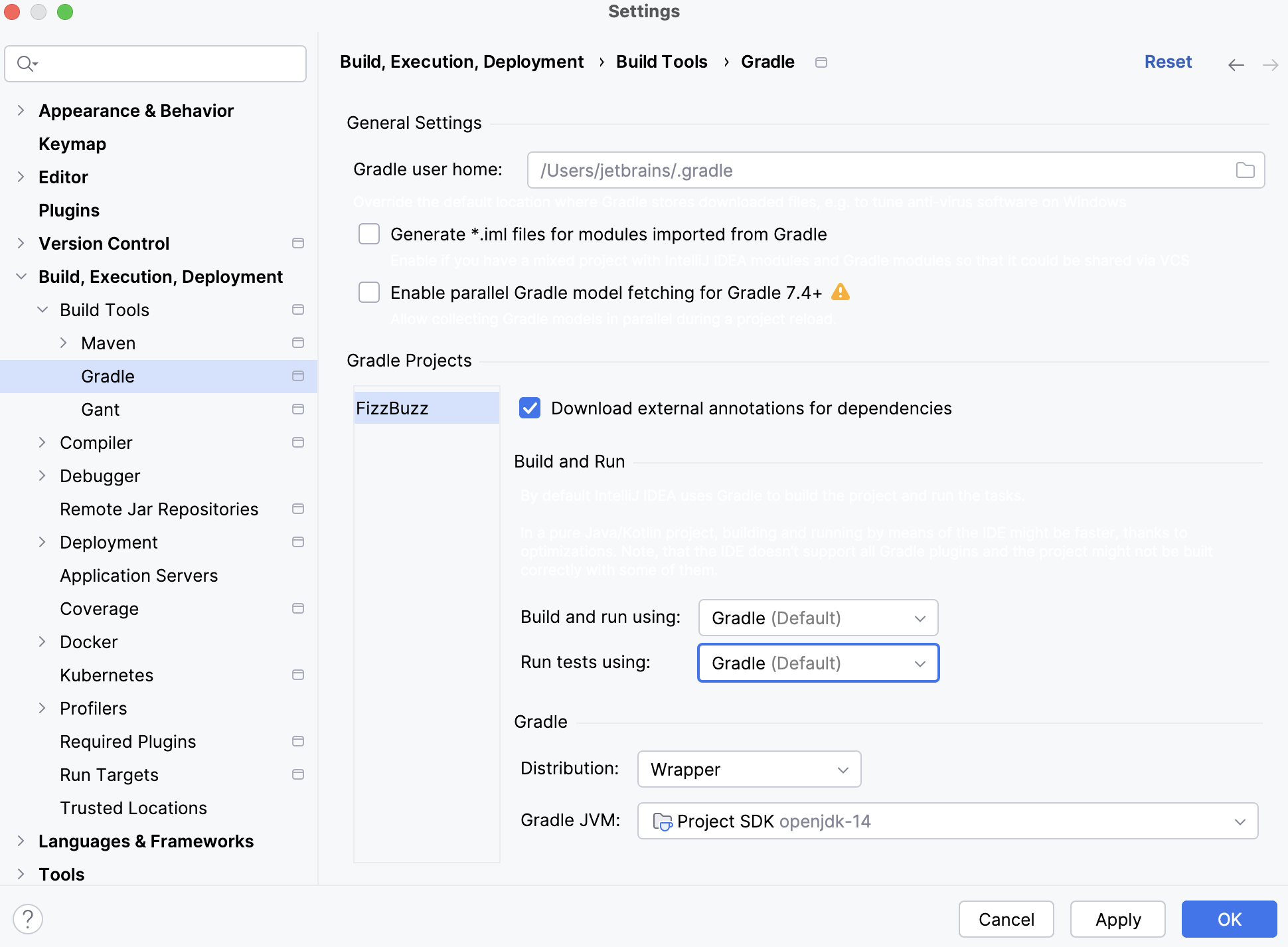
In the Distribution list select one of the following options:
Wrapper: this is a recommended default option that uses Gradle wrapper.
In this case you delegate the update of Gradle versions to Gradle and get an automatic Gradle download for the build. This option also lets you build with a precise Gradle version. The Gradle version is saved in the gradle-wrapper.properties file in the gradle directory of your project and helps you eliminate any Gradle version problems.
Wrapper task: select this option to configure a Gradle wrapper according to the
wrappertask configuration. It might be convenient if you prefer to control which Gradle version to use in the project.If you used the default Gradle wrapper option and then switched to the Gradle
wrappertask configuration, changes you made in the task automatically update during the project import.Local installation: select this option if you want to manually download and use a specific Gradle version. Specify the location of your Gradle installation and JVM under which IntelliJ IDEA will run Gradle when you import the specified Gradle project and when you execute its tasks.
Click OK to save the changes.
Add VM options for the Gradle project
You can specify VM options for your Gradle project using the gradle.properties file.
In the Project tool window, right-click the project and from the context menu, select .
In the New File dialog, enter gradle.properties as a filename and click OK.
Open the created file in the editor and add the VM options you need.
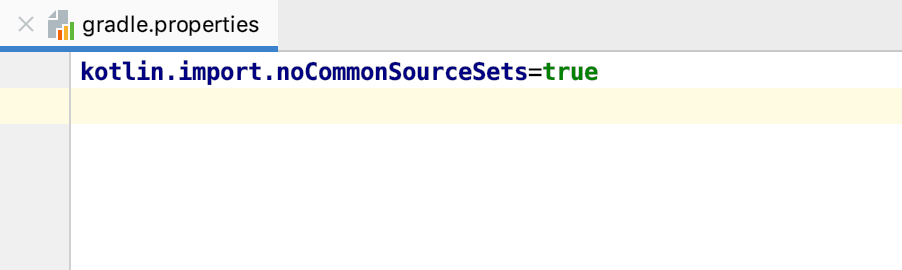
For more information, refer to the Gradle documentation.
Increase daemon heap size
You can adjust the existing Gradle daemon heap size for your project using the gradle.properties file.
In the Project tool window, right-click the project and from the context menu, select .
In the New File dialog, enter gradle.properties as a filename and click OK.
Open the created file in the editor and specify the needed daemon size using the
org.gradle.jvmargs=(JVM arguments)property.The default size is
-Xmx512m "-XX:MaxMetaspaceSize=256m".Check the following code snippet as a syntax example:
org.gradle.jvmargs=-Xmx4096m
For more information, refer to the Gradle documentation.
Configure Gradle Daemon toolchains
Starting with Gradle version 8.8, IntelliJ IDEA supports the Gradle Daemon toolchain, which helps speed up builds and manage project JDKs. Also, starting with IntelliJ IDEA version 2025.1, this support is available by default.
You can either create a new project with the daemon toolchain or add the support to the already existing project.
Configure Gradle Daemon toolchain for a new project
Open the IDE and press Shift twice to open the search window.
Type Registry to open the Registry tool window and select the
gradle.daemon.jvm.criteria.new.projectoption.IntelliJ IDEA creates a project that contains the
gradle-daemon-jvm.propertiesfile inside thegradledirectory with the project JDK information.Press Ctrl+Alt+S to open settings and then select .
In the Gradle section, you can manage JDKs and choose the one you need for your project using Gradle JVM Criteria.
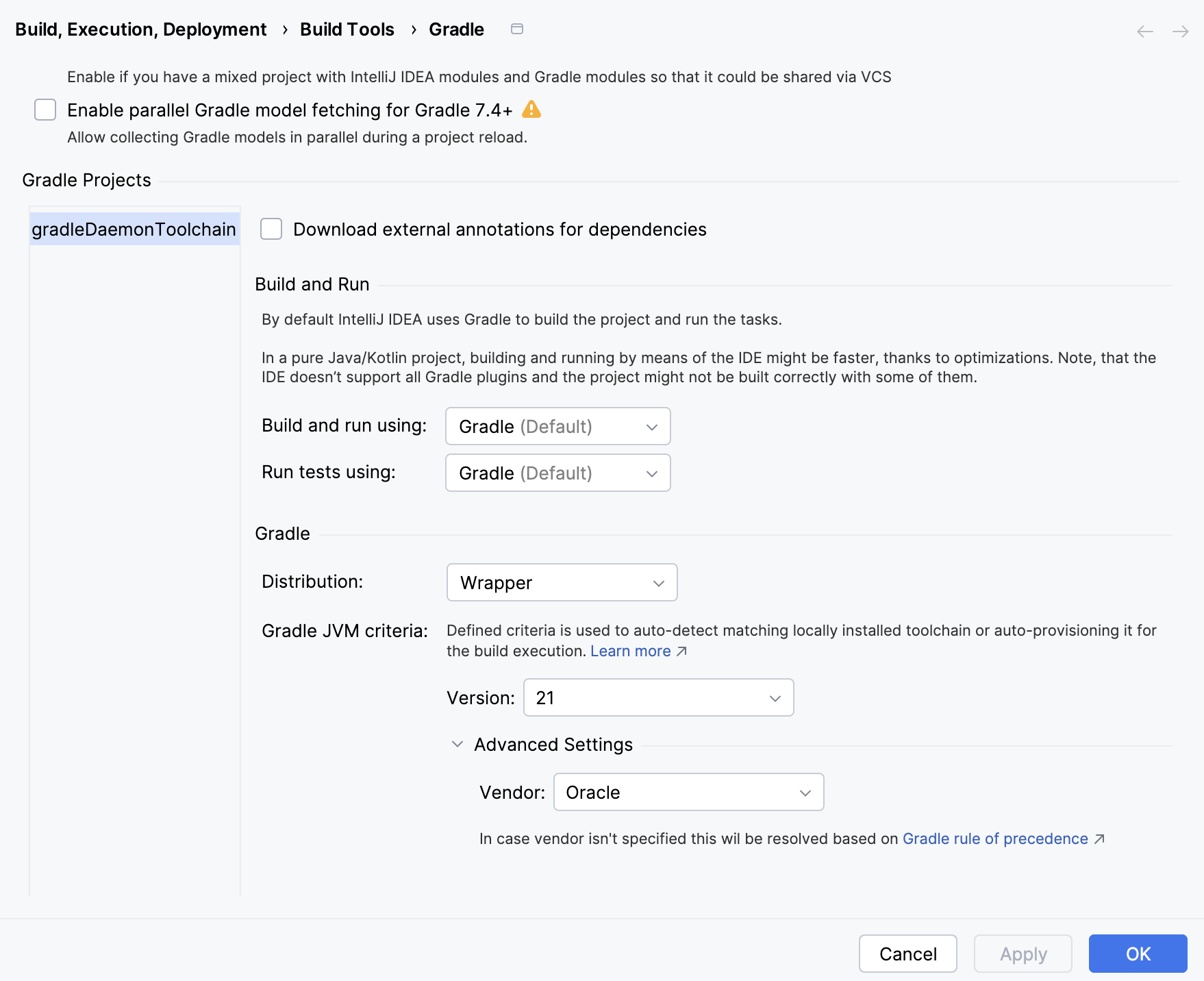
In the list of Version, select the necessary version, and you can also choose Vendor inside the Advanced Settings section.
Click OK to save the changes.
Configure Gradle Daemon toolchain for the existing project
Open your Gradle project.
In the Project tool window, right-click the
gradledirectory and select .In the window that opens, add the
gradle-daemon-jvm.propertiesfile.Open
gradle-daemon-jvm.propertiesin the editor and add Gradle JVM version and vendor.Check the following example:
toolchainVendor=ibm toolchainVersion=19Click
 (Sync Gradle Changes) in the editor to synchronize the changes with your project.
Press Ctrl+Alt+S to open settings and then select .
In the Gradle section, you can manage JDKs and choose the one you need for your project using Gradle JVM Criteria.
In the list of Version, select the necessary version, and you can also choose Vendor inside the Advanced Settings section.
Click OK to save the changes.