Implement methods of an interface or abstract class
If a class is declared as implementing a certain interface or extending a class with abstract methods, it has to implement the methods of such interface or class. IntelliJ IDEA creates stubs for implemented methods , with the default return values for the primitive types, and null values for the objects.
Implement required methods
From the main menu, select or press Ctrl+I. You can also right-click anywhere in the class file, then click Generate Alt+Insert, and select Implement methods. Or put your cursor on the class and press Alt+Enter and select Implement methods.
In the dialog that opens, select the methods to implement (hold the Shift or Ctrl key to perform a multi-selection). The list does not include the methods that are already implemented or cannot be accessed from the current class. If necessary, select the Copy JavaDoc checkbox to insert JavaDoc comments for the implemented methods .
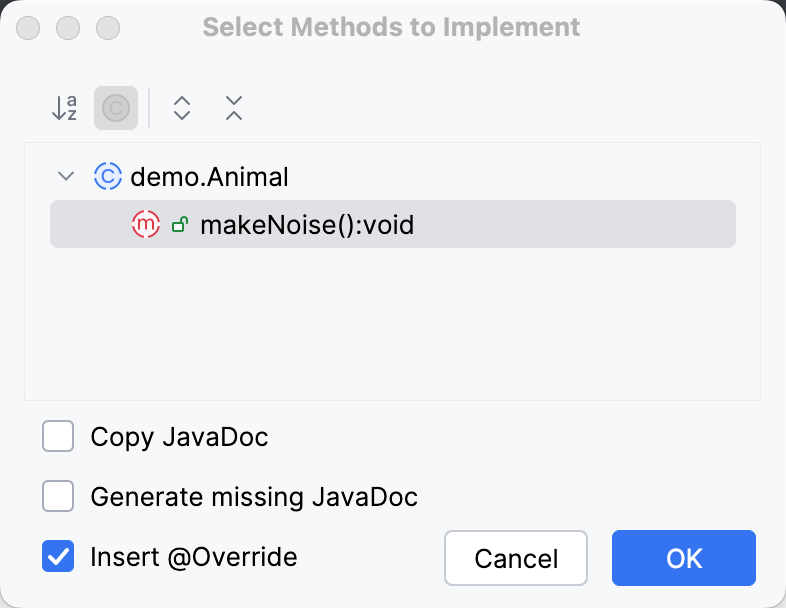
Click OK.
Change method body
The code template used for implementing methods (Implemented method body) accepts predefined template variables from the File Header include template (such as ${USER}, ${DATE}, and so on)
For example, consider the following file template:
Provided that the implemented interface contains two methods, this template expands into the following code:
Configure nullability annotations
You can configure the nullability annotations for the generated code.
Press Ctrl+Alt+S to open settings and then select .
Click Configure Annotations, then select the annotation in Annotation used for code generation.