Dependency Structure Matrix
Working on complicated projects with many dependencies makes it difficult to understand where to look for problems. You might encounter complex relationships or cyclic dependencies that may seriously affect application performance and behavior. This is where DSM helps.
DSM stands for Dependency Structure Matrix – a method that helps you visualize dependencies between the parts of your project (modules, classes, and so on) and highlight the information flow.
DSM analysis can be used to see how changes will affect the project. For example, if one of the classes needs to be changed, you can identify all dependencies and see how this change will propagate through the project.
Install the Dependency Structure Matrix plugin
This functionality relies on the Dependency Structure Matrix plugin, which you need to install and enable.
Press Ctrl+Alt+S to open settings and then select .
Open the Marketplace tab, find the Dependency Structure Matrix plugin, and click Install (restart the IDE if prompted).
Build dependency matrix
In the main menu, go to .
Alternatively, right-click an item in the Project tool window and select Analyze Dependency Matrix.
In the dialog that opens, select the scope that you want to analyze and click Analyze.
If your project class files are out of date, the analysis may result in incomplete or incorrect data. To avoid this, IntelliJ IDEA prompts you to compile a project before continuing the DSM analysis.
The DSM tool window will open, enabling you to examine dependencies. By clicking the cells in the tool window, you can go into more detail.
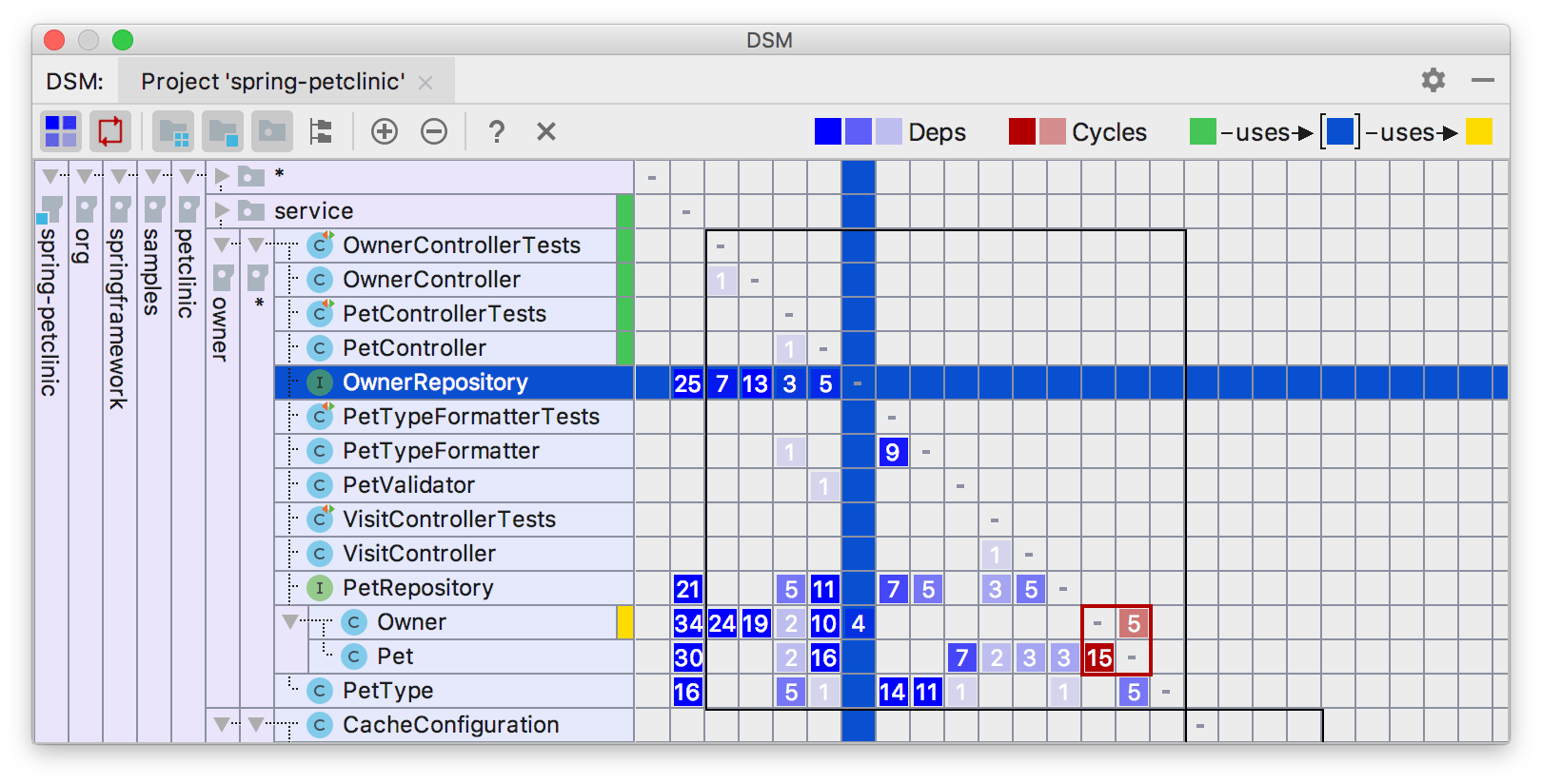
DSM tool window sorts dependencies in a special way: classes, which are used most are moved to the bottom.
On the matrix, all dependencies always flow from green to yellow: when you select a row, green annotations show dependent components, while the yellow ones show components on which the selected components depend. Mutual dependencies are shown in red. Various shades correspond to the number of dependencies. The more dependencies there are, the darker the corresponding cell is.
Explore dependencies
You can limit the view to see only selected dependencies. In contrary to the Limit Scope option, only classes which produce selected dependencies are left.
In the main menu, go to , right-click the necessary dependency and select Explore Dependencies Between.
The classes that produce these dependencies will be opened in a new tab in the DSM tool window.
Note that the DSM tool window becomes available only after you have built the matrix.
Find usages for dependencies
You can open selected dependencies for further source-code analysis.
In the main menu, go to , right-click the necessary dependency and select Find Usages for Dependencies.
Note that the DSM tool window becomes available only after you have built the matrix.
Limit the DSM scope
You can limit the scope of your DSM to the selected rows. Only these will remain in the new matrix.
Select the rows you want to keep, and from the context menu, select Limit Scope To Selection.
The limited scope will be opened on a new tab in the DSM tool window.
DSM tool window
Note that the DSM tool window becomes available only after you have built the matrix.
Here you can see the typical matrix view.
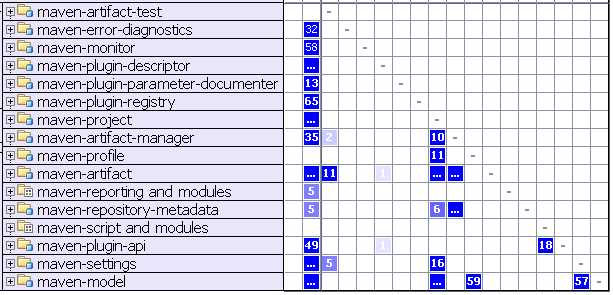
The row headers represent the program structure. Everything is collapsed now, and only modules are shown. When expanded, the header is tree-like, allowing you to expand modules and dig into program packages. * — node groups classes inside the package. The column headers are the same as the corresponding row headers. Thus, they are not shown to save space. Instead, different visual aids are used on the row headers.
If you select a row, the matrix will look like this.
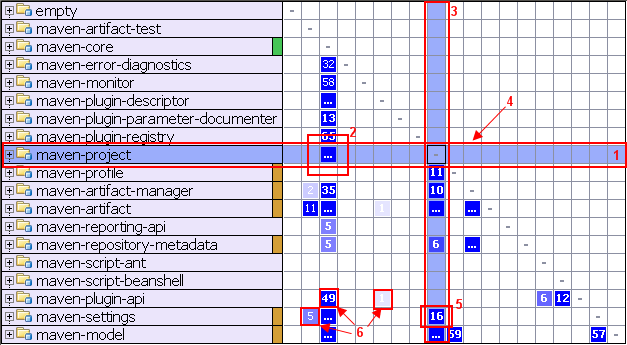
Here you can learn the following:
The selected row and corresponding column are highlighted to visualize row dependencies.
The ellipsis in the cell means that the
maven-coremodule has many (more than 99) dependencies onmaven-projectmodule.The column shows the dependencies of the selected row.
The row shows the dependencies on the selected row.
This means that the
maven-projectmodule has 16 dependencies onmaven-settingsmodule.Various shades correspond to the number of dependencies.
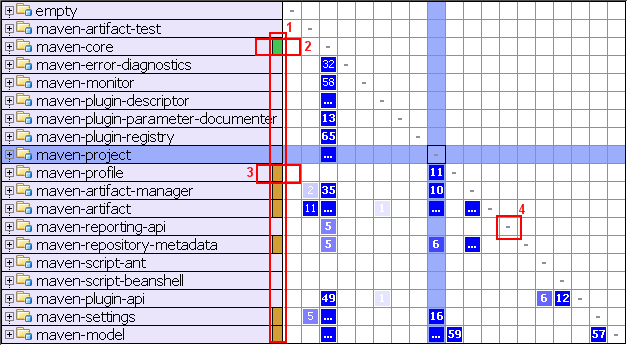
Color annotations help to visualize row dependencies at a glance.
maven-coredepends onmaven-project.maven-projectdepends onmaven-profile.The dashes on the diagonal correspond to self-dependencies which are not shown.
You can select any cell to explore the dependencies indicated in it.
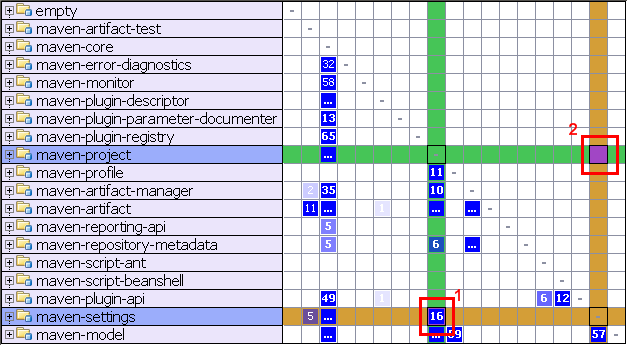
The cell #1 was selected. These color annotations mean that maven-project has 16 dependencies onmaven-settings. The symmetrical cell (cell #2) shows dependencies in the other direction — in this case zero.
There is a simple mnemonic rule — all dependencies always flow from Green to Yellow.
Instead of alphabetically sorting rows, DSM view sorts dependencies in a special way: classes, which are used most are moved to the bottom. In a project with good structure this creates a triangular shape in the lower left half of the matrix.
Cycles
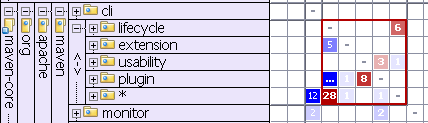
Mutual dependencies are shown in red. It means that the plugin and usability packages are both dependent on each other.