SDKs
A Software Development Kit, or an SDK, is a collection of tools that you need to develop an application for a specific software framework. For example, to develop applications in Java, you need a Java SDK (JDK). SDKs contain binaries, source code for the binaries, and documentation for the source code. JDK builds also contain annotations.
Generally, SDKs are global. It means that one SDK can be used in multiple projects and modules. After you create a new project and define an SDK for it, you can configure modules in this project to inherit its SDK. You can also specify an SDK for each module individually. For more information, refer to Change module SDK.
Supported SDKs
Configure SDKs
To define an SDK means to let IntelliJ IDEA know in which folder on your computer the necessary SDK version is installed. This folder is called an SDK home directory.
Global SDK
In the main menu, go to .
To add an SDK, click
 , select the necessary SDK and specify its home directory in the dialog that opens.
Only for JDKs: if you don't have the necessary JDK on your computer, select Download JDK. In the next dialog, specify the JDK vendor, version, change the installation path if required, and click Download.

Project SDK
In the main menu, go to .
If the necessary SDK is already defined in IntelliJ IDEA, select it from the SDK list.
If the SDK is installed on your computer, but not defined in the IDE, select , and specify the path to the SDK home directory.
Only for JDKs: If you don't have the necessary JDK on your computer, select . In the next dialog, specify the JDK vendor, version, change the installation path if required, and click Download.

Module SDK
In the main menu, go to .
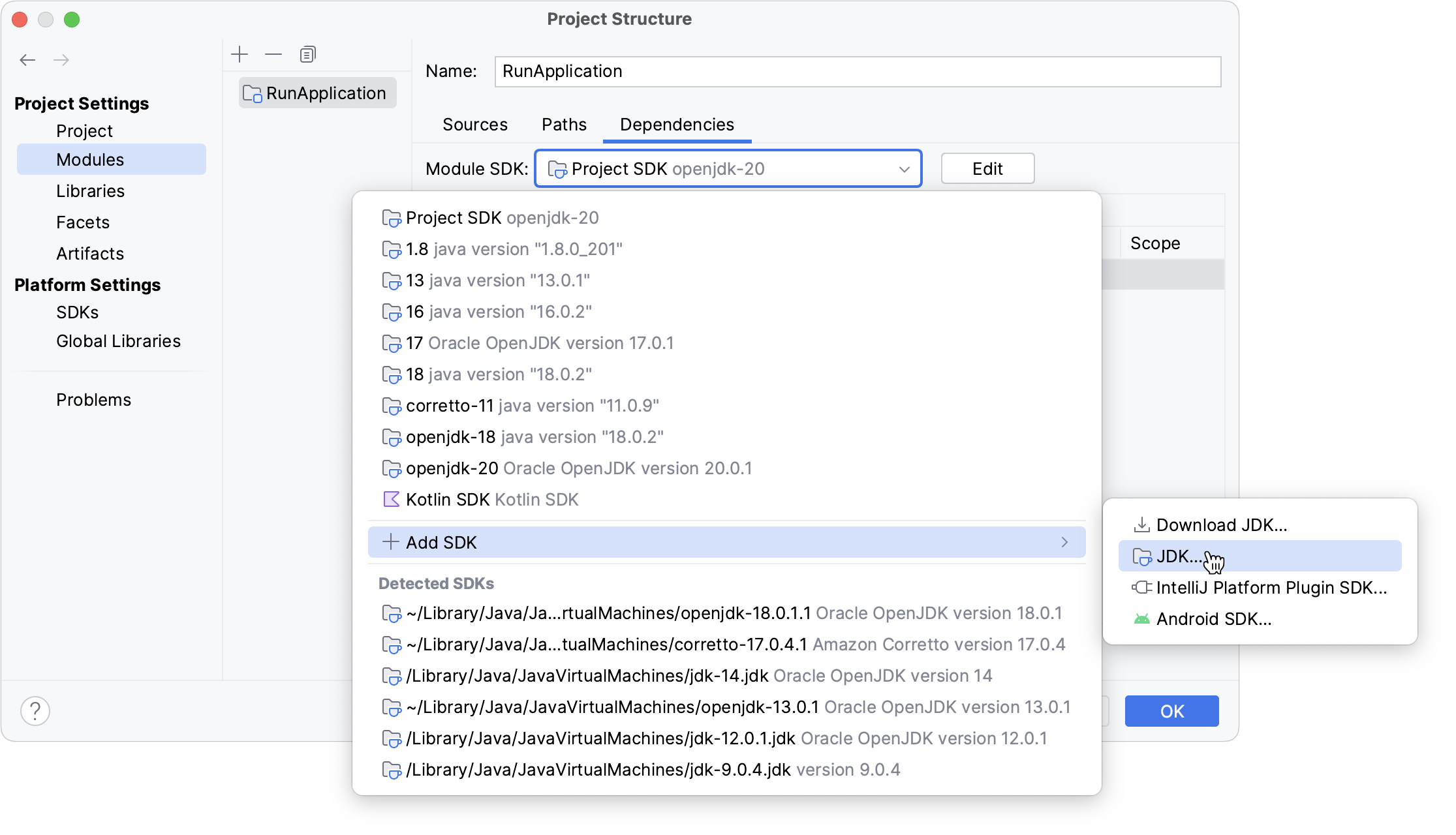
Select the module for which you want to set an SDK and click Dependencies.
If the necessary SDK is already defined in IntelliJ IDEA, select it from the Module SDK list.
If the SDK is installed on your computer, but not defined in the IDE, select , and specify the path to the SDK home directory.
Only for JDKs: If you don't have the necessary JDK on your computer, select . In the next dialog, specify the JDK vendor, version, change the installation path if required, and click Download.
Java Development Kit (JDK)
To develop applications in IntelliJ IDEA, you need a Java SDK (JDK). A JDK is a software package that contains libraries, tools for developing and testing Java applications (development tools), and tools for running applications on the Java platform (Java Runtime Environment – JRE).
The JRE can be obtained separately from the JDK, but it is not suitable for application development, as it doesn't have essential components such as compilers and debuggers.
In IntelliJ IDEA, you can download a JDK package right from the IDE, or you can manually download the necessary JDK distribution and define it in the IDE.
For a manual download, use any available distribution that you like, for example:
Set up the project JDK
In the main menu, go to .
If the necessary JDK is already defined in IntelliJ IDEA, select it from the SDK list.
If the JDK is installed on your computer, but not defined in the IDE, select , and specify the path to the JDK home directory (for example, /Library/Java/JavaVirtualMachines/jdk-12.0.1.jdk).
If you don't have the necessary JDK on your computer, select . In the next dialog, specify the JDK vendor, version, change the installation path if required, and click Download.
Apply the changes and close the dialog.

Configure SDK documentation
You can add documentation to IntelliJ IDEA so that you can get information about symbols and method signatures right from the editor in the Quick Documentation popup.
You can also configure external documentation by specifying the path to the reference information online. External documentation opens the necessary information in a browser so that you can navigate to related symbols and keep the information for further reference at the same time.
In SDKs, documentation is normally bundled. However, you can configure it manually in case you need additional or specific documentation or if you work offline.
Specify SDK documentation paths
To view external SDK documentation, configure the documentation URL first.
In the Project Structure dialog Ctrl+Alt+Shift+S, select SDKs.
Select the necessary SDK version if you have several SDKs configured, and open the Documentation Path tab on the right.
Click the
 icon, enter the external documentation URL, and click OK.
For example, for Java 20, type
https://docs.oracle.com/en/java/javase/20/docs/api/.
Apply the changes and close the dialog.
Access SDK documentation offline
If you work offline, you can view external documentation locally.
Download the documentation package of the necessary version.
The documentation package is normally distributed in a ZIP archive that you need to unpack once it is downloaded.
For example, you can download the official Java SE Development Kit 20 Documentation and unzip it.
In the Project Structure dialog Ctrl+Alt+Shift+S, select SDKs.
Select the necessary JDK version if you have several JDKs configured, and open the Documentation Path tab on the right.
Click the
icon and specify the directory with the downloaded documentation package (for example, C:\Users\jetbrains\Desktop\docs\api).Apply the changes and close the dialog.
When the documentation is configured, you can open it in the editor.