Setting Component Properties
Whenever you select a component or an entire form in the Form Workspace, or in the Components tree view, the respective properties display in the Inspector. For the properties of different types (text, Boolean, color, etc.) the Inspector provides different editors. Besides editing in the Inspector, you can edit text properties using the in-place editor.
Find the detailed description of properties in the section Component Properties
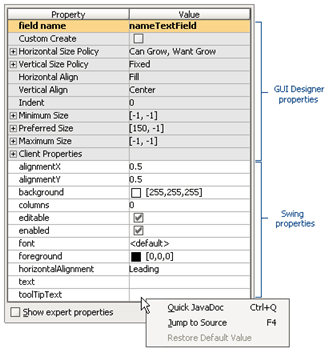
To select a property in the Inspector, just click the respective property name. To activate the editor for the selected property, click the Value column. If the property requires choosing the value, the ellipsis button is revealed. Click this button to invoke one of the available property editors, or press Shift+Enter.
Use the following editors to modify properties in the Inspector:
Text field: Type a value.
Pick list: Pick a value from a drop-down list of valid choices.
Checkbox: Set value for Boolean type properties.
Dialog: Presents the Browse button
 that opens the relevant dialog: Edit Text, Select Color, Choose Icon File etc. For text properties, refer to editing text property procedure.