Setting Text Properties
After placing the component on the form workspace, the in-place editor for the Text property activates automatically.
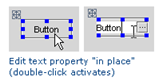
To activate the in-place editor later, select the desired component and double-click it, or press F2. Finally, you can select a component and start typing – in this case, the existing text will be lost.
If you need to enter a lengthy text, or take a value from a resource bundle, refer to the following procedure.
To edit a text property
Click the ellipsis button. In the Edit Text dialog, specify whether you want to edit the text as a string or resource bundle.
If you have selected the String option, type the desired text in the Value field, and proceed to step 4.
If you have selected the Resource bundle option, specify the name of the desired resource bundle, key and value.
Click ellipsis button next to the Bundle name field, or press Shift+Enter. In the Choose Properties File dialog, find the desired resource bundle in the project tree view, or click the Search by Name tab, type the search string and select resource bundle from the suggestion list.
Click ellipsis button next to the Key field, or press Shift+Enter. In the Choose Property Key dialog, select the desired key from the list.
Type value in the Value field.
If you want to enable i18n support for the property, make sure that the option Value does not need internationalization is cleared. In this case, intention action i18nize property text is suggested for this component. If the option is selected, the intention action is suppressed.
Click OK.