Git
The page is available only when the Git plugin is enabled. The plugin is bundled with PhpStorm and activated by default. If the plugin is disabled, enable it in as described in Managing plugins.
Use this page to specify the version control settings that will be applied to the directories of your project that are under Git control.
Path to Git executable | In this field, specify the path to the Git executable file. Type the path or click Browse PhpStorm supports Git from the Windows Subsystem for Linux 2 (WSL2), which is available in Windows 10 version 2004. If Git is not installed on Windows, PhpStorm searches for Git in WSL and uses it from there. Also, PhpStorm automatically switches to Git from WSL for projects that are opened when you use the \\wsl$ path. 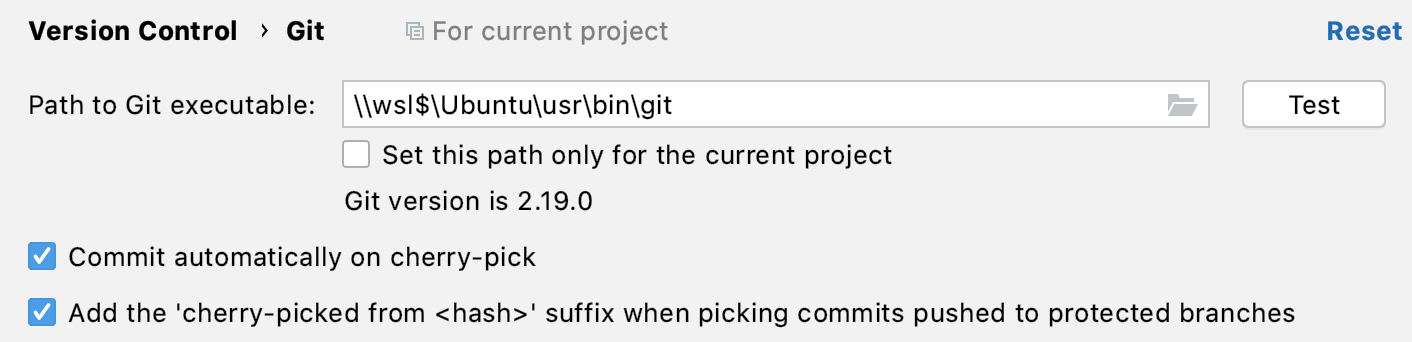 |
Test | Click this button to verify the path to the Git executable file. |
 and specify the path in the dialog that opens.
Commit
Enable staging area | Enable this option if you are more used to the concept of staging changes for commit instead of using changelists where modified files are staged automatically. Using the staging area allows you to easily commit changes to the same file separately (including overlapping changes), and see which changes are already staged without switching focus from the editor. For more information, refer to Use the Git staging area to commit changes. |
Warn if CRLF line separators are about to be committed | Select this option to enable smart handling of If this option is deselected, you will have to fix issues with line endings manually using the Diff Viewer dialog. |
Warn when committing in detached HEAD or during rebase | Select this option if you want PhpStorm to display a warning when a commit is performed from a detached head or on rebase, as this may cause issues and code loss. |
Add the 'cherry-picked from <hash>' suffix when picking commits pushed to protected branches | Select this option if you want to keep a reference to the original commit when cherry-picking a commit from a protected branch. By default, no suffix is added when cherry-picking a change. |
Configure GPG Key | Click to configure GPG Key for signing your commits or to select an existing key. For more information, refer to Sign commits with GPG keys. |
Push
Auto-update if push of the current branch was rejected | Select this checkbox if you want the current branch to be updated automatically if the If this option is deselected, PhpStorm will display the Push Rejected dialog when pushing a branch is rejected because your local repository and the remote storage are not synchronized. Note the following:
|
Show Push dialog for Commit and Push | Select this option if you want the Push dialog to be displayed after you've clicked Commit and Push in the Commit Changes dialog. Otherwise, your changes will be pushed automatically to the affected repository. |
Show Push dialog only when committing to protected branches | Select this option if you only want to show the Push Changes dialog if you are pushing to a protected branch when you've clicked Commit and Push in the Commit Changes dialog. Otherwise, your changes will be pushed automatically to the affected repository. |
Protected branches | If you want to disable the ability to force push changes for certain branches, list them here (this is a team-shared parameter that is stored in .idea/vcs.xml). You can list several branches separated by a semicolon, or supply branch patterns as the input is treated as a list of regular expressions. |
Load branch protection rules from GitHub | Select this option if you want to add GitHub protection rules to PhpStorm and sync them on every fetch. |
Update
Update method | Use this list to choose the strategy to synchronize your local repository with the remote storage. The selected method will be used when the
|
Clean working tree using | Select how you want uncommitted changes to be treated when you perform a project update:
|
Filter "Update Project" information by paths | If you don't want to get information on all changes to a project in the Update Info tab when you perform an update, you can filter the list by specific paths. |
Fetch remote changes automatically | Enables background fetching of remote updates every 20 minutes. Use this to keep track of incoming changes. The interval is configurable via the |
Check remote for incoming changes | When this option is enabled, PhpStorm will check if there are pending incoming commits that have not been fetched to your local repository, and will mark such branches in the VCS widget. |
Fetch tags | Specify how PhpStorm should handle tags when fetching from a remote:
|
Use credential helper | Select this option if you don't want to override credential helpers, which is the default behavior. You will be able to authenticate using a credential helper in the Git login dialog. |
Stash
Combine stashes and shelves in one tab | Enable this option if you want to see both stashed and shelved changes listed in one tab called Stashes and Shelves in the Commit tool window (Alt+0) . |
When "Show Diff" is called, compare stashed changes | In this section, specify what you want to see in the Diff viewer while investigating the stashed changes.
|