Copy and move refactorings
The Move refactoring lets you move classes, class members (methods, fields, and constants), regular functions, and constants, HTTP requests files, and directories within a project. In doing so, PhpStorm tracks these movements and automatically corrects all references to the moved symbols in the source code.
Move a file or a directory to another directory
Select the file or directory in the Project tool window.
Do one of the following:
Go to .
From the context menu of the selection, choose .
Press F6.
The dialog that opens depends on the type of the selected symbol.
In the To directory field, specify the folder to move the selected file or folder to. Choose an existing folder from the list or type the full path to the parent folder to be created. To have the references to the selected file or folder updated according to the refactoring result, select the Search for references checkbox.
Move a PHP namespace
PhpStorm assumes that the namespaces in your project are arranged in compliance with the PSR-0/PSR-4 standard and enforces you to retain the folder structure and the namespace hierarchy in accordance with this standard when moving namespaces.
When you specify a namespace to move a namespace to, PhpStorm automatically updates the Target Destination Directory field, which shows the path to the folder that corresponds to the namespace.
In the editor, place the caret at the namespace to move and choose from the main menu or the selection context menu. Note that if you select the folder that corresponds to the required namespace in the Project tool window and then choose , the Move Directory refactoring will be invoked.
In the Move Namespace Dialog that opens, specify the new namespace name and the folder that will correspond to it.
The New Namespace Namefield shows the fully qualified name of the selected namespace. Specify the new namespace name. Use only backslashes
\as namespace separators.When the dialog opens, the Target Destination Directoryfield shows the path to the folder corresponding to the current namespace.
The path is displayed in the following format:
...\<project root>\<current namespace folder relative to the project root>The path is updated automatically as you specify the new namespace name. However, if you are going to move a namespace to another parent namespace, PhpStorm will not suggest the proper folder unless you appoint a root folder for your namespace structure by marking the relevant folder as Sources on the Directories page of the Settings dialog (Ctrl+Alt+S) . For more information, refer to Directories.
Do one of the following:
Accept the preselected path displayed in the field.
Choose another path from the list. All of them are evaluated from the namespace root or from the current directory, so it is safe to choose any of them.
Click
 and select a folder in the dialog that opens.
Press F2 and edit the preselected path. Keep in mind that this may cause problems with automatic loading in the future.
Click Refactor and in the Move Files with Related Namespaces dialog that opens specify the classes and files to be moved to the new namespace and the new folder.
The upper pane of the dialog lists the destination namespaces and folders for classes and files related to the namespace. Each item in the list corresponds to a class/file. When you move the caret to an item, the bottom pane shows the contents of the file related with it.
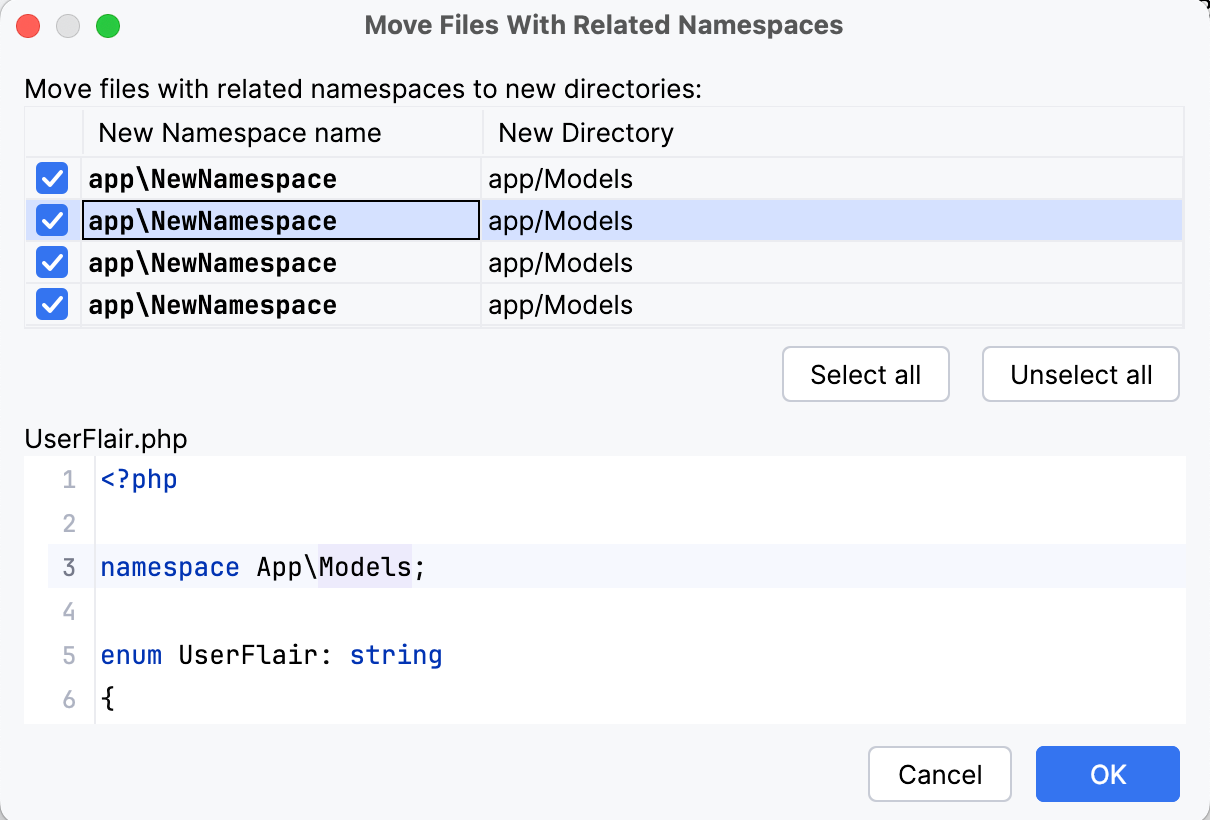
To have a class and the corresponding file moved to the destination namespace and the destination folder, select the checkbox next to the namespace/folder.
To add all the items to the list or remove all of them from the list, click Select All or Unselect All respectively.
Click OK to start the refactoring.
Move a static PHP method, property, or constant to another class
Open a PHP class in the editor and place the caret at a static method, property, or constant.
From the main menu or the editor context menu, select .
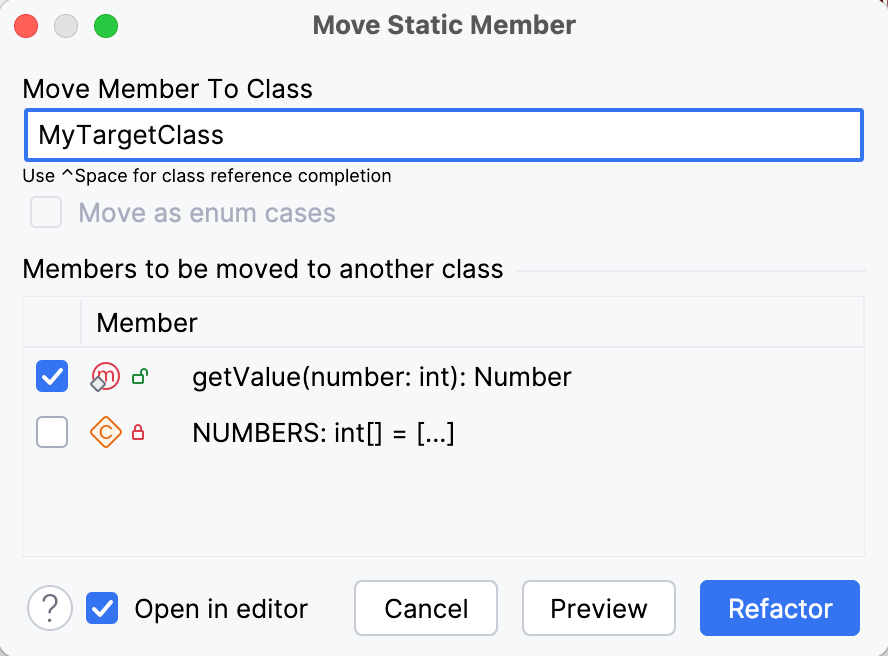
The Move Static Member dialog opens.
In the Move Member To Class field, enter the fully qualified name of the class where you want to move the selected members.
Use completion suggestions as you type or press Ctrl+Space to get the full list of available classes.
In case of moving same type constants, you can select the Move as enum cases checkbox to move constants to the target enum class as enum cases.
In the Members to be moved to another class list, select the checkboxes next to the static methods, properties, or constants of the current class that you want to move to another class.
If a selected member has unselected dependencies, such dependencies are highlighted in blue.
Leave the Open in editor checkbox selected to open the target class in the editor after refactoring.
Move a function or constant from a PHP file to a class
Do any of the following:
To move a single constant or function, open a PHP file in the editor and place the caret at a constant or function.
To move several constants or functions at once, open a PHP file in the editor and select the constants or functions to move in the Structure tool window (Alt+7) or the structure view popup (Ctrl+F12).
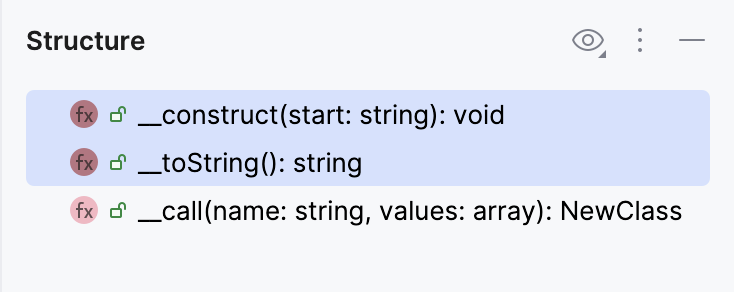
From the main menu or the editor context menu, select or press F6.
Depending on your selection, the Move Constant or Move Function dialog opens.
In the dialog, type the fully qualified name of the class where you want to move the selected constant or function. PhpStorm provides completion for the class and namespace reference: as you type a class or namespace name, a suggestion list with the relevant item is displayed. You can also get a full list of available classes by pressing Ctrl+Space.
Move an instance PHP method to another class
The Move instance method refactoring moves an instance (non-static) method to another class.
In the editor, place the caret at an instance method and do one of the following:
From the main menu or context menu, choose .
Press F6.
Do the following:
In the Move Instance Method dialog that opens, select the target class to move an instance method to.
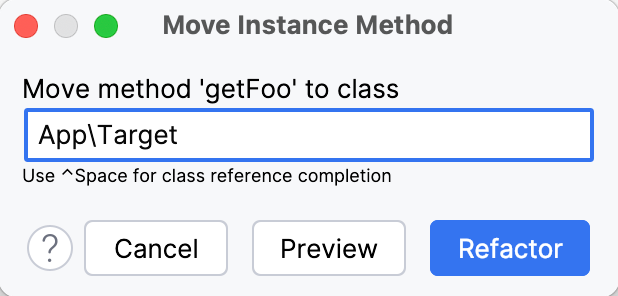
If the method does not use any class parameters nor relies on accessing properties or methods of another class, PhpStorm will automatically set the method visibility to
public static, silently perform the Make Static refactoring using the default options, and then move it. In simpler cases, such as moving a currently unused method, PhpStorm will not alter the method visibility.Otherwise, in the Move Instance Method dialog that opens, specify the following:
In the Select an instance expression list, select the target class to move an instance method to. The list of potential move targets includes the method parameters' classes and properties' classes in the current class.
In the Visibility area, select the preferred visibility modifier for the target method.
In the Parameter name to replace the $this reference to class <class_name> field, type the desired name of the parameter. When refactoring is performed, the parameter will be added for the method being moved, which will replace all
$thisreferences to the current class.
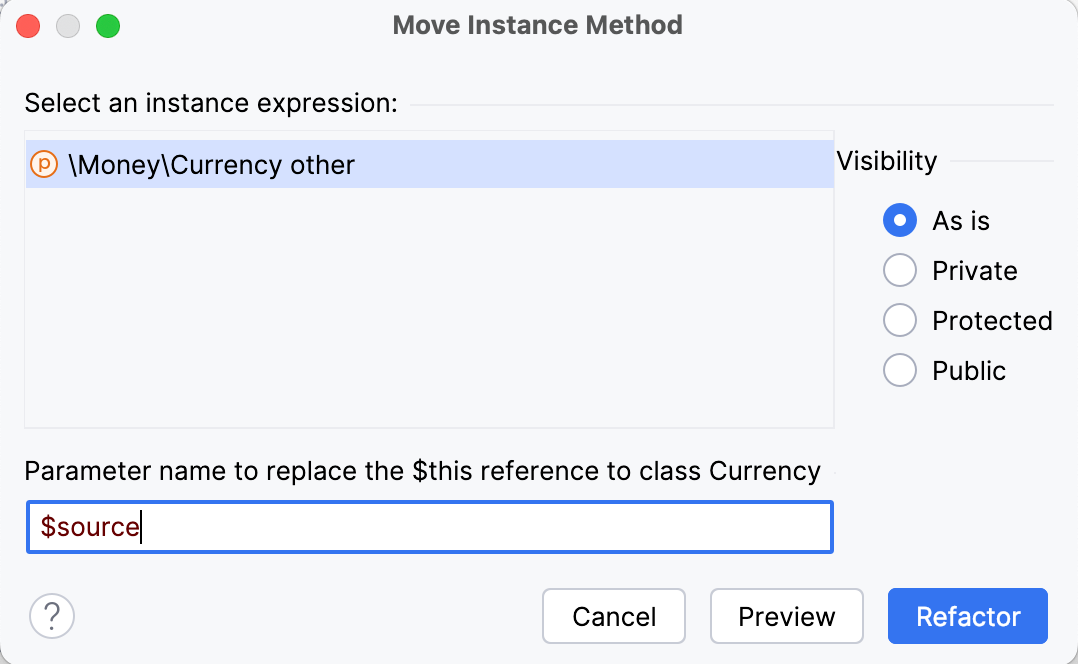
Initiate the refactoring by clicking Refactor or Preview. For more details, refer to Code refactoring.
Example
Let's move the foo instance method from class B to class A. As a result, PhpStorm will move the method and replace the $this reference to class B with created $b parameter:
Move a class to another namespace
PhpStorm assumes that the namespaces in your project are arranged in compliance with the PSR-0/PSR-4 standard and enforces you to retain the folder structure and the namespace hierarchy in accordance with this standard when moving classes among namespaces.
When you specify a namespace to move a class to, PhpStorm automatically updates the Target Destination Directory field, which shows the path to the folder where the file that implements the class in question will be stored.
In the editor, place the caret at the class to move.
Do one of the following:
Go to .
From the context menu of the selection, choose .
Press F6.
In the Move Class dialog, that opens, specify the namespace to move the class to and the folder where the file that implements the class will be stored.
In the Move Class <class name> to Namespace field, appoint the namespace to move the selected class to. This can be:
A new namespace under the current namespace.
Another subordinate namespace under the current parent.
An existing or a new namespace under another parent.
In any case, the import statements referencing the class are updated accordingly.
In the Target destination directory field, appoint the folder where you want PhpStorm to move the file that implements the class.
PhpStorm assumes that the namespaces in your project are arranged in compliance with the PSR-0/PSR-4 standard and enforces you to retain the folder structure and the namespace hierarchy in accordance with this standard when moving classes among namespaces.
When you specify a namespace to move a class to, PhpStorm automatically updates the Target Destination Directory field, which shows the path to the folder file that implements the class in question.
When the dialog opens, the field shows the path to the folder corresponding to the current namespace.
The path is displayed in the following format:
...\<project root>\<current namespace folder relative to the project root>The path is updated automatically as you specify the new namespace name. However, if you are going to move a namespace to another parent namespace, PhpStorm will not suggest the proper folder unless you appoint a root folder for your namespace structure by marking the relevant folder as Sources on the Directories page of the Settings dialog (Ctrl+Alt+S) . For more information, refer to Directories.
Do one of the following:
Accept the preselected path displayed in the field.
Choose another path from the list. All of them are evaluated from the namespace root or from the current directory, so it is safe to choose any of them.
Click
and select a folder in the dialog that opens.Press F2 and edit the preselected path. Keep in mind that this may cause problems with automatic loading in the future.
If multiple classes are defined in the file, then the Extract class into a separate file checkbox is selected. Leave this default selection.
Initiate the refactoring by clicking Refactor or Preview, for more details, refer to Code refactoring.
Move classes and namespaces via drag-and-drop
As an alternative to using the code editor, you can perform the Move Class and Move Namespace refactorings by directly dragging files and folders in the Project tool window.
Make sure the project has the namespace roots configured as described in Configure PHP namespaces in a project.
In the Project tool window, select a file or multiple files (to move individual classes), or folders (to move entire namespaces) and drag them to a target location.
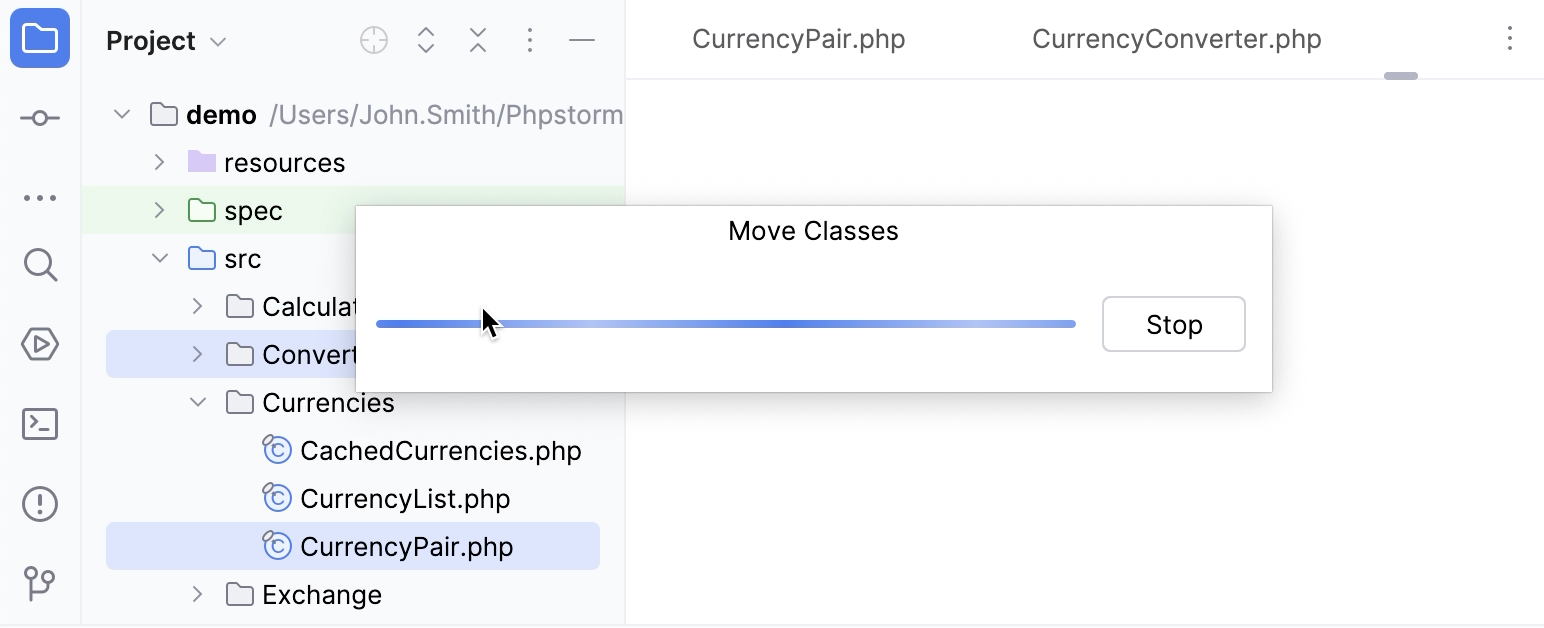
For more details, refer to Code refactoring.
Move an HTTP request
You can use the Move refactoring F6 to move HTTP requests from scratches to physical files, as well as between physical files.
In the editor, place the caret at the request to be moved and do one of the following:
From the main menu or the context menu, select .
Press Alt+Enter and select the Move HTTP Requests intention action.
Press F6.
In the Move HTTP Requests dialog that opens, do the following:
In the Path field, choose one of the existing .http files from the list or click
 to locate the file.
You can also type the full path to the file manually. If you specify the name of a non-existing file, a new file with the provided name will be created automatically.
In the Requests list, select the checkboxes next to the requests you want to move.
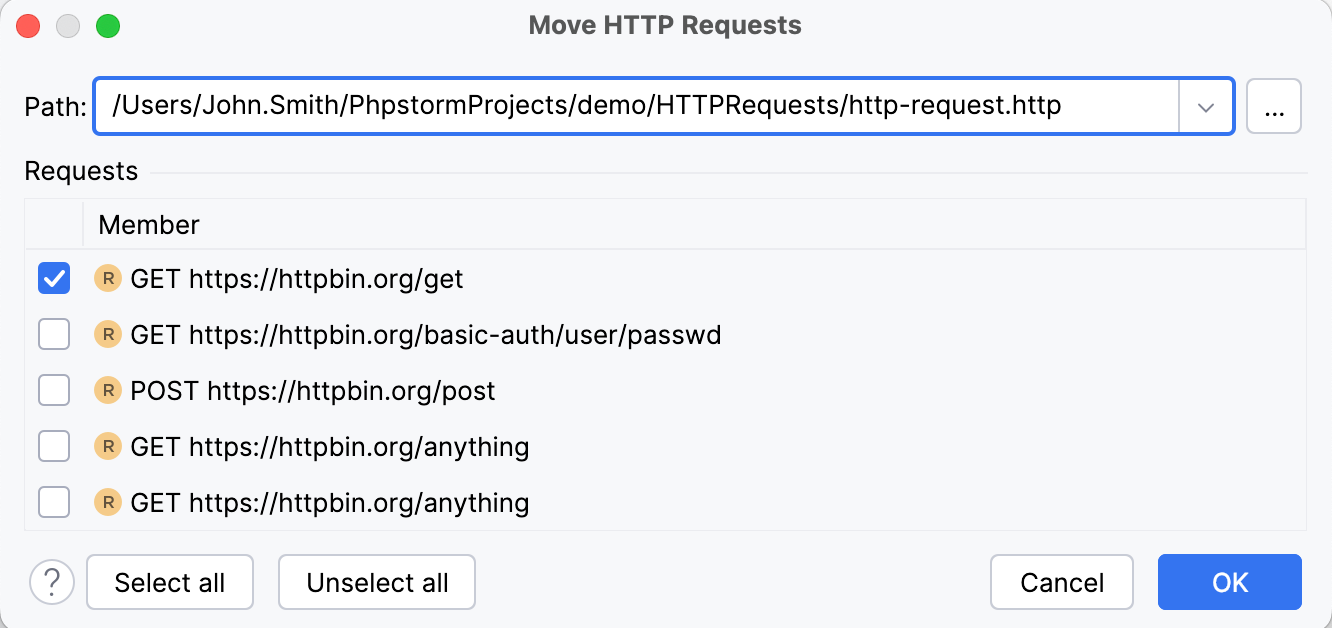
Copy refactoring
The Copy refactoring allows you to copy a class, file, or directory with its entire structure from one directory to another.
Select the desired item in one of the views or open it in the editor.
Do one of the following:
From the main menu or the selection context menu, choose .
Press F5.
Select the desired class in the Project tool window and drag it to the target destination with Ctrl pressed.
In the Copy dialog that opens specify the new name and destination, then click OK.