Create and manage projects
Whatever you do in PhpStorm, you do that in the context of a project. A project is an organizational unit that represents a complete software solution. It serves as a basis for coding assistance, bulk refactoring, coding style consistency, and so on.
A project in PhpStorm is represented in the Directory Based Format. A root project directory contains the .idea directory, with the following files:
.iml file that describes the project structure.
workspace.xml file that contains your workspace preferences.
A number of xml files. Each xml file is responsible for its own set of settings, that can be recognized by its name: projectCodeStyle.xml, encodings.xml, vcs.xml, and so on.
Thus, for example, adding a new run/debug configuration and changing encoding will affect two different xml files. This helps avoid merge conflicts when the project settings are stored in a version control system and modified by the different team members.
The .idea directory is not visible in the Project view of the Project tool window Alt+1.
Share project settings through VCS
Project settings are stored in the project directory as a set of XML files under the .idea folder. This folder contains both user-specific settings that should not be placed under version control and project settings that are normally shared among developers working in a team, for example, the code style configuration.
When you enable version control in your project, PhpStorm automatically moves the workspace.xml file with your personal settings to the .gitignore list to avoid conflicts with other developers' settings.
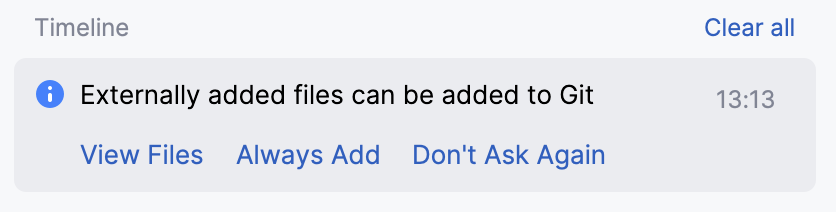
Configuration files are processed according to your choice. Once you modify the project settings, and a new configuration file is created, the IDE shows a notification at the bottom of the screen prompting you to select how you want to treat configuration files in this project:
View files: view the list of created configuration files and select which of them you want to place under version control. After that, the selected files will be scheduled for addition to VCS.
Always Add: silently schedule all configuration files created in the .idea directory for addition to VCS (applies only to the current project).
Don't Ask Again: never schedule configuration files for addition to VCS; they will have the unversioned status until you manually add them to VCS (applies only to the current project).
If you close the notification without selecting any option, it will appear again after a new configuration file is created. The new file will also go to the list that will be there until you select one of the options even if you restart the IDE.
List of non-shareable configuration files
PhpStorm identifies configuration files and adds them to the list of ignored files automatically. However, if you are sharing your project manually, we recommend that you avoid placing these files and folders under version control:
.idea/workspace.xml
.idea/usage.statistics.xml
.idea/dictionaries folder
.idea/shelf folder
For the full list of files, refer to How to manage projects under Version Control Systems and JetBrains.gitignore.
Copy global settings to the project level
Global (IDE) settings are stored separately from projects. That is why these settings are not shared through version control together with the project.
Some settings, however, can be copied to the project level. For example, you can create a copy of your or inspection profiles. If you do so, the IDE creates the corresponding configuration files in the .idea directory that you can share together with the project through VCS.
PhpStorm also provides several ways of sharing settings between different IDE instances. For more information, refer to IDE settings backup and sync.
Once you have opened a folder in PhpStorm, the .idea subfolder is added to it where PhpStorm stores its internal configuration settings, for example, for the project code style or the version control system.