Investigate changes in Git repository
In PhpStorm, you can trace back all changes in your project. This helps you locate the author of any change, review the differences between file versions or commits, and safely roll back and undo changes if necessary.
Review project history
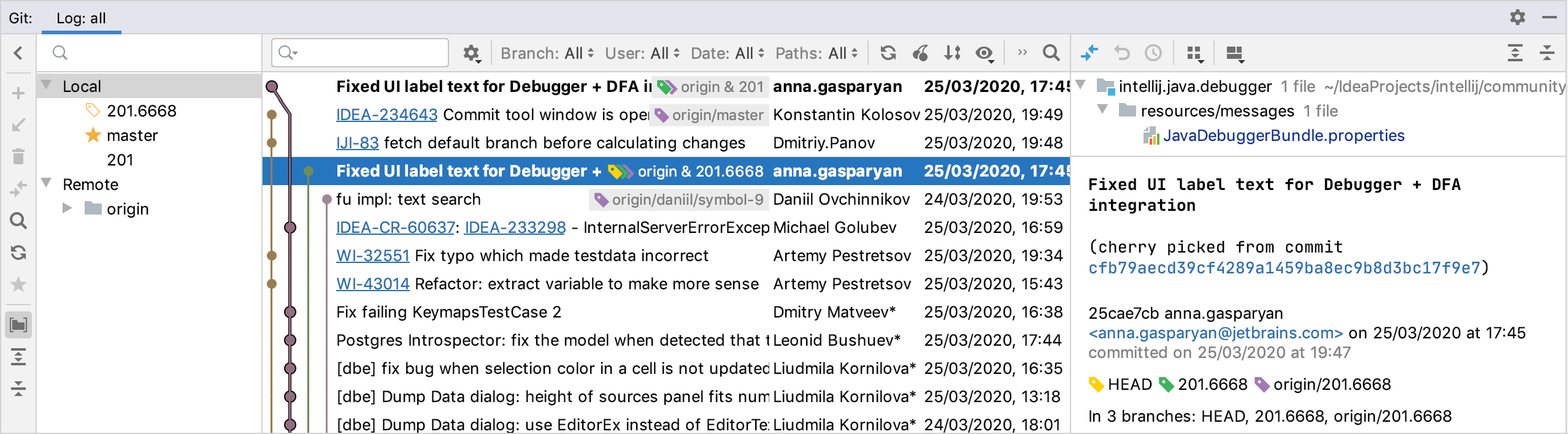
You can review all changes made to a project sources that match the specified filters. To view project history, open the Log tab of the Git tool window Alt+9. It shows all changes committed to all branches and remote repositories:
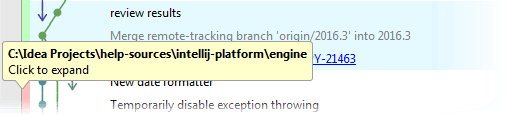
In multi-repository projects, the colored stripe on the left indicates which root the selected commit belongs to (each root is marked with its own color). Hover over the colored stripe to invoke a tip that shows the root path:
Navigate and search through project history
Search through the list of commits by entering full commit names or messages or their fragments, revision numbers, or regular expressions.
Filter the commits by branch or favorite branches, user, date, and folder (or root and folder for multi-root projects).
Click the Go to Hash/Branch/Tag
 icon on the toolbar or press Ctrl+F and specify a commit hash, tag or the name of a branch you want to jump to (you will be taken to the latest commit in that branch).
Click an arrow to jump to the next commit in a long branch:

Press the Left and Right keys to jump to the parent/child commit. This is especially useful if you have commits to different repositories and multiple branches all mixed in the Log tab of the Git tool window Alt+9.
For more information about the Log tab of the Git tool window Alt+9, refer to Log tab.
Review a project's snapshot at a specific revision
PhpStorm lets you review the state of your project at a selected revision.
Open the Git tool window Alt+9 and switch to the Log tab.
Select a commit and choose Show Repository at Revision from the context menu.
The Repositories tool window will open containing the snapshot of your project at the selected revision.
Review the differences between two commits
PhpStorm allows you to check which files were modified between two commits instead of having to browse the changes in each commit in between.
Select any two commits in the Log tab of the Git tool window Alt+9 and choose Compare Versions from the context menu.
The Changes tool window with a list of files modified between the selected commits opens. You can view the diff for any file by clicking
 Show Diff or pressing Ctrl+D.
Review file history
You can review all changes made to a specific file, and find what exactly was modified in each revision.
Select the necessary file in any view (the Project tool window (Alt+1) , the editor, the Commit window, and so on).
Select Git | Selected File | Show History from the main menu or Git | Show History from the context menu of the selection. The History tab is added to the Git tool window showing the history for the selected file and allowing you to review and compare its revisions.
To identify which changes were introduced in a specific revision, select it in the list. On the right side of the panel the diff is instantly shown.
To view the diff of the whole file in the dedicated Diff viewer, select it in the list and press Ctrl+D or click
Show Diff on the toolbar. The Diff Viewer will open showing what has changed in this revision.
You can use the toolbar buttons to compare the selected revision with the local version, compare classes from the selected revision, check out the selected revision, annotate the selected revision, and so on:
Item | Tooltip and Shortcut | Description |
|---|---|---|
Branch | Branch filter | Click Branch and select a branch to review changes made to a file within this branch. |
| Refresh | Click this button to refresh the current information. |
| Show Diff Ctrl+D | Click this button to compare the selected revision of a file with its previous revision in the Diff Viewer. |
| Show All Affected Files Alt+Shift+A | Click this button to open the Paths Affected in Revision dialog, where you can view all files that were modified in the selected revision. |
| View Options | Click to choose the amount of information you want to see in the History view. You can also select the Show Commit Timestamp option if you want PhpStorm to show the commit timestamp instead of the time when a change was authored. Also, select the type of info you want to see:
|
| Open on GitHub | Click this button to open the page that corresponds to the selected commit on GitHub. |
| Open on GitLab | Click this button to open the page that corresponds to the selected commit on GitLab. |
| Enable Git Log Indexing | Click this button to improve working with the history of changes across the IDE. Indexing project repositories allows:
To disable this option, go to . |
| Renaming column | Click this column to expand it and review the history of the file's renaming. Hover over the column to see the changes in the file's path. |


View history for a selection
In the editor, select the necessary fragment of source code or place the caret at the corresponding line.
Choose Git | Current File | Show History for Selection from the main menu or Git | Show History for Selection from the context menu of the selection.
The history for the selected fragment will open in a separate window. If nothing is selected, the history will be displayed for the current line.
Review history for directories
In addition to reviewing the history for the whole project or for a specific file, you can check which changes were made in specific folders.
Select a directory or multiple directories in the Project tool window (Alt+1) and choose from the context menu.
A new tab is added to the Git tool window Alt+9 that shows commits filtered by the selected folders.
Review the differences between the local and a committed file version
You can check how a committed file revision is different from its local version:
Open the Git tool window Alt+9 and switch to the Log tab.
Select the commit you are interested in, and in the right pane select the file.
Click the
button on the toolbar.You can then apply the committed revision of the file to its current version by right-clicking the file in the right pane and selecting Get from Revision
 from the context menu.
Review how changes were merged
PhpStorm allows you to review how changes were merged from one branch to another, and how exactly conflicts (if any) were resolved during a merge:
In the Log tab of the Git tool window Alt+9, select the merge commit you are interested in.
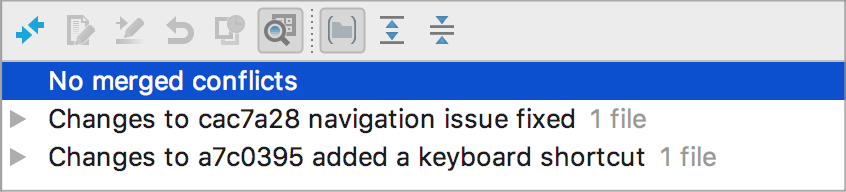
If no conflicts were detected and resolved during the merge, PhpStorm will display the corresponding message in the Changed Files pane and suggest reviewing changes that originate from both parents:
Select the required file from one of the nodes and click
Show Diff on the toolbar or press Ctrl+D. The Diff Viewer will show a two-panel diff allowing you to compare the current version with the selected parent.If conflicts occurred during the merge, the Changed Files pane will show you a list of files merged with conflicts.
Select the required file and click
Show Diff on the toolbar or press Ctrl+D. The Diff Viewer will show a three-panel diff allowing you to compare the current version with each of its parents, and see how exactly conflicts were resolved.
Locate code author (Annotate with Git Blame)
You can figure out who introduced which changes to a file by using VCS annotations (corresponds to git-blame). The annotated view shows detailed information for each line of code:
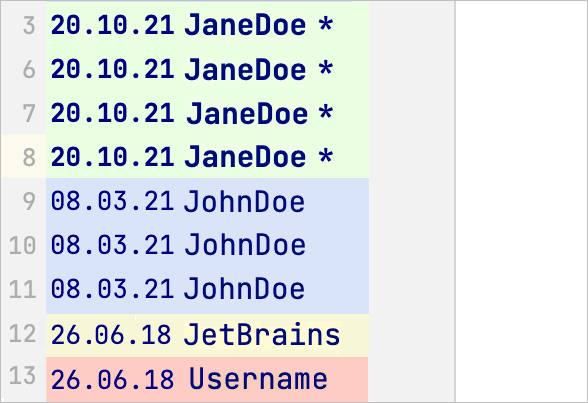
Annotations for lines modified in the current revision are marked with a bold type and an asterisk.
By default, different commits are highlighted with different colors (refer to Configure the amount of information shown in annotations).
From the annotations view, you can jump to:
The corresponding commit in the Log tab of the Git tool window Alt+9: click the annotation or hover over it and click the commit hash in the popup with detailed info.

The difference in lines: hover over an annotation. The IDE will highlight the line and the changes from the corresponding commit.

The corresponding commit on https://github.com: use the Open on GitHub context-menu option.
The related issue in your bug-tracking system if issue navigation is enabled: hover over an annotation and click the issue link if it's included in the commit message
Enable annotations
Right-click the gutter in the editor or in the Diff Viewer and select Annotate with Git Blame from the context menu.
You can assign a custom shortcut to the Annotate command: go to the Keymap settings page Ctrl+Alt+S and look for Version Control Systems | Git | Annotate.
To close annotations, right-click the gutter in the editor or in the Diff Viewer and select Close Annotations from the context menu.
Configure the amount of information shown in annotations
You can choose how much information you want to see in the annotations view.
Right-click the annotations gutter, choose View and select which type of information you want to see, including the revision from which this change originated, the date, the name of the author in different formats, and the commit number.
You can also set highlighting under Colors.
Configure annotation options
Right-click the annotations gutter and select Options from the context menu:
Ignore Whitespaces: whitespaces will be ignored (git
blame -w). This means that annotations will point to the previous meaningful commit.Detect Movements Within File: when a commit moves or copies lines within the same file, such change will be ignored (git
blame -M). This means that annotations will point to the previous meaningful commit.Detect Movements Across Files: when a commit moves or copies lines from other files that were modified in the same commit, such change will be ignored (git
blame -C). This means that annotations will point to the previous meaningful commit.Show Commit Timestamp: select this option if you want PhpStorm to show the commit timestamp in the Annotations view instead of the time when a change was authored.
Customize date format
Press Ctrl+Alt+S to open settings and then select .
Click the Date Time Pattern field next to VCS Annotate and specify the date format that you want to use for VCS annotations. See patterns reference.
Show the author of changes in the editor
You can configure the editor to show the author of the last change to an element (a method or a class) in inlay hints. To switch them on:
Press Ctrl+Alt+S to open settings and then select .
Select the Code author option.
Choose the position to display the author name:
On top of the line (default)
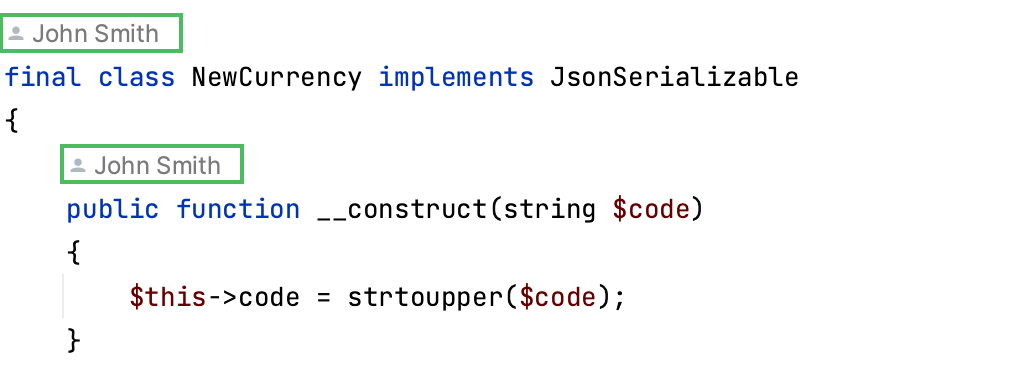
On the right
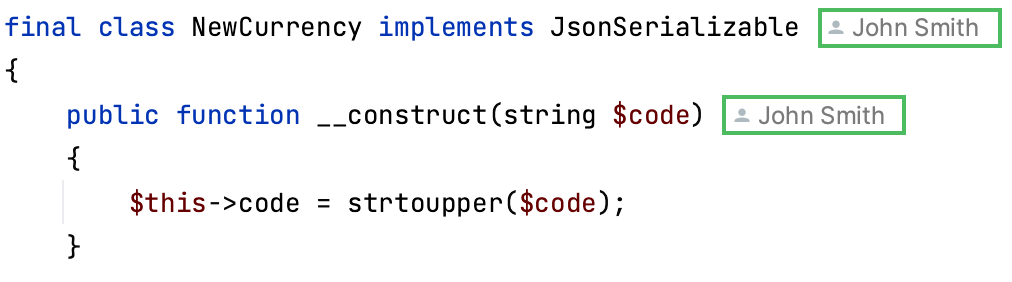
When this option is enabled, you can click the author name hint in the editor to open the annotated view.
Hide the author of changes
To hide the names of code authors in the editor, do one of the following:
Open the Editor | Inlay Hints | Code vision settings page Ctrl+Alt+S and disable the Code author option.
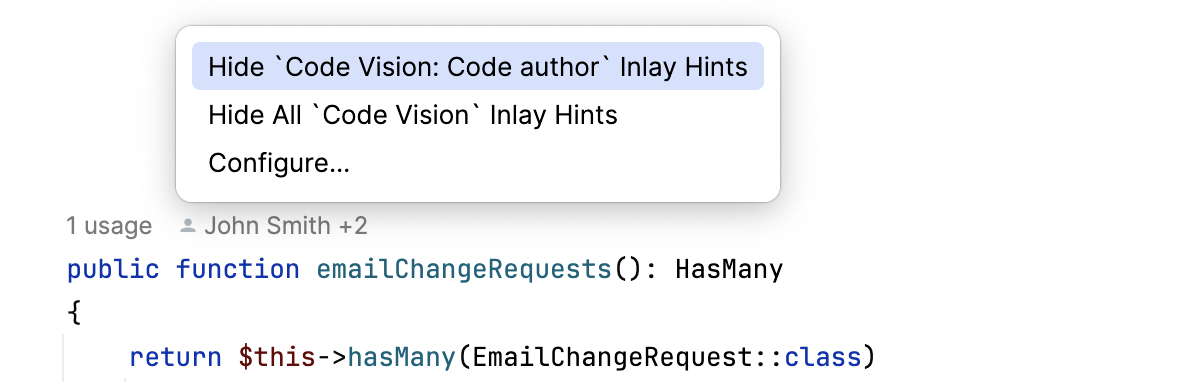
Right-click the author name hint in the editor and select Hide `Code Vision: Code author` Inlay Hints.
Annotate a previous revision
PhpStorm lets you annotate not only the current file revision, but also its previous revisions. The following options are available from the context menu of the annotations gutter:
Annotate Revision: this option is useful if you want to check what a file looked like after a particular change was committed. To do this, right-click this change and select Annotate Revision from the context menu.
Annotate Previous Revision: this option is useful if you find yourself in a situation when the last change in a particular line is meaningless, for example, if all that was changed is code formatting. In this case, you can check what the previous revision of the file looked like. To do this, right-click a change and select Annotate Previous Revision from the context menu.
Hide Revision: this option is useful to avoid seeing irrelevant or administrative changes. These are typically introduced by low-level migrations or formatting actions. When these changes affect the whole root, they create clutter in the Annotate dialog and so it may be desirable to exclude the changes from the view as well as from the ‘annotate’ column. The Hide Revision action allows you to exclude a revision from the annotation result in-place and show the result in both the editor and gutter. The excluded revisions can be restored with the opposite action Restore Hidden Revisions. Information about hidden revisions is displayed in the notification panel at the top of the editor. It is also possible to restore hidden revisions by clicking on the corresponding link in the notification panel.
You can also annotate a particular file from the History view. In the History tab, select the file version you want to review, right-click the corresponding line and select Annotate from the context menu.
Watch this video to learn more on how you can benefit from using annotations: