Apply Filters
dotTrace lets you create filters to gray out or fold sets of functions in views.
To add a new filter by module* name:
From the menu bar, choose . The Options dialog opens.
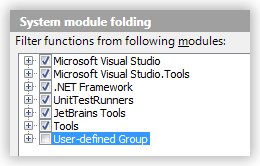
Select the System module folding item in the left tab.
Click Add to add a new module. The Add Module dialog opens.
Choose a category and define a name for a new module. Click OK.
The new module appears as a child in the module tree.
Click OK to save your changes.
If the checkbox near a node in the module tree is selected, the corresponding filter is active. Otherwise it's not active and doesn't perform any filtering.
If while working with a view you face classes of functions that you don't want to be shown, you can also create a new filter for them from any view.
To filter functions from a particular assembly
Select a function.
Do one of the following:
Select from the menu.
Right-click the selected function, and choose Filter functions from assembly 'name' in the context menu.
A new filter is added as a subnode of the User-defined Group node.