Configure projects in PyCharm
Whatever you do in PyCharm, you do that in the context of a project. A project is an organizational unit that represents a complete software solution. It serves as a basis for coding assistance, bulk refactoring, coding style consistency, and so on.
Project files
A project in PyCharm is represented in the Directory Based Format. A project directory is marked with  icon.
icon.
Such a project directory contains the .idea directory, with the following files:
.iml file that describes the project structure.
workspace.xml file that contains your workspace preferences.
A number of xml files. Each xml file is responsible for its own set of settings, that can be recognized by its name: projectCodeStyle.xml, encodings.xml, vcs.xml, and so on.
Thus, for example, adding a new run/debug configuration and changing encoding will affect two different xml files. This helps avoid merge conflicts when the project settings are stored in a version control system and modified by the different team members.
All the settings files in the .idea directory should be put under version control except workspace.xml, which stores your local preferences. The workspace.xml file should be marked as ignored by VCS.
.idea directory is not visible in the Project view of the Project tool window.
Project types
The directory structure of each project contains an .idea directory for PyCharm-specific settings, project files, and libraries.
PyCharm suggests the following types of projects:
Pure Python project is intended for pure Python programming. The directory structure of such a project contains the .idea directory for the PyCharm-specific settings and the project file, and libraries.
Create a plain Python project as described in the Create a Python project section.
Django project. This project type provides specific infrastructure of the Django applications, and all the necessary files and settings.
Create a Django application as described in the Create a Django project section.
Working with Django applications requires a database. Using SQLite is preferred since it is pre-configured. If you are using a different database engine, make sure it is installed and configured properly.
Flask project. This project type provides specific infrastructure of a Flask application, and all the necessary files and settings.
Create a project as described in the Creating a Flask Project section.
PyCharm Edu projects
Educational project is intended for students who want to learn Python.
An educational project consists of the following entities:
The process of creating such a project is described in the Learner Start Guide.
Course is intended for the educators.
A course consists of the following entities:
- Course
A course is just a project of a special type. It consists of lessons.
- Lesson
A lesson is a directory where the task files are stored. Each lesson can contain several tasks.
- Task
A task is a directory where the following files are stored:
Task description which you have to type in the Task Description tool window
The file with the extension .py, that contains the exercise code and can contain answer placeholders
the test file tests.py that helps you make sure that the students have fulfilled your task correctly.
Also a task can contain more files required for fulfilling it.
- Answer placeholder
An answer placeholder is a frame shown to the students that replaces and hides a part of your initial code. These placeholders should contain descriptions of actions to be taken by the students to complete the tasks. You have to create descriptions of these actions yourself.
The first mouse click inside the answer placeholder selects the entire placeholder; the second mouse click removes selection.
- Hints
If the students are not sure of themselves, they can view hints. The hints are also created by the educators.
Besides these groups of files, PyCharm provides special file test_helper.py that contains useful functions, which a lecturer may use for writing tests.
For more information, refer to Educator Start Guide.
Project settings
Project settings apply to the current project only. They are stored together with other project files in the .idea directory in the .xml format. For example, projects keep VCS settings, code style spellchecker settings, the list of language injections, and so on. These settings are placed under version control automatically together with your application code when you send it to your VCS.
To configure project settings, select for macOS (Ctrl+Alt+S) or for Windows and Linux.
In the Settings dialog, settings that are marked with the  icon apply only to the current project. Other settings are global and apply to all existing projects.
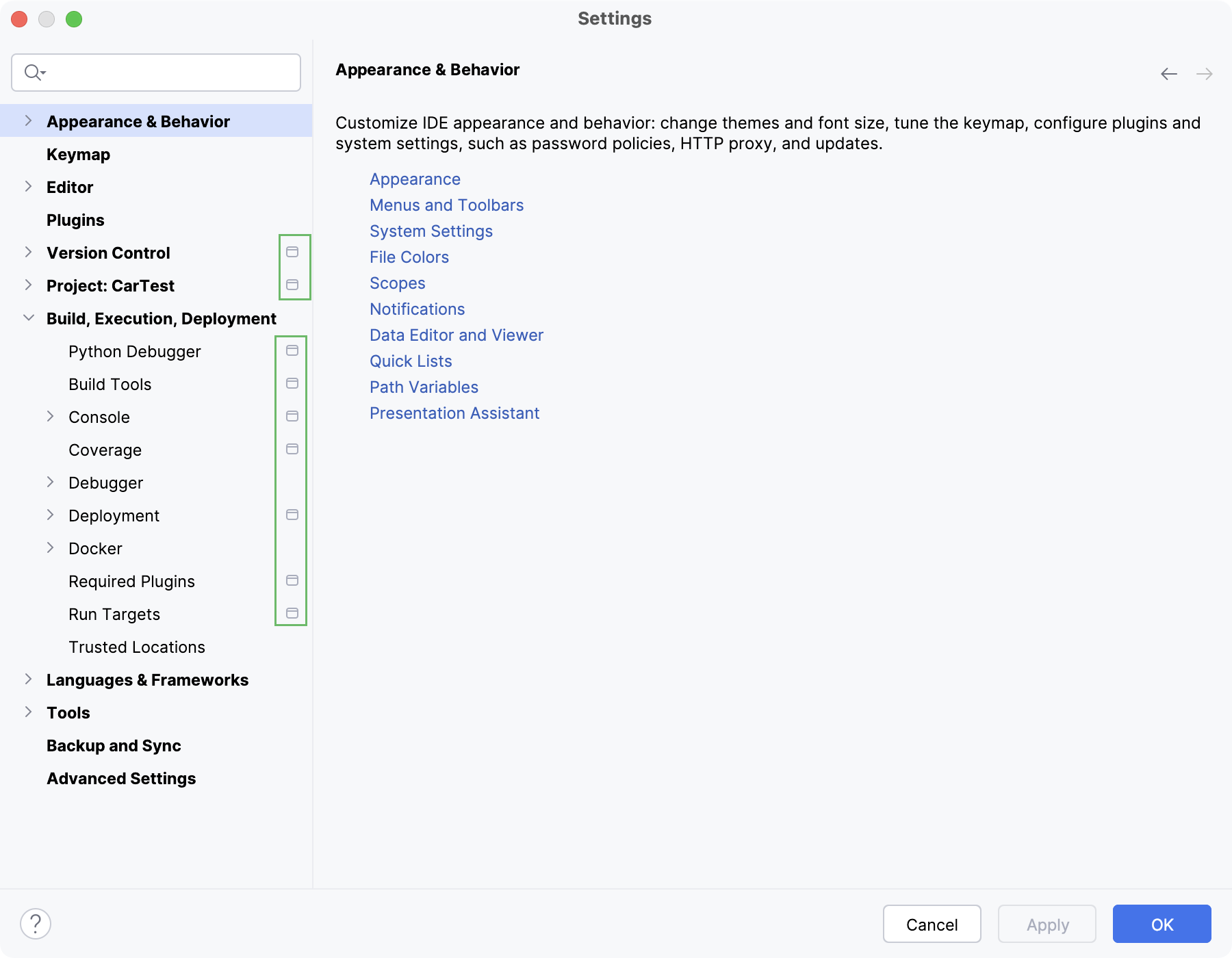
If you want to share project settings between already existing projects, you can use the Settings Sync plugin. You can also export the settings to a ZIP archive and import it later to other IDE instances.
You can configure project settings not only for the current project, but for all projects that you will create later. This means that you can set the new default settings for your projects.
Configure default project settings
In the main menu, go to .