Close files in the editor
PyCharm suggests several ways to close editor tabs.
To close a file in the editor, do one of the following
In the main menu, point to , choose one of the appropriate closing commands.
- Close
Closes the file in the active tab.
- Close All
Closes all editor tabs.
- Close Others
Closes all tabs except the current one. The alternative way to close all other tabs lays with clicking the
 button, while holding the Alt key pressed: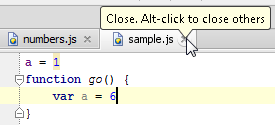
- Close Unmodified
Closes all files that were not changed. This command is only available, when version control integration is enabled in project.
- Close All But Pinned
Closes all files that were not pinned. This command appears, if there are pinned editor tabs.
Right-click any editor tab, and choose same commands from the context menu.
Hover over a tab and click the middle mouse button.
Hover over a tab and click
.Press Ctrl+F4.
08 October 2024