Compare files, folders, and text sources
PyCharm lets you review the differences between files, folders, local files and their repository versions, database objects, and text sources.
Compare files
Compare two or three files
In the Project tool window (Alt+1) , select the files you want to compare and choose , or press Ctrl+D.
Alternatively, select one file, choose Compare With… from its context menu, and select a file that is outside your project.
Compare active editor with Clipboard
Right-click anywhere in the editor and choose Compare with Clipboard from the context menu.
Compare active editor with a project file
In the Project tool window (Alt+1) , right-click the file you want to compare with the currently opened file.
Choose Compare File with Editor from the context menu.
Compare active editor with any file
If you often need to compare files that are outside your project with the active editor, or don't want to have the Project tool window (Alt+1) open, you can use the Compare File with Editor action that lets you choose any file and compare it with the active editor.
To add this action to the editor tab's context menu:
Press Ctrl+Alt+S to open settings and then select .
In the right pane, expand the Editor Tab Popup Menu node, select where you want to add the new action, click
 and select Add Action….
Find and add the Compare File with Editor action under .
Compare a local file with its repository version
Open the Commit tool window (Alt+0) .
Locate the required file in a changelist and do one of the following:
Right-click the file and select .
Select the file and press Ctrl+D.
Double-click the file.
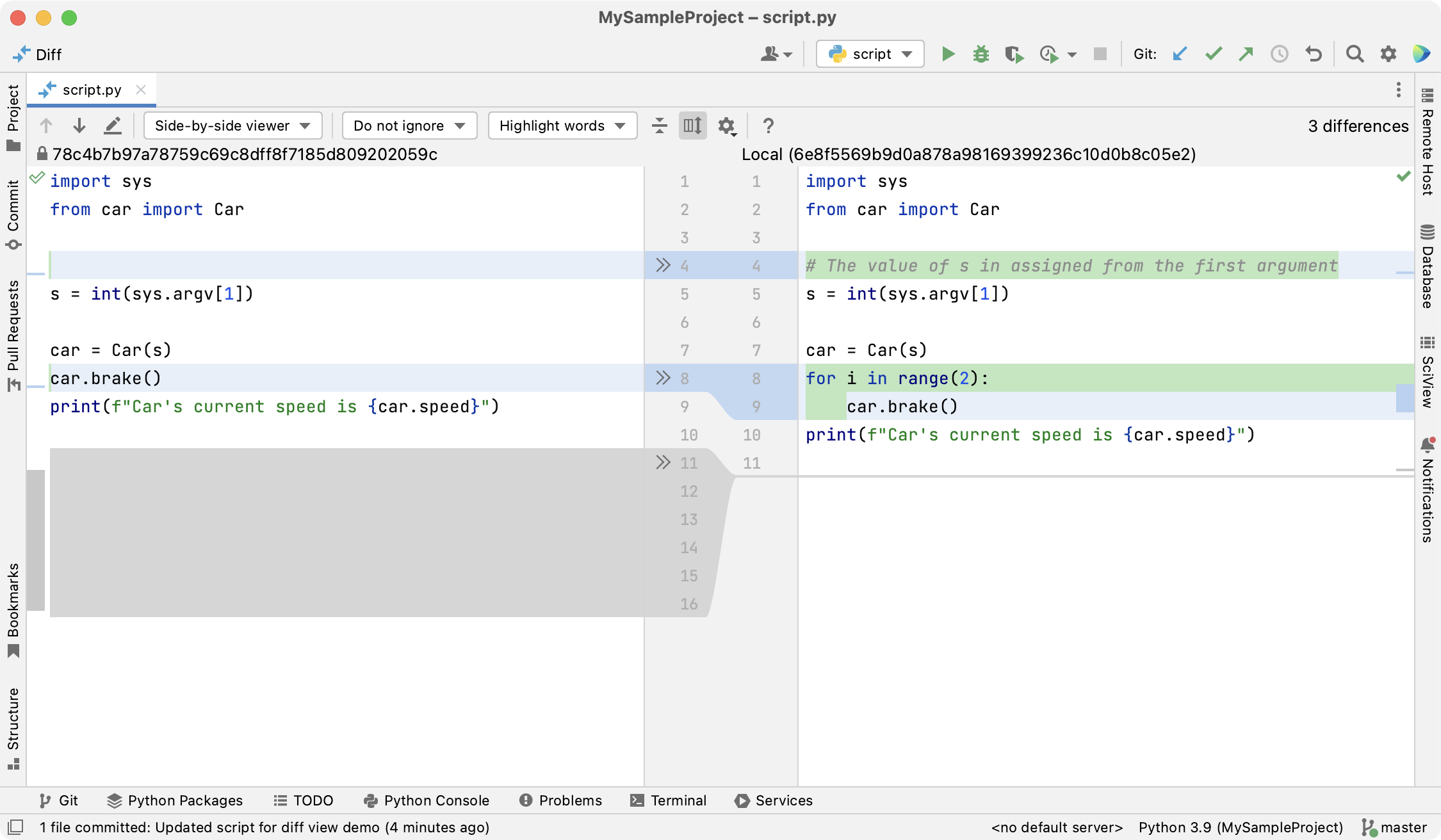
PyCharm displays the differences in the Diff Viewer for Files:
Color | Description |
|---|---|
| Added |
| Modified |
| Deleted |
 Green
Green Blue
Blue Gray
GrayTo apply changes, use the chevron buttons:  and
and  .
.
To append changes, press Ctrl — the buttons will turn into 
 .
.
Productivity tips
- Assign shortcuts for 'accept' and 'append'
To assign shortcuts to the accept and append actions, open the Keymap settings page Ctrl+Alt+S and locate these actions under Version Control Systems | Diff & Merge.
- Swap sides
When you are comparing two files, or a file with the Clipboard contents, you can swap sides by clicking
 on the toolbar.
- Compare files from the command line
You can compare two or three files from the command line and use PyCharm as an external diff tool. For more information, refer to Compare files from the command line.
Compare folders
PyCharm lets you compare files in two folders against their file size, content, or timestamp. The differences are displayed in the Diff Viewer for Folders:
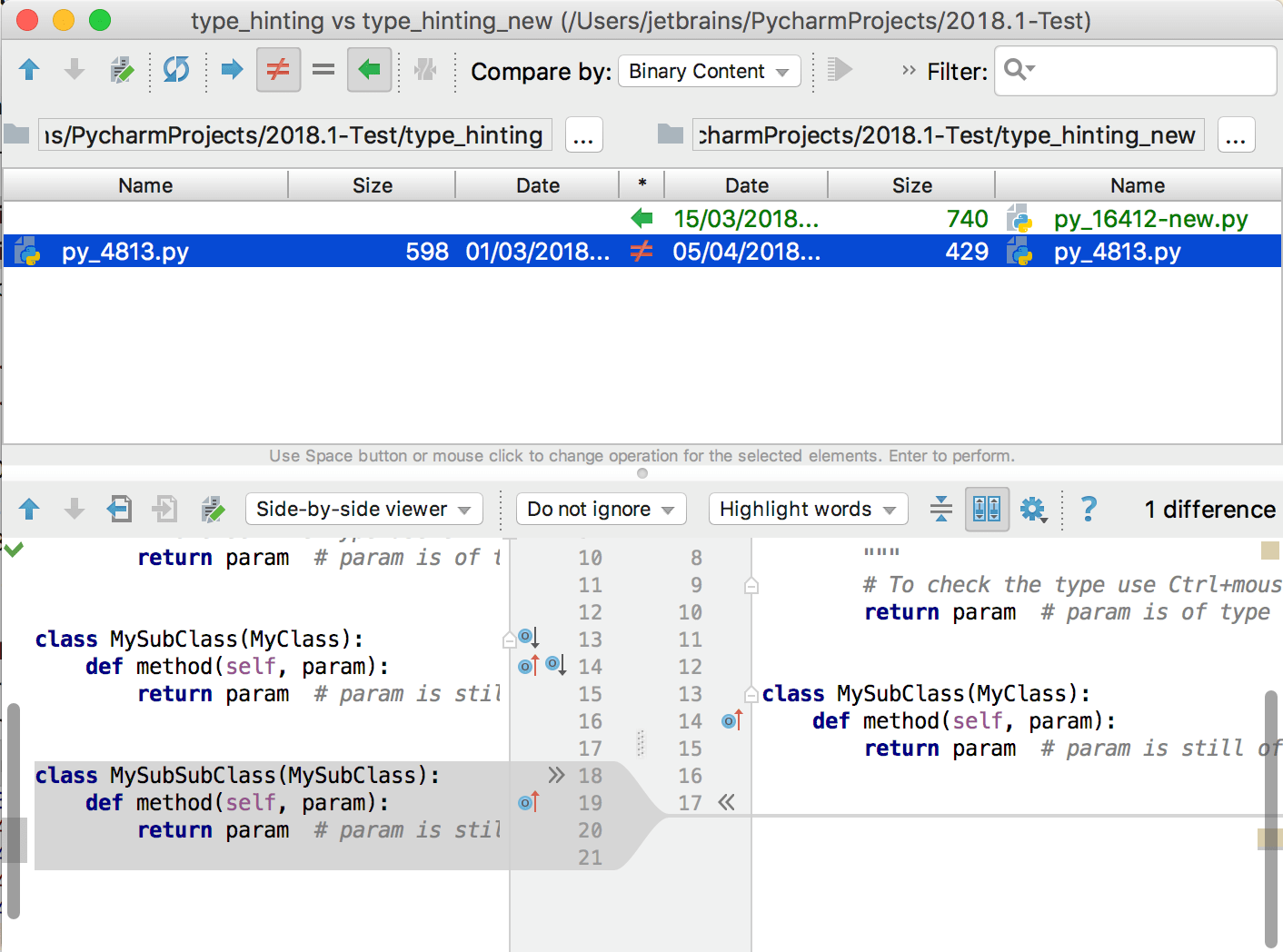
The top pane lists all files in the selected folders, while the bottom pane shows the differences between two versions of the selected file (refer to Compare files).
Compare folders
Select the folders you want to compare in the Project tool window (Alt+1) .
From the context menu, choose Compare Directories, or press Ctrl+D.
Use the following toolbar buttons to filter the list:
 : click to display files that are present in the left folder, but are missing from the right one.
 : click to display files that are present in the right folder, but are missing from the left one.
 : click to display files that are present in both folders, but whose contents, timestamp or size are different.
 : click to display files that are present in both folders and that are identical with regard to the option selected in the Compare by dropdown.
Use the text filter in the search field to include or exclude files from the list:
To include files, input a matching pattern. For example,
.txtvalidates all paths that end with.txt.To exclude files, add
!before your pattern. For example,!build/*excludes all files that are located within the build directory.Use
&(AND) and|(OR) to combine several filters. For example,*.txt|.xml&!build/*validates all paths that end with.txtor.xmland are not located within the build directory.
Synchronize folders
PyCharm lets you sync the contents of two folders, or apply changes from one folder to another.
For each file, click the icon in the * column until you've set an action to be taken on that file.
- : copy the selected item from the left to the right folder. If such file already exists in the right folder, it will be overwritten.
- : copy the selected item from the right to the left folder. If such file already exists in the left folder, it will be overwritten.
- : no action will be performed (the two files are identical).
- : no action will be performed (the two files are different).
 : remove the selected item.
Do one of the following:
To apply the selected action to the current item, click the Synchronize Selected button
 on the toolbar or press Enter.
To apply the selected actions to all items, click the Synchronize All button
 on the toolbar.
Compare different files in two folders
Sometimes a file may be present in one folder, and another file with a similar name in the other folder (for example, VCS_library_1.4 and VCS_library_1.5). These may be versions of the same file that you want to compare. Also, there may be a situation when you think a file was renamed, but is otherwise identical to a file in another folder. PyCharm lets you compare two files, one of which is present in the right folder, and another one in the left even though such files are treated as different entities.
Select the files you want to compare in the left and the right pane.
Click the Compare New Files with Each Other icon
 on the toolbar. The differences between the selected files will be displayed in the bottom pane.
Compare any text sources
Apart from comparing contents of files or folders, you can open an empty Diff Viewer and paste any text or drag files into the right and left panels to compare. This can be useful, for example, if you want to compare the console output of an application with the output from a slightly modified version of the same application.
Press Ctrl+Shift+A and start typing to locate the Open Blank Diff Window action.
Paste any text you want to compare in the left and right panels.
Right-click either left or right panel and select Switch to Three-Side Viewer to compare any three text sources.
Productivity tips
- Assign a shortcut for the 'Open Blank Diff' action
On the Keymap settings page Ctrl+Alt+S, locate this action under Version Control Systems | Diff & Merge.
- Swap sides
You can swap sides in the Diff Viewer by pressing the
icon on the toolbar.- Open Diff in a separate window
By default, Diff Viewer opens in an editor tab. You can configure the settings to open the viewer in a separate window instead. On the Advanced Settings settings page Ctrl+Alt+S, disable the Open Diff as Editor Tab option.
Compare via an external diff tool
You can set up and launch an external diff tool to compare your files and changes right from PyCharm. Make sure to install the necessary diff tool on your machine beforehand.
Configure an external diff tool
Press Ctrl+Alt+S to open settings and then select .
Select the Enable external tools option.
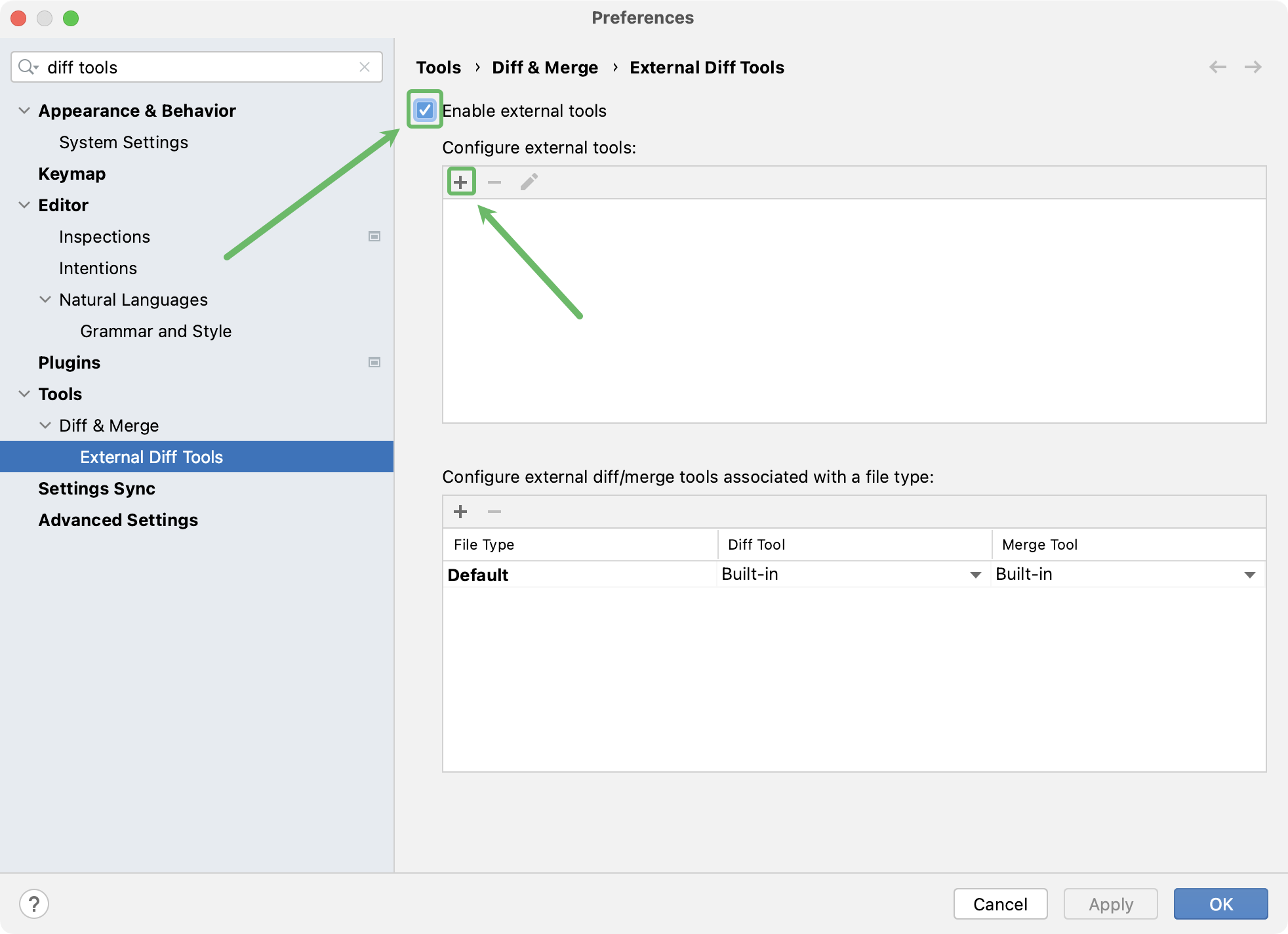
In the Configure external tools section, click
.In the Add An External Tool dialog that opens, fill in the following details:
Tool group: select Diff tool from the list.
Program path: specify the path to the diff tool executable in your system.
Argument pattern: if necessary, adjust the pattern for displaying changes, where:
%1 - local changes
%2 - content from the remote server
%3 - the current version without local changes
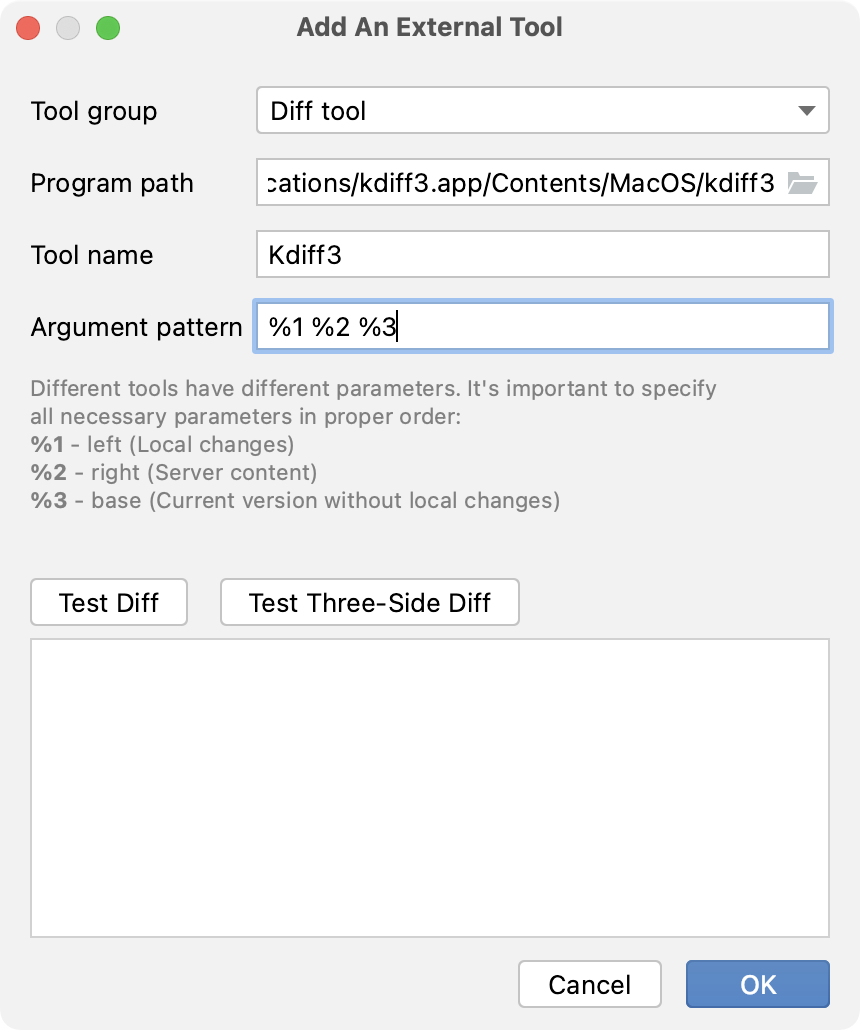
Click Test Diff or Test Three-Side Diff to check that the external diff tool launches from PyCharm successfully.
Click OK to save the changes.
Launch an external diff tool from PyCharm
When examining differences in Diff Viewer, click
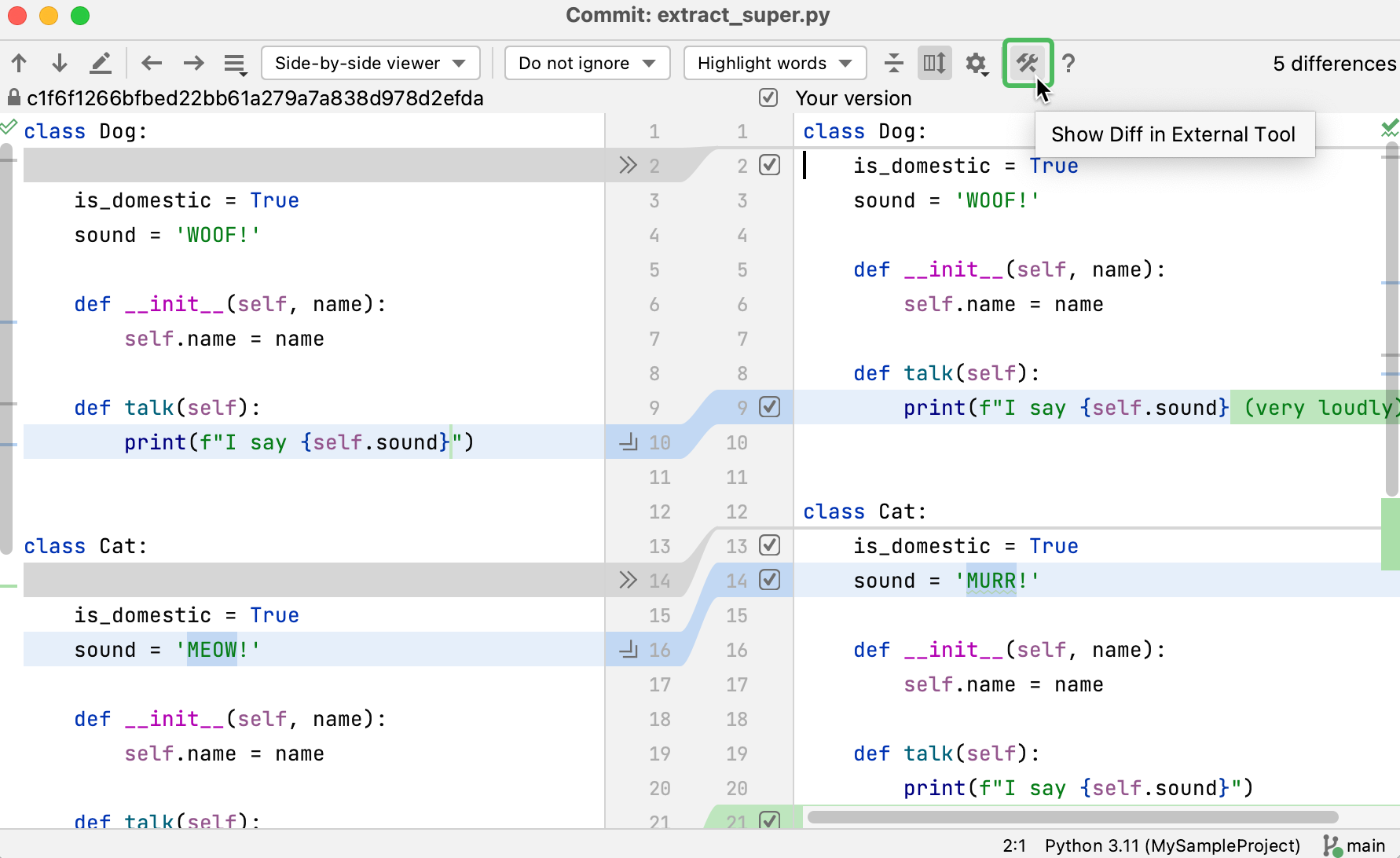
 to have PyCharm launch the configured external diff tool.