Copy and move refactorings
The Move refactoring lets you move classes, functions, modules, files, and directories within a project. In doing so, PyCharm tracks these movements and automatically corrects all references to the moved symbols in the source code.
The following Move refactorings are available:
The Move File refactoring moves a file to another directory.
The Move Directory refactoring moves a directory to another directory.
The Move Module Members refactoring moves top-level symbols of a Python module.
The Make local function/method top-level refactoring converts a method or a local function to a top-level function and moves it to the specified file.
Move a file or a directory to another directory
Select the file or directory in the Project tool window.
From the main menu or the editor context menu, choose or press F6.
In the To directory field, specify the folder to move the selected file or folder to. Choose an existing folder from the list or type the full path to the parent folder to be created. To have the references to the selected file or folder updated according to the refactoring result, select the Search for references checkbox.
Moving top-level symbols
Move a member
Place the caret at a top-level symbol, for example:
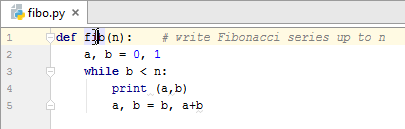
From the main menu or the editor context menu, choose or press F6. The Move Module Members dialog opens:
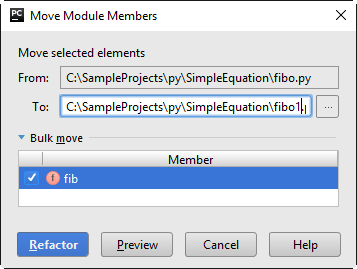
For more information about controls, refer to the dialog reference.
In this dialog, select the members to be moved, and specify the target file.
Moving function/method to the top-level
This refactoring moves local functions or methods to the top-level by converting references to instance attributes or variables from enclosing scopes to parameters and updating existing usages accordingly.
Move a function or a method to top-level
Place the caret at the local function or method name.
From the main menu or the editor context menu, choose or press F6.
In the Make Method Top-Level dialog that opens, specify the destination of move. You can type it manually, or click the browse button
 and locate the destination file in the Choose Destination File dialog.
Click Refactor to perform the refactoring, or Preview, to shows the preview in the Find tool window. If satisfied with the preview results, confirm move by clicking Do Refactor.
Example
Before | After |
|---|---|
import math
class Solver(object):
def __init__(self, a, b, c):
self.a = a
self.b = b
self.c = c
def demo(self):
d = self.b ** 2 - 4 * self.a * self.c
if d >= 0:
disc = math.sqrt(d)
root1 = (- self.b + disc) / (2 * self.a)
root2 = (- self.b - disc) / (2 * self.a)
print(root1, root2)
return root1, root2
else:
raise Exception
Solver(2, 123, 0.025).demo()
|
import math
class Solver(object):
def __init__(self, a, b, c):
self.a = a
self.b = b
self.c = c
def demo(b, a, c):
d = b ** 2 - 4 * a * c
if d >= 0:
disc = math.sqrt(d)
root1 = (- b + disc) / (2 * a)
root2 = (- b - disc) / (2 * a)
print(root1, root2)
return root1, root2
else:
raise Exception
s = Solver(2, 123, 0.025)
demo(s.b, s.a, s.c)
|
Copy refactoring
The Copy refactoring lets you create a copy of a file or directory in a different or the same directory.
Perform the Copy refactoring
Select the item of interest in a tool window (for example the Project tool window). Alternatively, open the necessary class or file in the editor.
Do one of the following:
Choose from the main menu or the context menu.
Press F5.
In the Project tool window, press and hold Ctrl, and drag the item to the target location.
In the Copy dialog that opens, specify the name and location for the copy that you are creating, and click OK.