PyCharm 2.7.2 Web Help

2.0+

The Extract Constant refactoring makes your source code easier to read and maintain. It also helps you avoid using hard coded constants without any explanations about their values or purpose.

Example

BeforeAfter
public class Class {
    public void method() {
        String string = "string";
        ArrayList list = new ArrayList();
        list.add(string);
        anotherMethod(string);
        ...
    }
}
    
public class Class {
    @NonNls
    private static final String STRING ="string";
    public void method() {
        ArrayList list = new ArrayList();
        list.add(STRING);
        anotherMethod(STRING);
        ...
    }
}
    
public class Class {
    public void method() {
        ArrayList list = new ArrayList();
        list.add("string");
        anotherMethod("string");
        ...
    }
}
    
public class Class {
    @NonNls
    private static final String STRING ="string";
    public void method() {
        ArrayList list = new ArrayList();
        list.add(STRING);
        anotherMethod(STRING);
        ...
    }
}
    
 a = 1
 result = foo(a)*123
 if some_cond
         a = a + result
         else a = a - result
 end
              
    a = 1
    result = foo(a)*FIXNUM
    FIXNUM = 123
    if some_cond
        a = a + result
        else a = a - result
    end
              
class Person
   def greet()
       puts "Mr. #{'Bob'}  greets you!"
   end
end
              
class Person
       BOB = 'Bob'
       def greet()
            puts "Mr. #{BOB}  greets you!"
       end
end
              
 import math

 class Solver:
     def roots(self):
         a = 3
         b = 25
         c = 46
         root1 = (-b + math.sqrt(b**2 - 4*c)) / (2*a)
         root2 = (-b - math.sqrt(b**2 - 4*c)) / (2*a)
         print (root1, root2)

    Solver().demo()
                        

    import math
    RETURN_TYPE_OF_SQRT =  math.sqrt(b**2 - 4*a*c)

    class Solver:
        def demo(self):
            a = 3
            b = 25
            c = 52
            root1 = (-b + RETURN_TYPE_OF_SQRT) / (2*a)
            root2 = (-b - RETURN_TYPE_OF_SQRT) / (2*a)
            print(root1, root2)

    Solver().demo()
py_extract_substring1 py_extract_substring_constant
To extract a Python constant in-place

The in-place refactorings are enabled in PyCharm by default. So, if you haven't changed this setting, the Extract Constant refactoring for Python is performed in-place, right in the editor:

  1. Place the cursor within the expression or declaration of a variable to be replaced by a constant.
  2. Do one of the following:
    • Press Ctrl+Alt+CCtrl+Alt+C.
    • Choose Refactor | Extract Constant in the main menu, or on the context menu.
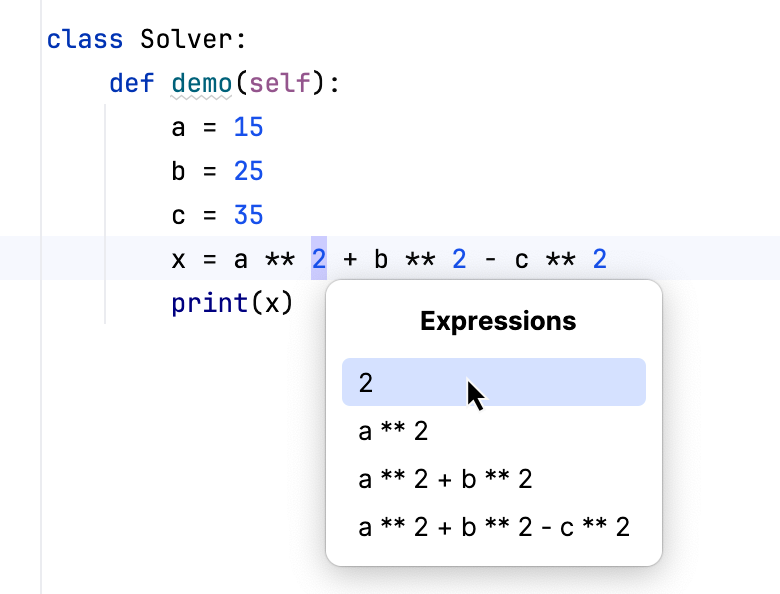
  3. If more than one expression is detected for the current cursor position, the Expressions list appears. If this is the case, select the required expression. To do that, click the expression. Alternatively, use the UpUp and DownDown arrow keys to navigate to the expression of interest, and then press EnterEnter to select it.

    IntroduceConstant_Python_InPlace_SelectExpression

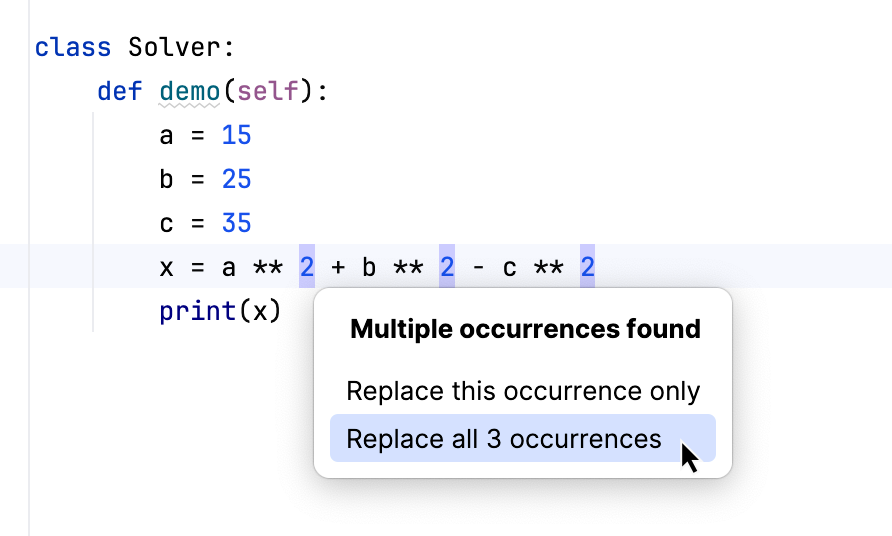
  4. If more than one occurrence of the expression is found within the class, specify whether you wish to replace only the selected occurrence, or all the found occurrences with the new constant:
    IntroduceConstant_Python_InPlace_ReplaceOccurrences
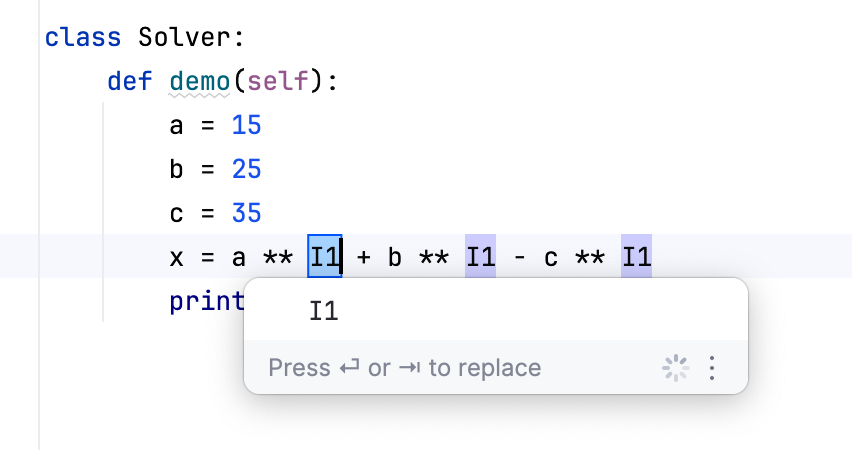
  5. Specify the name of the constant. Select the name from the list or type the name in the box with a red border.
    IntroduceConstant_Python_InPlace_SelectName
  6. To complete the refactoring, press TabTab or EnterEnter.

    If you haven't completed the refactoring and want to cancel the changes you have made, press EscapeEscape.

    Note that sometimes you may need to press the corresponding key more than once.

To extract a constant using the dialog box

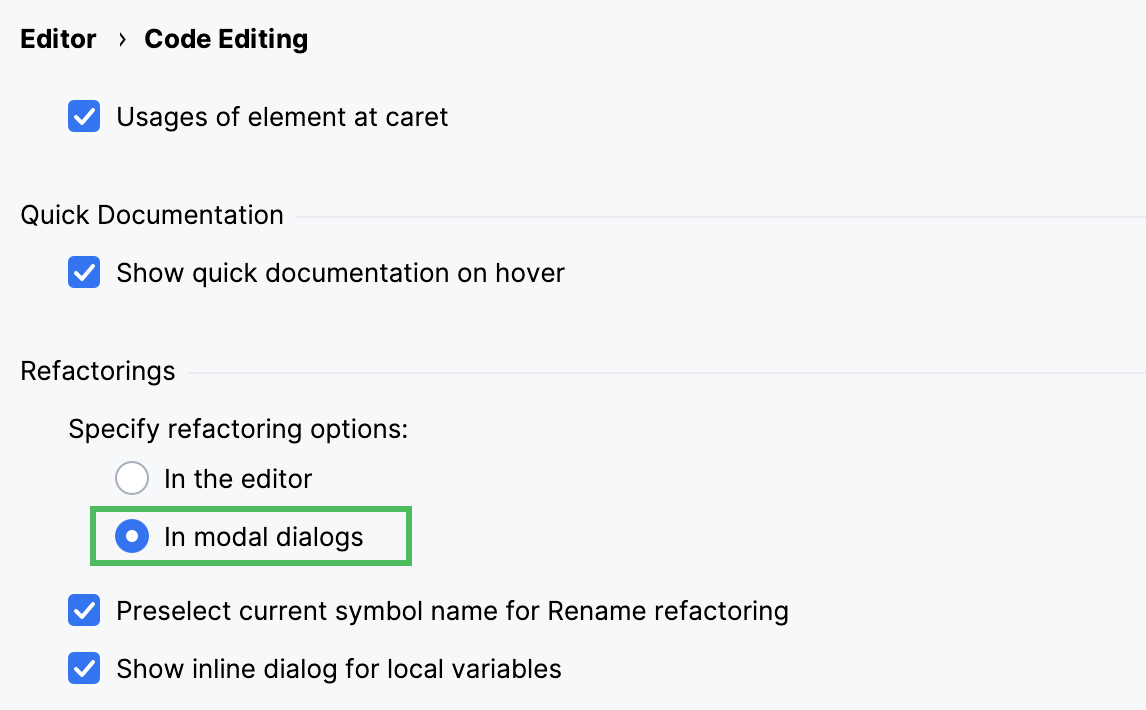
If the Enable in place refactorings check box is cleared on the Editor settings, the Extract Constant refactoring is performed by means of the Extract Constant Dialog dialog box.

enableInplaceRefactoringCleared

  1. If you are working with Python code, make sure that the Enable in place refactorings option is off in the editor settings. (By default, the Extract Constant refactorings for Python are performed in-place.)
  2. In the editor, select the expression or variable to be replaced with a constant, or just place the cursor within such an expression or variable declaration.
  3. In the main or the context menu, choose Refactor | Extract Constant, or press Ctrl+Alt+CCtrl+Alt+C.
  4. In the Expressions pop-up menu, select the expression to be replaced. Note that PyCharm highlights the selected expression in the editor.
  5. In the Extract Constant Dialog dialog that opens, specify the name of the new constant.
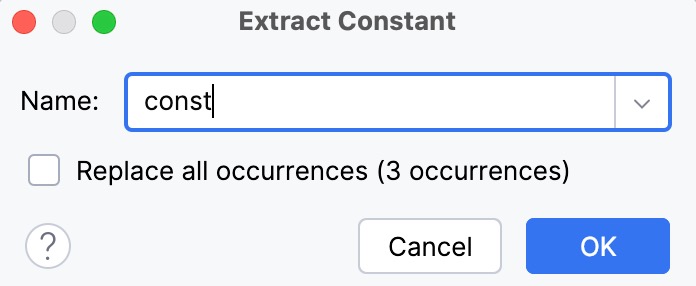
  6. To automatically replace all occurrences of the selected expression (if it is found more than once), select the option Replace all occurrences.
  7. Click OK to create the constant.
  8. In the Extract Constant Dialog dialog that opens:
    1. Specify the name of the new constant.
    2. Select the class where the constant will be introduced. If you select an enum class here, use the Introduce as enum constant option to specify whether the constant should be an enum constant, or a usual field.
    3. In the Visibility area, select the visibility scope for the new constant.
    4. If the new constant is going to replace an existing variable, you can choose to delete the corresponding variable declaration. To do that, use the Delete variable declaration check box.
    5. To replace all the occurrences of the selected expression (if the selected expression is found more than once in the class), select the Replace all occurrences check box.
    6. In the projects configured for using annotations, you can annotate the constant of the String type as @NonNls to prevent it from change during possible localizations. To do so, select the option Annotate field as @NonNls.
    7. Click OK.

See Also

Reference:

Web Resources: