Switch between Mercurial working directories
Install the Mercurial plugin
This functionality relies on the Mercurial plugin, which you need to install and enable.
Press Ctrl+Alt+S to open settings and then select .
Open the Marketplace tab, find the Mercurial plugin, and click Install (restart the IDE if prompted).
The Mercurial integration with PyCharm provides the possibility to switch update the repository's working directory to the specified changeset or a specific line of development. Changesets can be identified by their hashes or by previously assigned tag identifiers.
By default, Mercurial requires that before update the current working directory should be clean. If your current working copy is not clean, you can either commit the changes or shelve them as described in Shelve or stash changes.
Quickly switch to another branch or bookmark
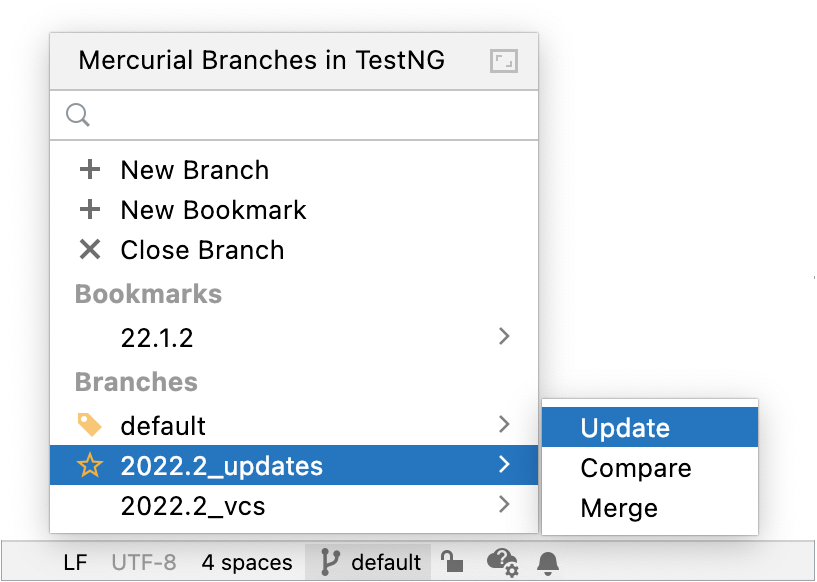
In the Status bar, click the Mercurial Branch widget to open the VCS widget.
Select the branch or bookmark to which you want to switch and in the menu that opens, click Update.
Switch to another working directory
In the main menu, go to .
In the Switch Working Directory dialog that opens, specify the target working directory:
To switch to another line of development, choose Branch and select the desired branch from the list.
To switch to a changeset to which you have previously assigned a tag identifier, choose Tag and select the desired tag from the drop-down list.
To switch to a changeset identified by a hash, choose Revision and type the desired revision number in the field.
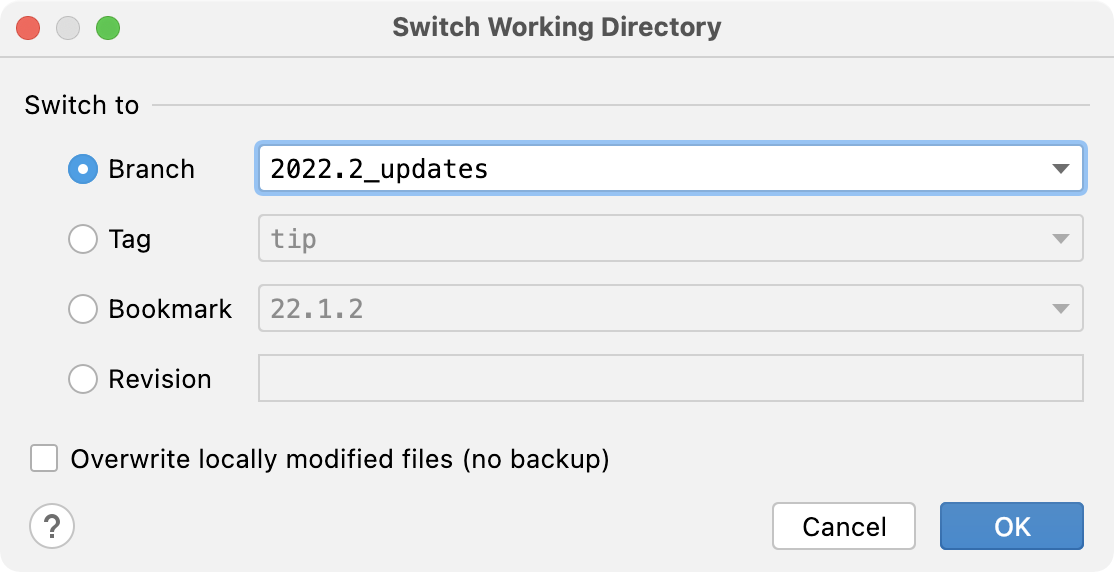
To have any local changes overwritten, select the Overwrite locally modified files (no backup) checkbox.
As soon as a conflict takes place, the Conflicts dialog opens with a list of conflicting files to resolve.