Inspect This
This command is a shortcut to ReSharper's code exploration and inspection features:
You can invoke this command from the Solution Explorer, File Structure window, and other tool windows. Depending on the context, this shortcut helps you access all code-exploration features available in that context.
View contextually available code exploration features
Place the caret at a symbol in the editor or select the symbol in a tool window.
Press Control+Shift+Alt+A or choose from the main menu. Alternatively, you can press Control+Shift+A, start typing the command name in the popup, and then choose it there.
The Inspect This list appears.
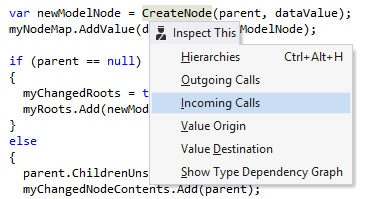
Choose an item from the list and click it or press Enter.
This feature is supported in the following languages and technologies:
|
|
|
|
|
|
|
|
|
|---|---|---|---|---|---|---|---|---|
|
|
|
|
|
| | | |


The instructions and examples given here address the use of the feature in C#. For more information about other languages, refer to corresponding topics in the Languages and frameworks section.