Generate Formatting Members
Any type in .NET implements the ToString() method, which returns a string representation of an object of the type. To return a meaningful string for our types, we often need to override the ToString() method.
ReSharper allows you to automate this routine with the Generate formatting members command.
Depending on the target C# version, ReSharper either uses interpolated string or String.Format(). Note that you can always convert between those with context actions Alt+Enter.
In the example below, this command is used to generate the ToString() method based on _radius and _center fields.
Before generation | After generation |
|---|---|
class Circle
{
int _radius;
Point _center;
}
|
class Circle
{
int _radius;
Point _center;
public override string ToString()
{
return $"{nameof(_radius)}: {_radius}, {nameof(_center)}: {_center}";
}
}
|
Generate overrides for formatting members
In the editor, place the caret at the type name or within a type at the line where you want to insert overrides for formatting members. If the caret is on the type name, the generated code will be added in the beginning of the type declaration.
Press Alt+Insert or choose from the main menu. Alternatively, you can press Control+Shift+A, start typing the command name in the popup, and then choose it there.
In the Generate popup, select Formatting Members.
In the Generate dialog that appears, select fields and/or auto-properties to be used in the
ToString()override.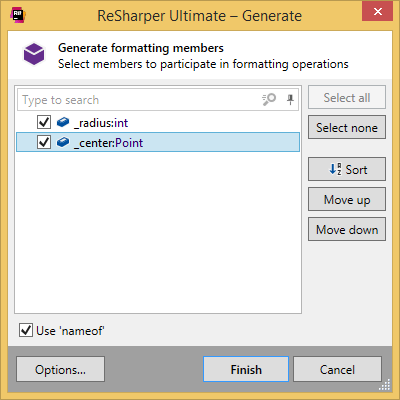
If there are no fields/properties in your type or you do not select any of them, ReSharper, depending on your settings, throws new
NotImplementedException(), returns default value, or puts code that will not compile in the body of the generated methods. You can configure the settings on the page of ReSharper options.Optionally, use the following controls in the dialog:
ToString already exists — appears if an implementation of
ToString()already exists and lets you choose whether to:Replace the method if it already exists.
Put the newly generated method side by side with the existing one.
Skip generating a new method altogether.
Use 'nameof' — appears if the target C# version is higher than 6.0. If this checkbox is selected, ReSharper will use
nameof(symbol_name)to define the string representation of the symbol, otherwise, it will calculate the string representation automatically, for example, a field named_radiuswill be rendered as"Radius".
Click Finish to complete the wizard.
You can also click Options to review or modify common code generation preferences on the page of ReSharper options.
You can also generate the override by choosing Overriding Members in the Generate menu, but in this case the override will return base.ToString().
This feature is supported in the following languages and technologies:
|
|
|
|
|
|
|
|
|
|---|---|---|---|---|---|---|---|---|
|
| | | | | | | |


The instructions and examples given here address the use of the feature in C#. For more information about other languages, refer to corresponding topics in the Languages and frameworks section.