Copy Type refactoring
This refactoring allows you to copy a class, interface, struct, or enum defined in your solution from one namespace to another, or clone it within the same namespace. For partial types, all parts will be copied even if they are located in separate files.
Make a copy of a type
Select a type in one of the following ways:
In the editor, place the caret at the name of a type.
Select a type in the Solution Explorer.
Select a type in the File Structure window window.
Select a type in the Class View.
Select a type in the Object Browser.
Select a type in the type dependency diagram.
Do one of the following:
Press Control+Shift+R and then choose Copy Type.
Right-click and choose Refactor | Copy Type from the context menu.
Choose from the main menu.
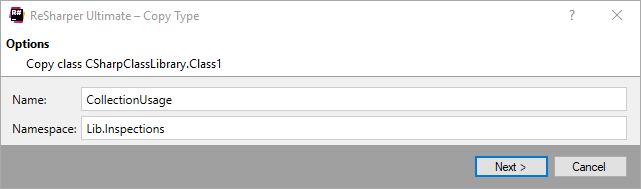
The Copy Type dialog will open.
Specify a name for the copied type and a namespace where it should be added.
To apply the refactoring, click Next.
If no conflicts are found, ReSharper performs the refactoring immediately. Otherwise, it prompts you to resolve conflicts.
This feature is supported in the following languages and technologies:
|
|
|
|
|
|
|
|
|
|---|---|---|---|---|---|---|---|---|
|
| | | |
| | | |


The instructions and examples given here address the use of the feature in C#. For more information about other languages, refer to corresponding topics in the Languages and frameworks section.