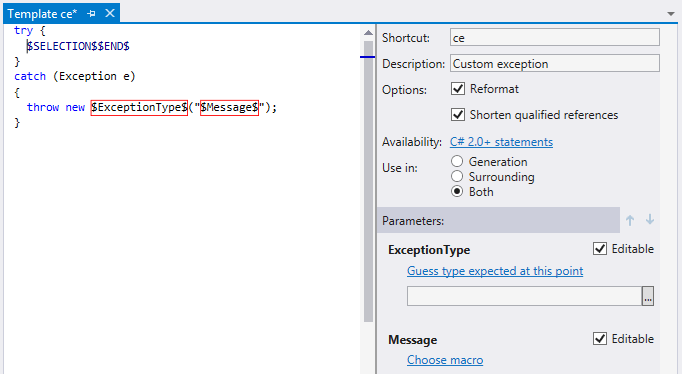
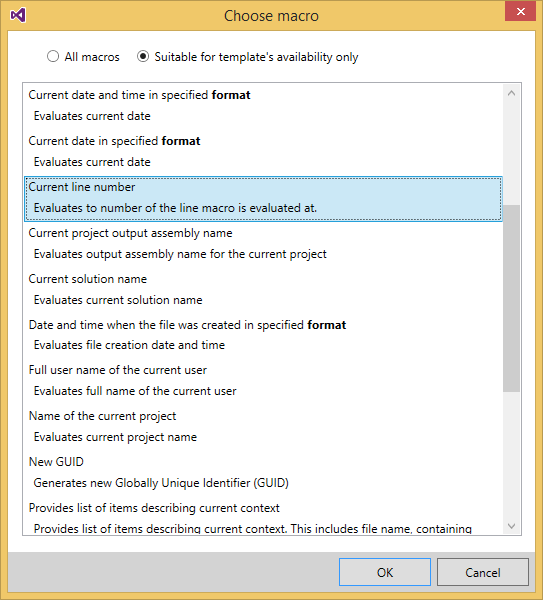
This dialog box helps specify a macro that ReSharper should use
to suggest or guess values for each template variable.
You will use this dialog box when you
declare or edit template variables.
The dialog contains a set of predefined macros described below.
| Macro | Description |
|---|---|
|
[No macro]
Go to top |
No selections were made. The user assumes full responsibility for specifying the value of the template variable after expanding the template. Suggestions list in the resulting code is empty. |
|
Comma-delimited list of values
Go to top |
Displays the specified list of values. When you choose this macro, a Comma-delimited list of values link appears in the Value column in the corresponding line of the table. This link remains highlighted in red until you enter a value. Click this link to open the Choose Parameter Value dialog box where you should enter some values delimited by commas. |
|
Constant value
Go to top |
A macro expands to static text provided by the developer. When you choose this macro, a Constant value link appears in the Value column in the corresponding line of the table. This link remains highlighted in red until you enter a value. Clicking this link opens the Choose Parameter Value dialog box where you should enter the constant value to be returned by the macro. |
|
ASP.NET Masterpage content generator
Go to top |
Generates content for masterpage content placeholders at the point where the variable is evaluated. |
|
ASP.NET MVC Action
Go to top |
Shows completion list with available ASP.NET MVC Actions at the point where the variable is evaluated. |
|
ASP.NET MVC Controller
Go to top |
Shows completion list with available ASP.NET MVC Controllers at the point where the variable is evaluated. |
|
Cast to the required type (if the cast is necessary)
Go to top |
Inserts (if required) a cast to the type that is expected at the left side of an assignment operator. |
|
Clipboard content
Go to top |
Inserts the text that is currently stored in clipboard. |
|
Containing namespace
Go to top |
Evaluates the name of the containing namespace. |
|
Containing type member
name
Go to top |
Evaluates the short name of the innermost containing type member (for example, method or property). |
|
Containing type name
Go to top |
Evaluates the name of the innermost containing type. |
|
Current date and time in specified format
Go to top |
Evaluates current date and time. When you choose this macro, a format link appears in the Value column in the corresponding line of the table. Click the link to specify the desired format in the Choose Parameter Value dialog box. |
|
Current date in specified format
Go to top |
Evaluates current date. When you choose this macro, a format link appears in the Value column in the corresponding line of the table. Click the link to specify the desired format in the Choose Parameter Value dialog box. |
|
Current file name
Go to top |
Evaluates the current file name. |
|
Current file name without extension
Go to top |
Evaluates the current file name without extension. Perfect for debugging/diagnostic messages. |
|
Current line number
Go to top |
Expands to the current line number. |
|
Current project output assembly name
Go to top |
Evaluates the output assembly name for the current project. |
|
Current solution name
Go to top |
Evaluates the current solution name. |
|
Default namespace
Go to top |
Gets the default namespace for the current project. |
|
Default namespace for current file
Go to top |
Gets the default namespace for the current file. |
|
Execute basic completion
Go to top |
Shows type code completion list at the point where the variable is evaluated. |
|
Execute SmartType completion
Go to top |
Shows Smart Type code completion list at the point where the variable is evaluated. |
|
Full user name of the current user
Go to top |
Evaluates the full name of the current user. |
|
Guess element type for expected collection type
Go to top |
Guesses element type if a collection type is expected at this point. |
|
Guess element type of collection represented by variable
Go to top |
ReSharper will try to guess the element type of the collection that is substituted as a value of another template variable at the time of template expansion. When you choose this macro, a variable link appears in the Value column in the corresponding line of the table. This link remains highlighted in red until you specify a variable. Click this link to open the Choose Variable to Reference dialog box that helps choose a template variable from the list of available options. |
|
Guess key type of dictionary represented by variable
Go to top |
Analyzes code and guesses type of key of a dictionary collection. |
|
Guess type expected at this point
Go to top |
Guesses expected type. |
|
Guess value type of dictionary represented by variable
Go to top |
Analyzes code and guesses type of value of a dictionary collection. |
|
Insert reference to type
Go to top |
Evaluates the selected type name. |
|
Insert runat="server" if server-side tag selected
Go to top |
Inserts runat="server" if server-side tag is selected. |
|
Name of the current project
Go to top |
Evaluates current project name. |
|
New GUID
Go to top |
Generates new GUID. |
|
Provide list of items describing current context
Go to top |
Provides list of items describing current context. This includes file name, containing type name, namespace name, etc. |
|
Short name of the current user
Go to top |
Evaluates current user name. |
|
Suggest an array variable
Go to top |
When expanding the template, ReSharper tries to suggest a reasonable unique name for a variable that is also consistent with the variable type and code style/naming options. |
|
Suggest attribute value
Go to top |
Suggests attribute value for current html tag attribute. |
|
Suggest enumerable variable
Go to top |
Suggests visible variable that can be enumerated (i.e. used in foreach loops). |
|
Suggest name for a variable
Go to top |
When executed in variable declaration (where variable name should stand), suggests name for the variable. |
|
Suggest name for an index variable
Go to top |
This macro informs ReSharper that the variable is to be used as an index variable to get appropriate name suggestions. |
|
Suggest parameter of
type
Go to top |
Suggests a list of parameters of a specified type. When you choose this macro, a type link appears in the Value column of the corresponding table row. Click this link to open the Pick a Type dialog box where you can choose from the list of available types or enter a type name directly. |
|
Suggest type for a
new variable
Go to top |
Suggests type for a new variable declared in the template. |
|
Suggest variable of type
Go to top |
Suggests a list of variables of the specified type. When you choose this macro, a type link appears in the Value column of the corresponding table row. Click this link to open the Pick a Type dialog box where you can choose from the list of available types or enter a type name directly. |
|
Suggest attribute name by tag
Go to top |
Suggests attribute name used in the same tags in current document. |
|
Suggest tag name
Go to top |
Suggests tag name used in current document. |
|
Suggest XML attribute name
Go to top |
Suggests XML attribute name used in current document. |
|
Suggest XML attribute name by tag
Go to top |
Suggests XML attribute name used in the same tags in current document. |
|
Suggest XML tag name
Go to top |
Suggests XML tag name used in current document. |
|
Value of another variable with the first character in lower case
Go to top |
Expands to a value of another template variable but with the first character in lower case. You will need to choose the reference variable using the Choose Variable to Reference dialog box that you can access by clicking the another variable link in the Value column of the corresponding table row. |
|
Value of another variable with the first character in upper case
Go to top |
Expands to a value of another template variable but with the first character in the upper case. As with the previous macro, you'll need to choose the reference variable using the Choose Variable to Reference dialog box. |

.