JavaScript Tests
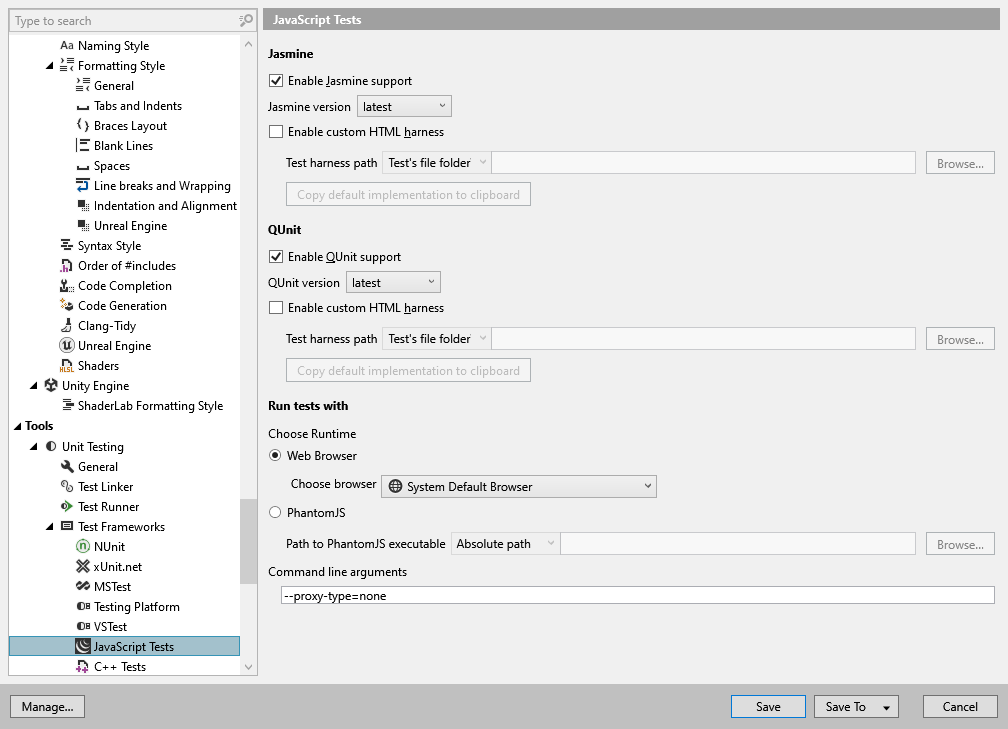
In this page of ReSharper options, you can adjust preferences for unit testing assistance in JavaScript and TypeScript.
Jasmine
Enable Jasmine support | By default, ReSharper adds action indicators allowing you to execute Jasmine tests right from the editor and automatically discovers Jasmine tests in your solution. Clear this checkbox to disable this behavior. |
Jasmine version | Choose the version of Jasmine framework used by ReSharper test runner. |
Enable custom HTML harness | Use this option to allow ReSharper's test runner run tests with custom HTML test harness, compatible with the Chutzpah test runner. |
Test harness path | Filename or path to the HTML harness file. Use the selector to specify absolute or relative path. |
Copy default implementation to clipboard | Copies to the clipboard a default HTML harness template with special Chutzpah placeholders. |
QUnit
Enable QUnit support | By default, ReSharper adds action indicators allowing you to execute QUnit tests right from the editor and automatically discovers QUnit tests in your solution. Clear this checkbox to disable this behavior. |
QUnit version | Choose the version of Jasmine framework used by ReSharper test runner. |
Enable custom HTML harness | Use this option to allow ReSharper's test runner run tests with custom HTML test harness, compatible with the Chutzpah test runner. |
Test harness path | Filename or path to the HTML harness file. Use the selector to specify absolute or relative path. |
Copy default implementation to clipboard | Copies to the clipboard a default HTML harness template with special Chutzpah placeholders. |
Run Tests With
Web Browser | If this option is selected, you can specify the browser where ReSharper will run tests. |
PhantomJS | If this option is selected, ReSharper will run tests with PhantomJS. You will need to specify relative or absolute path to the PhantomJS.exe. |
Command line arguments | Specify optional command-line arguments passed to the selected runtime (web browser or PhantomJS). |