Code Inspection and Quick-Fixes in ASP.NET
Most of ReSharper's code analysis features are also supported in ASP.NET. You can find the detailed information on these features in the corresponding topics of the Code analysis section. In the main topic of the section, you can also find the feature matrix and check what exactly is supported in ASP.NET.
In this topic, you can find some examples of using code analysis features in ASP.NET.
Code inspection
Various code inspections are available for ASP.NET, including detecting unused import namespaces, unknown symbols and entities, and so on. You can set a severity level for each inspection.

To navigate between code issues that ReSharper discovers, use marker bar and status indicator.
If the locations of files in design time are different from the location where the application is deployed, you can use Path mapping to help ReSharper analyze your code.
Auto-importing namespaces
During code analysis ReSharper detects and highlights symbols that can't be resolved because the appropriate Import or Register directives are missing. Also, it offers an easy way to add such directives and fix the problem. ReSharper adds the necessary Import directive for .NET symbols:

Or a necessary Register directive for ASP.NET controls:

For more information, refer to Import missing namespaces.
Examples of quick-fixes
Import type
If an Import directive is missing for a type used in the file, ReSharper suggests this quick-fix.
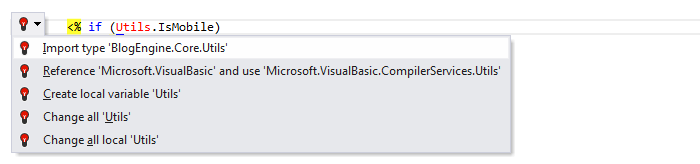
After applying the quick-fix, the necessary directive is added.

Create method
ReSharper informs you that the ChangePasswordPushButton_Click method doesn't exist...

...and offers to create one.
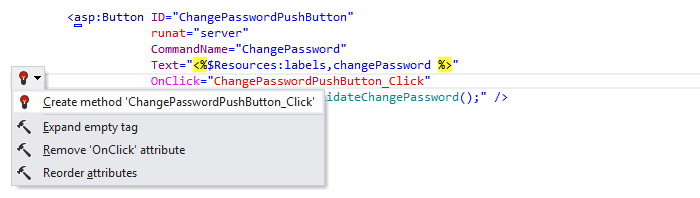
The method declaration is inserted into the code-behind file or into the current file depending on web page code model (single-file page model or code-behind page model).

Change signature
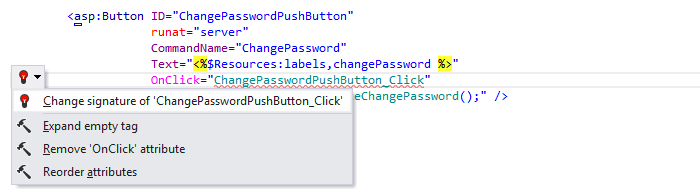
The signature of the ChangePasswordPushButton_Click method doesn't match the signature of the OnClick event.
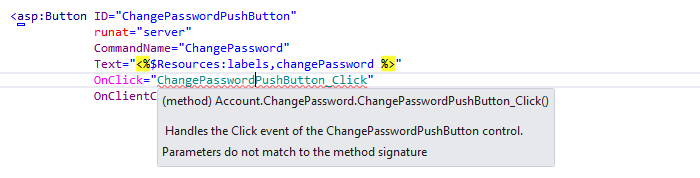
ReSharper offers a quick-fix to change the signature of the method:
Remove unused directives in file
ReSharper detects unused import namespace directives.

As they are unnecessary ReSharper suggests a quick-fix that removes all of them from the current file.

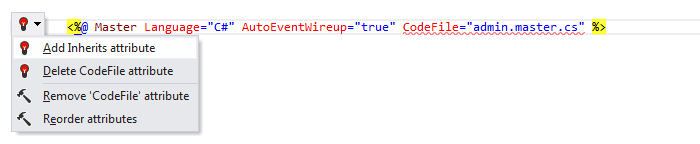
Add Inherits attribute
This quick-fix is specific for ASP.NET directives. The CodeFile attribute is used together with the Inherits attribute to associate a code-behind source file with a user control or a page. When the latter is missing, ReSharper suggests a quick-fix:
Create ContentPlaceholder
If there is a Content control on a content page that is mapped to a missing ContentPlaceholder on the master page, ReSharper suggests creating the corresponding ContentPlaceholder control on the corresponding master page.
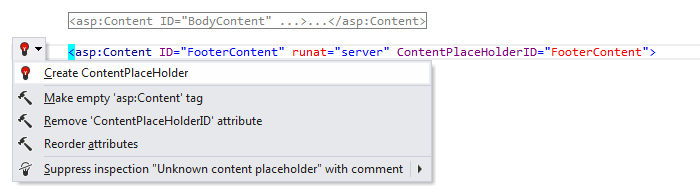
The ContentPlaceholder control with the corresponding ID attribute is added to the master page:
