How to use this help
This documentation aims to provide comprehensive information on ReSharper features and usage scenarios. If you have not found the answer to your question about ReSharper here or if you have noticed an error, use the comment field at the bottom of the related page.
Navigation and search
Here are some ways to navigate and search in ReSharper help:
Use the table of contents displayed on the left side of your browser window. Topics in the table of contents are organized based on tasks that you can perform with ReSharper.
Jump between chapters of the current topic using links on the right side of your browser window.
Click the search icon at the top right corner and start typing what you want to find.
Use the Previous/Next links below the main content block of the page to navigate to neighbouring topics.
Use the See Also section at the bottom of the page to navigate to related topics.
ReSharper features in different languages
In most of descriptions and examples, C# is used as the target language. Some features may not be available or may work differently in other supported languages. Supported languages are often listed in the lower part of feature topics. Instructions and examples for specific languages are available in the Languages and frameworks section.
You can also study the matrix of features and supported languages in the ReSharper features in different languages topic.
Keyboard shortcuts and command aliases
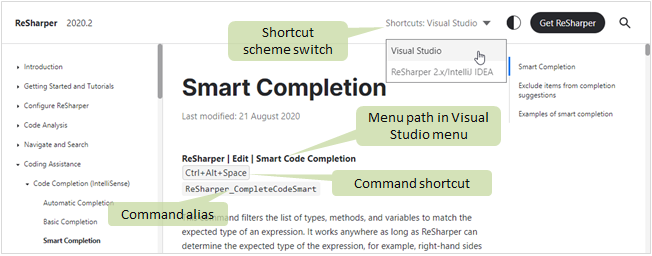
ReSharper provides two default shortcut schemes. Therefore, in this help system, you can adjust keyboard shortcuts displayed within the help content depending on the scheme that you prefer to use in the product.
To select the shortcut scheme for help pages, use the selector in the upper right corner of a page. This selector only appears if at least one adjustable shortcut is displayed in the page.
In help topics that describe specific commands, the path to the command in the main menu , command alias and command shortcut (according to the selected scheme) are displayed just below the topic header.
Note that some commands may not be available from the main menu or may not have a default shortcut.
If you want to assign a custom shortcut to a command, you can use the command alias to find the command in Visual Studio options. For more information, refer to Configure keyboard shortcuts. Command aliases for all ReSharper commands are also listed on the Default keyboard shortcut schemes page.