Add and remove #region blocks
ReSharper can help you quickly add, move and remove #region blocks in your code.
Manage regions in the editor
Right in the editor, you can quickly surround the current selection with region. ReSharper will add the #region and #endregion directives and place the caret in the position where you can type the region name.
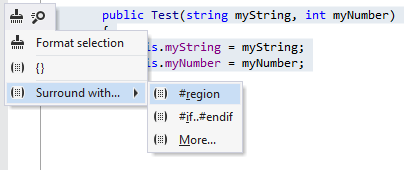
You can also move regions in different ways using the Move code element feature:
You can move the
#regionand#endregiondirectives up and down so that the region includes the neighbouring elements, or so that the elements are left out of the region. To do so, place the caret at the directive that you want to move, press Ctrl+Shift+Alt, and then use the up and down arrow keys.You can move the whole region up and down in the scope. To do so, select the whole region including
#regionand#endregiondirectives, press Ctrl+Shift+Alt, and then use the up and down arrow keys.
To remove an existing region, press Alt+Enter and choose the corresponding context action.
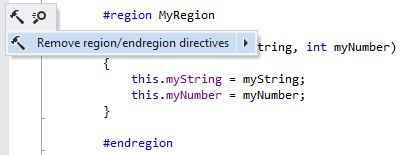
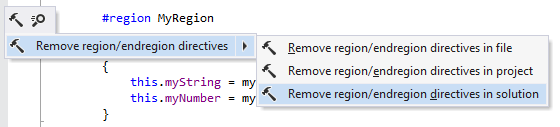
Note that you can also apply this action in a wider scope. For example, you can use it to remove all #region blocks in the entire solution:
Work with regions in the File Structure window
Regions that surround types and/or type members appear in the File Structure window window. A region is displayed as a frame that surrounds the corresponding items. You can expand/collapse regions to show/hide items inside them.
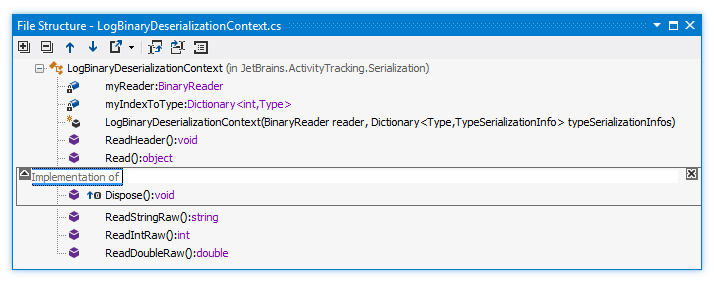
You can wrap symbols into a region right from the file structure. To do so, select the members you want to wrap (Ctrl-click items for multiple selection), and then click Surround with Region .png "ThemedIcon.Enregion.Screen.(Gray).png") on the toolbar.
on the toolbar.
You can remove any region by clicking the cross icon .png "ThemedIcon.Close.Screen.(Gray).png") in the upper right corner of the region frame.
in the upper right corner of the region frame.
To rename a region, double-click its name or press F2 over it, and then type the new name.