Syntax highlighting
ReSharper extends the default Visual Studio's symbol highlighting. Additionally, it highlights fields, local variables, types, and other identifiers with configurable colors. For example, ReSharper syntax highlighting allows you to easily distinguish between local variables and fields in your code.
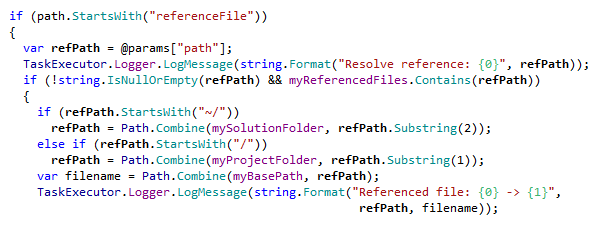
ReSharper syntax highlighting for C# with default colors looks as follows:
Toggle ReSharper syntax highlighting
Select from the main menu or press Alt+R O, then choose on the left.
Use the Color Identifiers checkbox to enable or disable ReSharper syntax highlighting.
Click Save in the Options dialog to apply the modifications and let ReSharper choose where to save them, or save the modifications to a specific settings layer by choosing this layer from the Save To selector. For more information, see manage and share resharper settings.
Configure colors and fonts
Choose from the menu and then go to page.
In Display items, scroll down the list until you find items that begin with
ReSharper. Explore the list to view or edit formatting and highlighting of ReSharper items.
This feature is supported in the following languages and technologies:
|
|
|
|
|
|
|
|
|
|---|---|---|---|---|---|---|---|---|
|
| |
|
|
|
|
|
|


The instructions and examples given here address the use of the feature in C#. For more information about other languages, refer to corresponding topics in the Languages and frameworks section.