Find Usages of Symbols
This command allows finding all usages of one or more symbols in the solution and referenced assemblies. You can start the search from the declaration of the symbol or from any other usage. You can invoke this command from the Solution Explorer, File Structure window, and other tool windows.
Find usages of a symbol from the current context
Place the caret at a symbol in the editor or select the symbol in a tool window.
Do one of the following:
From the main menu, choose .
Right-click and choose Find Usages in the context menu.
Press Alt+F7.
If a single usage is found, ReSharper will navigate you to the usage directly in the editor. Two or more search results will be shown in the Find Results window, where you can conveniently explore and analyze the usages.
You can also list and study symbol usages in the Peek Definition view.
To do so, by default you can Ctrl-click the declaration or any usage with the middle mouse button. If you want to disable this, clear the Use Ctrl+Middle Button Click Peek Usages checkbox on the page of ReSharper options Alt+R, O. Or you can always invoke this command from the main menu: .
Find usages of any symbol from the solution and referenced assemblies
Search the desired symbol using one of the following commands:
Search Everywhere/Go to Type Control+N
Go to Symbol Shift+Control+Alt+N
Go to File Member Control+F12
When the desired symbol appears in the results list, select it using the keyboard and then press Alt+F7.
If a single usage is found, ReSharper will navigate you to the usage directly in the editor. Two or more search results will be shown in the Find Results window, where you can conveniently explore and analyze the usages.
You can change the default behavior so that even the single found usage is also displayed in the Find Results window. To do so, clear the Go to Usage: if there is only one result.... checkbox on the page of ReSharper options Alt+R, O.
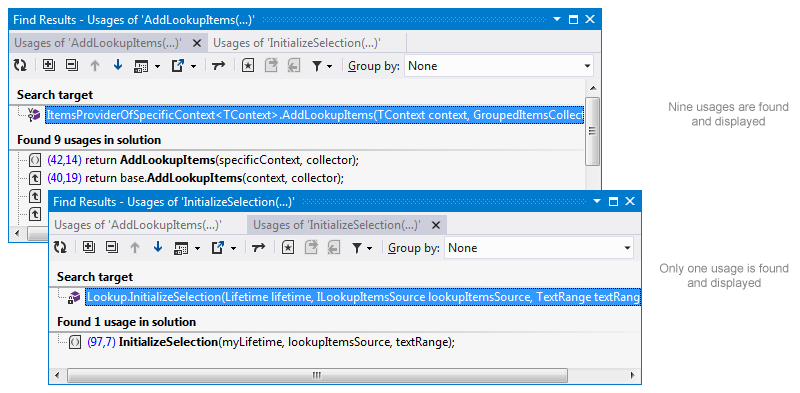
It is also possible to search for usages of multiple symbols declared in a specific scope, that is in one or more files, folders, or projects.
Find usages of multiple symbols
In the Solution Explorer, select one or more nodes — files, declarations inside them, folders, or projects.
Press Alt+F7.
Search results will be shown in the Find Results window, where you can see all declarations in that scope (search targets) and all usages of these symbols in the solution.
Find usages of generic types
When searching for usages of generic types such as IFoo<string>, you may actually want to find either all usages of IFoo<> or usages of the exact generic substitution IFoo<string> only.
By default, ReSharper allows you to disambiguate the search results by showing an additional popup.
You can also configure the feature so that a specific search logic (either all substitutions or the exact substitution) should be always performed. To do so, use the Find generic type usages behavior selector on the page of ReSharper options Alt+R, O.
This feature is supported in the following languages and technologies:
|
|
|
|
|
|
|
|
|
|---|---|---|---|---|---|---|---|---|
|
|
|
|
|
|
|
| |


The instructions and examples given here address the use of the feature in C#. For more information about other languages, refer to corresponding topics in the Languages and frameworks section.