Go to Related Files
Navigating to related files may be very useful for web applications: for example, it enables you to jump from a web form to its master page, user controls, referenced images or JavaScript and CSS files. In ASP.NET MVC applications, it simplifies navigation from views to controllers and back.
Place the caret within a file or select the file in the Solution Explorer.
Press Control+Alt+Shift+G or choose from the main menu. Alternatively, you can press Control+Shift+A, start typing the command name in the popup, and then choose it there.
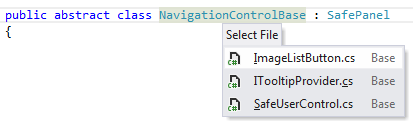
If there are some related files, the Select File list opens. Select a file from the list and click it to open it in the editor.
This feature is supported in the following languages and technologies:
|
|
|
|
|
|
|
|
|
|---|---|---|---|---|---|---|---|---|
|
|
|
|
|
|
|
| |


The instructions and examples given here address the use of the feature in C#. For more information about other languages, refer to corresponding topics in the Languages and frameworks section.