Safe Delete refactoring
If you are going to delete any other symbol or a project/assembly reference use this refactoring to ensure that the solution will compile after the deletion. If there are no references to the deleted item, or if all references are safely collapsible, the item will be deleted right away. Otherwise, ReSharper will show you all the references that are not safe to delete, allowing you to edit the corresponding code. If there are any empty files left after removing the symbol, the refactoring can also remove these files.
Safely delete a symbol
Select a symbol in one of the following ways:
In the editor, place the caret at the name of a symbol.
Select a symbol in the Solution Explorer.
Select a symbol in the File Structure window window.
Select a symbol in the Class View.
Select a symbol in the Object Browser.
Select a symbol in the type dependency diagram.
Do one of the following:
Press Alt+Delete.
Press Control+Shift+R and then choose Safe Delete.
Right-click and choose Refactor | Safe Delete from the context menu.
Choose from the main menu.
The Safe Delete dialog will open.
If the symbol has base symbols or inheritors or both, ReSharper prompts you to specify which symbols should be removed.
In the case of a type, you can delete the type and all its inheritors.
In case of a polymorphic method or property, you can delete the base members as well by choosing one of the following options:
Remove the whole hierarchy: the selected member, all bases symbols and all its inheritors
Remove the selected member and all its inheritors
Remove the single member of the hierarchy, that is, the selected member
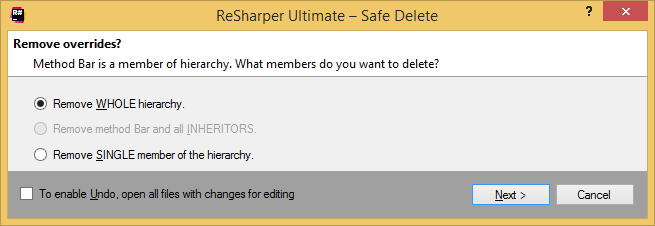
To apply the refactoring, click Next.
If no usages are found, the symbol is deleted immediately. Otherwise, the detected conflicts are shown in the next step of the refactoring wizard and you will need to resolve the conflicts manually.
Safely delete a project/assembly reference
In the Solution Explorer, select one or more references you want to delete.
Do one of the following:
Press Alt+Delete.
Press Control+Shift+R and then choose Safe Delete.
Right-click and choose Refactor | Safe Delete from the context menu.
Choose from the main menu.
If only unused references are selected, the refactoring is performed immediately. Otherwise, the Safe Delete Assembly Reference dialog appears with all usages of symbols from the projects/assemblies being deleted. You can click each usage to navigate to the source code and see if you can delete it. The list of usages in the dialog is updated automatically as you change the code.
As soon as there are no more usages in the dialog, you can click Next to complete the deletion.
If you want to delete the selected assembly references and get rid of the usages later, clear the Remove only unused references and click Next.
There are other ways of cleaning project and assembly references.
You can invoke the Optimize References command, which will let you analyze all references and remove unused ones.
You can invoke the Remove Unused References command on the project or on the References node in the Solution Explorer.
This feature is supported in the following languages and technologies:
|
|
|
|
|
|
|
|
|
|---|---|---|---|---|---|---|---|---|
|
|
|
|
|
|
|
| |


The instructions and examples given here address the use of the feature in C#. For more information about other languages, refer to corresponding topics in the Languages and frameworks section.