Storage of templates
One of the interesting things about ReSharper's code templates is their distributed storage. Code templates behave smart enough to use and manage them without deep understanding of their internal organization details. However, you may need to study these details if you experience any problems with editing or sharing templates or have complex usage scenarios.
Predefined Templates
All predefined templates are stored in the ReSharper installation. All necessary modifications, including deletion of predefined templates, are saved in settings layers.
To better understand the way it works. let's simplify a predefined template to three fields: body, description, and scope, as shown in the picture below. And now imagine that we have edited the template's scope in Layer 1, then the template's description in Layer 2, and then the template's scope again in layer 3:
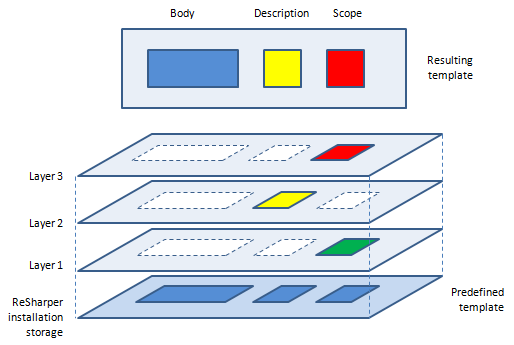
The resulting modified template, which we get when all three layers are applied, will have the body from the original predefined template, the description from Layer 2, and the scope from Layer 3, as it overrides the underlying Layer 1.
Code templates are internally identified by GUIDs to allow all fields to be editable. Predefined templates have the same GUIDs in all ReSharper installations. Therefore, if you export your modification of a predefined template, other ReSharper users will have no problem importing it.
As all modifications to predefined templates are saved in settings layers, you can always return to the default state of these template by clearing the layers that contain modifications. Even when you delete a predefined template, ReSharper just marks it as deleted in the corresponding setting layer, so if you clear this layer the deleted template is recovered.
To clear a settings layer, choose in the main menu, then right-click the layer and choose Reset, tick the PatternsAndTemplates item and click Reset.
User-defined Templates
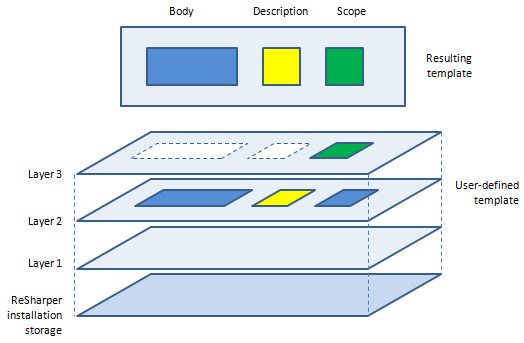
Unlike predefined templates, each user-defined template is saved in some settings layer. If you edit such template in the layer where it is defined, the edited fields are modified. However, if you edit a user-defined template in another layer, the modifications will be saved in this layer the same as for a predefined template.
The following simplified model of a user-defined template shows a template created in Layer 2, then its description is modified in the same layer, and finally, its scope is edited in Layer 3:
User Interface
You can control storage of templates in the Templates Explorer window. Use the Layer selector to choose a setting layer and see which user-defined templates are saved in this layer and modify them if necessary. The order of layers displayed in the Layer selector corresponds to the order, in which layers override each other (see illustrations above).
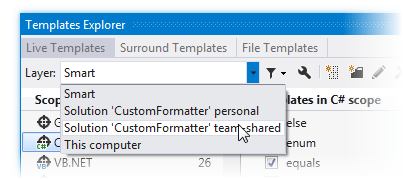
If the selected layer includes only modifications to other templates, you will not see them. However, if this layer has modifications to predefined templates, then you can see how these modifications are applied. To do so, click Filter Templates .png "ThemedIcon.Filter.Screen.(Gray).png") and choose Show predefined templates.
and choose Show predefined templates.
To create a new template in a specific layer, choose this layer in the Layer selector and click New Template .png "ThemedIcon.AddLiveTemplate.Screen.(Gray).png") .
.
The Smart layer works as follows:
If you create a new template, it is saved in 'This computer' layer.
If you modify a template saved in 'This computer' layer, the modifications are saved in this layer.
If you modify a template saved in any other layer, the modifications are saved in 'Solution personal' layer.
If you modify a predefined template, the modifications are saved in 'This computer' layer.
The mechanism of template storage may seem tricky at first, but it helps you have a right set of templates for each solution, share templates with your team, import and export templates, all without much effort. Here are a couple of examples to illustrate how it may be helpful.
You have changed a scope of a predefined template so that it can apply in some custom file types. Then, in a newer version of ReSharper, the template body was updated. After installing this newer version, you will get the updated body and at the same time keep the modified scope.
Your team leader has created a custom live template and shared it with the team. You like the template and use it but you prefer to have other shortcut for it. No problem. You can edit the template shortcut and save the changes in the Solution personal settings layer, which overrides the Solution team-shared layer. Thus you will have your personal shortcut and the team will not see any changes. And of course, if the template body or scope is updated, you will get all updates.