Highlight Usages in File
The editor automatically highlights usages of a symbol at caret, which is very convenient in short files and for locals in small contexts. However, this kind of highlighting does not always work well in larger contexts because the selection is only there as long as the caret stays at the symbol.
There is also a caret-independent highlighting that stays until you press Esc and applies different configurable colors to read and write access usages. You can toggle this highlighting for a single item or for several different items simultaneously, and then use shortcuts to jump between the highlightings.
Highlight usages in the current document
Do one of the following:
To highlight usages of a symbol, place the caret at a declaration or a usage of this symbol.
To highlight usages of all types from an imported namespace, place the caret at the
usingdirective (Importsstatement in Visual Basic) of this namespace.To highlight usages of specific expression, select this expression.
Press Control+Shift+F7 or choose from the main menu. Alternatively, you can press Control+Shift+A, start typing the command name in the popup, and then choose it there.
ReSharper highlights read usages with blue and write usages with red. The colors are configurable.
The highlights are also duplicated with blue and red markers on the marker bar on the right. Checking these markers may be helpful if not all highlighted items are visible in the current frame.
To navigate between the highlighted items, choose from the menu or press Control+Alt+PageDown/Control+Alt+PageUp. Alternatively, click the status indicator (that should be displaying
.png "ThemedIcon.ErrorStripeFindNext.Screen.(Gray).png") ) in the right top corner of the editor to jump between the highlights.
) in the right top corner of the editor to jump between the highlights. When you finish examining the highlights, press Esc to remove them.
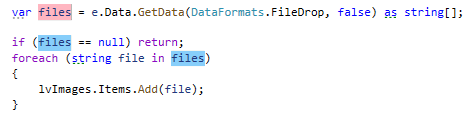
Usages of a symbol:
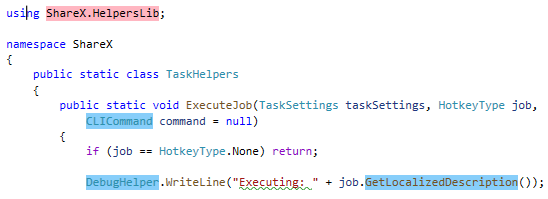
Usages of all types from an imported namespace:
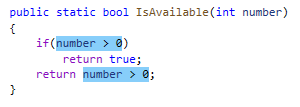
Usages of an expression:
Configure highlighting colors
Choose from the menu and then go to page.
In Display items, configure the following items:
ReSharper Read Usage
ReSharper Read Usage Marker on Error Stripe
ReSharper Write Usage
ReSharper Write Usage Marker on Error Stripe
This feature is supported in the following languages and technologies:
|
|
|
|
|
|
|
|
|
|---|---|---|---|---|---|---|---|---|
|
|
|
|
|
|
|
| |


The instructions and examples given here address the use of the feature in C#. For more information about other languages, refer to corresponding topics in the Languages and frameworks section.