Go to Derived Symbols
This command gets the list of all derived symbols for a type or a member and lets you navigate directly to one of them, down the inheritance hierarchy. If you are looking for actual implementations and not interested in intermediate steps of the inheritance chain, use Go to Implementation.
You can invoke this command from the Solution Explorer, File Structure window, and other tool windows. If necessary, you can navigate in the opposite direction with the Go to Base Symbols command.
Navigate to derived symbols
Place the caret at a symbol in the editor or select the symbol in a tool window.
Press Alt+Control+B or choose from the main menu. Alternatively, you can press Control+Shift+A, start typing the command name in the popup, and then choose it there.
If the symbol has only one derived symbol, ReSharper will navigate to it directly.
If necessary, you can change the default behavior so that even the single symbol is displayed in the list. To do so, clear the Go to Base/Inheritor if there is only one... checkbox on the page of ReSharper options Alt+R, O.
If the symbol has several derived symbols, they will be listed in a drop-down. The list may contain items in both bold and regular font. Bold indicates that an item has direct inheritance, while the regular font is used for indirect inheritance.
You can do one of the following:
Click the desired item to open it in the editor.
Select the desired item by pressing Up and Down and then press Enter to open it in the editor.
Start typing to filter results. Note that you can use CamelHumps here. If necessary, press Esc once to clear the filtering.
To view and analyze the list of matched items in the Find Results window, click Show in Find Results
.png "ThemedIcon.SearchResults.Screen.(Gray).png") , press Shift+Enter or + on the numeric keypad .
, press Shift+Enter or + on the numeric keypad . To show the matched items on the type dependency diagram, press Alt+Num+ or click Show on Diagram
.png "Show on Diagram") .
.
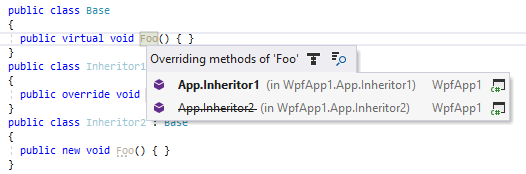
If there are members in derived classes that hide the member you're navigating from, such members are displayed as strikethrough:
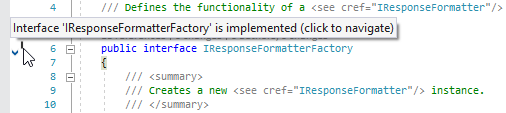
When a type or a member has inheritors in the current solution, ReSharper adds a special icon (for example, .png "ThemedIcon.HasOverrides.Screen.(Gray).png") ) to the left of the declaration. You can click the icon to expand the list of derived symbols and navigate.
) to the left of the declaration. You can click the icon to expand the list of derived symbols and navigate.
To find out whether the type or a member has inheritors and display the corresponding gutter mark, ReSharper has to perform some calculations. Although these calculations are performed efficiently and without any performance impact in most cases, large inheritance hierarchies with the combination of weak hardware could lead to some performance degradation. If such cases, you can clear the Show gutter navigation marks for implemented and overridden types and members checkbox on the page of ReSharper options to avoid complex calculations and thus improve performance.
On the other hand, on-the-fly detection of base types or members is much cheaper performance-wise. Therefore, the hierarchy marks for types and members that implement or override other types or members are not disabled with this option.
This feature is supported in the following languages and technologies:
|
|
|
|
|
|
|
|
|
|---|---|---|---|---|---|---|---|---|
|
|
|
|
|
| | | |


The instructions and examples given here address the use of the feature in C#. For more information about other languages, refer to corresponding topics in the Languages and frameworks section.