Completion Behavior
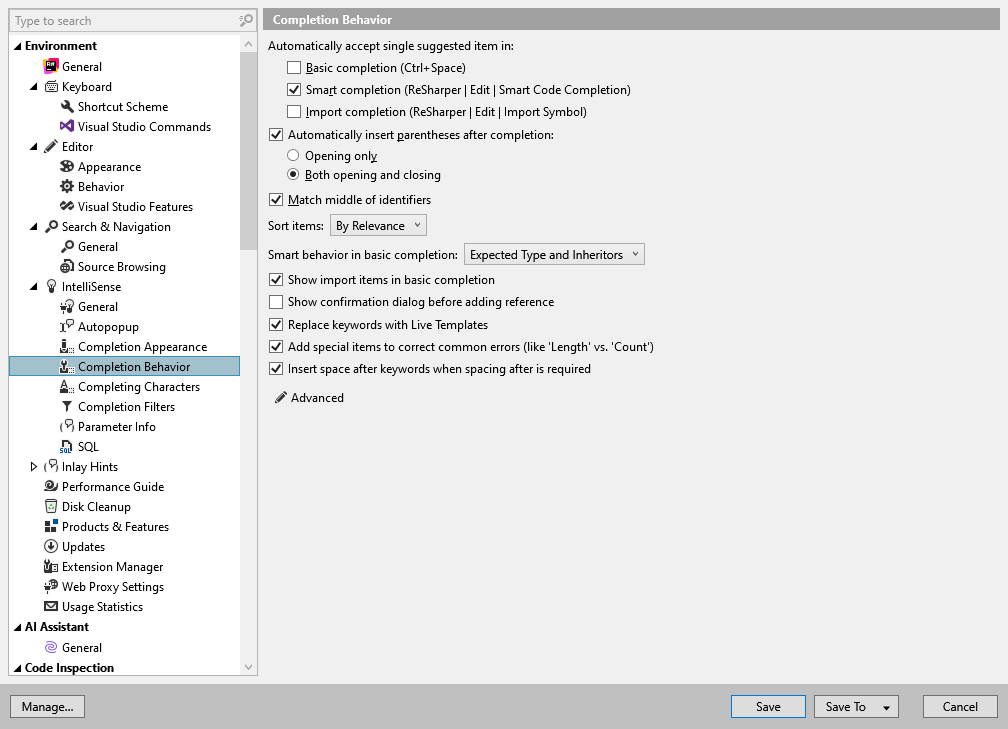
This page of ReSharper options allows you to define the behavior of ReSharper's IntelliSense popup. For more information, refer to Code completion.
Narrow down list on typing | Defines whether ReSharper should drop the items that do not match to the entered symbols and to the letters of a CamelHumps expression when displaying completion lists. |
Automatically complete single item with | This group of options lets you enable or disable automatic commit for specific code completions (Basic completion, Smart completion, Import Symbol Completion) in cases where there is a single possible choice in the completion list. That is, as soon as the completion list narrows down to one item, the item is inserted automatically. |
Automatically insert parenthesis after completion | Defines how parentheses are inserted when completing a method. Note that you can type the opening parenthesis |
Match middle of identifiers | If this checkbox is selected, ReSharper matches letters at any position in the compound word according to the CamelHumps notation. |
Sort items | This selector allows specifying how completion suggestions are sorted in the list. The By relevance option, selected by default, means that ReSharper applies heuristics to determine which suggestions are more relevant based on the context and your previous input. If necessary, you can choose Alphabetically to apply a more straightforward sorting order. |
Smart Behavior in basic completion | This selector allows you to add expected types and/or inheritors to basic completion lists. If these features are enabled, more suggestions (static members, lambda expressions, and so on) appear. Also, the symbols that fit to the context are automatically preselected. If a value other than 'None' is chosen, some performance degradation is possible. |
Show import items in basic completion | When this checkbox is selected, completion items suggested by the Import Symbol Completion will automatically appear in completion lists of automatic completion and basic completion. |
Show confirmation dialog before adding reference | This checkbox defines whether to show a confirmation dialog for the double import completion before it adds a new reference to the current project. |
Replace keywords with Live Templates | This option, which is enabled by default, defines whether to suggest corresponding live templates when you type keywords like |
Add special items to correct common errors (like Length vs. Count) | Use this checkbox to define whether to show suggestions for mistyped Length/Count in the completion list. 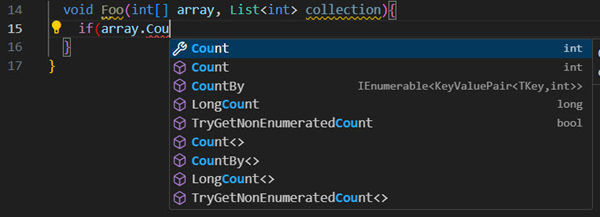 |
Insert space after keywords when spacing after is required | By default, ReSharper inserts necessary spaces when you pick keywords from the completion list, for example, when you choose To avoid this problem, you can clear this checkbox and type all spaces manually. |
Advanced settings
Parameter Info default location | Use this selector to define whether the Parameter Information popup should appear above or below the line where your caret is. |
Start automatic completion on typing after | Use this selector to define the time interval for displaying the Automatic completion popup after you type a character in the editor. |
Insert lambda completion items as templates | If this option is enabled, for lambda completion ReSharper deploys a hot spot session to allow you specify names for lambda expression parameters. |
Suggest to encapsulate fields from base types | If this checkbox is selected, ReSharper adds fields from all base types to the completion list. |
 If this option is disabled, parameter names are chosen automatically.