General
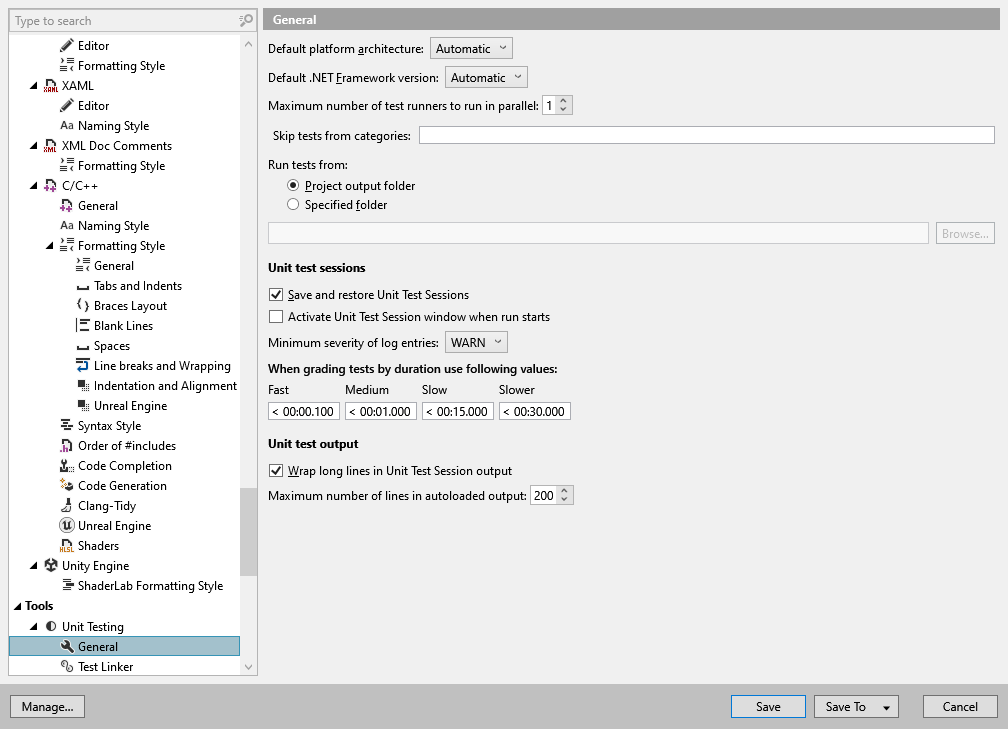
On this page of ReSharper options, you can adjust general settings that apply to all unit testing features.
Default platform architecture | This selector allows choosing a platform to run unit tests on. |
Default .NET Framework version | This selector allows setting .NET version to use when running unit tests. |
Maximum number of test runners to run in parallel | Use this selector to set the maximum number of assemblies to be tested concurrently in parallel threads. Fore each assembly, ReSharper will launch a separate test runner. |
Skip tests from categories | Type names of test categories to be excluded from the run, separated by a comma. The tests associated with the category that you specified are ignored. For XUnit tests, where there is no special attribute for categories, list the ignored categories as follows:
For more information, refer to Test categories |
Run tests from: | Choose Project output folder to run compiled tests from the default location. When assemblies are placed in the default project location, test files are retrieved from the same location. Choose Specified folder to run tests using a post-build step, so the tests are run from the particular folder. Enter the desired path in the field, or click Browse to find and set the desired location. |
Unit Test Sessions
Save and restore Unit Test Sessions | Select this checkbox to allow ReSharper to restore unit test sessions when you close and reopen Visual Studio. |
Activate Unit Test Session window when run starts | Select this checkbox if you want Unit Test Sessions window to open each time you run unit tests. |
Maximum severity of log entries | This selector lets you specify which log entries should appear in the execution log in the Unit Test Sessions window. |
When grading tests by duration use the following values | Minutes, seconds, and milliseconds |
Unit Test Output
Wrap long lines in Unit Test Session output | Defines how to display long lines in the Output tab in the Unit Test Sessions window. If this checkbox is selected, long lines are wrapped. |
Maximum number of lines in autoloaded output | Defines how to many lines should be displayed in the Output tab in the Unit Test Sessions window. |