Add files to Git and track changes
Add files to Git
Open the Commit tool window (Alt+0) .
Put any files in the Unversioned Files changelist under version control by pressing Ctrl+Alt+A or selecting Add to VCS from the context menu. You can either add the entire changelist or select separate files.
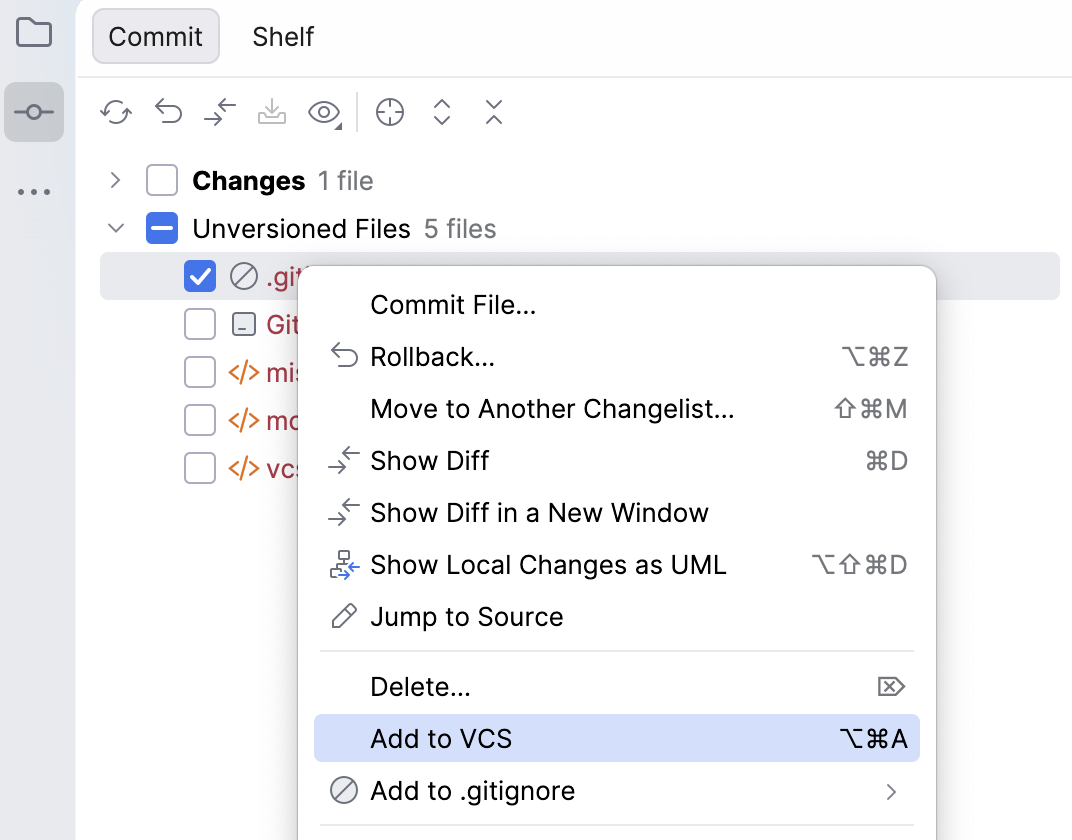
If you have enabled Git integration for your project, RubyMine suggests adding each newly created file under version control. You can change this behavior in the Settings dialog Ctrl+Alt+S under . If you want certain files to always remain unversioned, you can configure Git to ignore them.
Check project files status
RubyMine allows you to check the status of your local working copy compared to the repository version of the project. It lets you see which files have been modified, which new files have been added to Git, and which files are not being tracked by Git.
Open the Commit tool window (Alt+0) .
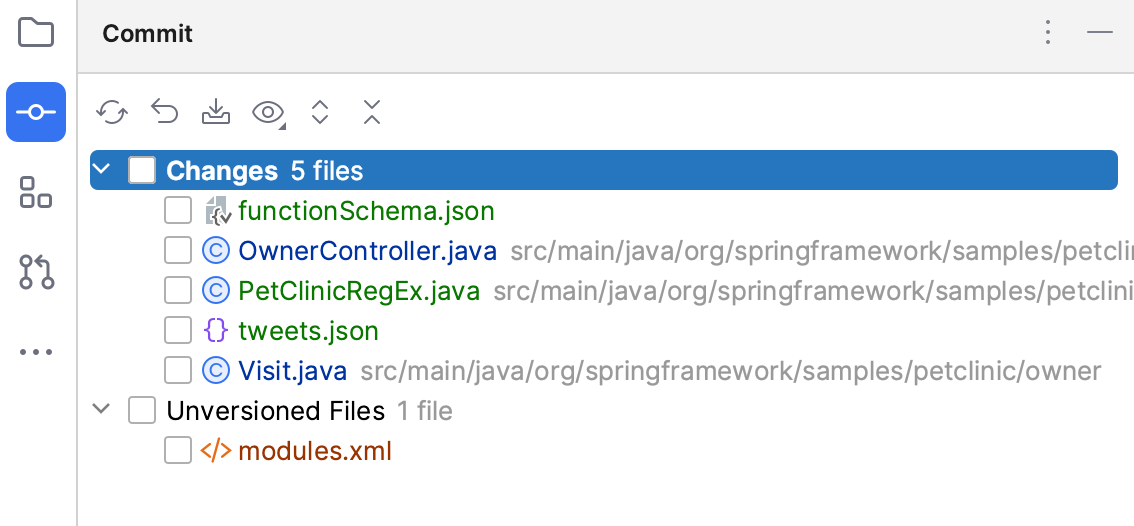
The Changes changelist shows all files that have been modified since you last synchronized with the remote repository (highlighted in blue), and all new files that have been added to Git, but have not been committed yet (highlighted in green).
The Unversioned Files changelist shows all files that have been added to your project, but that are not being tracked by Git.
Track changes to a file in the editor
You can also track changes to a file as you modify it in the editor. All changes are highlighted with change markers that appear in the gutter next to the modified lines and show the type of changes introduced since you last synchronized with the repository. When you commit changes to the repository, change markers disappear.
The changes you introduce to the text are color-coded:
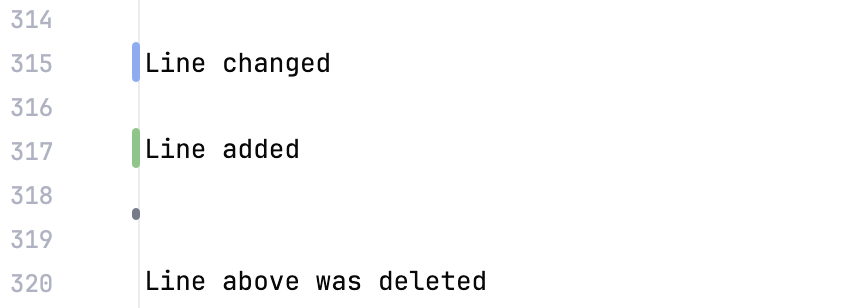
The table below lists default line highlighting colors and their meanings in some of the color schemes.
Color | Line Status | Description |
|---|---|---|
| Modified lines | Lines that have been modified since the last update. |
| Whitespace-modified lines | Lines in which only whitespaces have been modified since the last update. |
| Added lines | Lines that have been added since the last update. |
| Deleted lines | Lines that have been removed since the last update. |
 #C3D6E8
 #EDDCBC
 #C9DEC1
 #9F9F9F
Color | Line Status | Description |
|---|---|---|
| Modified lines | Lines that have been modified since the last update. |
| Whitespace-modified lines | Lines in which only whitespaces have been modified since the last update. |
| Added lines | Lines that have been added since the last update. |
| Deleted lines | Lines that have been removed since the last update. |
 #374752
 #4C4638
 #384C38
 #656E76
Color | Line Status | Description |
|---|---|---|
| Modified lines | Lines that have been modified since the last update. |
| Whitespace-modified lines | Lines in which only whitespaces have been modified since the last update. |
| Added lines | Lines that have been added since the last update. |
| Deleted lines | Lines that have been removed since the last update. |
 #1AABFF
 #666666
 #009924
 #FFA14F
You can manage changes using a toolbar that appears when you hover over a change marker and then click it. The toolbar is displayed together with a frame showing the previous contents of the modified line:

You can roll back changes by clicking  and explore the differences between the current and the repository version of the current line by clicking
  .
.
Instead of reverting the whole file, you can copy any part of the contents of this popup and paste it into the editor.
Check file status
RubyMine allows you to check the status of project files relative to the repository. File status shows you which operations have been performed on the file since you last synchronized with the repository.
You can check the status of a file in any interface element (for example, the editor or a tool window) by the color used to highlight the filename.
You can customize the default colors for file statuses on the Colors and Fonts settings page.
You can configure VCS file status colors on the Version Control | File Status Colors settings page Ctrl+Alt+S.
The table below lists default file status colors and their meanings in some of the color schemes.
Color | File Status | Description |
|---|---|---|
| Added | The file in the active changelist is scheduled for addition to the repository. |
| Added in not active changelist | The file in an inactive changelist is scheduled for addition to the repository. This file status is available if the Highlight files from non-active changelists option is enabled in . |
| Changelist conflict | The file in an inactive changelist has been modified in the active changelist. In this case, a new dialog will open, prompting you to resolve the changelist conflict. This file status is available if all options are enabled in . |
| Copied | If a file is a copy of another file, its metadata is tracked, and such a file is marked as copied. |
| Deleted | The file is scheduled for deletion from the repository. |
| Deleted from file system | The file has been deleted locally but has not been scheduled for deletion, and it still exists in the repository. |
| Have changed descendants | If a file is modified, the IDE will recursively highlight all directories containing that file. This status is available if the Highlight directories that contain modified files in the Project tree option is enabled in . |
| Have immediate changed children | If a file is modified, the IDE will highlight its parent directory. This status is available if the Highlight directories that contain modified files in the Project tree option is enabled in . |
| Hijacked | [Perforce, ClearCase, VSS] The file is modified without checkout. |
| Ignored | A file is intentionally untracked by VCS. |
| Merged | The file is merged by your VCS as a result of an update. |
| Merged with conflicts | During the last update, the file has been merged with conflicts. |
| Merged with property conflicts | During the last update, the IDE has detected differences between the properties of the local file and its server version. |
| Merged with text and property conflicts | Text and property conflicts happen when two or more developers modify the same lines of a file and the same file properties. |
| Modified | The file has changed since the last synchronization. |
| Modified in not active changelist | The file in an inactive changelist has been modified. This file status is available if the Highlight files from non-active changelists option is enabled in . |
| Obsolete | The file should no longer be in your working copy of the repository. |
| Renamed | Since the last update, the file has been renamed. |
| Switched | [SVN] The file is taken from a different branch than the whole project. |
| (Unknown) Unversioned | The file exists locally but is not in the repository and is not scheduled for addition. |
| Up to date | The file has not been changed. |


 None (default color)
Color | File Status | Description |
|---|---|---|
| Added | The file in the active changelist is scheduled for addition to the repository. |
| Added in not active changelist | The file in an inactive changelist is scheduled for addition to the repository. This file status is available if the Highlight files from non-active changelists option is enabled in . |
| Changelist conflict | The file in an inactive changelist has been modified in the active changelist. In this case, a new dialog will open, prompting you to resolve the changelist conflict. This file status is available if all options are enabled in . |
| Copied | If a file is a copy of another file, its metadata is tracked, and such a file is marked as copied. |
| Deleted | The file is scheduled for deletion from the repository. |
| Deleted from file system | The file has been deleted locally but has not been scheduled for deletion, and it still exists in the repository. |
| Have changed descendants | If a file is modified, the IDE will recursively highlight all directories containing that file. This status is available if the Highlight directories that contain modified files in the Project tree option is enabled in . |
| Have immediate changed children | If a file is modified, the IDE will highlight its parent directory. This status is available if the Highlight directories that contain modified files in the Project tree option is enabled in . |
| Hijacked | [Perforce, ClearCase, VSS] The file is modified without checkout. |
| Ignored | A file is intentionally untracked by VCS. |
| Merged | The file is merged by your VCS as a result of an update. |
| Merged with conflicts | During the last update, the file has been merged with conflicts. |
| Merged with property conflicts | During the last update, the IDE has detected differences between the properties of the local file and its server version. |
| Merged with text and property conflicts | Text and property conflicts happen when two or more developers modify the same lines of a file and the same file properties. |
| Modified | The file has changed since the last synchronization. |
| Modified in not active changelist | The file in an inactive changelist has been modified. This file status is available if the Highlight files from non-active changelists option is enabled in . |
| Obsolete | The file should no longer be in your working copy of the repository. |
| Renamed | Since the last update, the file has been renamed. |
| Switched | [SVN] The file is taken from a different branch than the whole project. |
| (Unknown) Unversioned | The file exists locally but is not in the repository and is not scheduled for addition. |
| Up to date | The file has not been changed. |


 None (default color)


Color | File Status | Description |
|---|---|---|
| Added | The file in the active changelist is scheduled for addition to the repository. |
| Added in not active changelist | The file in an inactive changelist is scheduled for addition to the repository. This file status is available if the Highlight files from non-active changelists option is enabled in . |
| Changelist conflict | The file in an inactive changelist has been modified in the active changelist. In this case, a new dialog will open, prompting you to resolve the changelist conflict. This file status is available if all options are enabled in . |
| Copied | If a file is a copy of another file, its metadata is tracked, and such a file is marked as copied. |
| Deleted | The file is scheduled for deletion from the repository. |
| Deleted from file system | The file has been deleted locally but has not been scheduled for deletion, and it still exists in the repository. |
| Have changed descendants | If a file is modified, the IDE will recursively highlight all directories containing that file. This status is available if the Highlight directories that contain modified files in the Project tree option is enabled in . |
| Have immediate changed children | If a file is modified, the IDE will highlight its parent directory. This status is available if the Highlight directories that contain modified files in the Project tree option is enabled in . |
| Hijacked | [Perforce, ClearCase, VSS] The file is modified without checkout. |
| Ignored | A file is intentionally untracked by VCS. |
| Merged | The file is merged by your VCS as a result of an update. |
| Merged with conflicts | During the last update, the file has been merged with conflicts. |
| Merged with property conflicts | During the last update, the IDE has detected differences between the properties of the local file and its server version. |
| Merged with text and property conflicts | Text and property conflicts happen when two or more developers modify the same lines of a file and the same file properties. |
| Modified | The file has changed since the last synchronization. |
| Modified in not active changelist | The file in an inactive changelist has been modified. This file status is available if the Highlight files from non-active changelists option is enabled in . |
| Obsolete | The file should no longer be in your working copy of the repository. |
| Renamed | Since the last update, the file has been renamed. |
| Switched | [SVN] The file is taken from a different branch than the whole project. |
| (Unknown) Unversioned | The file exists locally but is not in the repository and is not scheduled for addition. |
| Up to date | The file has not been changed. |


Delete files from the repository
If you delete a file that is under version control, it still exists in the repository until you've committed the changes. The deleted file is placed in the active changelist and is highlighted in grey.
Select a file in the Project tool window (Alt+1) and press Delete or choose Delete from the context menu.
In the dialog that opens, you can choose whether you want to delete this file without searching for usages or to perform safe delete (to make sure that you are deleting an unused file) by checking the Safe delete option.
If any usages have been found, the Usages Detected dialog will pop up listing them. You can view these usages and remove references to this file before deleting it.
Commit the changes to the repository.