Configure project structure
In RubyMine, content is a collection of files with which you are currently working, possibly organized in a hierarchy of subfolders. The top-level folder of a project is its content root.
You can add any folder as a part of your project. To do that, just add this folder as a new content root on the Project Structure page as described in Working with multiple content roots.
Configuring folders in a content root
Within a content root, RubyMine can distinguish between the folders with the source code your edit and the folders with other types of content. By default, any folder is treated as Source and is indicated with  unless you mark it as another type:
Tests
 folders let you keep code related to testing separately from production code.
Resource Root
 folders: files in Resource Root folders can be referenced relative to these folders instead of specifying full paths. For example, when you start typing within the
 srcattribute of the HTMLimgtag, auto-completion will suggest images from the Resource Root folder.Excluded
 folders are ignored by code completion, navigation, and inspections. Exclude folders and specific files that you don't need at the moment, this helps you increase the RubyMine performance.
To configure the category of a folder
Right-click the folder in the Project tool window, select from the context menu, and then select the necessary category.
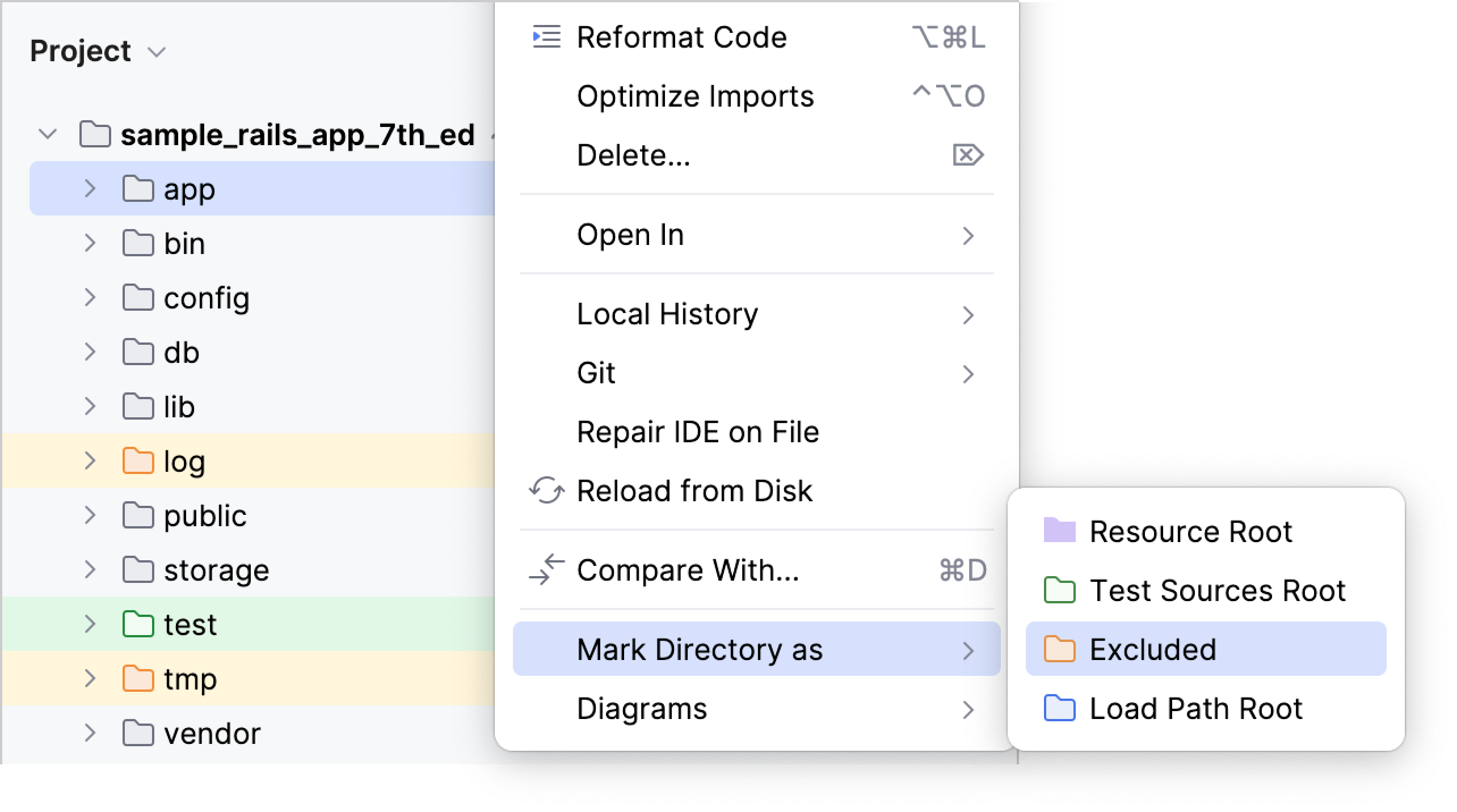
To restore the previous category of a folder
Right-click the folder in the Project tool window, select from the context menu, and then select . For Excluded folders, select .
Excluding files
If you don't need a file right now but you don't want to completely remove it, you can temporarily exclude the file from the project. Excluded files are ignored by code completion, navigation, and inspections.
To exclude a file, right-click it in the Project tool window and select from the menu.
From the Choose File Type list, select Plain text.
The file is marked with the
 icon in the directory tree.
To revert the changes, right-click the file and select from the menu.
Excluding files and folders by name patterns
In the Settings dialog (Ctrl+Alt+S) , go to . The Project Structure page opens.
In the Exclude files field, type the masks that define the names of files and folders to be excluded, for example,
*.min.jsorlib. Use semicolons as separators.If the name of a file matches any of these patterns, the file is treated as excluded.
If the name of a folder matches a pattern, all the files in this folder and in its subfolders are excluded.
Working with multiple content roots
You can have several content roots in your projects. This lets you work with files from several directories that do not have a common immediate parent. This is helpful when you use static contents, for example, icons. You can just save them all in a folder and then add this folder as a content root in several projects.
In the Settings dialog (Ctrl+Alt+S) , click Project Structure. The Project Structure page opens.
To add a content root, click Add Content Root in the right-hand pane and then select the required folder in the dialog that opens.
To remove a content root, select it in the right-hand pane and then click
 next to it. Confirm the deletion. Note that the corresponding folder won't be physically deleted.
Configuring load path
The load path is the path where require and load statements will look for files. The specified paths will be used in code completion for require and load. If the load path is not defined, code completion will suggest only the paths relative to the project root.
A directory that belongs to the load path is marked as the source root directory  in the project view.
Configuring load paths using project structure
Open the Project Structure settings, and then click Load Path.
Click
 .
.Locate the desired path in the Select Path dialog.
Configuring load paths via context menu
Right-click the desired directory in the Project tool window.
From the context menu, point to Mark Directory As node.
Choose Load Path Root. The directory is marked with the source root icon
.To unmark a directory, choose from the context menu. The directory is then marked with regular folder icon
.