Spellchecking
RubyMine looks for spelling errors in identifier names, string literals, comments, markdown files, and commit messages. For this purpose, RubyMine provides a dedicated Spelling inspection which is enabled by default.
Fix a misspelled word
Place the caret at a word highlighted by the Spelling inspection.
Press Alt+Enter or click
 to the left of the caret to show the available actions.
Select one of the suggested ways to fix the spelling.
In string literals and comments, only the spelling of this particular word at caret changes. For code identifiers, such as variables, functions, classes, and other symbols, the inspection also suggests changing all occurrences via the Rename refactoring.
Save a word to the dictionary
If a detected typo is actually a valid word, you can add it to a user-defined dictionary that extends built-in dictionaries.
Place the caret at a word highlighted by the Spelling inspection.
Press Alt+Enter or click
to the left of the caret to show the available actions.Select Save to dictionary to add the word to the user's dictionary and do not report it in the future.
If you have added the word by mistake, press Ctrl+Z to remove it from the dictionary.
By default, RubyMine saves words to the global application-level dictionary. You can choose to save words to the project-level dictionary if the spelling is correct only for this particular project or should be shared with the team working on that project. For more information, refer to Select the default dictionary for saving words.
Find all spelling errors
You can run the Spelling inspection on your entire project or a set of files.
Press Ctrl+Alt+Shift+I or go to in the main menu.
In the Enter inspection name popup, find and select the Spelling inspection.
In the Run 'Typo' dialog, select the scope in which you want to run the inspection, and other options, such as a file mask filter. Then click OK.
RubyMine will run the Spelling inspection on all files in the selected scope and show all found typos in a separate tab of the Problems tool window.
Configure the Typo inspection
By default, the Spelling inspection checks code identifiers, string literals, and comments in all scopes.
Press Ctrl+Alt+S to open settings and then select .
Expand the Proofreading node and click Spelling in the central pane.
In the right pane, configure the Spelling inspection:
- Severity
Specify the severity level and the scope in which to apply this level.
For example, if you want typos to stand out more, select Error or Warning to highlight typos similar to syntax errors or warnings in your code.
- Options
Specify the type of content to check:
Process code: check code identifiers .
Process literals: check text inside string literals.
Process comments: check text inside comments.
To disable the Spelling inspection entirely, clear the checkbox next to it.
Suppress the Typo inspection
Like with any other inspection, you can suppress the Spelling inspection for specific files and code elements.
Place the caret at a word highlighted by the Spelling inspection.
Click
or press Alt+Enter to show the available intention actions.On one of the suggested fixes, press the right arrow key or click
 and select Suppress for statement or another relevant suppress action.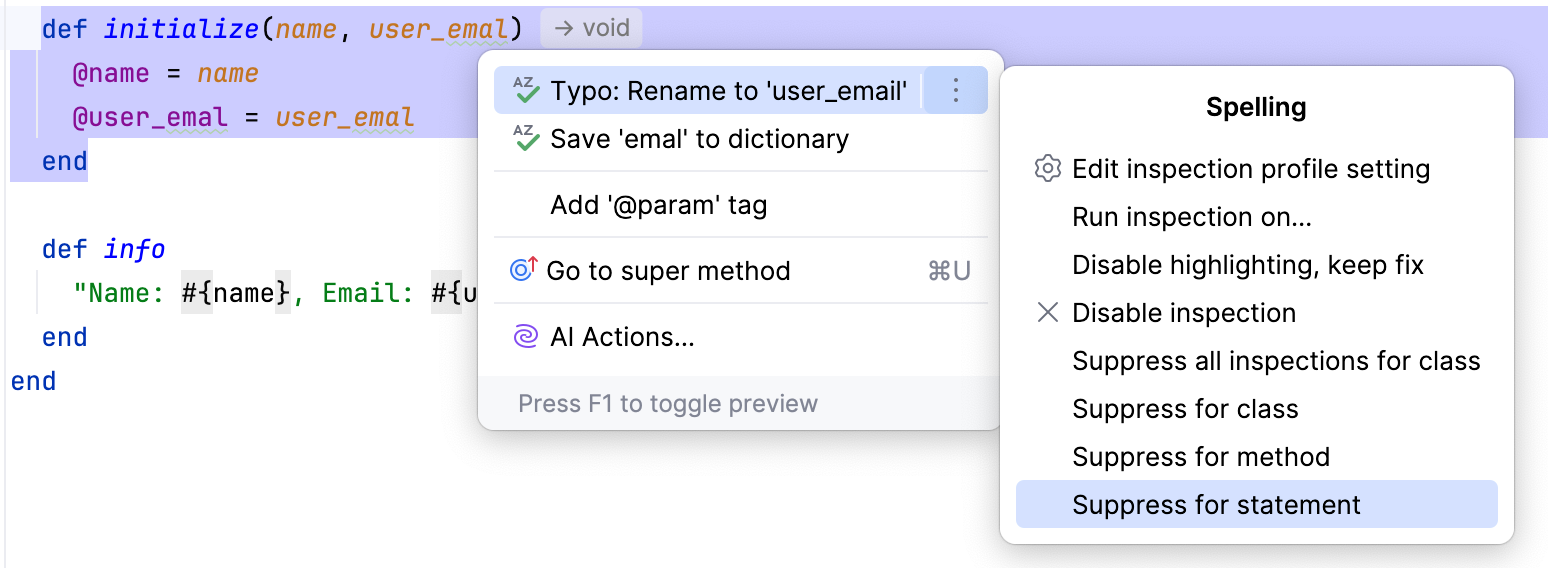
Depending on the language and code element, this adds a special annotation or comment that tells the editor to suppress the relevant inspection in the corresponding scope. For example, in case of Ruby, suppressing the Spelling inspection for a statement adds the following comment before it:
This suppresses all spelling checks within the statement scope.
For more information, refer to Suppress inspections.
Disable spellchecking
Disable the Typo inspection
Press Ctrl+Alt+S to open settings and then select .
Expand the Proofreading node.
Clear the checkbox next to the Spelling inspection.
Disable spellchecking in commit messages
Press Ctrl+Alt+S to open settings and then select .
In the Commit Message Inspections, clear the Spelling checkbox.
Disable spellchecking for new projects
In the main menu, go to .
Clear the checkboxes described above. This will affect the projects created or opened for the first time after you save the settings.
Dictionaries
RubyMine includes bundled dictionaries for all configured languages. You cannot change them directly, but you can extend the spellchecker in other ways:
Save words to a built-in global or project dictionary.
Add plain-text files with the .dic extension that contain lists of words.
Add Hunspell dictionaries, each of which consists of two files: the DIC file that contains a list of words with the applicable modification rules and the AFF file that lists prefixes and suffixes regulated by a specific modification rule. For example, en_GB.dic and en_GB.aff.
Configure spellchecker dictionaries
Press Ctrl+Alt+S to open settings and then select .
Configure the list of custom dictionaries:
To add a new custom dictionary to the list, click
 or press Alt+Insert and specify the location of the required file.
To edit the contents of a custom dictionary in RubyMine, select it and click
 or press Enter. The corresponding file will open in a new editor tab.
To remove a custom dictionary from the list, select it and click
 or press Alt+Delete.
Select the default dictionary for saving words
By default, RubyMine saves words to the global application-level dictionary. You can choose to save words to the project-level dictionary if the spelling is correct only for this particular project or should be shared with the team working on that project.
Press Ctrl+Alt+S to open settings and then select .
If you want to choose the dictionary manually every time you save a highlighted word, clear the checkbox next to the Use single dictionary for saving words option.
If you want to save highlighted words on the project level, leave the checkbox selected and choose project-level next to that option.
In this case, the IDE keeps words in an XML file under .idea/dictionaries that you can share with your team through VCS. Your teammates will be able to access and modify the dictionary and share their changes.
Add accepted words manually
Press Ctrl+Alt+S to open settings and then select .
Add words to the Accepted words list. RubyMine always adds manually accepted words to the project-level dictionary.
You cannot add words that are already present in one of the dictionaries and mixed-case words, such as
CamelCaseandsnake_case.
The Accepted words list also shows words that you saved to any of the built-in dictionaries using the Alt+Enter menu.
It does not show words added to the shared project-level dictionary by other users and words from other custom dictionaries, but these words will be still ignored by the spellchecker.
Share dictionaries
RubyMine stores the built-in project-level dictionary in the d.xml file in the .idea subdirectory of your project directory with other project-related files.
When you share this file with your project team through VCS, other team members using RubyMine will be able to access the dictionary to share the list of ignored words.