TeamCity 2024.03: Bundled HashiCorp Vault Plugin, Untrusted Builds, and More
In version 2024.03, we’ve introduced a number of highly anticipated features. For example, the HashiCorp Vault plugin is now bundled with TeamCity. Moreover, our new untrusted builds group allows you to differentiate between changes authored by trusted users and changes from external sources.
What’s more, the newly introduced dotCover runner enables users to execute processes under code coverage profiling, merge snapshots between build steps, and generate consolidated reports across a build chain for parallel tests executed in TeamCity.
Read on to learn more about what’s new in TeamCity.
Bundled deal: the HashiCorp Vault plugin is now part of TeamCity
TeamCity has benefitted from integration with HashiCorp Vault via a plugin for a while now. Last year, we revamped the way this integration works, making it much easier to configure.
With version 2024.03, we’ve started bundling the plugin with TeamCity, making it an integral component of any TeamCity installation.
Learn more about TeamCity’s HashiCorp Vault integration in our documentation.
Optional artifact dependency
Artifact dependencies empower your build configurations to fetch files produced by other configurations or builds within the same configuration. To establish these dependencies, define artifact rules specifying which files to download and their storage locations.
Previously, if TeamCity couldn't locate files based on these rules, builds would fail with the "Unable to resolve artifact dependency" error.
Starting from version 2024.03, we're introducing a more adaptable approach to defining artifact dependencies. Now, you can configure dependencies so they are ignored in the following cases:
- The source build doesn't exist at all (unless there are other non-optional rules).
- The source build lacks the required file.
- The artifact rule is based on an archive, and the archive doesn't contain the required file.
If you'd like to provide feedback on this feature, please feel free to do so in this YouTrack ticket.
For the full list of new features, please visit our What’s New page in the documentation.
More control over external pull requests with the untrusted builds group
The Pull Requests feature enables you to review code before merging it into the main codebase. Users can opt to run builds from any contributors or only from those within their organization. The former option carries security risks, potentially exposing the TeamCity server to harmful code, while the latter limits collaboration with a wider base of contributors.
In version 2024.03, we’ve introduced what we call the untrusted build group, which allows TeamCity to differentiate between changes authored by trusted users and changes from external sources.
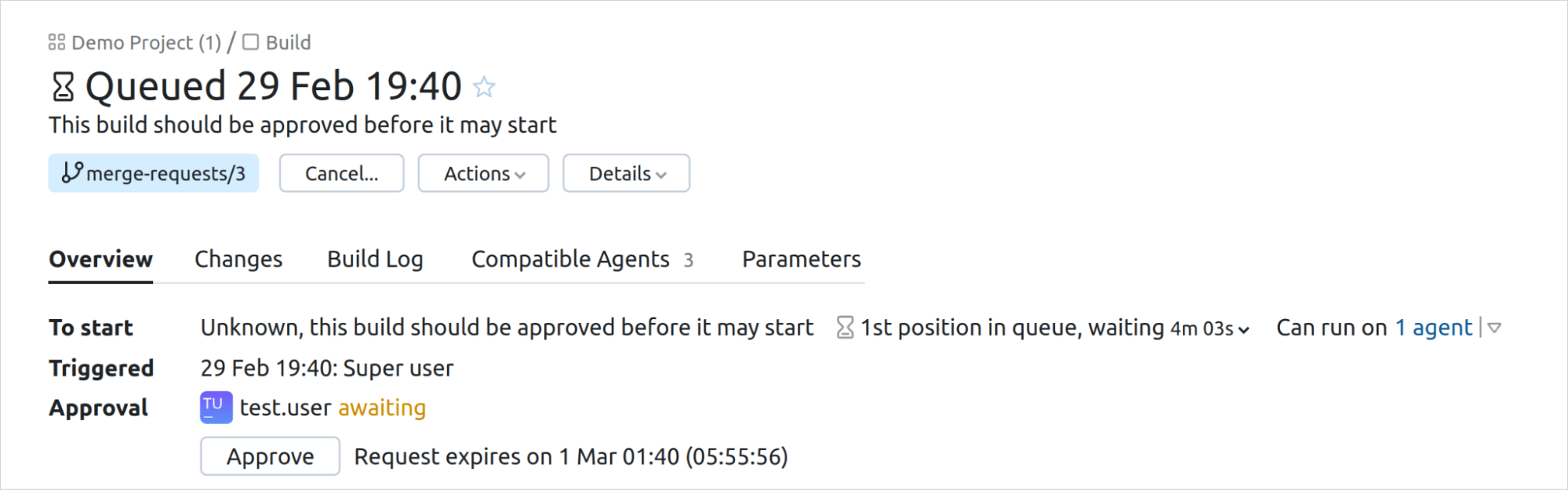
The untrusted build group currently supports GitHub and GitLab. Learn more about it in our documentation.
New dotCover runner
JetBrains dotCover has been supported as a code coverage tool for .NET-related projects in TeamCity for a while now. In version 2024.03, we’ve added a new build runner to the .NET Support plugin that integrates it with the dotCover tool.
The new dotCover runner allows users to:
- Run arbitrary processes under dotCover profiling to produce coverage snapshots.
- Merge build-step snapshots produced by other .NET or dotCover runners.
- Generate merged reports across a build chain for parallel tests and transform them into TeamCity custom reports.
Learn more in our documentation
.NET test retry policies in TeamCity
In version 2024.03, we’ve added new functionality to the .NET build runner. The new option will allow users to set build-wide retry policies for failed tests.
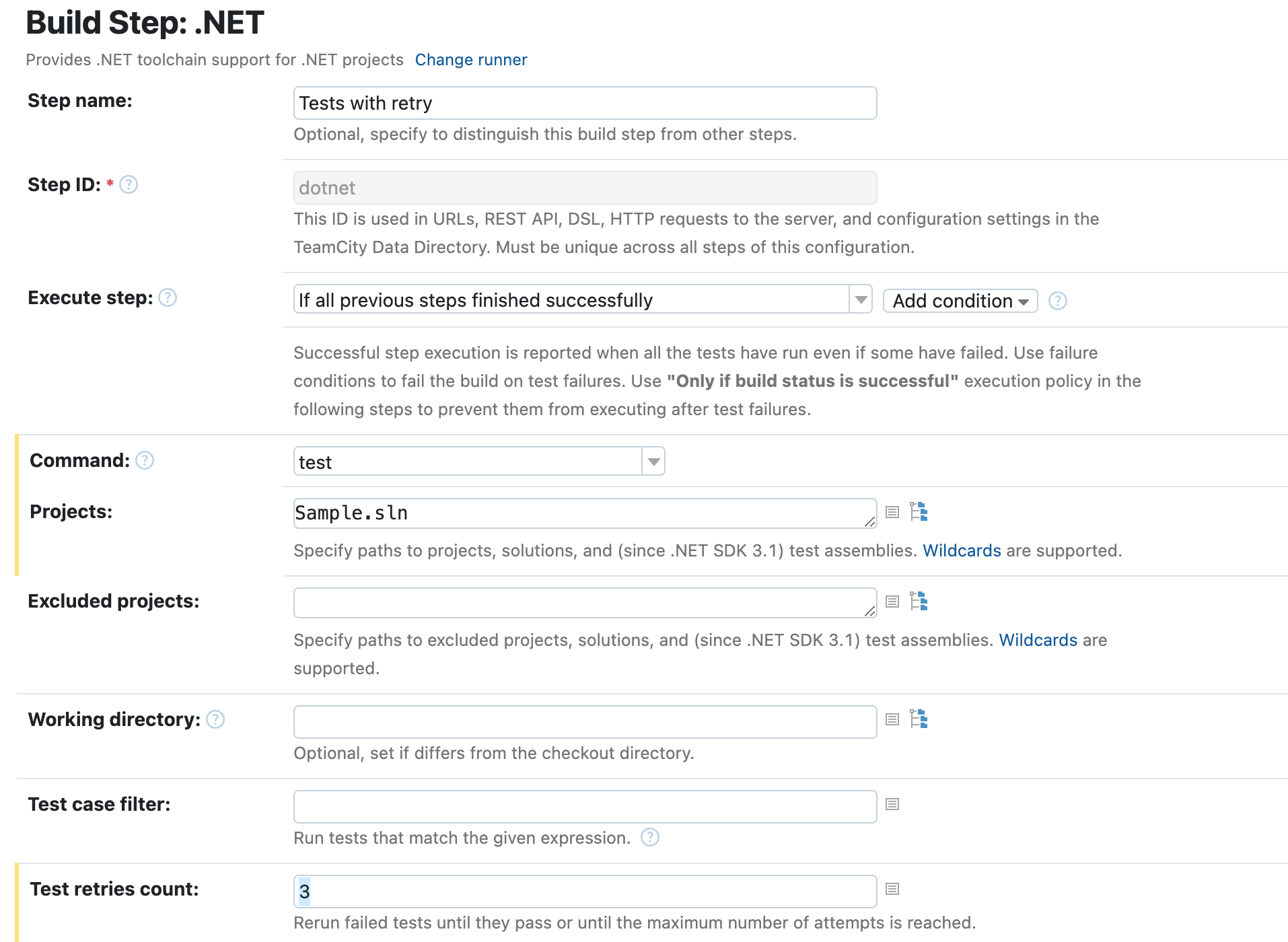
This feature will help address test flakiness and mitigate transient failures for integration tests.
Learn more in our documentation.
Configuration cache support in the Gradle runner
The configuration cache option in Gradle substantially enhances build performance by caching the configuration phase's result and reusing it in subsequent builds. Prior to version 2024.03, TeamCity's Gradle build runner lacked support for this feature.
In this release, we've introduced this functionality to TeamCity, bringing improved efficiency and performance to Gradle builds. Check out our documentation for information on how to enable the configuration cache option in your TeamCity setup.
TeamCity 2023.11: Matrix Builds, Build Caches, and More
TeamCity 2023.11 comes with a number of highly anticipated features that will help you configure builds more easily, including Matrix builds and Build caches.
Enhanced integrations with Git hosting platforms, including GitHub, GitLab, Bitbucket, and Azure DevOps, now allow for easier authentication options.
The completely reworked UI for EC2 and S3 plugins simplifies working with these Amazon services.
Read on to learn what’s new.
Welcome to Matrix builds
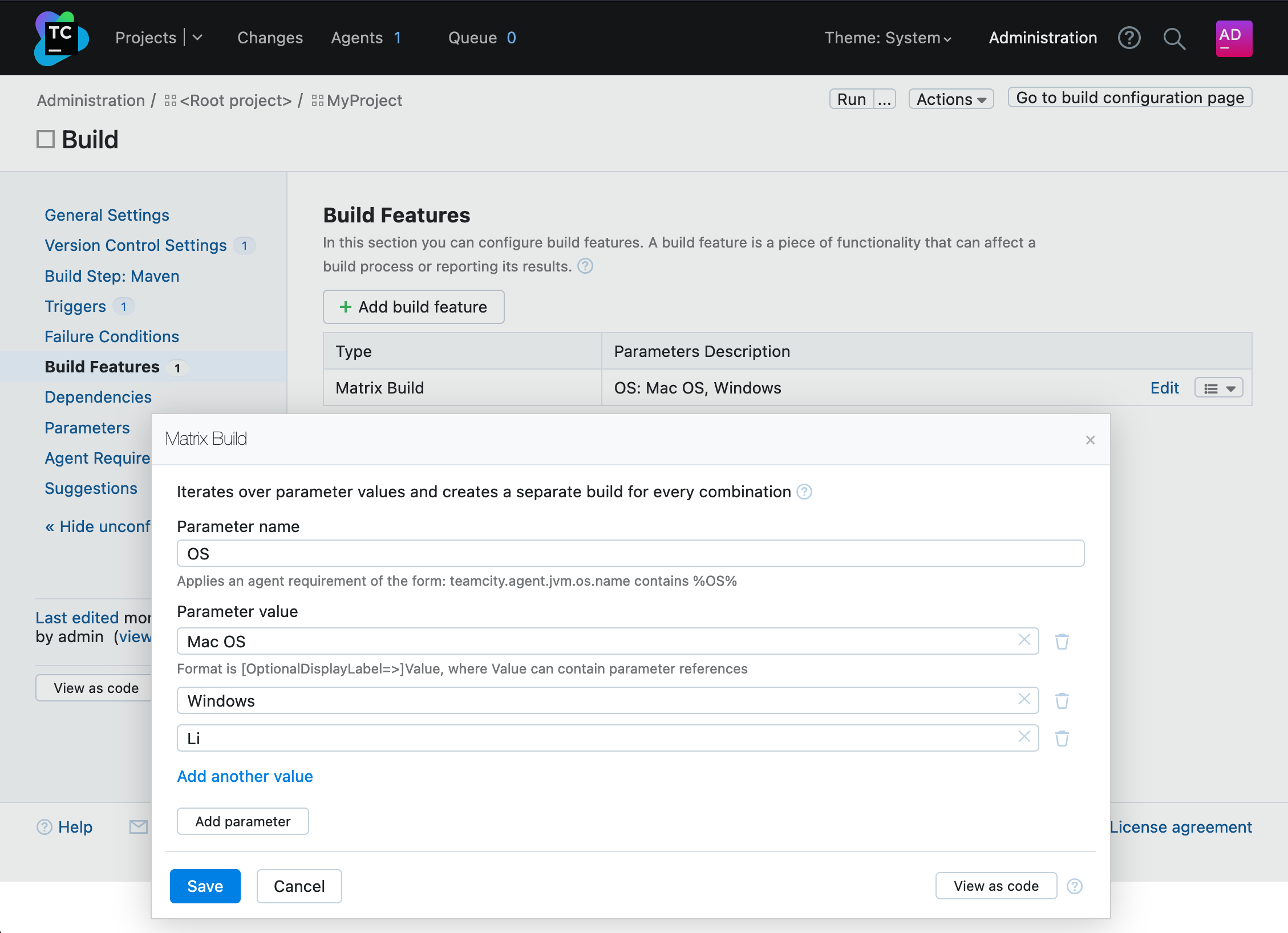
Thanks to Matrix builds in TeamCity, you can define a combination of parameters and corresponding values to create a matrix of builds. Each combination of parameter values generates a unique build. The matrix build is then made up of several multiple builds running in parallel.
Matrix builds are especially useful when testing software across different configurations, such as operating systems or browser versions.
Read more about matrix builds in our documentation.
Reduce, reuse, recycle with Build Cache
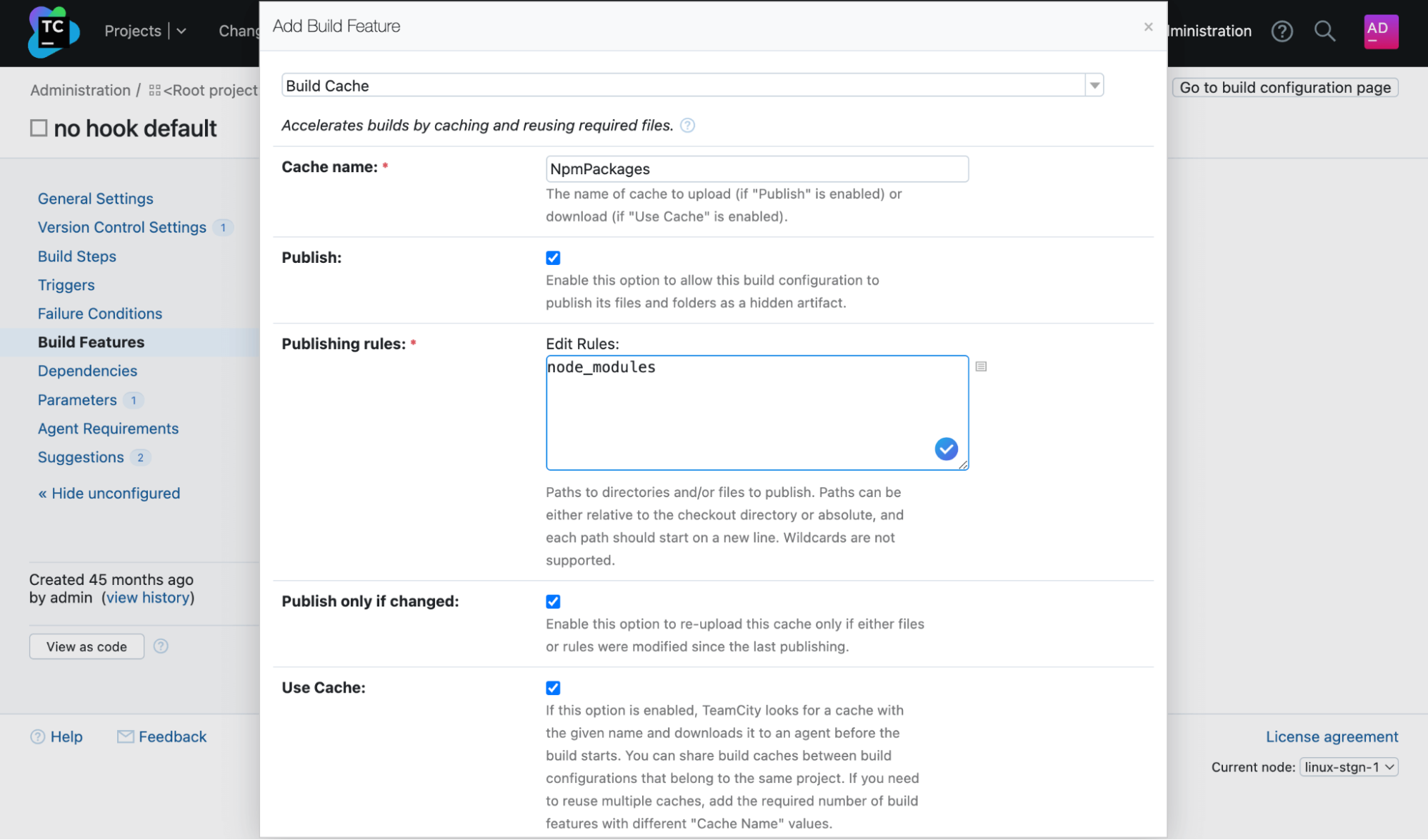
In CI/CD, using single-use build agents is considered the best and most secure practice. But best practices don’t come without challenges.
Every time you run a build on a single-use build agent, heavy or multiple libraries need to be downloaded from the internet in order for the build to be executed. This causes slow build times and delays in starting the build.
No more!
Build caches help you optimize your CI/CD build time by downloading the files that your project depends on and then reusing them again within the project.
Learn more about Build Caches in our documentation.
Head in the clouds: EC2 and S3 plugin updates
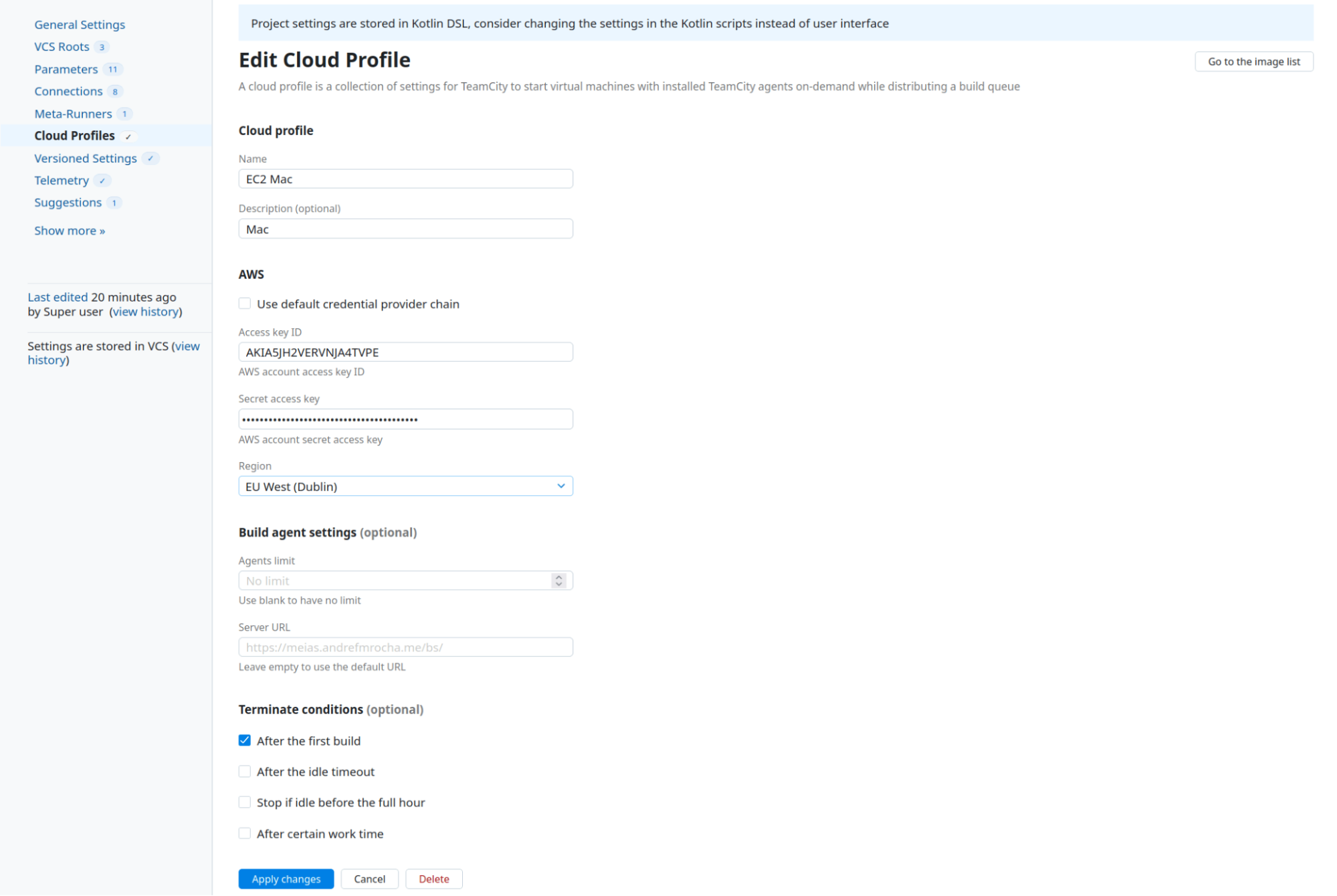
With the 2023.11 release, we’ve completely rethought our approach to setting cloud profiles and images. The new UI guides you through the process, suggesting relevant setting options.
You can now benefit from using EC2 Mac instances, running AWS EC2 spot instance build agents with a spot placement score, and much more.
The S3 plugin also got a new intuitive and streamlined UI designed with both Amazon S3 buckets and S3-compatible storages in mind.
Learn more in our documentation.
Git-ready with TeamCity
GitHub
In 2023.05, we introduced a new type of connection to GitHub. Instead of utilizing the traditional OAuth-based access to repositories, you can use GitHub Apps instead.
Starting from version 2023.11, you can establish these connections more efficiently, eliminating the need for manual configuration and registration of new apps in GitHub.
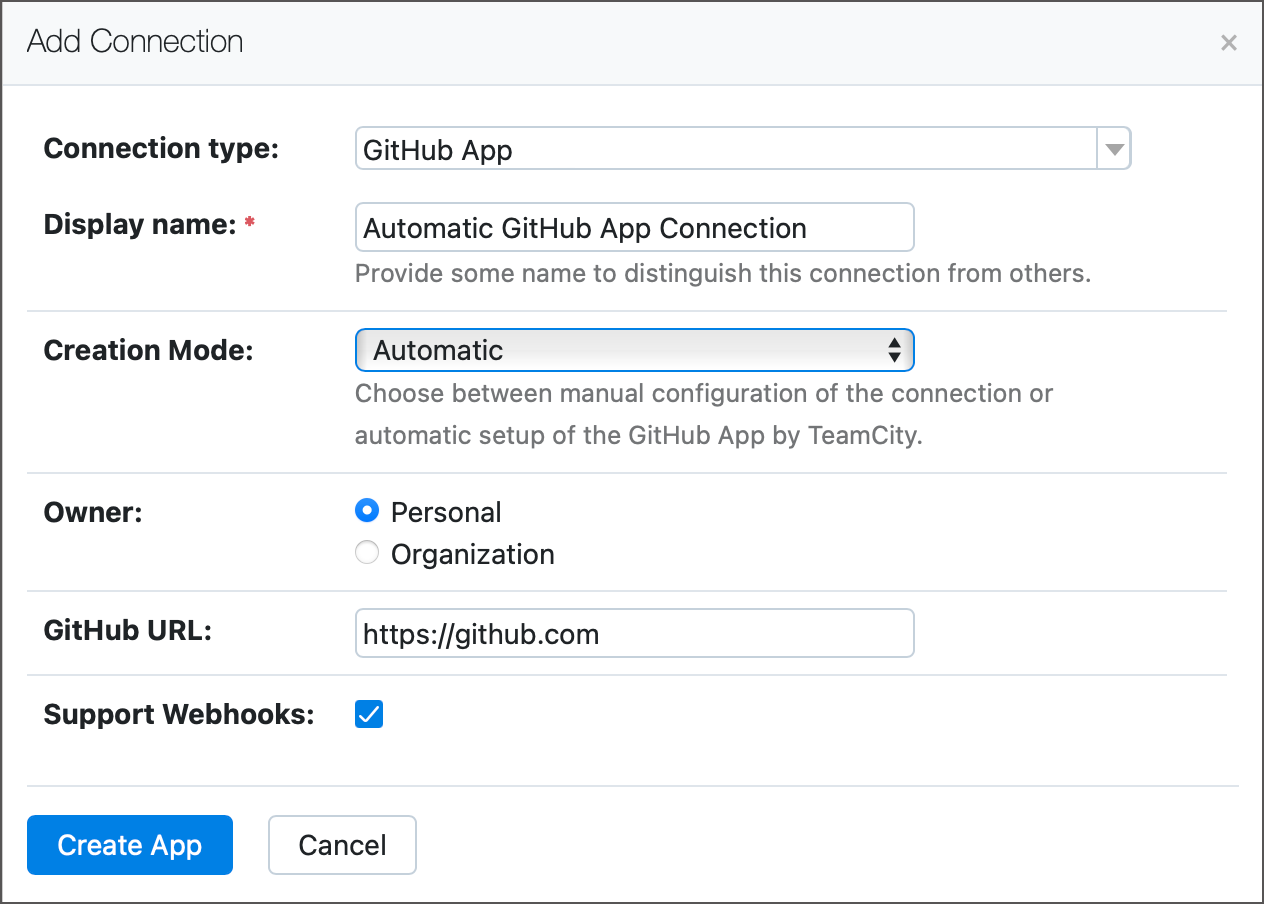
On the authentication side, you can now also issue impersonal refreshable access tokens for GitHub App connections on the Commit Status Publisher, Pull Requests build features, and GitHub Issue Tracker settings pages.
GitLab
Starting from version 2023.11, you can configure TeamCity to ignore draft merge requests in the Pull Requests build feature for GitLab.
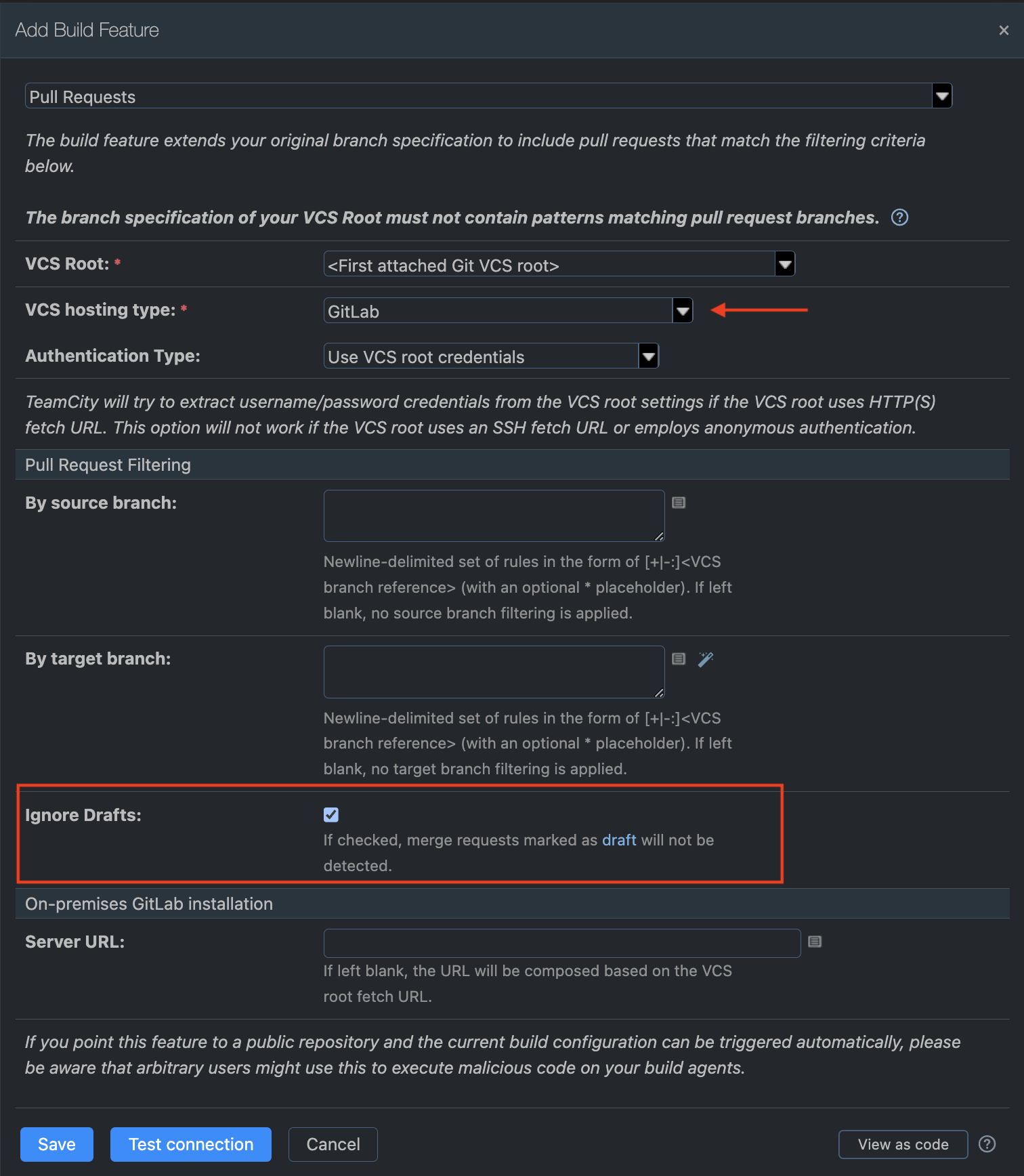
Commit Status Publishers and Pull Requests that target GitLab repositories can now use refreshable OAuth tokens to pass the authentication.
Supporting refreshable tokens for authentication
Commit Status Publishers and Pull Requests that target GitLab repositories can now use refreshable application tokens to pass the authentication.
Azure DevOps
TeamCity now supports refreshable OAuth tokens for Commit Status Publisher and Pull Requests build features for Azure DevOps.
Learn more in our documentation.
Bitbucket Cloud
With this release, we’re enhancing Bitbucket authentication in several ways.
In addition to app passwords and VCS Root credential authentication types, TeamCity also supports refreshable and permanent access tokens as an authentication method for the Pull Request Build Feature for Bitbucket Cloud.
Bitbucket Server / Data Center
The Pull Requests feature can now use refreshable OAuth tokens to access repositories on Bitbucket Server / Data Center.
Learn more from our documentation.
Enhanced Perforce Helix Swarm integration
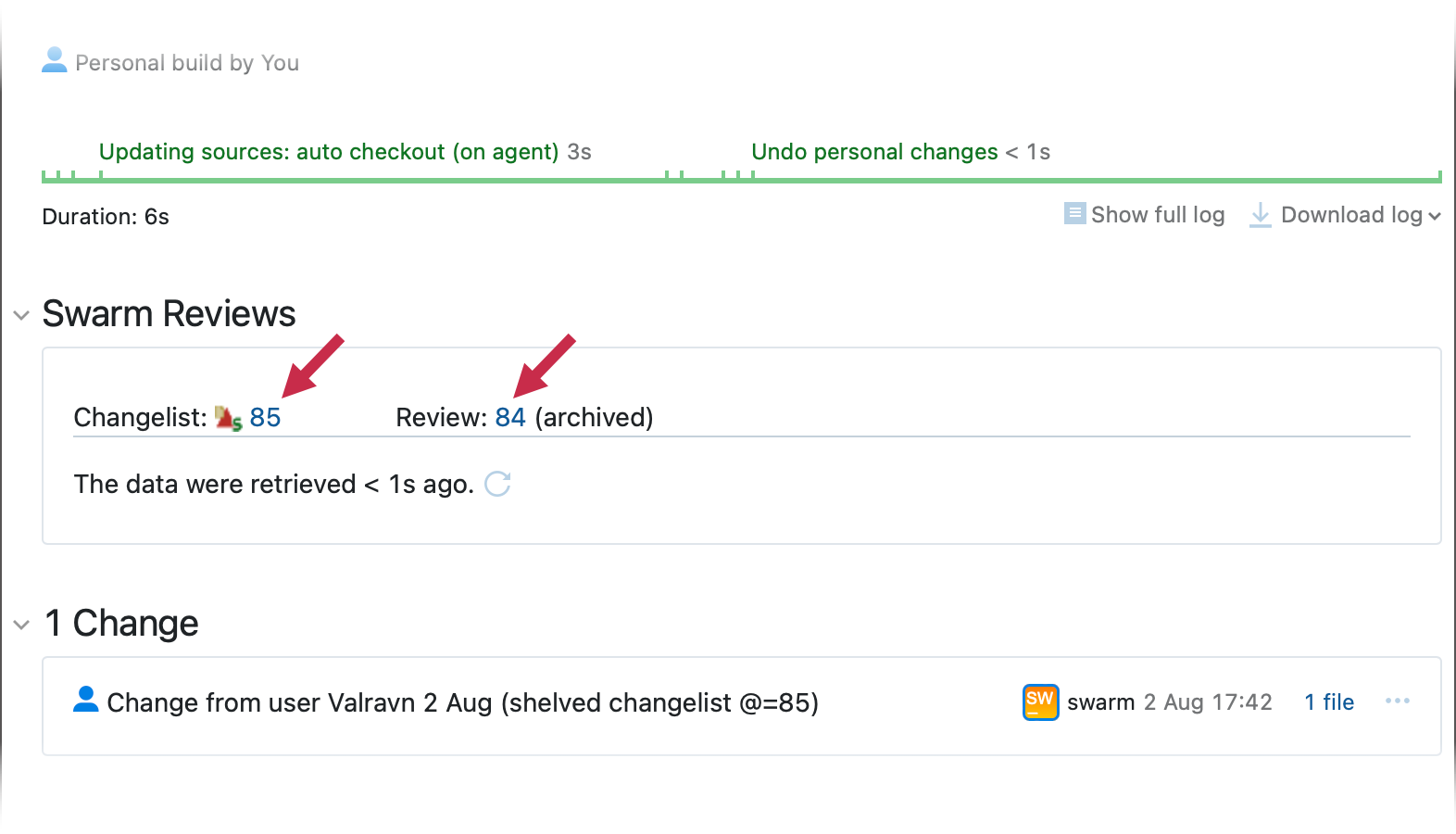
We’ve also improved the existing Swarm and TeamCity integration. The integration allows you to use TeamCity build statuses in Swarm and navigate from the TeamCity UI to the Swarm interface.
Starting from version 2023.11, the TeamCity Perforce Helix Swarm publisher for the Commit Status Publisher build feature can be integrated with custom workflows that already exist in your Swarm setup. In addition, the Commit Status Publisher no longer requires the credentials of users with administrator access.
Now, it’s possible to set up the integration without using Swarm administration-level credentials in TeamCity. The updated integration also allows including gates based on TeamCity checks into custom workflows.
Learn more in our documentation.
Favorite agent pools
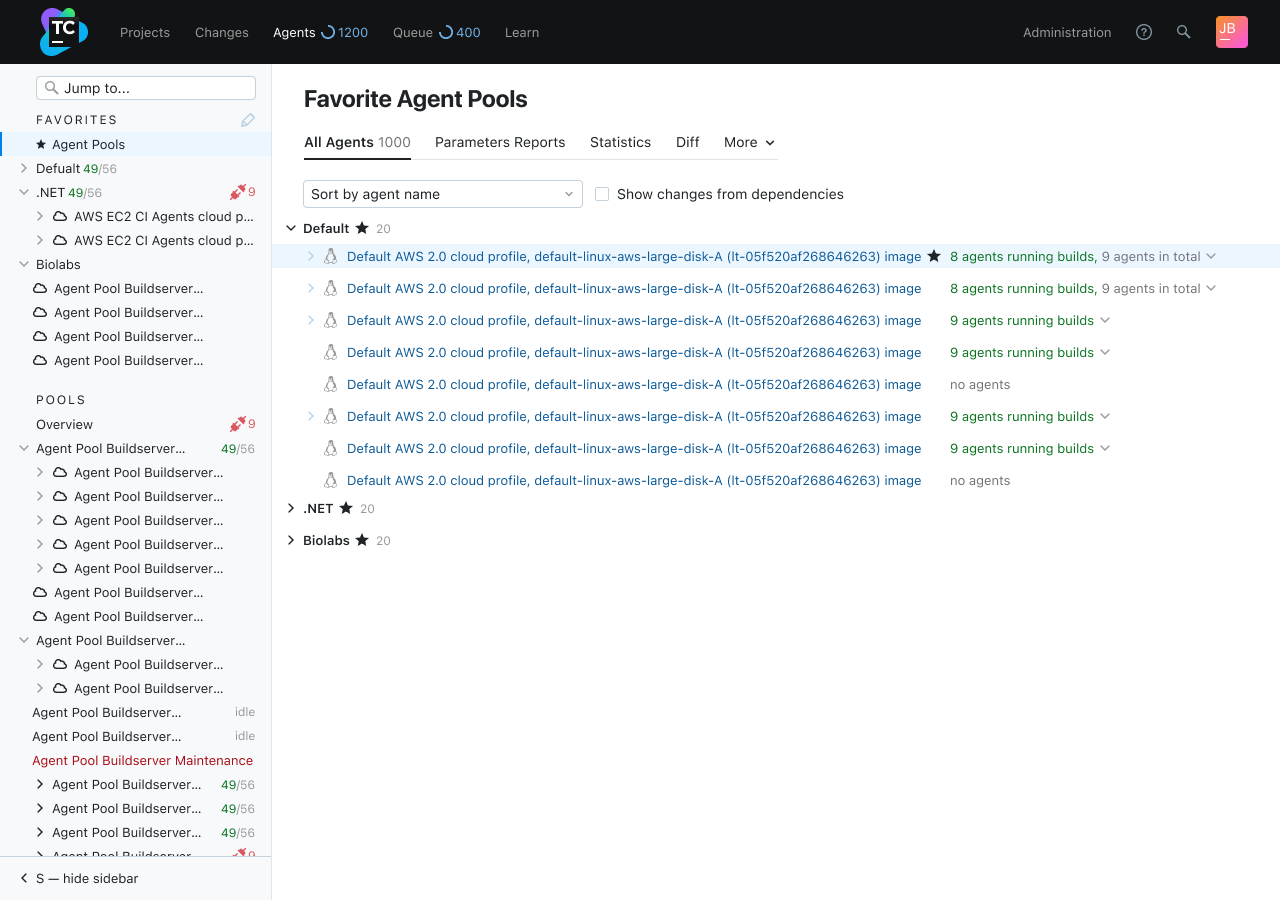
You can now mark certain agent pools as favorites and access them from a unified place. This comes in handy when you need to access the agent pools that you are responsible for.
Terminal power unleashed: Seamlessly access your agents via agent terminals
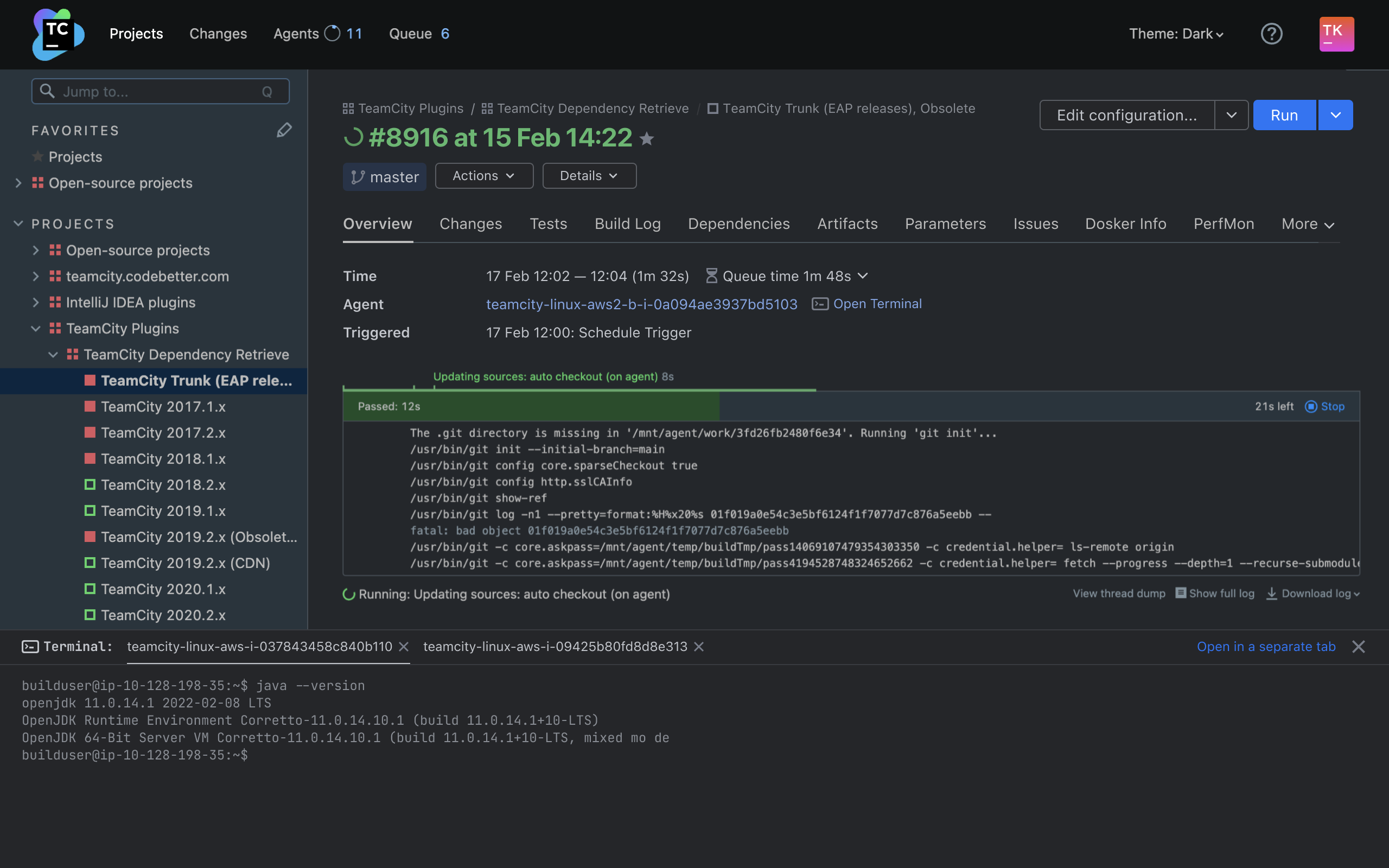
Agent terminal is a unique TeamCity feature that provides a convenient and quick way to get direct access to an agent machine by opening a remote terminal directly from the TeamCity UI. It is supported on Linux, Windows (with PowerShell), and macOS.
Starting from version 2023.11, you don’t have to switch tabs in order to open agent terminals – they open on the same page in the TeamCity UI.
TeamCity 2023.05: Dark Theme, Agent Terminal, and More
TeamCity 2023.05 delivers a range of highly anticipated features, including a dark theme, improved terminal access to agents, and multi-node setup enhancements. To further bolster security, TeamCity now integrates with Let's Encrypt and offers two-factor authentication for custom groups. This release also introduces exciting new capabilities such as GitHub App connection and the ability to send custom Slack messages directly from a running build.
Discover the dark theme
Developers have every right to feel comfortable while using their daily tools. This is why we’ve developed one of the most upvoted features in TeamCity’s history: the dark theme.
The dark theme can help reduce eye strain and eliminate visual distractions. Additionally, some users find it more aesthetically pleasing.
TeamCity's dark theme is available for both the Classic and Sakura UIs. In addition to the Light and Dark options, you can also choose System theme which will automatically match your OS settings.
Agent terminal
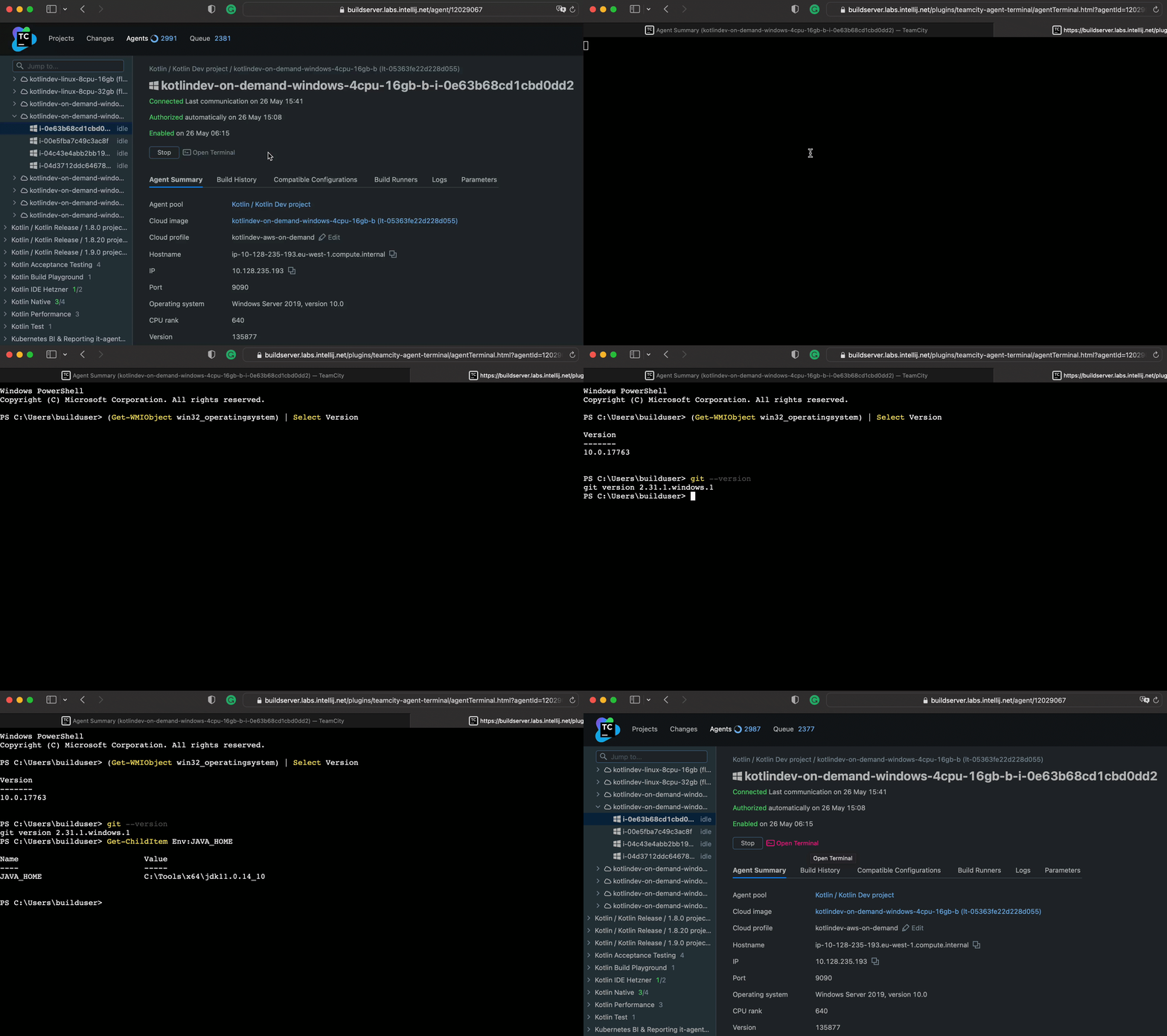
In TeamCity 2023.05, you can now open remote terminals to agent machines directly from the TeamCity UI in order to easily view agent logs, check installed software, and debug specific agent issues.
This new feature is particularly useful when troubleshooting issues on an agent, as remote terminals eliminate the need to maintain SSH keys for connecting to agents. It is supported on Mac, Linux, and Windows (with PowerShell).
Multi-node setup enhancements
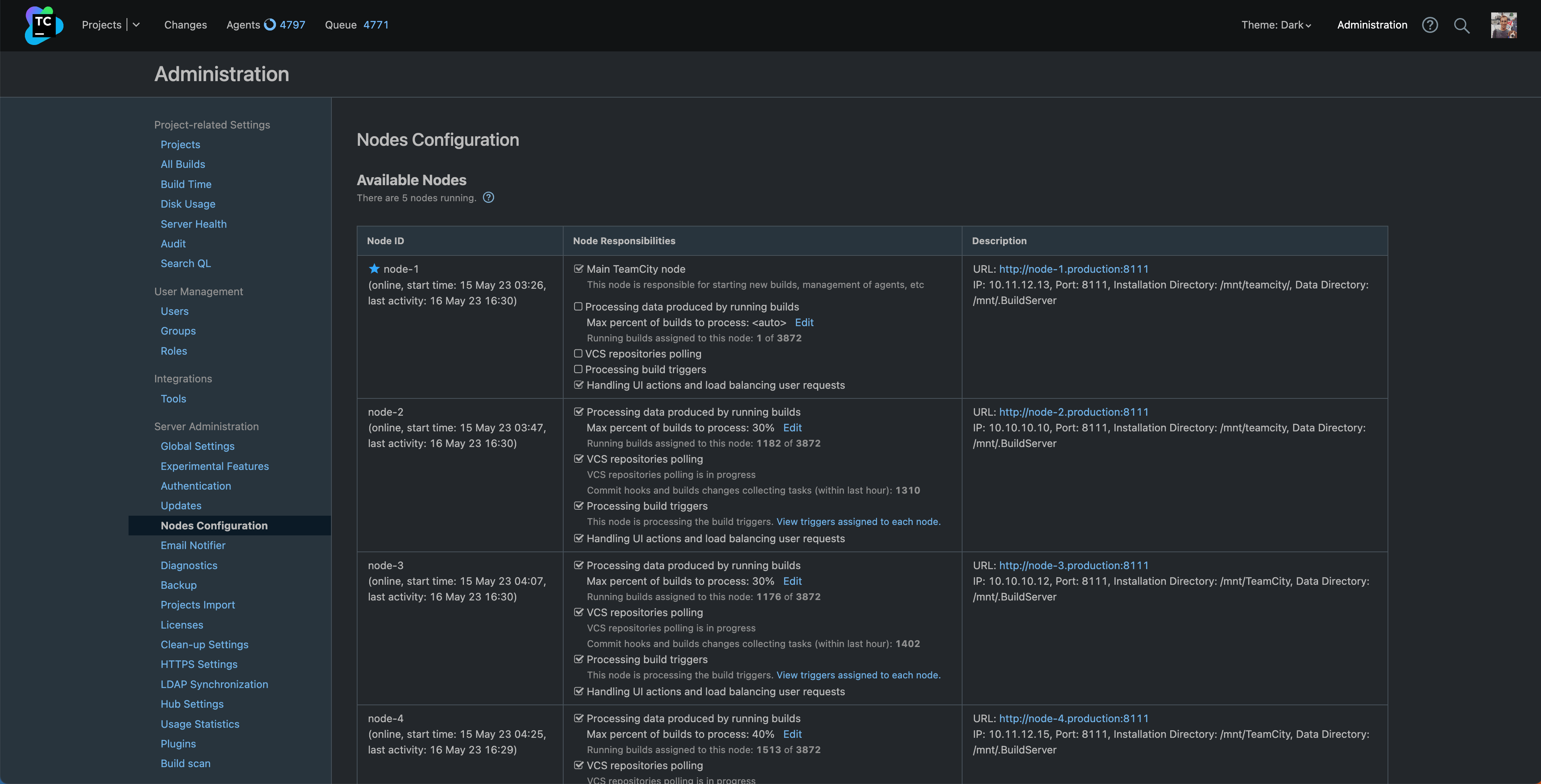
With this release, we’re also implementing an improved request distribution logic that efficiently distributes the load between the main and secondary nodes.
To enhance TeamCity's scalability, nodes are now completely interchangeable. All nodes within the TeamCity network can contribute to balancing user requests, thus enabling a more even distribution of the workload generated by users of the web UI across all nodes.
Assign the VCS polling responsibility to multiple nodes
In the 2023.05 version, TeamCity users are no longer constrained to a single node for VCS repositories polling duties. The latest release permits this function to be delegated across multiple nodes, resulting in a more even workload distribution, faster identification of new commits, and faster build initiation.
By leveraging this feature improvement, users can streamline their build, test, and deployment processes, enhancing overall efficiency, reducing delays, and boosting productivity.
Strengthening security
At TeamCity, ensuring robust security is our top priority. To reinforce the product's ability to resist data breaches and potential business disruptions, we have incorporated the following features.
Integration with Let’s Encrypt
TeamCity now includes integration with Let's Encrypt, a certificate authority that offers free and automated digital certificates to facilitate HTTPS on websites. By contacting Let's Encrypt, TeamCity can automatically obtain and install a valid certificate that will subsequently be updated without any user intervention.
Two-factor Authentication
In previous versions, enabling the mandatory two-factor authentication mode affected the entire server. However, with this latest release, it is now possible to form custom user groups that will require the use of 2FA even if the global mode is set to Optional.
GitHub App connection
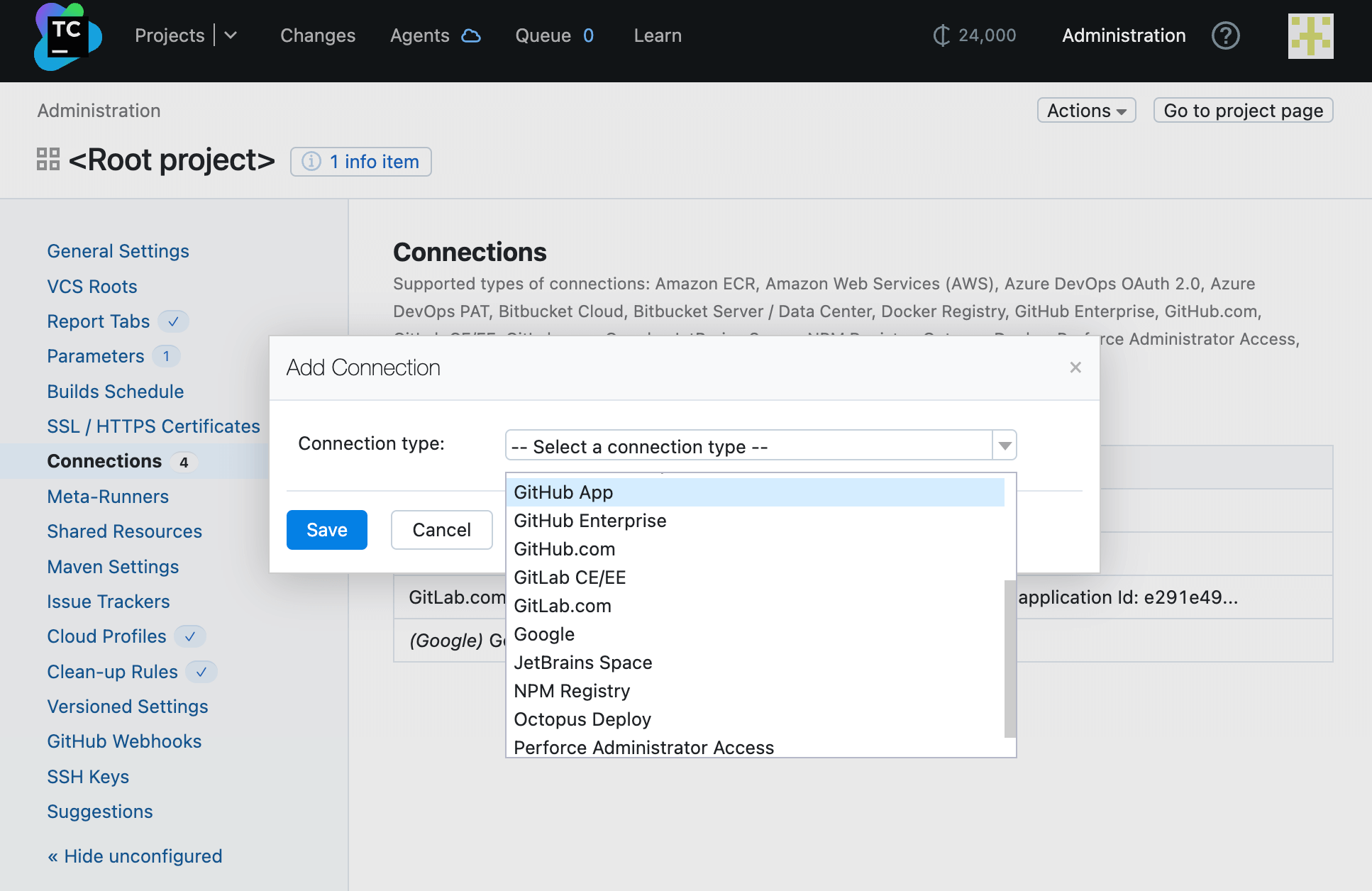
TeamCity can now be authorized to collaborate with GitHub as a GitHub App, a recent feature that allows for executing various actions and utilizing the GitHub API without the need to establish separate service accounts or act on behalf of a user.
The biggest benefit of GitHub App connection is that TeamCity no longer has to access GitHub using a user's credentials. Instead, it uses non-personal renewable tokens that are granted for a GitHub App installation in the user's GitHub organization/account. This becomes particularly beneficial if someone leaves the organization or their access rights are altered.
Improved support for draft pull requests in the Pull Requests build feature
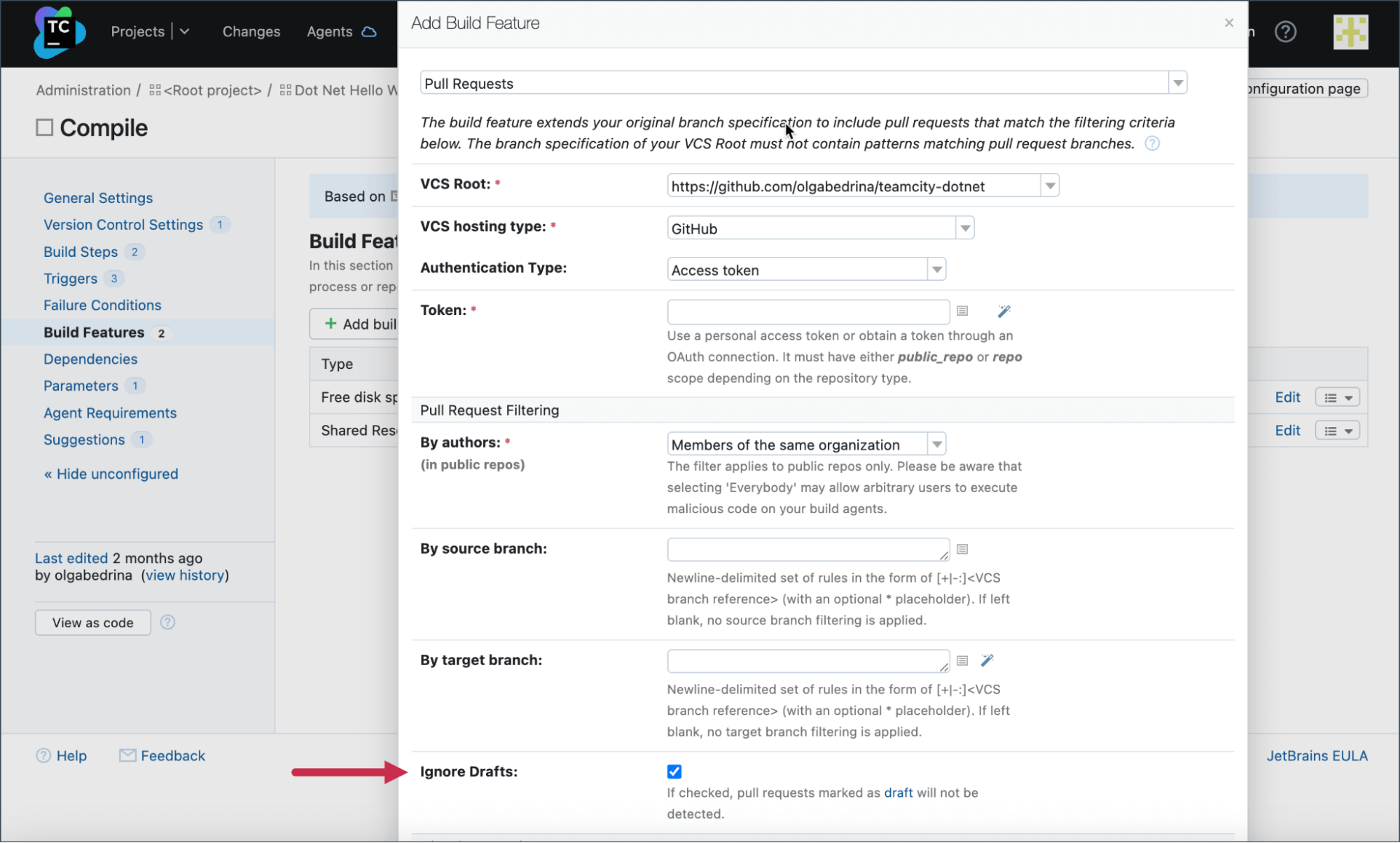
The ability to configure the Pull Requests build feature to ignore GitHub draft pull requests was introduced in TeamCity 2022.12.
Version 2023.05 additionally lets you disregard GitHub draft pull requests when utilizing the Pull Requests build feature. You can choose to activate the Ignore Drafts option within the feature settings, which will cause TeamCity to overlook any draft pull requests until their status is altered.
Customizable notifications
TeamCity users can already configure email and Slack notifications for specific events. Version 2023.05 makes this feature even better, allowing you to send Slack messages and email notifications using service messages.
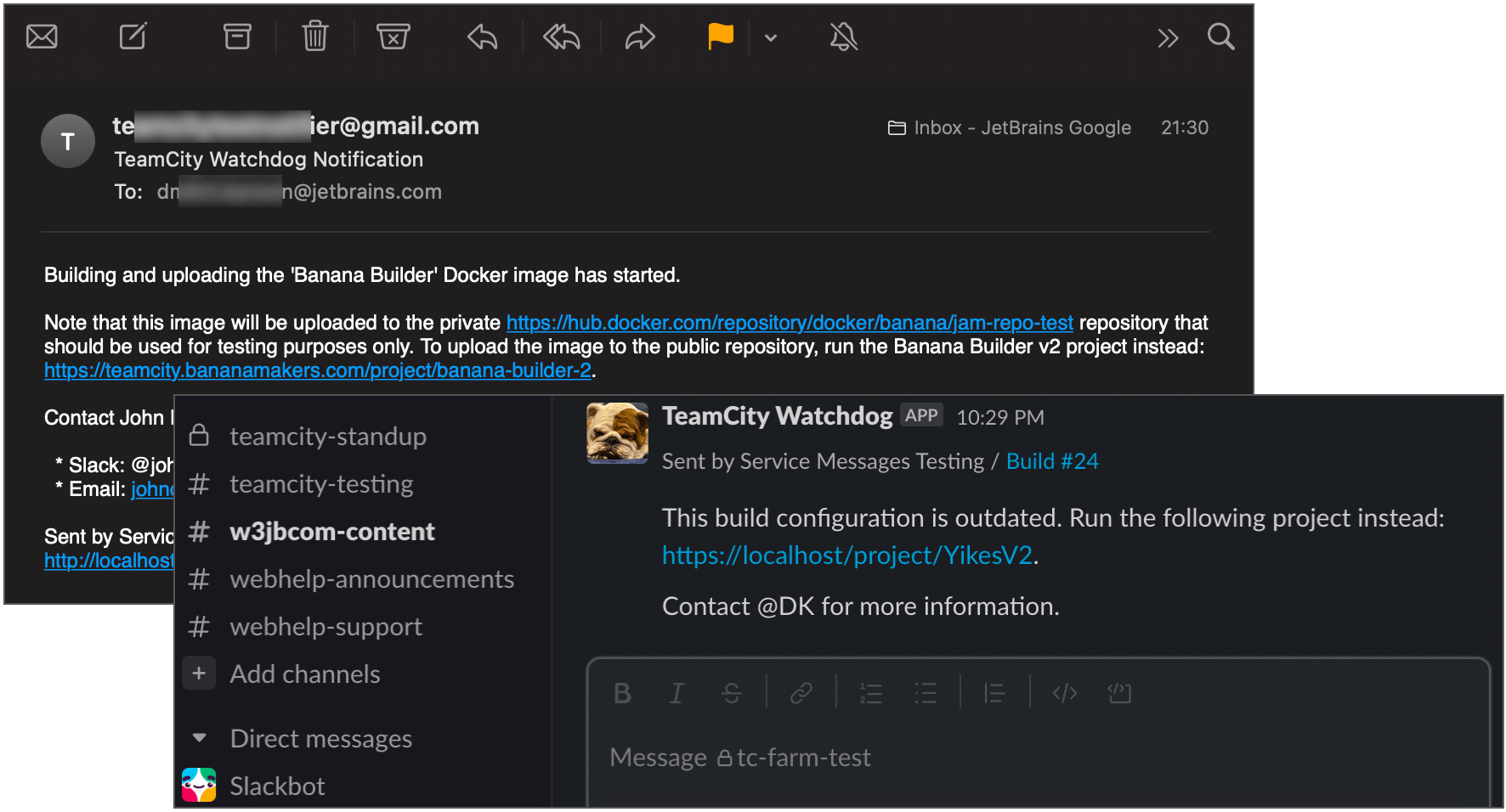
To prevent messages from being delivered to incorrect recipients, and to restrict links to untrusted external resources, these service messages incorporate inherent security measures.
One scenario in which this can be particularly helpful is sending notifications when certain conditions are met or critical events occur, like an ongoing deployment reporting an error that needs prompt review while the build is still in progress.
Add and remove build tags via service messages
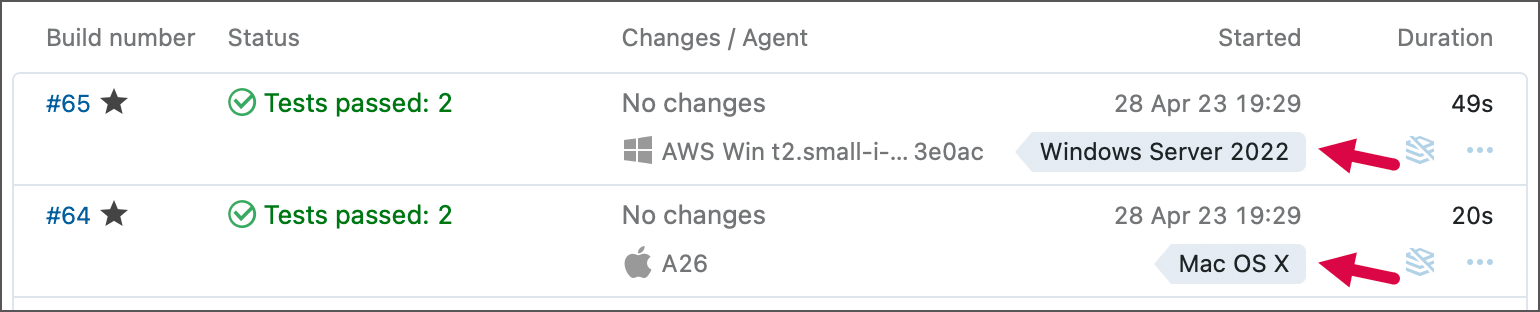
In addition to sending custom notifications, you can also add and remove build tags with the help of service messages.
Build tagging enables users to categorize and organize builds according to specific criteria. For example, build tags can be utilized to indicate the cause of build failures, making it easier to locate builds with similar reasons for failure.
Podman support

With the 2023.05 release, we’re introducing support for Podman, a container engine that allows users to manage containers without requiring root privileges. It is fully compatible with Docker commands, making it easier to switch between engines.
Over to you
For the full list of new features, please visit our What’s New page in the documentation.
As always, we’re looking forward to your feedback! Feel free to submit a request via the support form.
TeamCity 2022.10
TeamCity 2022.10 comes with the Sakura UI enabled by default, introduces many cloud-related features including the AWS credentials management system and out-of-the-box terminal access to AWS EC2-based build agents, and adds important improvements to VCS integrations. Server administrators will love the new streamlined way to implement HTTPS for on-premises TeamCity installations. Also, a new authentication module for using Google accounts and a number of long-requested features have been implemented.
Sakura UI: Perfect in Every Detail
Sakura /sa.ku.ʁa/, or cherry blossom, symbolizes the time of renewal and optimism – and we believe this perfectly describes our feelings as we make the Sakura UI default in TeamCity 2022.10.
The Sakura UI is modern, beautiful and fast. Built with accessibility in mind, it has feature parity with the classic UI, and also brings many new unique capabilities. We’ve been working on the Sakura UI for over four years, and we made sure to make it perfect down to the smallest detail. We had the unique opportunity to test it against thousands of internal and external projects including such giants as IntelliJ IDEA and Kotlin. We believe that you will love it too!
We understand that some of our users may be attached to the old user interface, and for a limited time we will keep it available for them. However, in one of the next versions, we will be deprecating it in favor of the Sakura UI, so if you think that we have missed something, please create an issue in YouTrack.
3, 2, 1, Blast off – to the Cloud!
More and more of our customers are moving their TeamCity installations to the cloud, so we continue to push our cloud capabilities forward.
Easier and more secure management of AWS credentials
We have implemented a new AWS credentials management system that issues temporary, short-lived AWS keys and exposes them in a safe way for your builds.
Terminal access to AWS EC2-based build agents
We believe that every development team should have full visibility and control over their delivery pipelines. To improve the debugging experience of cloud CI/CD, we have added the ability to open a secure terminal session to AWS EC2-based build agents directly from the TeamCity UI – without the need to access the cloud provider’s management console or ask a busy DevOps team to set up network access lists and SSH key-pairs.
The availability of the feature is controlled by the “Open an interactive session to the agent” permission that is only enabled for server administrators by default but can be assigned to other users when needed.
Cloud agent maintenance mode
If you've ever needed to debug a problem in a CI/CD pipeline that was executed on a cloud instance, you know that it can be tricky. Not only does it require time and effort to identify and spin up the right build agent, but you also need to make sure that it doesn’t launch new builds in the middle of the process.
This is where maintenance mode comes in. In this mode, TeamCity does not automatically terminate cloud agents after the build is finished, and they don’t get allocated for running new builds, allowing you to do the troubleshooting.
Managing cloud instances in a multiserver setup
Starting with TeamCity 2022.10, secondary nodes of TeamCity can start and stop cloud instances, providing uninterrupted operation of cloud-based CI during maintenance of a primary server.
Enhanced VCS Integrations
Perforce
TeamCity 2022.10 comes with two improvements related to the integration with Perforce tools:
- Perforce Shelve Trigger now understands when a shelved changelist is related to a non-default stream and allows the build to be run on it.
- TeamCity now detects changelists that have reviews in Perforce Helix Swarm and adds links to the respective review and change pages in Build Overview and Changes pages, respectively.
Support for refresh tokens in OAuth connections
TeamCity 2022.10 now uses short-lived OAuth tokens when working with GitLab, Bitbucket Cloud, and Azure DevOps, allowing you to create VCS roots without having to manually generate access tokens for these services.
Next-Level Security
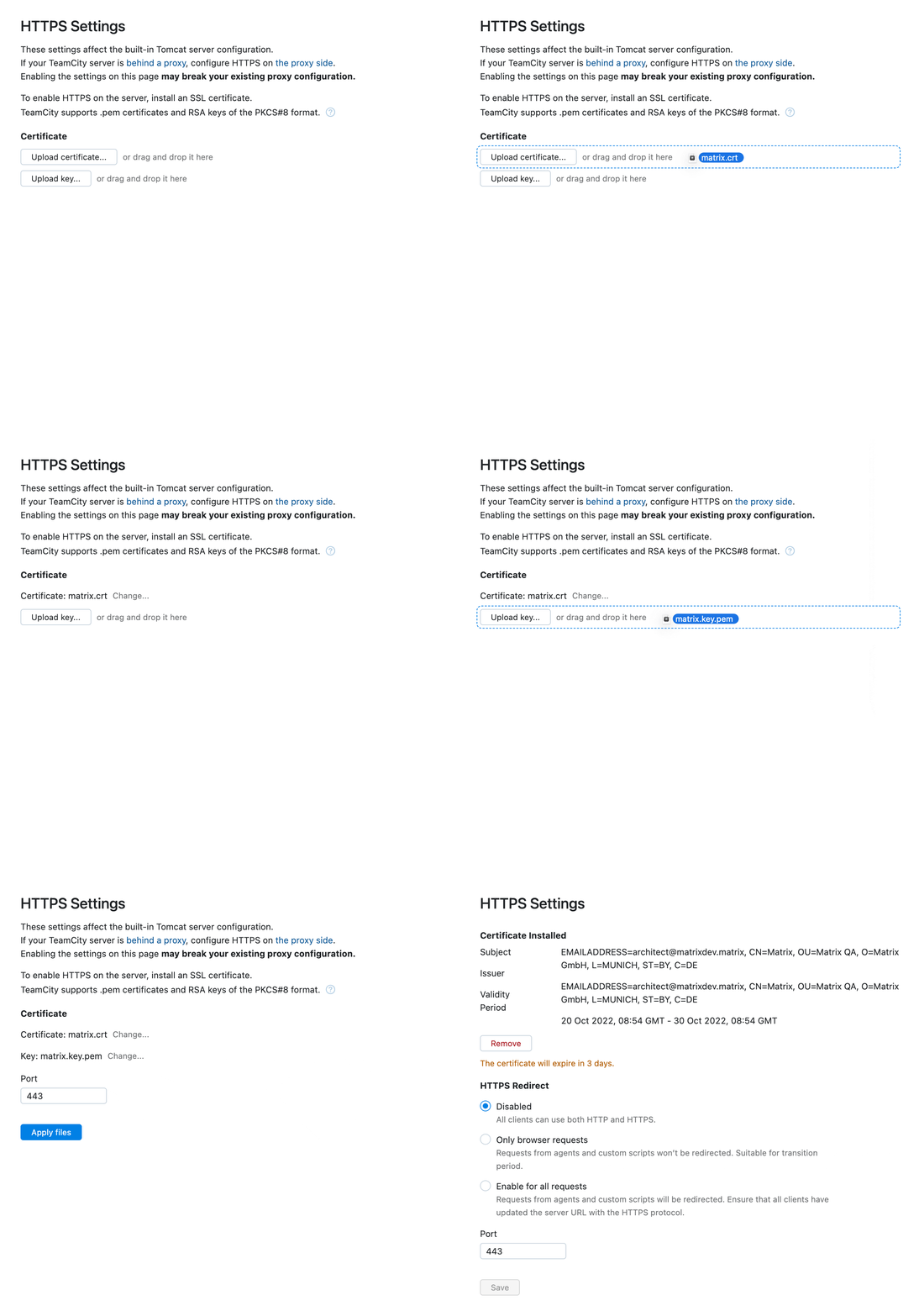
Out-of-the-box HTTPS support
Today, CI/CD pipeline security is more important than ever. In version 2022.10, we made it easy to enable HTTPS for your TeamCity server. All you need to do is to upload an HTTPS certificate, or a certificate chain, in PEM format, and TeamCity will do the rest.
Restricted access tokens
You can now create temporary access tokens that will allow other people to log into TeamCity under your account, but with a limited scope of permissions, for example, with view-only access for one specific project. This can be useful in cases where you want someone to help you debug your pipeline, or when making a demo.
Say Hello with Your Google Account
To support more workflows and make the experience with TeamCity smoother, we now support authentication using Google accounts. When logging in with Google, TeamCity will instantly match the Google email with an existing TeamCity user, and log them in without having to enter a password. It can also automatically create new profiles when new members join your team, provided that their email addresses belong to one of the domain names you specified.
Improved Disk Space Cleanup
The Free Disk Space build feature now keeps track of the size of artifacts and automatically calculates the disk space required for resolving artifact dependencies. This makes the use of the build feature more straightforward, as you no longer have to know the size of the artifacts downloaded during the build, and the only thing you need to specify is the amount of disk space required for the build process itself.
Promotion of Personal Builds
Starting with TeamCity 2022.10, you can promote personal builds. Builds that are triggered after the promotion also become personal builds.
These are just the most important highlights of TeamCity 2022.10. For the full list of changes, please see the TeamCity documentation.
TeamCity 2022.04
TeamCity 2022.04 introduces the new Parallel Testing feature that delivers an extraordinary speed boost when testing your projects. New powerful code analysis features will cut the time you spend on code reviews and increase the maintainability of your projects. Users who run their builds in the cloud will love the improved integration with Amazon S3 and Amazon CloudFront, as well as the new option of managing Cloud Profiles programmatically. There are a number of improvements to VCS integrations, new configuration options, and many great updates to the user interface.
Unparalleled Speed with Parallel Tests
TeamCity is now capable of parallelizing the execution of your tests by intelligently distributing them across multiple build agents, thus minimizing their overall duration. Unlike any other CI/CD solution, this feature takes into account not only the latest run, but also the history of your tests. With that, you can freely refactor your code, break your tests, and do whatever you think is best for your project – without the fear of compromising the parallelization and bogging down your pipelines.
Parallelization of test execution can be implemented in a multitude of ways. The easiest way is by using a Maven, Gradle, or .NET build runner, as these build runners support this feature straight out of the box. For other build runners and custom build scripts, TeamCity will save the optimal way to parallelize tests in special instruction files, allowing you to set up parallel testing yourself.
Built-in Code Quality Inspections for Better Code
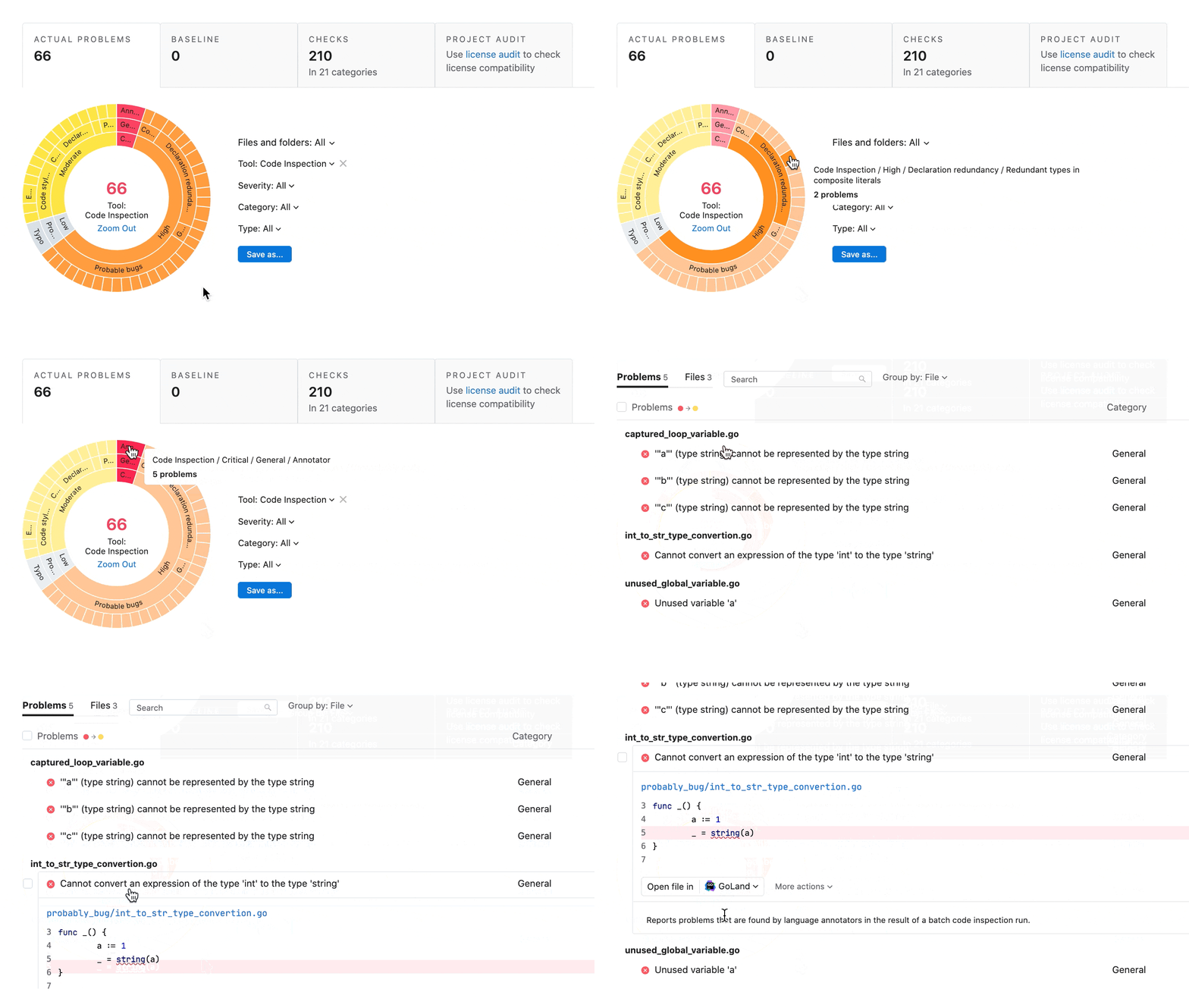
TeamCity helps you eliminate bugs and improve the quality of your software in so many ways – and now there’s one more! Starting with version 2022.04, you can enable advanced code quality inspections and perform a variety of other new actions – all powered by JetBrains Qodana:
- Run static analysis checks.
- Find duplicates in your code.
- Track how the code quality changes over time, and much more.
Adding code inspections to your build pipelines allows you to cut the time you spend on code reviews, ensures maintainability of your projects, and helps every developer on your team to work more efficiently. We welcome you to check out a live demo.
Taking Cloud Integration to New Heights
The world is quickly migrating to the cloud, and we’re seeing an increasing number of our customers following suit. TeamCity 2022.04 takes the cloud experience a step further by enhancing integration with Amazon Web Services and adding new configuration options.
Migrating build artifacts to Amazon S3
TeamCity has always had powerful integration with Amazon EC2 and Amazon S3 that allowed you to freely scale your build infrastructure, regardless of the size and complexity of your projects. Version 2022.04 allows you to not only store new build artifacts in Amazon S3, but also move existing artifacts from TeamCity’s local storage to Amazon S3. This is particularly useful for teams who are just starting their migration from a self-hosted setup to a cloud platform and want to take full advantage from the outset.
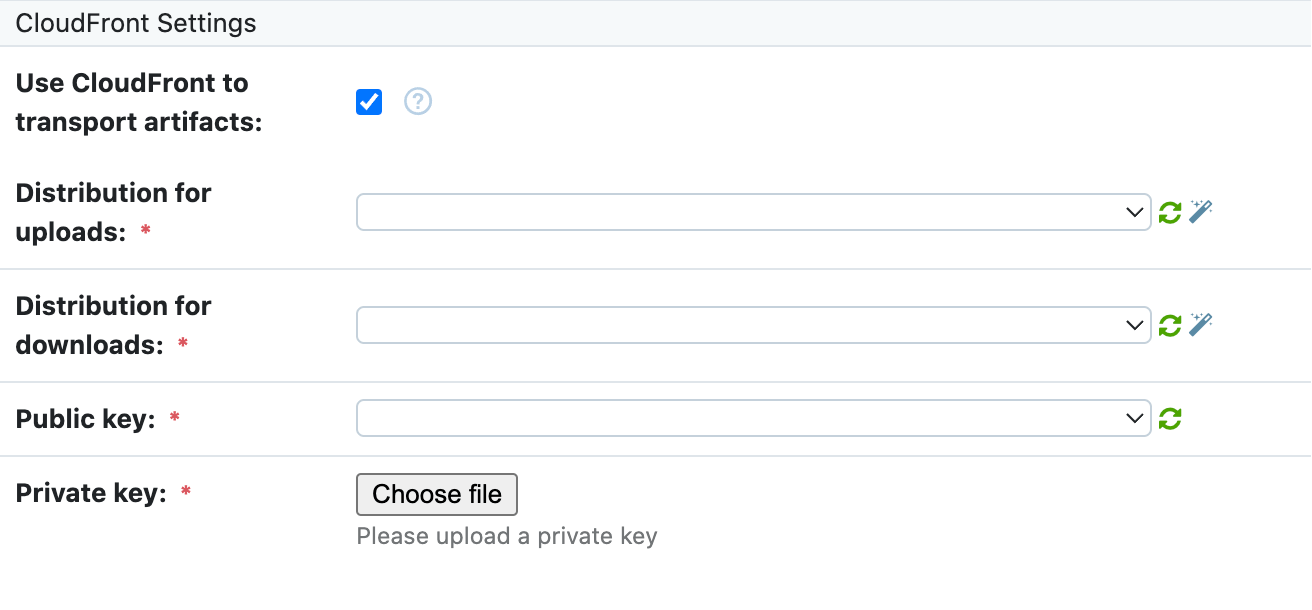
Downloading build artifacts from Amazon CloudFront
Working with build artifacts stored in Amazon S3 can be slow and expensive depending on the geographical distance between you and the region where the S3 bucket is located. To help you reduce costs, TeamCity 2022.04 adds native support for Amazon CloudFront, which allows you to work with artifacts cached on the nearest edge locations provided by AWS. This works on all levels including build agents, web users, API requests, and others – potentially giving your development process a tremendous speed boost.
More ways to manage autoscaling at the project level
Storing CI/CD configuration with your project’s codebase is the best way to ensure that it can always be built, tested and deployed. To provide more flexibility when building software in the cloud, TeamCity 2022.04 extends the Kotlin DSL, giving every project the opportunity to have its own Cloud Profile configuration.
Powering your Deployment Workflows
As previously announced in our roadmap, we are starting to explore the area of deployment, and as the first step in this direction we’re releasing build approvals. Now you can create build configurations that will not start immediately after being triggered, but will stay queued until everyone from the approval team gives their green light. This feature will be particularly useful for advanced teams that don’t want to limit developers’ ability to access the production environment, but at the same time need a higher level of control over the deployment procedure.
Your voice is welcome! If you have any feature requests related to deployment, please don’t hesitate to suggest them in our YouTrack project.
Smarter VCS Integrations
Space merge requests
We’re continuing to improve the integration with JetBrains Space, adding in support for merge requests. When building an MR, TeamCity will now publish the status to the respective merge request timeline in Space.
GitLab issues
We have enriched the list of supported issue trackers by adding GitLab. This works just as you’d expect: when a commit message mentions an issue ID, TeamCity automatically adds a link to the respective issue in GitLab and displays information about it.
Queued builds reporting
Previously, the Commit Status Publisher build feature would not send information to the version control system until TeamCity actually started the build, which was prone to occur long after the commit had been made. Starting with the new version, TeamCity updates the commit status immediately after adding the respective build to the queue, providing you with the most up-to-date information. This feature works with all supported VCS services including GitHub, GitLab, Space, Bitbucket and Azure DevOps.
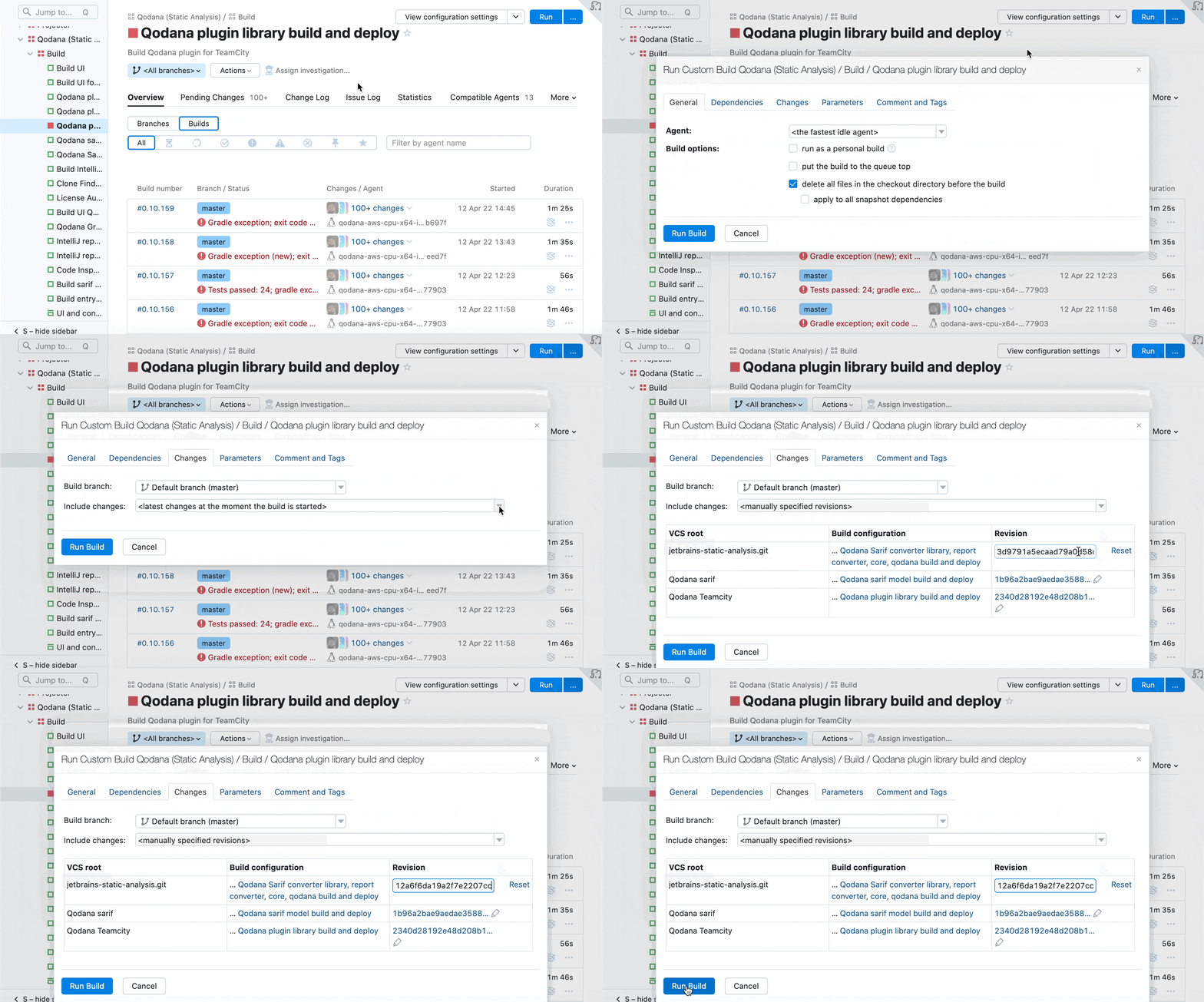
Running a custom build with a specific revision
When running a custom build, you can now specify an exact revision that may not necessarily belong to the list of changes known by the build configuration. This gives you a lot more flexibility in cases where you want to reproduce historical builds, deploy older versions, debug new build configurations, and many other situations.
More Control over Feature Branches
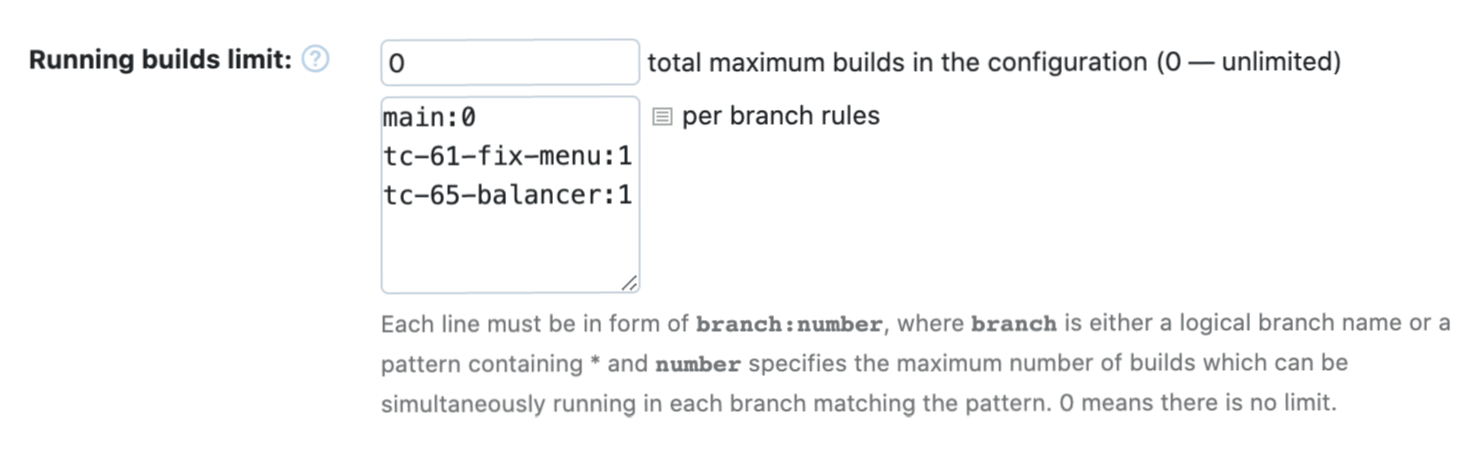
TeamCity has always allowed you to limit the number of builds running simultaneously for a build configuration. With version 2022.04, you can improve resource allocation and set this limit on the branch level. For example, your main branch may have an unlimited number of builds that can occupy as many build agents as they need while you limit your feature branches to running just one build at a time.
Security: Inside and Outside
Log4J and Log4Shell
Although TeamCity has not been affected by the Log4Shell vulnerability (CVE-2021-44228), some security scanners wrongly reported it as vulnerable without checking the exact version number of the Log4J framework used in the product. To avoid false-positive scanner reports, we have upgraded Log4J to the latest version.
Spring and Spring4Shell
Similarly to Log4Shell, the Spring4Shell vulnerability (CVE-2022-22965) does not affect TeamCity. However, to avoid false-positive reports from security scanners, we have upgraded the Spring Framework used in TeamCity to the latest version.
Harmony with Sakura UI
Our new Sakura UI is getting closer and closer to feature parity with the classic TeamCity UI. In version 2022.04, we have reimplemented the Agent Pools and Changes pages and vastly improved the overall performance of the new UI. Now we are just a few steps away from making it a default option – something we plan to do in TeamCity 2022.10. Stay tuned!
These are just some of the ways we've improved TeamCity. For upgrade instructions and the full list of changes in version 2022.04, please see the TeamCity documentation.