Emmet
On this page, configure Emmet preferences for HTML, XML, JavaScript (JSX Harmony) files and Style Sheets.
Item | Description |
|---|---|
Expand abbreviation with | From this list, select the default key to expand Emmet selectors with. This key will also expand Emmet live templates. |
Emmet.HTML
Item | Description |
|---|---|
Enable XML/HTML Emmet | Select this checkbox to enable Emmet support for XML and HTML. If this checkbox is not selected, complicated abbreviations, such as |
Enable abbreviation preview | Select this checkbox to have WebStorm show a popup with a preview of the entered abbreviation before actually expanding it. 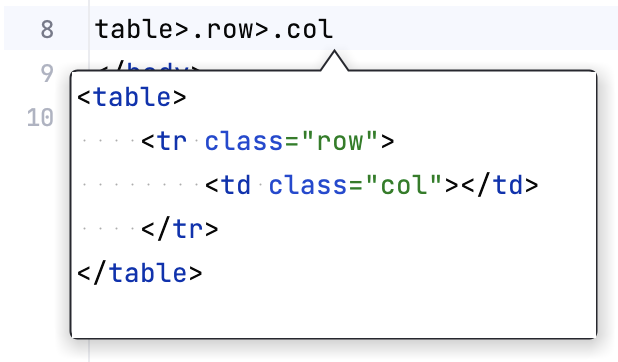 |
Enable automatic URL recognition while wrapping text with <a> tag |
|
Add edit point at the end of template |
|
BEM | In this area, specify the BEM separators for the class names, modifiers and short elements. For more information, refer to the Emmet documentation. |
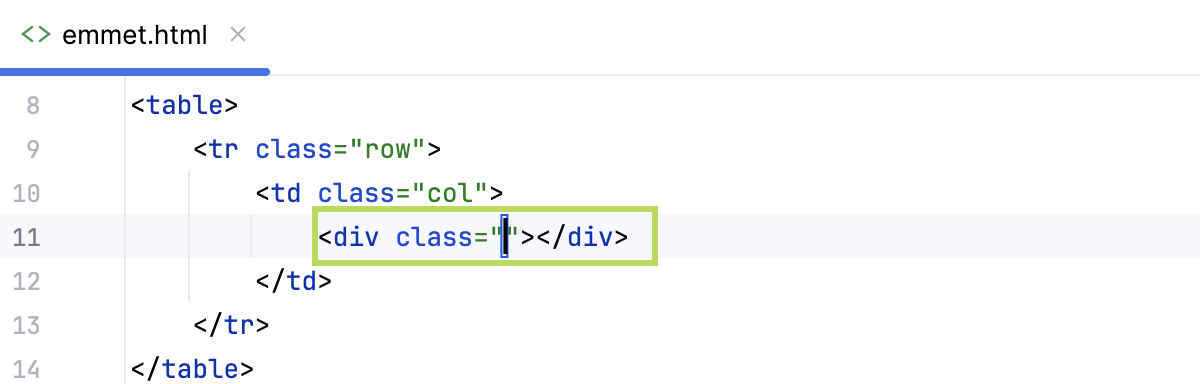
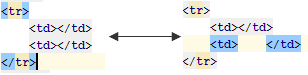
Filters enabled by default | In this area, specify which Emmet filters you want to be applied to an expanded abbreviation before it is shown in the editor. Learn more about filters at https://docs.emmet.io/filters/. To have a filter always applied by default, select the checkbox next to it. The available options are: |
Emmet.CSS
Item | Description |
|---|---|
Enable CSS Emmet | Select this checkbox to enable Emmet support for Style Sheets. If this checkbox is not selected, the complicated abbreviations, like |
Enable fuzzy search among CSS abbreviations | When this checkbox is selected, every unknown abbreviation will be scored against available template names. The match with the best score will be used to resolve the template. For example, with this option enabled, the following abbreviations can be equal to:
|
Enable expansion of unknown properties ('unknown' to 'unknown:;') |
|
Auto insert CSS vendor prefixes | If this checkbox is selected, the CSS properties listed in the table below are expanded into constructs that contain pre-pending vendor prefixes. Learn more at Vendor prefixes. If this checkbox is cleared, the entire table of properties is disabled. |
Properties and vendor prefixes | The table contains a list of CSS properties and vendor prefixes that correspond to various browsers.
|
 or press Alt+Insert. Then type the name of the property in the dialog that opens and enable it in the relevant browsers.
 or press Alt+Delete.
Emmet.JSX
Item | Description |
|---|---|
Enable JSX Emmet | Select this checkbox to use Emmet within XML fragments in the JSX Harmony context. |