Support and assistance
Access online documentation from the IDE
The most important source of information about WebStorm is this online help. To access it from WebStorm, do one of the following:
In the main menu, go to .
Press F1.
Click
 in a dialog or a tool window.
Access documentation offline
If you do not have internet access to view the online help, you can use the WebStorm Help plugin, which serves the help pages via the built-in web server for offline use.
Ask AI Assistant
If you have the AI Assistant plugin installed, you can ask questions about the IDE right in the chat.
Open the AI Assistant chat by clicking
 AI Chat on the right toolbar.
Type the
/docscommand and then type your question. If applicable, AI Assistant will provide a link to the corresponding setting or documentation page.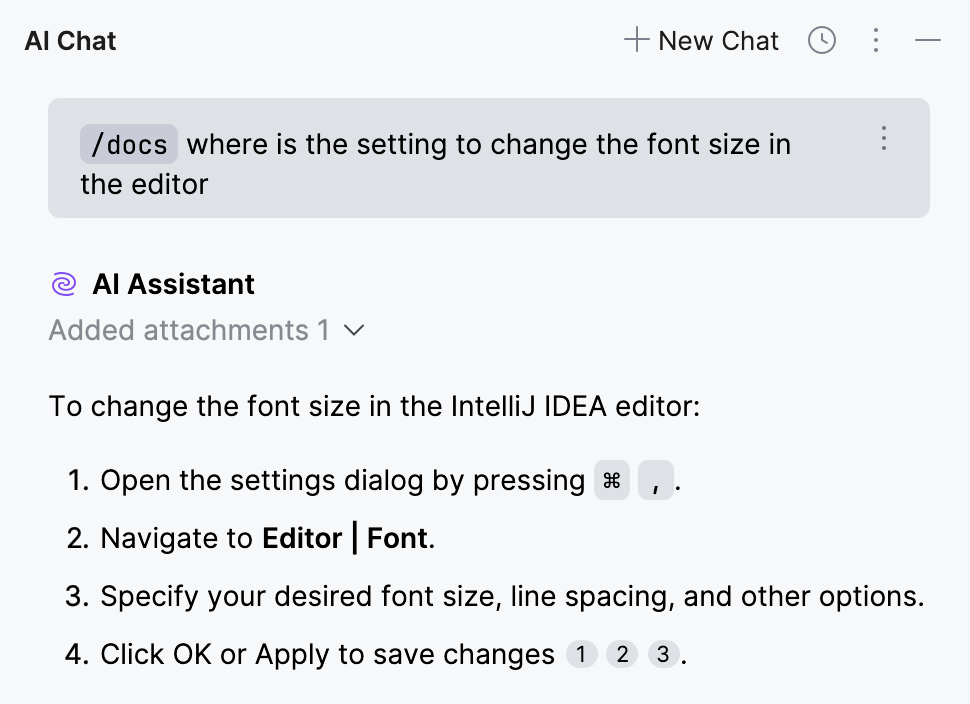
Learn more from Start a new chat (AI Assistant documentation).
Collect diagnostic data
To help support quickly analyze a problem and work out a helpful solution, it is important that you provide logs and other diagnostic data.
In the main menu, go to .
The data is saved in a WebStorm-logs-<number>.zip archive, which you can later attach when contacting support or reporting a bug.
Contact support
If you can't find the information you need in the online help, you can browse the WebStorm Knowledge Base. If it doesn't help either, contact the JetBrains support team.
In the main menu, go to to create a direct request for the support team.
Locate the WebStorm-logs-<number>.zip archive and attach it to your request.
Report bugs
If you encounter a bug or would like to suggest a new feature, use the WebStorm issue tracker.
In the main menu, go to .
Locate the WebStorm-logs-<number>.zip archive and attach it to your bug report.
Before submitting, it is a good idea to search the issue tracker for similar reports and feature requests to avoid duplicates. If you find a similar ticket, you can add a comment to it or vote for it to bring more attention from the development team.
Share feedback
You can use the feedback form to tell us what you like or don't like about JetBrains products.
In the main menu, go to .
Learn more
There are several ways to learn more about WebStorm:
Tips of the day provide useful hints about WebStorm's features. To open the Tip of the Day dialog, select from the main menu.
If you want to get a Tip of the Day on every IDE startup, clear the Don't show tips on startup checkbox.
The Productivity Guide displays a list of useful features with statistics and tips.
To open it, select from the main menu.
To discover new features, sort the list by group and note rarely used features in the same group as the ones you use more frequently. Click the feature to see its usage description.