Novedades de Rider 2026.1
Rider 2026.1 brings improved support for the .NET ecosystem and game development workflows, as well as refinements to the overall developer experience. Estos son algunos de los aspectos más destacados de esta versión:
Cualquier agente, integrado
- ACP Registry: Explore e instale agentes de IA con un solo clic.
- Árboles de trabajo de Git: trabaje en ramas paralelas y traslade una a un agente mientras usted sigue avanzando en otra.
The latest language support
- C# 14 newness, C# 15 Preview features, and more
.NET support and productivity improvements
- Compatibilidad para programas de C# basados en archivos
- NuGet Package Manager Console Preview
- Visor de desensamblados de .NET
Game development improvements
- Complete mobile development support for Unreal Engine on Android and iOS
- CMake support for C++ gaming projects Beta
- Redesigned Unity Profiler integration
- Enhanced Godot editor integration
IA
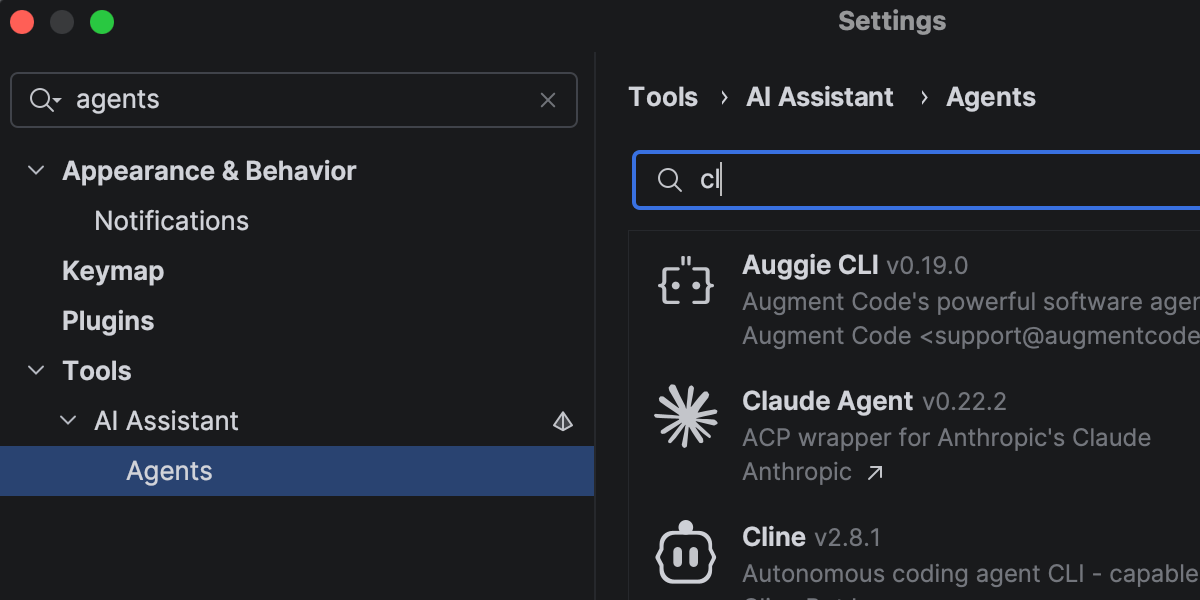
Rider sigue evolucionando como una plataforma abierta que le permite incorporar sus herramientas de IA preferidas en sus flujos de trabajo profesionales de desarrollo.
In addition to Junie, Claude Agent, and Codex in the AI chat, you can now choose from a wider range of agents, including GitHub Copilot and Cursor, and dozens of external agents supported via the Agent Client Protocol. Con el nuevo ACP Registry, puede descubrir agentes disponibles e instalarlos en un solo clic.
More improvements for working with AI agents in Rider here.
Faster solution loading and code completion
Rider 2026.1 improves performance in areas you notice during everyday work.
Opening solutions and attaching to running processes is now faster thanks to more efficient indexing of the referenced assemblies. Code completion is also more responsive, particularly for import suggestions, helping you stay in flow with fewer interruptions.
Code analysis has also been optimized, contributing to lower overall IDE overhead.
The latest language support
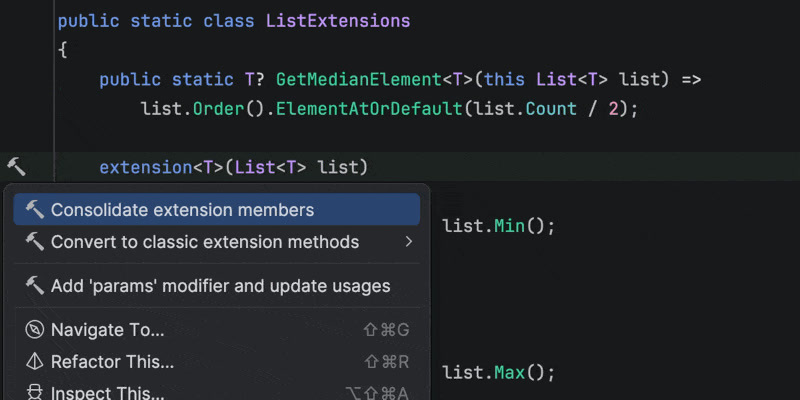
C#
Rider 2026.1 brings improvements to code analysis, new inspections, and support for evolving language features. Enhanced support for C# extension members includes better navigation and refactorings, as well as improved quick-fixes that automatically import missing extension members when needed.
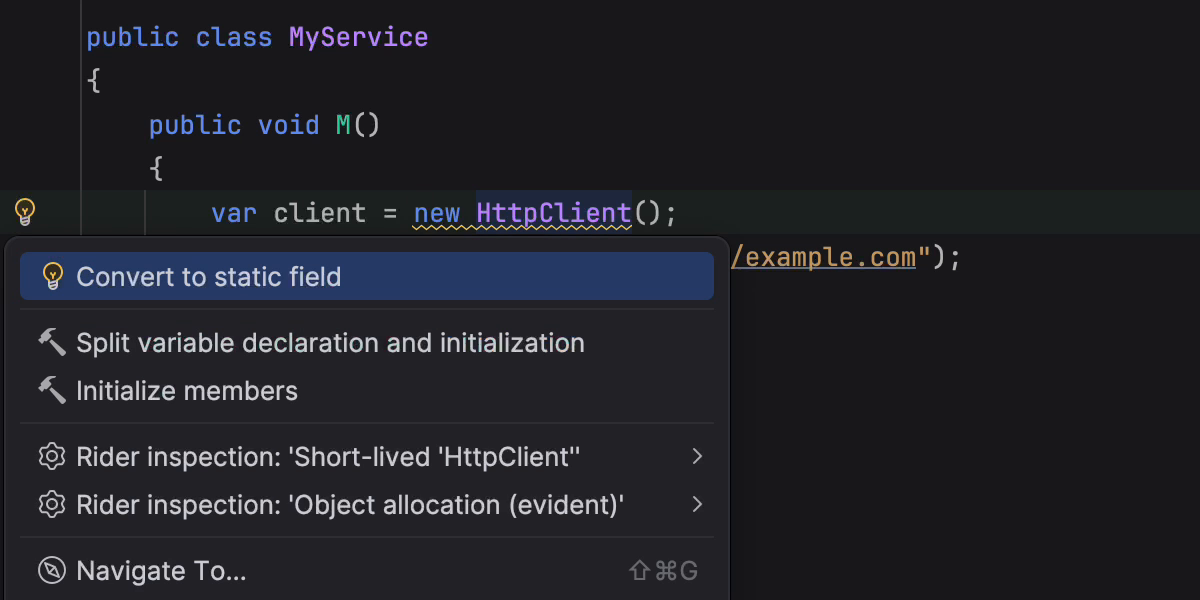
This release also introduces early support for C# 15 Preview language features, such as collection expression arguments and the [ExtendedLayout] attribute, helping you experiment with new syntax as the language evolves. In addition, several new inspections and style options help catch subtle issues, such as short-lived HttpClient instances or incorrect use of ImmutableArray<T> with collection initializers.
Rider’s C# code intelligence is powered by ReSharper. If you want to dive deeper into C# language updates, we describe them in detail on the What’s New in ReSharper 2026.1 page.
Improved debugging for F#
Rider's new Smart Step Into for F# support makes it easier for you to choose your step target. The debugger can also display return values for function calls, helping you understand program flow without adding extra logging. Stepping has been improved for async and task expressions, and multiple issues affecting F# debugging have been fixed.
For the full list of changes and fixes, see the F# plugin release notes.
.NET support and productivity improvements
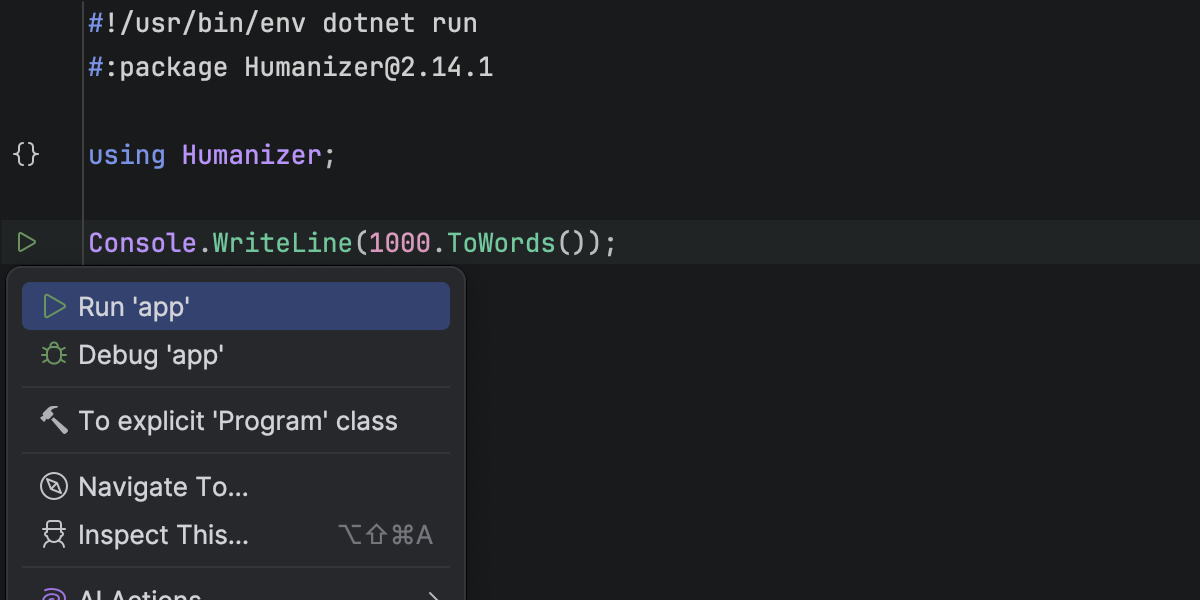
Compatibilidad para programas de C# basados en archivos
Rider ahora permite trabajar con programas de C# de un solo archivo que pueden ejecutarse con dotnet run file.cs. Puede abrir y ejecutar un archivo .cs independiente directamente desde el IDE, sin necesidad de un .csproj.
El editor de Rider reconoce programas basados en archivos con declaraciones de nivel superior, shebangs #! y directivas #:, incluidas #:package y #:sdk. El resaltado de código, la finalización de código, los marcadores de ejecución y la depuración están disponibles, lo que le permite crear scripts rápidos, prototipos y herramientas puntuales escritas en un solo archivo C#.
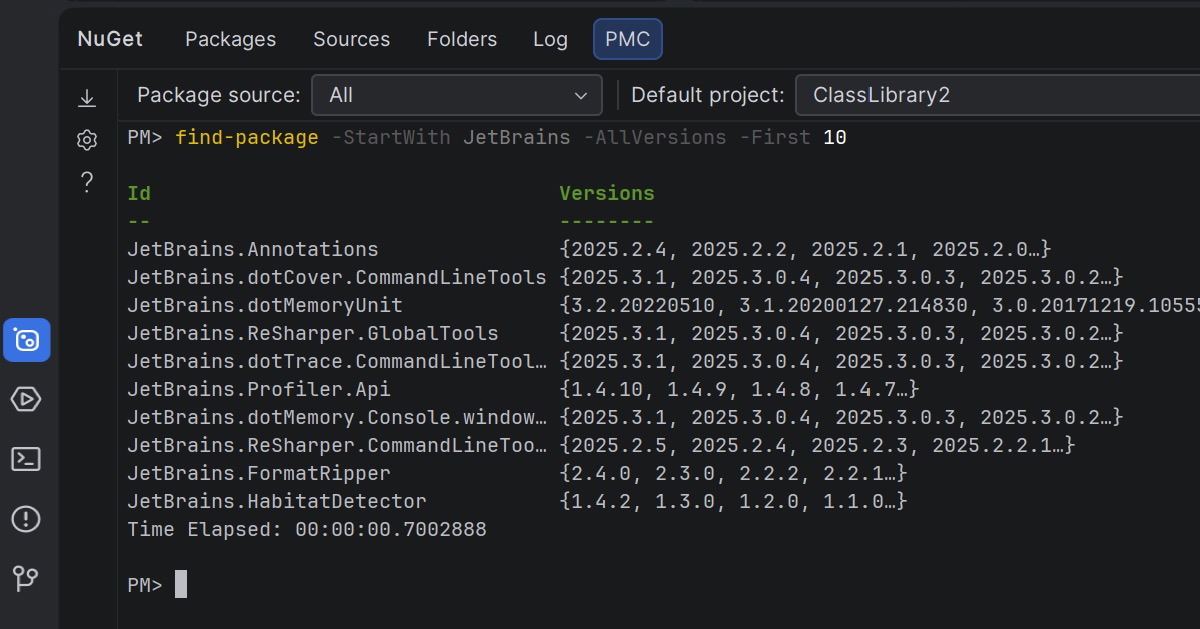
NuGet Package Manager Console Preview
Rider 2026.1 brings NuGet’s PowerShell-based workflow into the IDE, offering a Package Manager Console (PMC) that’s currently in preview.
The new console supports standard NuGet PowerShell commands, as well as commands provided by NuGet packages themselves. Los comandos de PowerShell para Entity Framework Core son totalmente compatibles, lo que le permite aprovechar los flujos de trabajo habituales de EF Core sin tener que salir de Rider.
Puede ejecutar comandos de NuGet y Entity Framework Core desde la ventana de herramientas NuGet o directamente en el terminal. In the NuGet tool window, you can select the package source and default project using UI controls. In the terminal-based console, this context is displayed in the PowerShell prompt and can be changed using PowerShell commands.
Let us know what you think about this feature here.
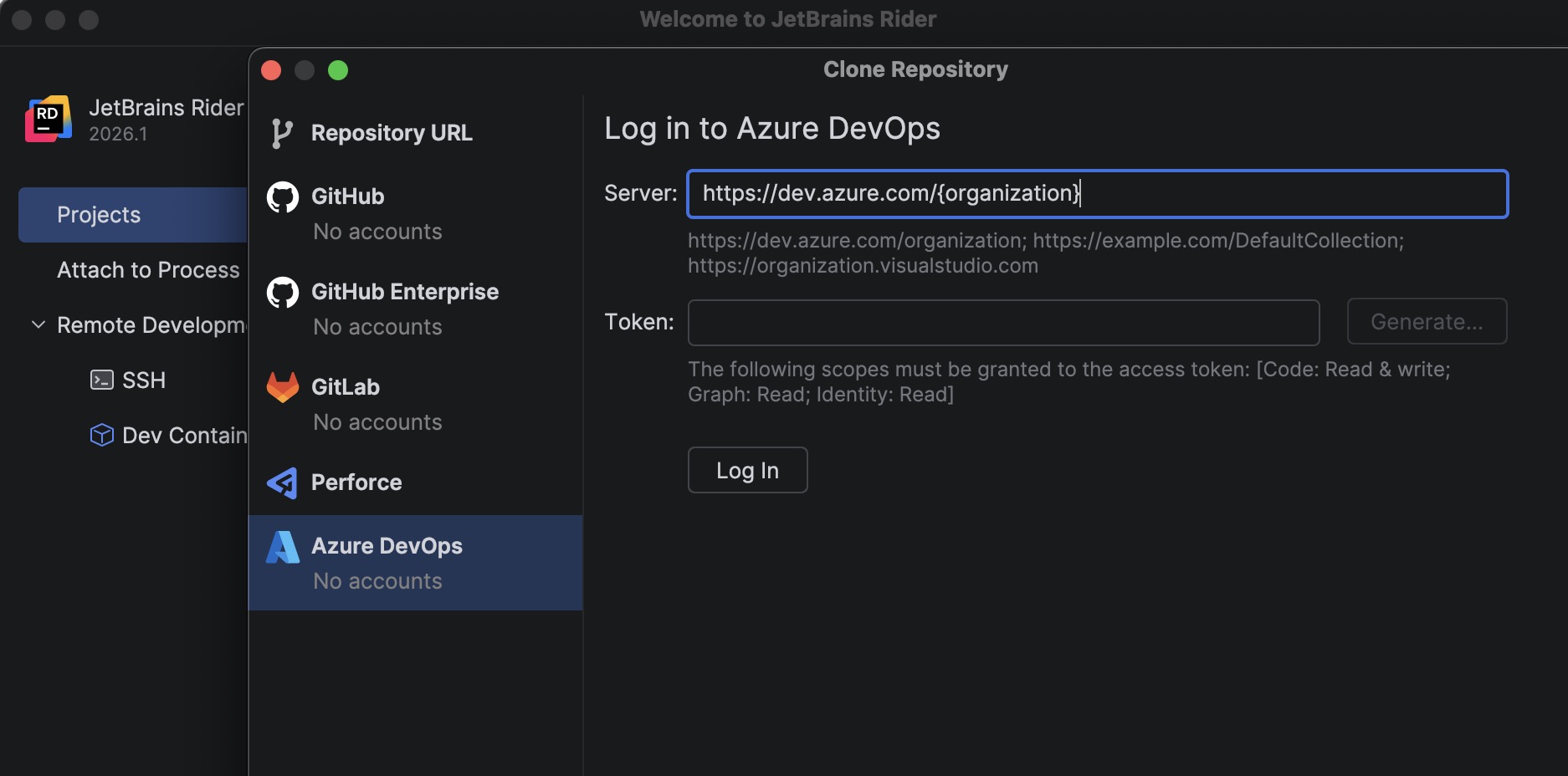
Azure DevOps: posibilidad de clonar repositorios
A new bundled Azure DevOps plugin allows you to clone repositories directly from Rider.
To get started, go to File | Open | Get from Version Control and select Azure DevOps from the list of providers. Rider authenticates you using a personal access token (PAT) and then displays the repositories available to your account so you can clone them directly from the IDE.
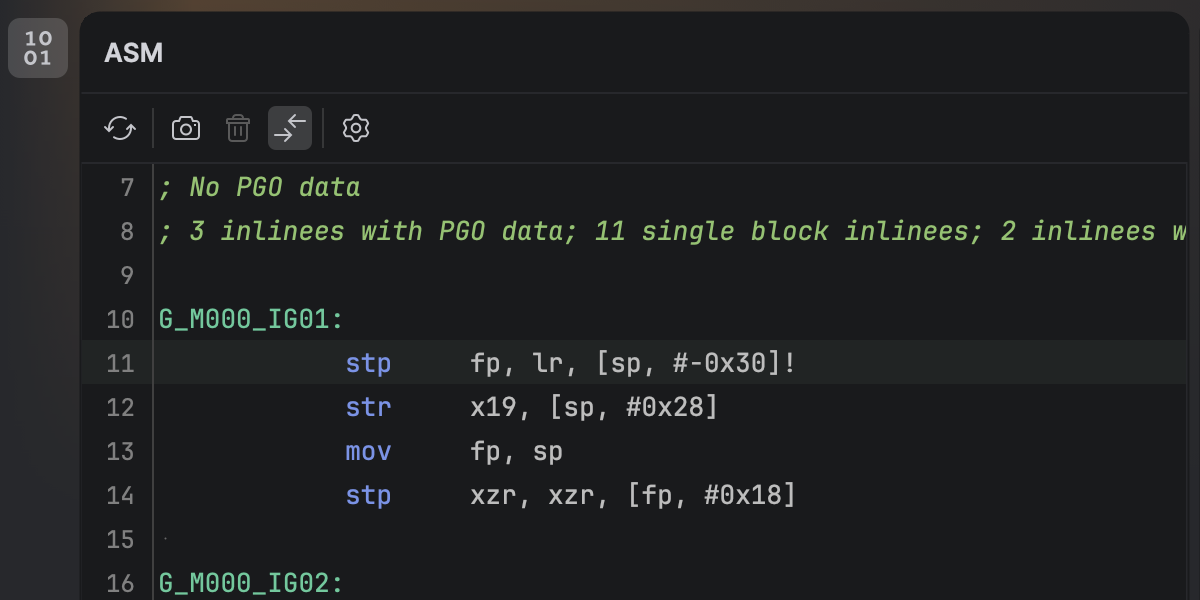
Visor de desensamblados de .NET
Ahora puede ver el desensamblado nativo generado a partir de su código C# sin salir de Rider. Una vez que haya instalado el nuevo complemento .NET Disassembler, podrá inspeccionar el código generado por los compiladores JIT, ReadyToRun y NativeAOT dentro de la nueva ventana de herramientas ASM Viewer.
Smoother MAUI iOS development workflow from Windows
Developing .NET MAUI applications for iOS from Windows requires connecting Rider to a Mac build host. Rider 2026.1 streamlines this workflow with a new setup experience that automatically prepares the remote environment.
When you connect to a Mac, Rider now verifies that the remote system has everything configured, including macOS, Xcode, the .NET SDK, and required MAUI workloads. If any components are missing, Rider can install or update them automatically, helping you get started faster.
Additionally, you can now build, deploy, and debug MAUI iOS applications from Windows more reliably. We’ve improved diagnostics and connection stability, and fixed issues that previously prevented MAUI apps from deploying to iOS simulators or Windows devices.
Game development improvements
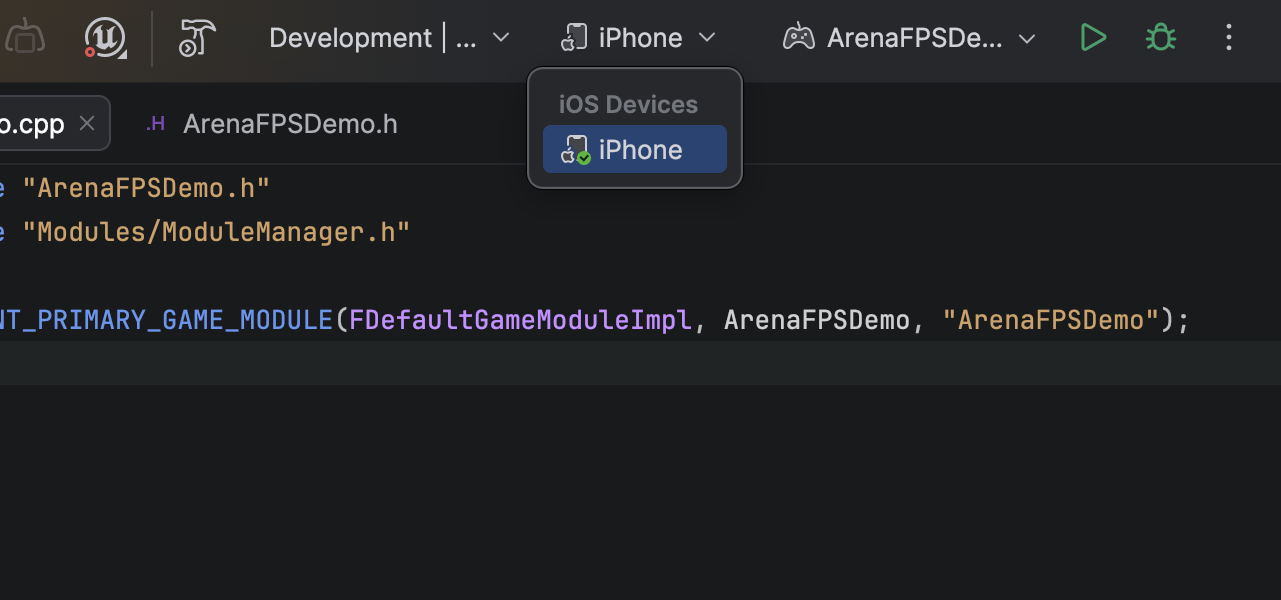
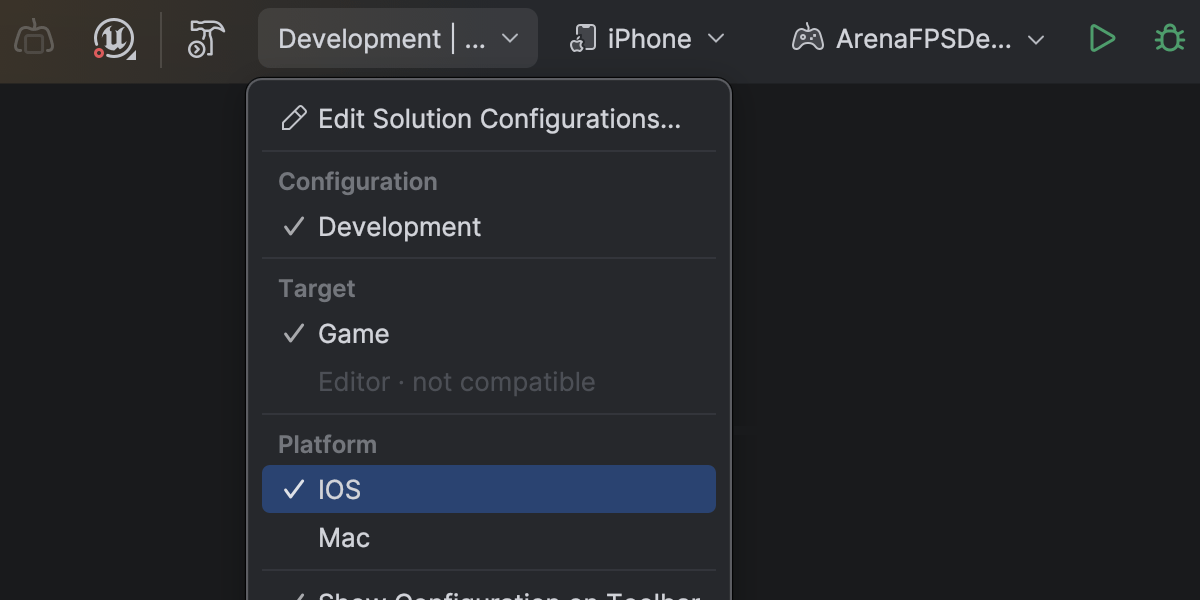
Complete mobile development support for Unreal Engine on Android and iOS
Rider 2026.1 fully supports mobile game development for Unreal Engine across both major mobile platforms. Esta versión parte de la base de Rider 2025.3, que ya introdujo la depuración para dispositivos móviles y de RV basados en Android, y ahora añade la compatibilidad con dispositivos móviles y de RV basados en iOS.
En macOS, puede depurar juegos de Unreal Engine que se ejecutan en dispositivos iOS directamente desde Rider. Establezca puntos de interrupción, inspeccione variables, avance por el código y analice las pilas de llamadas, todo desde la interfaz habitual del depurador.
La configuración inicial de Xcode para el aprovisionamiento y la firma sigue siendo necesaria conforme a los requisitos de Apple.
Dramatically faster variable inspections for UE projects
Inspecting complex variables while debugging Unreal Engine projects is now much faster and more responsive. Expanding containers no longer slows down your debugging session, making it easier to explore object state and understand what’s happening at runtime.
This improvement comes from a rewritten parser and evaluator for Natvis expressions used by Rider’s debugger. Variable inspection with the rewritten evaluator is up to 87 times faster on warm runs and 16 times faster on cold ones, and the debugger’s memory usage has dropped to just over a third of what it was.
Get the full story of how we were able to achieve that in this blog post.
Blueprint improvements
Finding usages, event implementations, and delegate bindings across Unreal Engine Blueprints and C++ code is now more reliable, making it easier to trace how gameplay logic connects across assets.
Code Vision now supports the BlueprintPure specifier and correctly detects blueprint events implementations in Blueprints. Find Usages has also been improved and now identifies additional BlueprintAssignable delegate bindings.
Blueprint usage search now relies on the asset path instead of the Blueprint name, ensuring accurate results even when multiple Blueprints share the same name.
Rider’s C++ intelligence is powered by JetBrains ReSharper C++. For a complete overview of the C++ improvements in this release, see the dedicated What’s New in ReSharper C++ 2026.1 page.
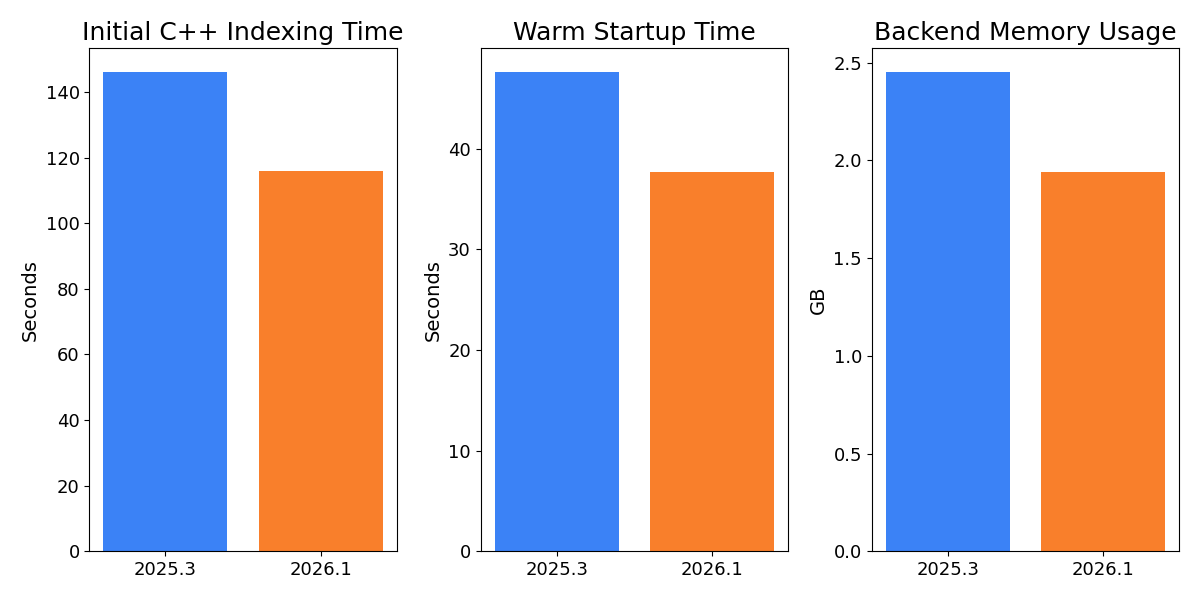
Faster indexing and lower memory usage for Unreal Engine projects
Working with large Unreal Engine codebases is now noticeably faster and more resource-efficient. In our measurements on Epic Games’ Lyra sample project, initial C++ indexing is over 20% faster, helping you get to work sooner when opening a project for the first time.
After opening an already indexed project, the backend uses approximately 14% less memory, reducing the IDE’s footprint and leaving more resources available for the rest of your workflow. Warm startup is also 10% faster, so returning to your project between sessions feels snappier.
Rider now also indexes Unreal Engine plugins by default. With the growing use of plugins in Unreal Engine projects and the recent performance gains, indexing plugins by default provides better code analysis and navigation out of the box. You can restore the previous behavior on the Language & Frameworks | C/C++ | Unreal Engine tab in Settings.
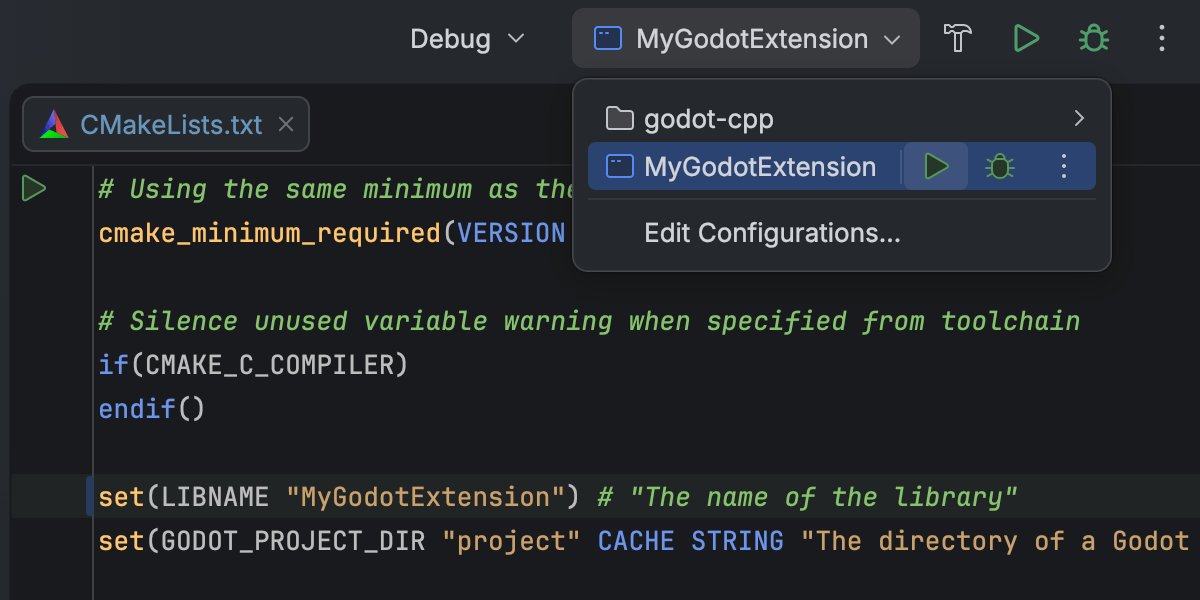
CMake support for C++ gaming projects Beta
Rider 2026.1 introduce el soporte Beta para proyectos C++ basados en CMake, lo que le permite abrirlos, editarlos y compilarlos directamente en el IDE. Esto facilita trabajar con proyectos multiplataforma sin necesidad de cambiar a otro sistema de compilación.
Esta implementación inicial se centra en los flujos de trabajo de C++, incluidos los de edición y depuración de archivos de configuración de CMake. Es posible que algunos flujos de trabajo y casos límite aún necesiten ajustes, y continuaremos mejorando el rendimiento y la compatibilidad en las próximas versiones. We would love for you to share your experience in this ticket.
This addition is intended to support game development workflows that rely on CMake, such as projects built around CMake-based engines or tooling. For general-purpose C++ and embedded development, CLion remains the primary JetBrains IDE.
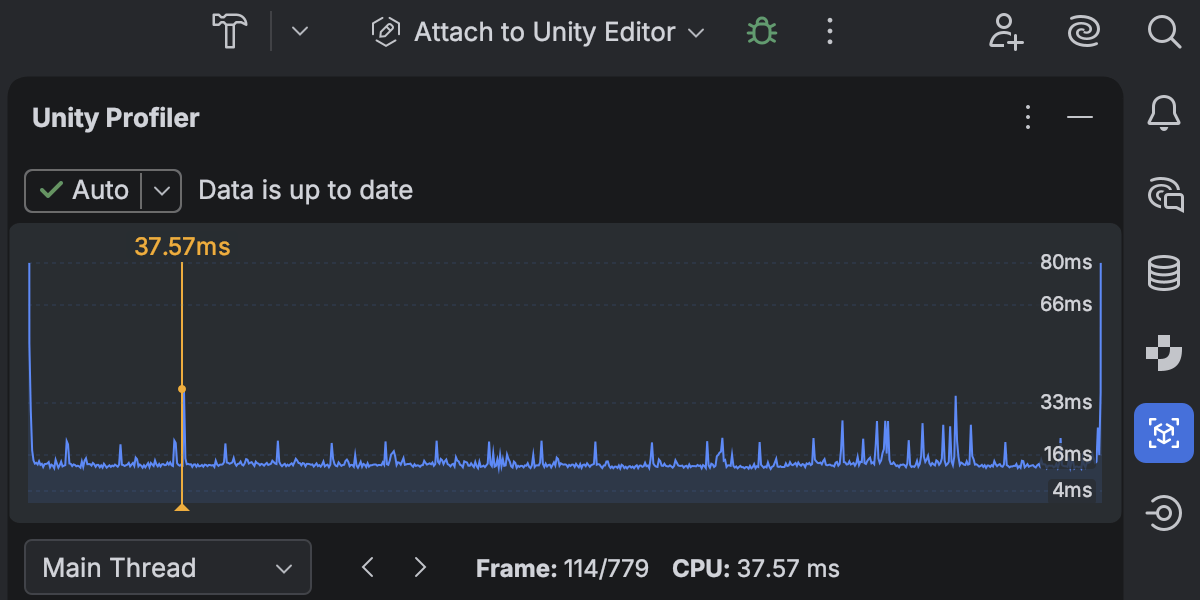
Integración rediseñada con Unity Profiler
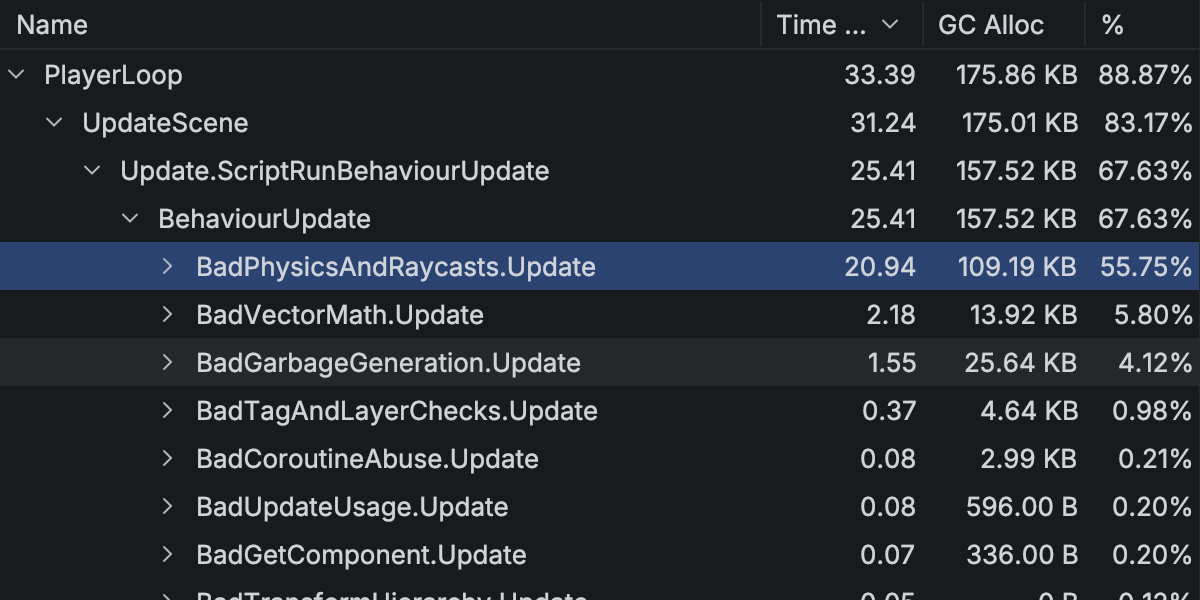
Performance investigation for game projects has become a first-class workflow in Rider 2026.1, thanks to the redesigned Unity Profiler integration.
You can now open Unity Profiler snapshots directly in Rider and analyze them in a dedicated Profiler tool window with a structured view of frames and call stacks. A timeline view shows CPU time per frame, helping you quickly identify slow frames and performance hotspots.
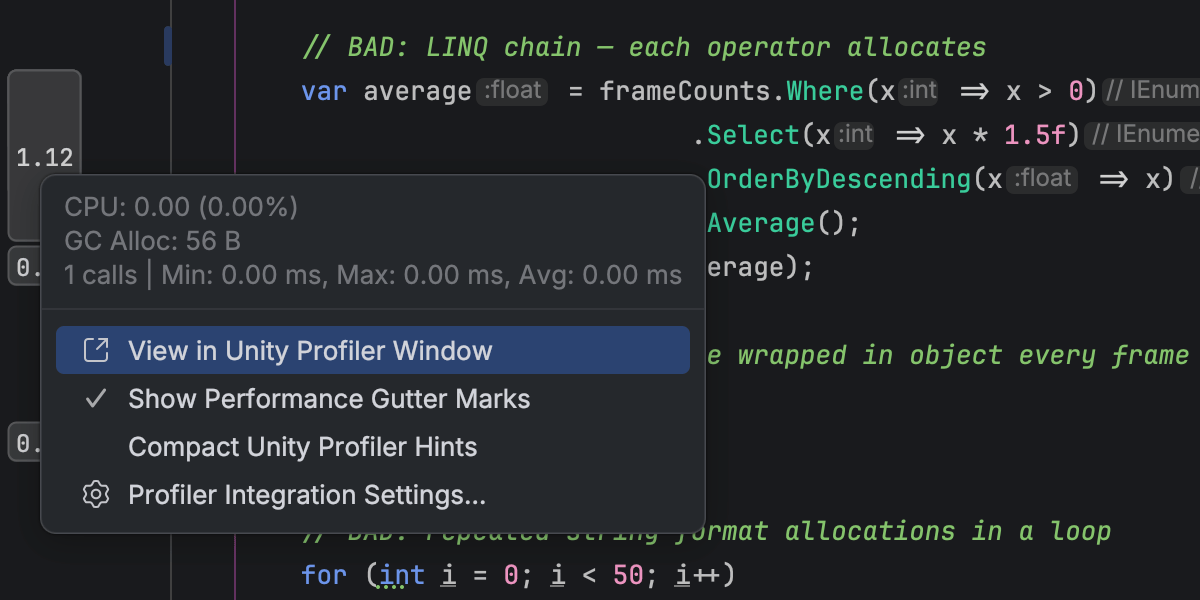
Los datos del perfilador están completamente integrados con su código. Puede navegar directamente desde los fotogramas del perfilador y las pilas de llamadas hasta el código fuente correspondiente, mientras que los indicadores en el medianil del editor muestran inline información sobre el tiempo de ejecución y la memoria.
This integration reduces context switching between the Unity Editor and Rider, allowing you to move more naturally between performance data and code when investigating runtime issues.
Please note that Rider does not perform profiling itself and relies on profiler data produced by Unity. Learn how to get started from our documentation.
Depuración en modo mixto en .NET en Windows
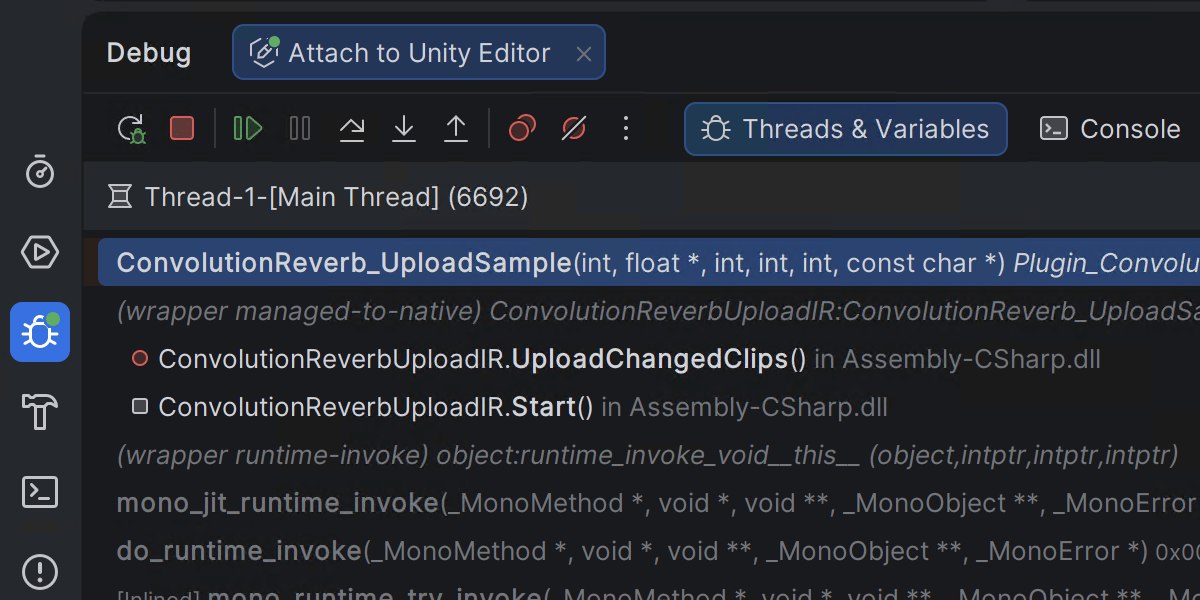
Rider 2026.1 introduces mixed-mode debugging, which lets you debug both managed (.NET and .NET Framework) and native (C/C++) code in a single debugging session. This is particularly useful for applications that cross managed-native boundaries, such as those where .NET code calls into native libraries or game engines built from a mix of managed and native components.
This feature is currently available only on Windows. You can leave your feedback on the feature in this ticket.
Integración mejorada con el editor de Godot
La integración de Rider con Godot incluye un nuevo complemento que conecta el editor de Godot con Rider. Al activarlo en la barra de herramientas de Godot, se configuran de forma automática los ajustes de su editor de Godot para ofrecerle una experiencia de desarrollo más fluida en Rider.
Busque «JetBrains Rider Integration» en el AssetLib dentro del editor de Godot para comenzar.
Platform and IDE changes
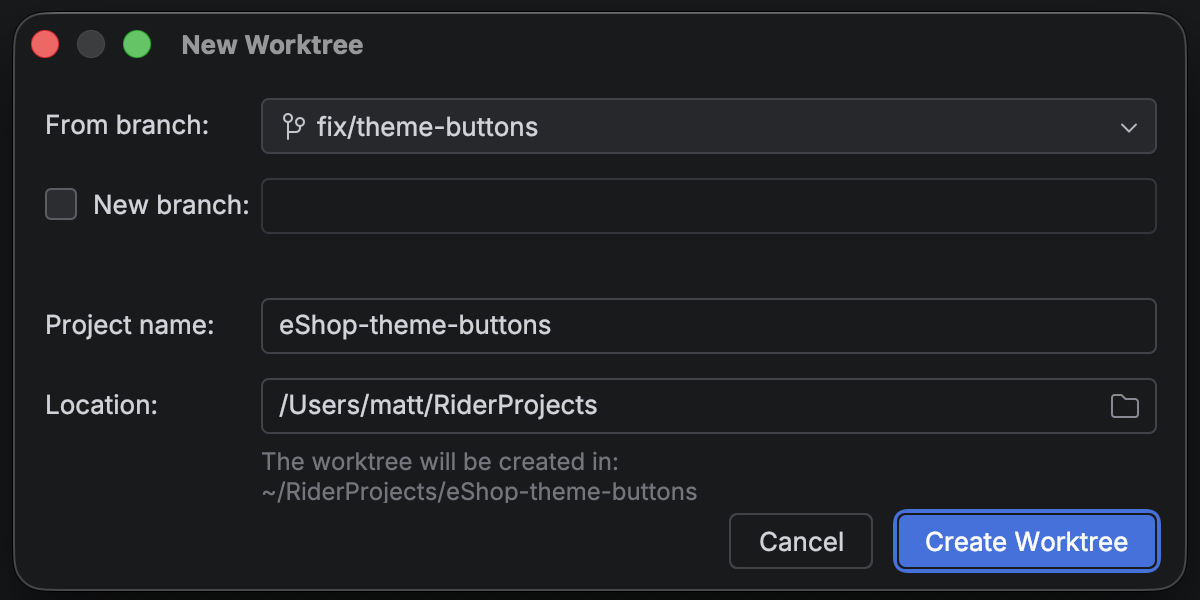
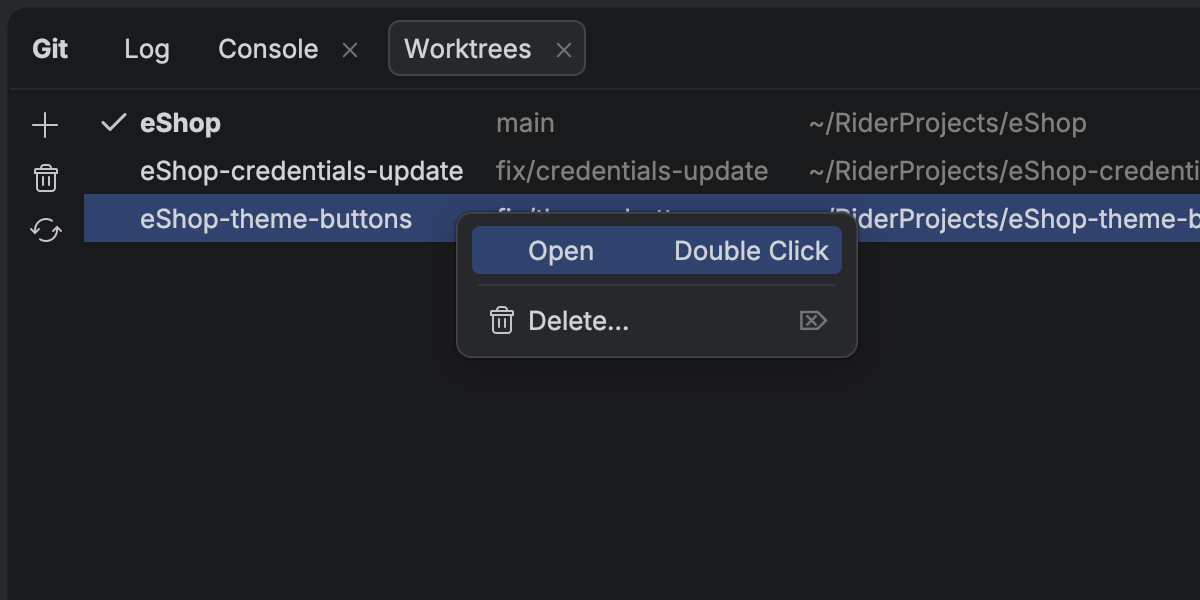
Capacidad de trabajar en varias ramas simultáneamente con árboles de trabajo de Git
Rider sigue evolucionando como una plataforma abierta que le permite incorporar sus herramientas de IA preferidas en sus flujos de trabajo profesionales de desarrollo.
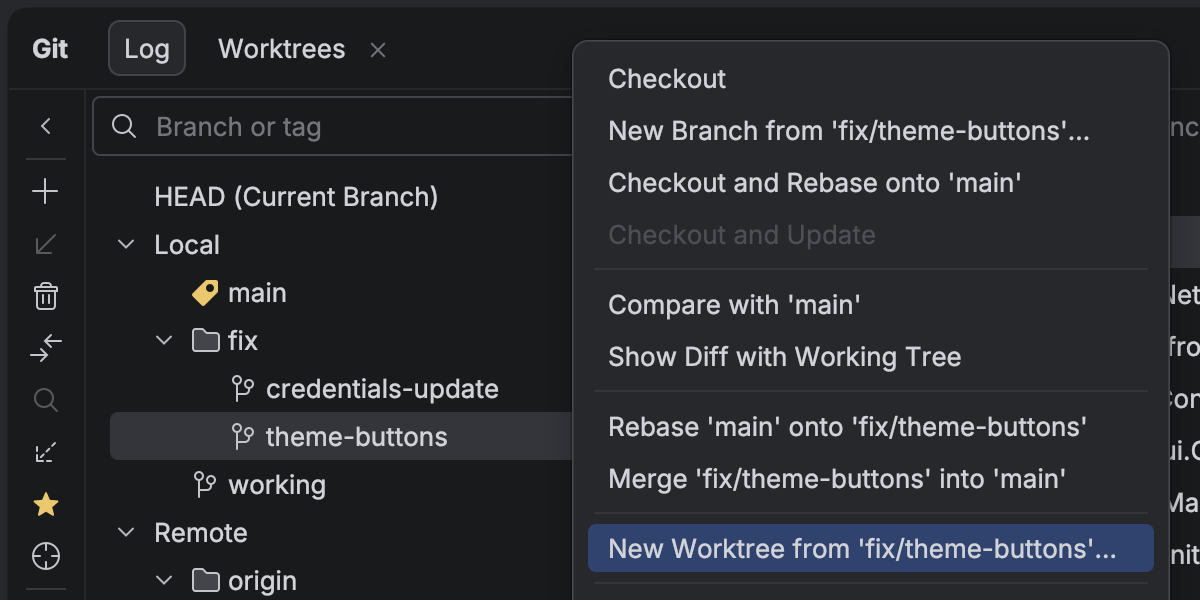
Con la evolución de los agentes de IA, ejecutar varias tareas en paralelo le ahorra mucho tiempo, y es ahí precisamente donde los árboles de trabajo de Git resultan extraordinariamente prácticos. To support cutting-edge workflows for AI-boosted software development, Rider now provides first-class support for Git worktrees. Cree un árbol de trabajo independiente para un hotfix urgente, asigne otro a un agente de IA y siga trabajando en su rama principal, todo al mismo tiempo y sin interrupciones.
Incluso si no utiliza agentes, los árboles de trabajo le ahorrarán tiempo cambiando de ramas, especialmente en grandes proyectos.
Trabajo con bases de datos
La integración del chat de IA con Codex y Claude Agent ahora ofrece compatibilidad completa y nativa para sus bases de datos conectadas. Ahora puede consultar, analizar y modificar el estado de su base de datos utilizando lenguaje natural directamente desde el IDE. Esta misma funcionalidad está disponible para agentes externos a través de un servidor MCP.
La configuración de la fuente de datos ahora se puede almacenar en su cuenta de JetBrains mediante plantillas de fuentes de datos. Especialmente práctica para los usuarios del All Products Pack o para cualquiera que utilice varias instancias de JetBrains IDEs, esta actualización le permite acceder a plantillas de fuentes de datos y ajustes en todos los JetBrains IDEs con funcionalidad de base de datos.
Retirada de Code With Me
A medida que continuamos desarrollando nuestros IDE y nos centramos en las áreas que aportan más valor a los desarrolladores, hemos decidido retirar Code With Me, nuestro servicio de programación por pares y codificación colaborativa. La demanda de este tipo de funcionalidad ha decaído en los últimos años, y estamos priorizando flujos de trabajo más modernos adaptados al desarrollo de software profesional.
A partir de la versión 2026.1, Code With Me no se incluirá en ningún JetBrains IDE. En su lugar, estará disponible en JetBrains Marketplace como complemento por separado. 2026.1 será la última versión del IDE compatible oficialmente con Code With Me, puesto que estamos retirando el servicio gradualmente.
You can read the full announcement and see the sunset timeline in this blog post.