# Support for C++26 reflection
> For the complete documentation index, see [llms.txt](https://www.jetbrains.com/help/clion/llms.txt).
Reflection was added to the C++26 standard by the [P2996 proposal](https://isocpp.org/files/papers/P2996R13.html). It lets you query program entities such as types, data members, and enumerators while the program is compiled, and then put the results back into the code.
Reflection adds the following syntax:
* The reflection operator `^^` turns an entity into an `std::meta::info` value: `^^Widget`.
* A splicer `[: :]` turns an `std::meta::info` value back into a type, a value, or a member reference: `[:widget_type:]`.
* A `template for` statement iterates over a sequence that is known at compile time.
* A consteval block runs code during compilation outside of a function body.
The reflection queries themselves come from the `` standard header.
## Configure reflection support
Procedure: 1. Set up the compiler
1. Use [GCC 16.1](https://gcc.gnu.org/gcc-16/) or later. GCC provides reflection as an experimental feature behind the `-freflection` compiler option, which you pass together with `-std=c++26`. You can check the state of a particular C++26 feature in [C++ standards support in GCC](https://gcc.gnu.org/projects/cxx-status.html).
2. Go to `Settings | Build, Execution, Deployment | Toolchains` and point the C Compiler and C++ Compiler fields of a toolchain to your GCC 16 binaries. For more details, refer to [Compilers](how-to-switch-compilers-in-clion.html).
3. Select that toolchain in the Toolchain field of your [CMake profile](cmake-profile.html).
Procedure: 2. Set the language standard and the compiler option
1. In a CMake project, set the language standard and add `-freflection` to the target:
```CMAKE
set(CMAKE_CXX_STANDARD 26)
set(CMAKE_CXX_STANDARD_REQUIRED ON)
add_executable(reflection_demo main.cpp)
target_compile_options(reflection_demo PRIVATE -freflection)
```
2. Reload the CMake project so that CLion picks up the new compiler and options. For more details, refer to [Quick CMake tutorial](quick-cmake-tutorial.html).
## Code insight for reflection
### Parsing and highlighting
CLion parses and highlights the reflection operator, splicers, `template for` statements, and consteval blocks:
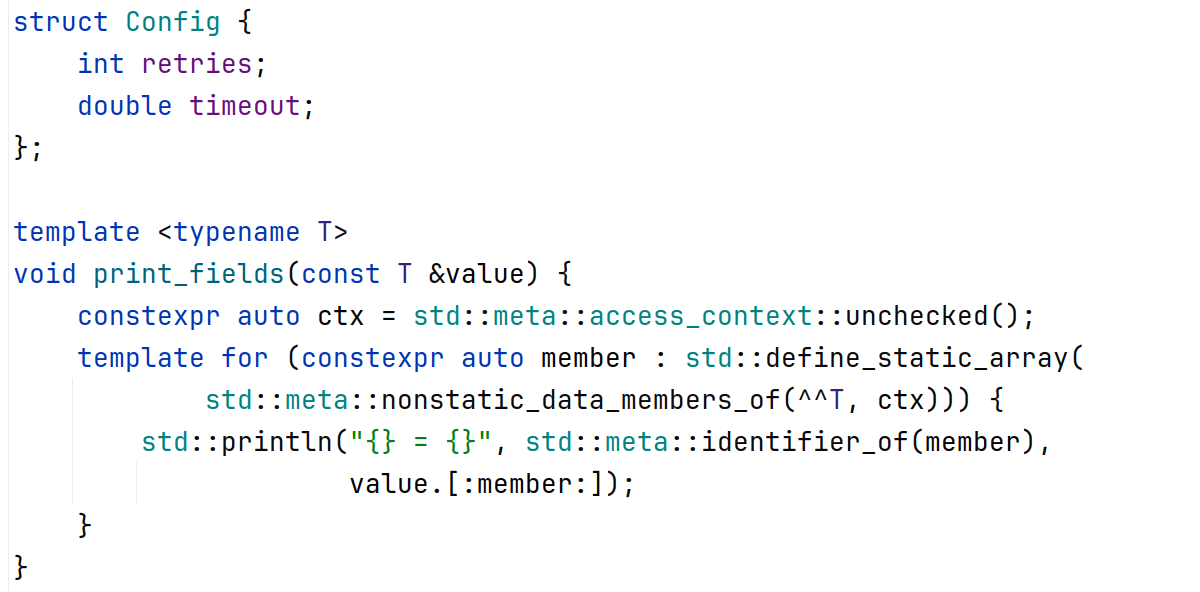
The following sample walks over the data members of any aggregate and prints their names and values:
```CPLUSPLUS
#include
#include
struct Config {
int retries;
double timeout;
};
template
void print_fields(const T &value) {
constexpr auto ctx = std::meta::access_context::unchecked();
template for (constexpr auto member : std::define_static_array(
std::meta::nonstatic_data_members_of(^^T, ctx))) {
std::println("{} = {}", std::meta::identifier_of(member),
value.[:member:]);
}
}
int main() {
print_fields(Config{.retries = 3, .timeout = 1.5});
}
```
### Matching splicer delimiters
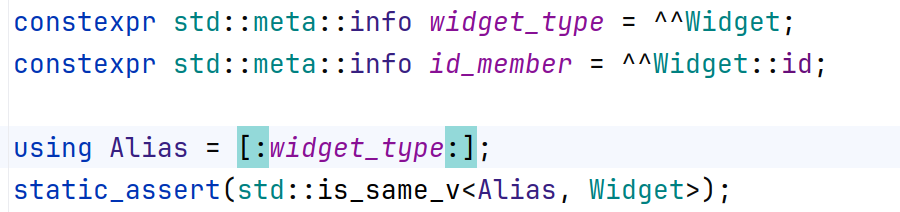
When you place the caret next to `[:` or `:]`, CLion highlights the matching delimiter, the same way it does for braces and parentheses:
### Navigation and usages
CLion resolves the operand of `^^` and the expression inside a splicer, so the navigation and search actions work on them:
* [Go to Declaration](navigating-through-the-source-code.html#go_to_implementation) (`Ctrl+B` (Windows), `⌘ B` (macOS), `⌘ B` (IntelliJ IDEA Classic (macOS)), `⌘ B` (macOS System Shortcuts), `Ctrl+B` (XWin), `Ctrl+B` (GNOME), `Ctrl+B` (KDE), `Ctrl+Alt+G` (Emacs), `F12` (Sublime Text), `F12` (Sublime Text (macOS)), `⌘ Click` (Xcode), `F12` (Visual Studio), `F12` (Visual Studio (macOS)), `Ctrl+B` (ReSharper), `⌘ B` (ReSharper (macOS)), `F2` (QtCreator), `F2` (QtCreator (macOS)), `Ctrl+B` (NetBeans), `F3` (Eclipse), `F3` (Eclipse (macOS))) from an identifier inside a splicer opens the declaration of the reflection constant that is spliced. From the operand of `^^`, it opens the declaration of the reflected entity.
* [Find Usages](find-highlight-usages.html) (`Alt+F7` (Windows), `⌥ F7` (macOS), `⌥ F7` (IntelliJ IDEA Classic (macOS)), `⌃ U` (macOS System Shortcuts), `Alt+F7` (XWin), `Alt+Shift+7` (GNOME), `Alt+Shift+7` (KDE), `Alt+F7` (Emacs), `Alt+F7` (Sublime Text), `⌥ F7` (Sublime Text (macOS)), `⌥ F7` (Xcode), `Shift+F12` (Visual Studio), `⇧ F12` (Visual Studio (macOS)), `Alt+F7` (ReSharper), `⌥ F7` (ReSharper (macOS)), `Ctrl+Shift+U` (QtCreator), `⌘ ⇧ U` (QtCreator (macOS)), `Alt+F7` (NetBeans), `Ctrl+G` (Eclipse), `⌘ ⇧ G` (Eclipse (macOS))) and [Highlight Usages in File](find-highlight-usages.html) (`Ctrl+Shift+F7` (Windows), `⌘ ⇧ F7` (macOS), `⌘ ⇧ F7` (IntelliJ IDEA Classic (macOS)), `⌘ ⌃ U` (macOS System Shortcuts), `Ctrl+Shift+F7` (XWin), `Ctrl+Shift+F7` (GNOME), `Ctrl+Shift+7` (KDE), `Ctrl+Shift+F7` (Emacs), `Ctrl+Shift+F7` (Sublime Text), `⌘ ⇧ F7` (Sublime Text (macOS)), `⌘ E` (Xcode), `Alt+Shift+F11` (Visual Studio), `⌥ ⇧ F11` (Visual Studio (macOS)), `Ctrl+Shift+F7` (ReSharper), `⌘ ⇧ F7` (ReSharper (macOS)), `Ctrl+Shift+F7` (QtCreator), `⌘ ⇧ F7` (QtCreator (macOS)), `Ctrl+Shift+F7` (NetBeans), `Alt+Shift+O` (Eclipse), `Ctrl+Shift+F7` (Eclipse (macOS))) count `^^Widget` and `^^Widget::id` as usages of the reflected entities.
* [Quick Documentation](viewing-inline-documentation.html) (`Ctrl+Q` (Windows), `F1` (macOS), `⌃ J` (IntelliJ IDEA Classic (macOS)), `⌘ I` (macOS System Shortcuts), `Ctrl+Q` (XWin), `Ctrl+Q` (GNOME), `Ctrl+Q` (KDE), `Ctrl+Q` (Emacs), `Ctrl+Q` (Sublime Text), `Ctrl+Q` (Sublime Text (macOS)), `⌘ ⌃ ⇧ /` (Xcode), `Ctrl+K, I` (Visual Studio), `⌘ K, I` (Visual Studio (macOS)), `Ctrl+Q` (ReSharper), `⌃ Q` (ReSharper (macOS)), `Ctrl+Q` (QtCreator), `Ctrl+Q` (QtCreator (macOS)), `Ctrl+Q` (NetBeans), `Alt+Middle-Click` (Eclipse), `⌥ Middle-Click` (Eclipse (macOS))) on a splicer shows the reflection constant behind it, together with the value that constant evaluates to: 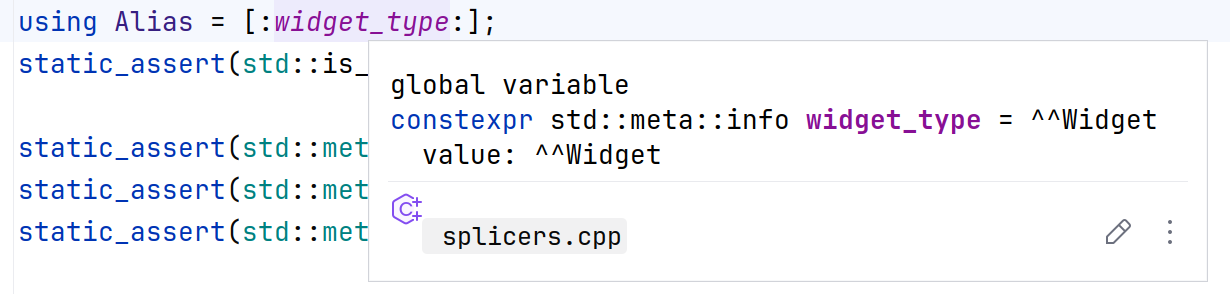
### Compile-time evaluation
CLion evaluates the common `std::meta` queries while you type, which means that `static_assert` declarations and consteval blocks built on top of them are checked in the editor. A wrong assumption is reported with the computed value:

The same evaluation covers code generation: CLion resolves the members that `std::meta::define_aggregate` adds to an incomplete type, so the code that uses those generated members is analyzed without errors.
### Related proposals
Alongside [P2996](https://wg21.link/P2996), which adds reflection itself, CLion supports the proposals that build on it:
* [P1306](https://wg21.link/P1306), expansion statements (`template for`).
* [P3289](https://wg21.link/P3289), consteval blocks.
* [P3394](https://wg21.link/P3394), annotations for reflection. Annotations written as `[[=Value{}]]` are parsed, and `std::meta::annotations_of` queries over them are evaluated.
* [P3293](https://wg21.link/P3293), splicing a base class subobject.
## Limitations
* CLion evaluates the `std::meta` functions that reflection code relies on most, such as `type_of`, `nonstatic_data_members_of`, and `define_aggregate`. The more specialized functions of the `` header are not evaluated yet.
* [Code completion](auto-completing-code.html) inside reflection contexts is basic and does not cover every position where a reflection or a splicer is allowed.
## See also
### External Links
[P2996: Reflection for C++26](https://isocpp.org/files/papers/P2996R13.html) [C++ standards support in GCC](https://gcc.gnu.org/projects/cxx-status.html)
### Procedures
[Support for C++20 Concepts](c-20-concepts.html) [Support for C++20 Modules](support-for-c-20-modules.html) [Compilers](how-to-switch-compilers-in-clion.html)